
Experimental: the PyPI package is new; install with
uv tool install worktrunk, thenwt config shell install. GitHub Releases, Homebrew and cargo are the main install channels.
 Worktrunk






November 2026: Worktrunk was released at the start of the year, and has quickly become the most popular git worktree manager. It's built with love (there's no slop!). Please let me know any frictions at all; I'm intensely focused on continuing to make Worktrunk excellent, and the biggest help is folks posting problems they perceive.
Worktrunk is a CLI for git worktree management, designed for running AI agents in parallel.
Worktrunk's three core commands make worktrees as easy as branches. Plus, Worktrunk has a bunch of quality-of-life features to simplify working with many parallel changes, including hooks to automate local workflows & copy-on-write build caches.
A quick demo:

📚 Full documentation at worktrunk.dev 📚
Context: git worktrees
AI agents like Claude Code and Codex can handle longer tasks without supervision, such that it's possible to manage 5-10+ in parallel. Git's native worktree feature gives each agent its own working directory, so they don't step on each other's changes.
But the git worktree UX is clunky. Even a task as small as starting a new
worktree requires typing the branch name three times: git worktree add -b feat ../repo.feat, then cd ../repo.feat.
Worktrunk makes git worktrees as easy as branches
Worktrees are addressed by branch name; paths are computed from a configurable template. Commands that take a branch also accept the path of the worktree it is checked out in.
Start with the core commands
Core commands:
| Task | Worktrunk | Plain git |
|---|---|---|
| Switch worktrees | wt switch feat |
cd ../repo.feat |
| Create + start Claude | wt switch -c -x claude feat |
|
| Clean up | wt remove |
|
| List with status | wt list |
git worktree list (paths only) |
Expand into the more advanced commands as needed
Workflow automation:
- Hooks — run commands on create, pre-merge, post-merge, etc
- LLM commit messages — generate commit messages from diffs
- Merge workflow — squash, rebase, merge, clean up in one command
- Interactive picker — browse worktrees with streaming CI status and diff, log, PR and comment previews
- Share build caches — ten worktrees get
target/,node_modules/, etc without building or copying them (on APFS, btrfs, and XFS) wt list --full— CI status and AI-generated summaries per branch- PR checkout —
wt switch pr:123to jump straight to a PR's branch - Dev server per worktree —
hash_porttemplate filter gives each worktree a unique port - Aliases & per-branch variables — custom
wt <name>commands and branch-scoped state for hook templates - ...and lots more
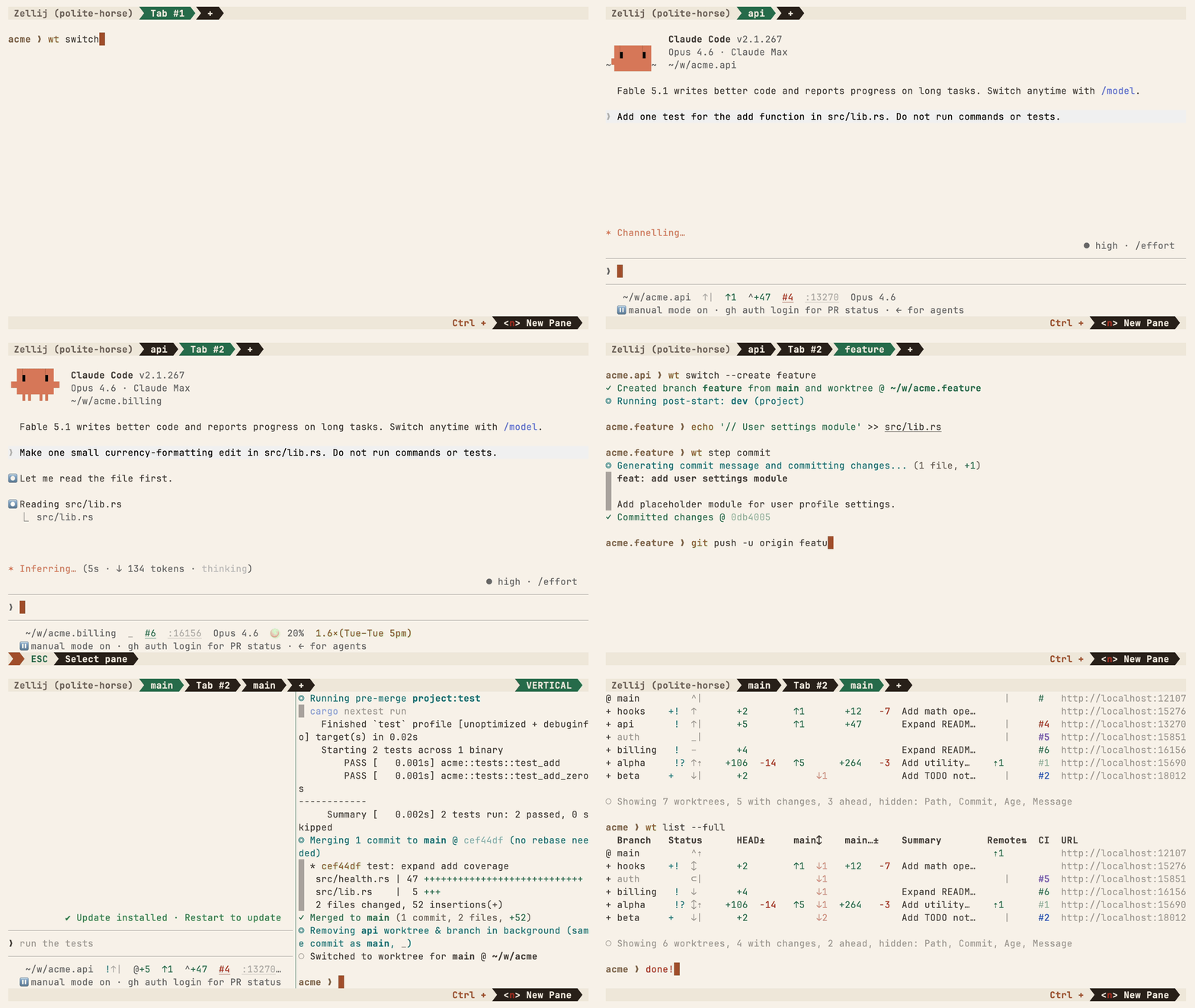
Multiple parallel agents, same simple commands:
Install
Homebrew (macOS & Linux):
brew install worktrunk && wt config shell install
Shell integration allows commands to change directories.
Cargo:
cargo install worktrunk && wt config shell install
Windows & other
Windows. wt defaults to Windows Terminal's command, so Winget additionally installs Worktrunk as git-wt to avoid the conflict:
winget install max-sixty.worktrunk
git-wt config shell install
Alternatively, disable Windows Terminal's alias (Settings → Apps → Advanced app settings → App execution aliases → "Terminal"/"Terminal Preview") to use wt directly.
Free code signing provided by SignPath.io, certificate by SignPath Foundation — policy.
Arch Linux:
sudo pacman -S worktrunk && wt config shell install
Conda / Pixi (community-maintained feedstock):
conda install -c conda-forge worktrunk && wt config shell install
Or with Pixi: pixi global install worktrunk && wt config shell install.
Quick start
Create a worktree for a new feature:
$ wt switch --create feature-auth
✓ Created branch feature-auth from main and worktree @ ~/repo.feature-auth
This creates a new branch and worktree, then switches to it. Do your work, then check all worktrees with wt list:
$ wt list
  Branch        Status       @±        ^↕        ^…±     Remote⇅  Commit    Age  Message
@ feature-auth  +   ↑      +27   -8   ↑1       +31                4bc72dc    2h  Add authenticatio…
^ main              ^⇡                                    ⇡1      0e631ad    1d  Initial commit

○ Showing 2 worktrees, 1 with changes, 1 ahead, hidden: Path
The @ marks the current worktree. + means staged changes, ↑1 means 1 commit ahead of main, ⇡ means unpushed commits.
When done, either:
PR workflow — commit, push, open a PR, merge via GitHub/GitLab, then clean up:
wt step commit                    # commit staged changes
gh pr create                      # or glab mr create
wt remove                         # after PR is merged
Local merge — squash, rebase onto main, fast-forward merge, clean up:
$ wt merge main
◎ Generating commit message and committing changes... (2 files, +53, no squashing needed)
  Add authentication module
✓ Committed changes @ a1b2c3d
◎ Merging 1 commit to main @ a1b2c3d (no rebase needed)
  * a1b2c3d Add authentication module
   auth.rs | 51 +++++++++++++++++++++++++++++++++++++++++++++++++++
   lib.rs  |  2 ++
   2 files changed, 53 insertions(+)
✓ Merged to main (1 commit, 2 files, +53)
◎ Removing feature-auth worktree & branch in background (same commit as main, _)
○ Switched to worktree for main @ ~/repo
For parallel agents, create multiple worktrees and launch an agent in each:
wt switch -x claude -c feature-a -- 'Add user authentication'
wt switch -x claude -c feature-b -- 'Fix the pagination bug'
wt switch -x claude -c feature-c -- 'Write tests for the API'
The -x flag runs a command after switching; arguments after -- are passed to it. Configure post-start hooks to automate setup (install deps, start dev servers).
Next steps
- Learn the core commands:
wt switch,wt list,wt merge,wt remove - Set up hooks for automated setup
- Explore LLM commit messages, interactive picker, Claude Code integration, CI status & PR links
- Browse tips & patterns for recipes: aliases, dev servers, databases, agent handoffs, and more
- Extending Worktrunk — customize workflows with hooks & aliases
- Watch @DevOpsToolbox's video on Worktrunk
- Run
wt --helporwt <command> --helpfor quick CLI reference
Contributing
- ⭐ Star the repo
- Tell a friend about Worktrunk
- Open an issue — feedback, feature requests, even a small friction or imperfect user message, or a worktree pain not yet solved
- Share: X · Reddit · LinkedIn
📚 Full documentation at worktrunk.dev 📚
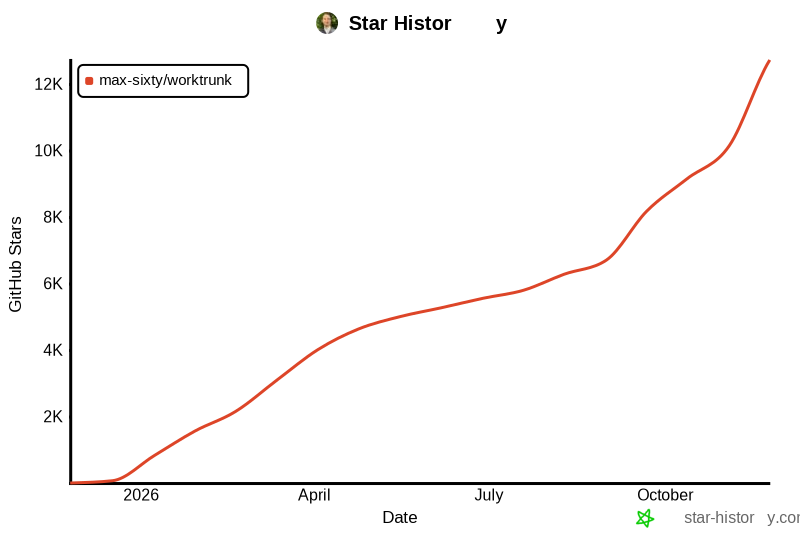
Star history
1 maintainer

Metadata
1 maintainer
Release files for worktrunk 0.83.0
For a detailed explanation of source distributions (sdists) and built distributions (wheels), please see the package formats documentation.
Built distributions (wheels)
Total release size: 91.7 MB
Release files / worktrunk-0.83.0-py3-none-win_amd64.whl
| Download URL | worktrunk-0.83.0-py3-none-win_amd64.whl |
|---|---|
| Size | 17.0 MB |
| Tags | Python 3 Windows x86-64 |
|
SHA-256 checksum How to use checksums |
1476934c136d7ffe45fd5dd3d6dfec743a26c9208e7c41b13b40183996973068
|
|
BLAKE2b-256 checksum How to use checksums |
09dbc53d32c093e18d83361227e1b2d067225dd203c35d5559f93e5b3303c500
|
| Upload date | |
|
Uploaded using Trusted Publishing? What is trusted publishing? |
Yes |
| Uploaded via |
twine/7.0.0 CPython/3.13.16
|
Provenance
Provenance describes where a file came from. On PyPI, provenance is shared via attestations, which provide a verifiable record of the build or publishing details. View details, limitations and caveats.


PyPI Publish Attestation
PyPI verified that this artifact, at this checksum, originated from the publisher listed below.
Signed by GitHub Actions, verified by PyPI on Nov 21, 2026.
Transparency logRelease files / worktrunk-0.83.0-py3-none-manylinux_2_17_x86_64.manylinux2014_x86_64.musllinux_1_1_x86_64.whl
| Download URL | worktrunk-0.83.0-py3-none-manylinux_2_17_x86_64.manylinux2014_x86_64.musllinux_1_1_x86_64.whl |
|---|---|
| Size | 20.5 MB |
| Tags | Linux glibc 2.17+ x86-64 Linux musl 1.1+ x86-64 Python 3 |
|
SHA-256 checksum How to use checksums |
d924ec99ba4beba040ca2517c32f6495064cc1cccb304f07ba251ecd30e2ab8b
|
|
BLAKE2b-256 checksum How to use checksums |
feffef0c312682e1fe62f08c53105dfdbf7db3847729f1162a9ec1b4cbda17a6
|
| Upload date | |
|
Uploaded using Trusted Publishing? What is trusted publishing? |
Yes |
| Uploaded via |
twine/7.0.0 CPython/3.13.16
|
Provenance
Provenance describes where a file came from. On PyPI, provenance is shared via attestations, which provide a verifiable record of the build or publishing details. View details, limitations and caveats.
PyPI Publish Attestation
PyPI verified that this artifact, at this checksum, originated from the publisher listed below.
Signed by GitHub Actions, verified by PyPI on Nov 21, 2026.
Transparency logRelease files / worktrunk-0.83.0-py3-none-manylinux_2_17_aarch64.manylinux2014_aarch64.musllinux_1_1_aarch64.whl
| Download URL | worktrunk-0.83.0-py3-none-manylinux_2_17_aarch64.manylinux2014_aarch64.musllinux_1_1_aarch64.whl |
|---|---|
| Size | 19.2 MB |
| Tags | Linux glibc 2.17+ ARM64 Linux musl 1.1+ ARM64 Python 3 |
|
SHA-256 checksum How to use checksums |
ac05fbdee75e4bf5cb9d69860536cf8eebaac87930d04154da43e8baa8bff537
|
|
BLAKE2b-256 checksum How to use checksums |
73d70b75310857447d421a60c166ee59a4ef4c794b7c7d507523d0ad9d97ddfc
|
| Upload date | |
|
Uploaded using Trusted Publishing? What is trusted publishing? |
Yes |
| Uploaded via |
twine/7.0.0 CPython/3.13.16
|
Provenance
Provenance describes where a file came from. On PyPI, provenance is shared via attestations, which provide a verifiable record of the build or publishing details. View details, limitations and caveats.
PyPI Publish Attestation
PyPI verified that this artifact, at this checksum, originated from the publisher listed below.
Signed by GitHub Actions, verified by PyPI on Nov 21, 2026.
Transparency logRelease files / worktrunk-0.83.0-py3-none-macosx_11_0_arm64.whl
| Download URL | worktrunk-0.83.0-py3-none-macosx_11_0_arm64.whl |
|---|---|
| Size | 16.8 MB |
| Tags | Python 3 macOS 11.0+ ARM64 |
|
SHA-256 checksum How to use checksums |
5cf571bb85e73e6ecd14bbb791d3566256367760961ae9f1100cde51a4517427
|
|
BLAKE2b-256 checksum How to use checksums |
fe0646b60476cf3e6f72d55ab97958aecdf88a06f973cb14bb003671ede63a39
|
| Upload date | |
|
Uploaded using Trusted Publishing? What is trusted publishing? |
Yes |
| Uploaded via |
twine/7.0.0 CPython/3.13.16
|
Provenance
Provenance describes where a file came from. On PyPI, provenance is shared via attestations, which provide a verifiable record of the build or publishing details. View details, limitations and caveats.
PyPI Publish Attestation
PyPI verified that this artifact, at this checksum, originated from the publisher listed below.
Signed by GitHub Actions, verified by PyPI on Nov 21, 2026.
Transparency logRelease files / worktrunk-0.83.0-py3-none-macosx_10_12_x86_64.whl
| Download URL | worktrunk-0.83.0-py3-none-macosx_10_12_x86_64.whl |
|---|---|
| Size | 18.1 MB |
| Tags | Python 3 macOS 10.12+ x86-64 |
|
SHA-256 checksum How to use checksums |
1f96d27d21aae484828d2b7d88de3888b58a3868613eb98b313e05437df6e7c5
|
|
BLAKE2b-256 checksum How to use checksums |
f49c0776e4f974eb551a915a2c75980c0b5f1cfb5ac86d6884518d4e5ff8db68
|
| Upload date | |
|
Uploaded using Trusted Publishing? What is trusted publishing? |
Yes |
| Uploaded via |
twine/7.0.0 CPython/3.13.16
|
Provenance
Provenance describes where a file came from. On PyPI, provenance is shared via attestations, which provide a verifiable record of the build or publishing details. View details, limitations and caveats.
PyPI Publish Attestation
PyPI verified that this artifact, at this checksum, originated from the publisher listed below.
Signed by GitHub Actions, verified by PyPI on Nov 21, 2026.
Transparency logSecurity for worktrunk 0.83.0
Provenance
Provenance describes where a file came from. On PyPI, provenance is shared via attestations, which provide a verifiable record of the build or publishing details. View details, limitations and caveats.
Full provenance
All 5 files in this release have been uploaded with provenance metadata.
Attestation for worktrunk-0.83.0-py3-none-win_amd64.whl
PyPI Publish Attestation
PyPI verified that this artifact, at this checksum, originated from the publisher listed below.
Signed by GitHub Actions, verified by PyPI on Nov 21, 2026.
Transparency logA note on package security
PyPI is a repository for distributing packages, not a service for auditing them. While third-party security researchers and our staff do their best to detect and remove malicious packages, PyPI cannot guarantee the quality, security or suitability of any given package.
To learn more about protecting yourself from malicious actors, visit our package security documentation.













