
The World Bank Data in Python







This is an implementation of the World Bank API v2 in Python. Use this package to explore the World Development Indicators published by the World Bank.
Quick tutorial
Installation
Install or update the World Bank Data python package with
pip install world_bank_data --upgrade
Get the list of sources, topics, countries, regions
import pandas as pd
import world_bank_data as wb
pd.set_option('display.max_rows', 6)
The list of topics is available with
wb.get_topics()
Sources are returned by
wb.get_sources()
And finally, the list of countries is accessible with
wb.get_countries()
In addition, give a try to
get_regionsget_incomelevelsget_lendingtypes
to retrieve more information about country classifiers.
Get the list of indicators
This is done with the get_indicators function. You may query only the indicators for a specific source or topic as below. If you input no arguments, the get_indicator function will return the description of all the 16,000+ indicators.
wb.get_indicators(topic=3, source=2) # topic and source id are from get_topics/get_sources
Requesting all indicators may take a few seconds, but no worries, the result is cached, so next time this will be instantaneous.
Searching for one country or indicator
Use the functions search_countries, search_source, search_indicators. Or, if you want to search in a existing dataframe, simply use search.
wb.search_indicators('mathematics')
Get the values of an indicator
The function get_series returns the value of a single indicator. The World Bank API accepts quite a few arguments, including:
mrv, integer: one or more most recent valuesdate, string: either one year, or two years separated with a colon, like '2010:2018'gapfill, string: 'Y' or 'N' (the default): forward fills missing values.
For instance, the call below returns the most recent estimate for the World Population:
wb.get_series('SP.POP.TOTL', mrv=1)
The result above has a 3-dimensional index. Use the argument simplify_index to ignore the dimensions that take a single value (here: year and series). Also, use the argument id_or_value='id' if you prefer your data to be indexed by the codes rather than labels:
wb.get_series('SP.POP.TOTL', date='2016', id_or_value='id', simplify_index=True)
Ready for an interative tutorial?
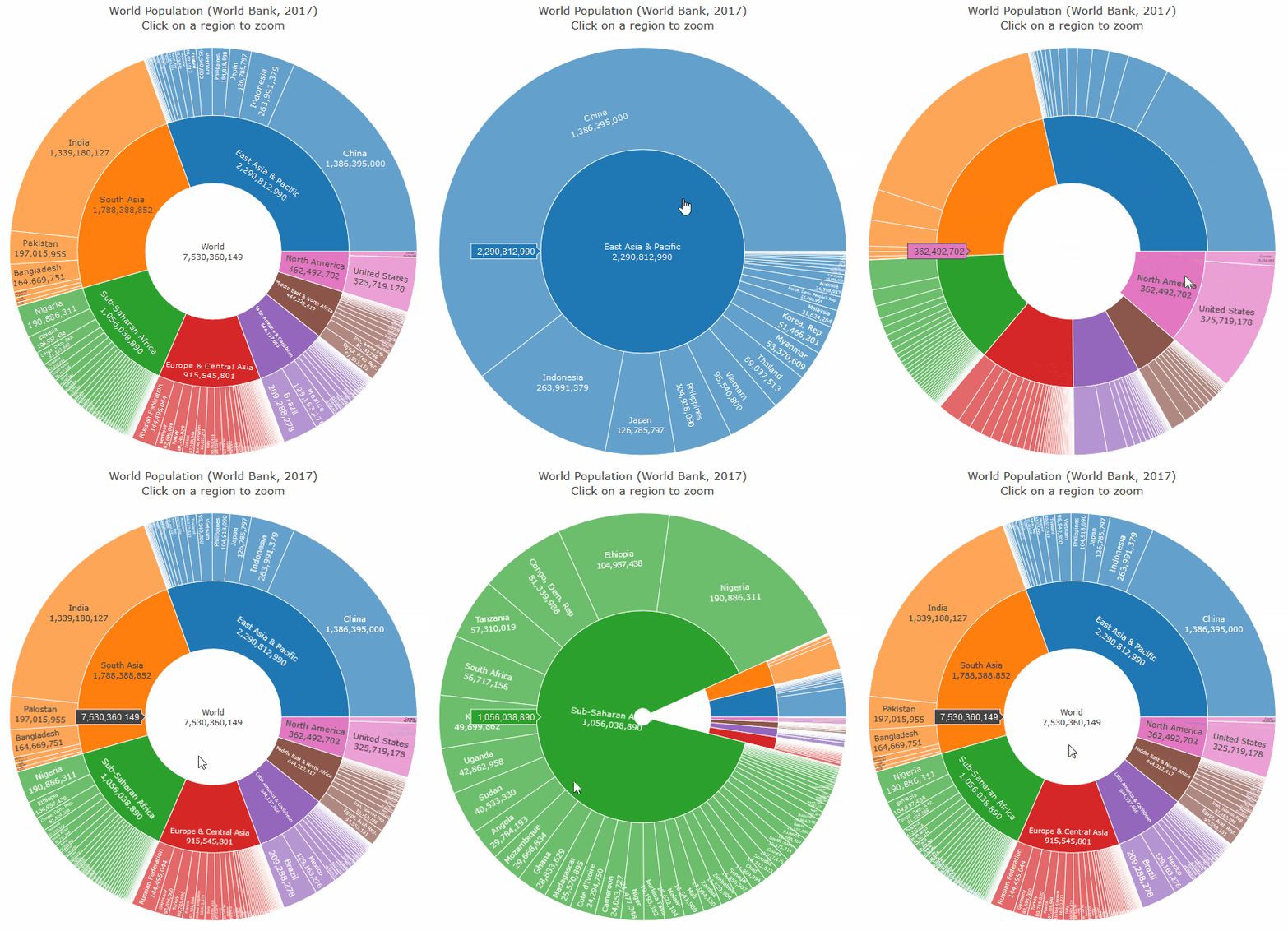
Go to our Binder and run either this README, or our other tutorial with the code required to produce this plot of the World Population:
References
The World Bank
The World Bank has a Data Catalog, and an interactive data explorer.
Third party applications that allow to access the data from various languages are listed here.
Google's Public Data Explorer
The World Bank data is also available in Google's Data Explorer.
Python
Alternatively to world_bank_data, Python users may find useful the following packages:
wbpy, nicely documented and recently updated to Python 3 and the World Bank API v2.wbdata, which works well.pandas_datareader
The reason for which I wrote world_bank_data is mostly speed, e.g. I wanted to use the lastest version of the World Bank API (v2) and benefit from significant speed improvements. Reimplementing the API also gave me a finer control on the mapping of options.
R
R users can use two packages to access the World Bank data:
See also the Introduction to the wbstats R-package, or this quick review of the two packages.
FAQ
Country and indicator description in non-English languages
The World Bank describes their sources and indicators in other languages than English. Use either the language argument in each of get_countries, get_indicators, etc, or change the default globally:
wb.options.language = 'vi'
wb.get_indicators('SP.POP.TOTL')
wb.options.language = 'en'
Caching
All requests, except get_series, are cached using a least recently used cache from the cachetools package.
Using behind a proxy
Using the package behind an http proxy is possible. Use either the proxies argument in the get_* functions, or set the proxy globally with e.g.:
wb.options.proxies = {'http': 'http://example.com:3128'}
License
This python package is licenced under the MIT License.
Please also read the World Bank Terms of Use relative to the conditions that apply to the data downloaded with this package.
1 maintainer

Metadata
1 maintainer
Release files for world-bank-data 0.1.4
For a detailed explanation of source distributions (sdists) and built distributions (wheels), please see the package formats documentation.
Source distribution (sdist)
| File | Size | Uploaded | |
|---|---|---|---|
| world_bank_data-0.1.4.tar.gz | 8.4 kB | Details |
Built distribution (wheel)
| File | Interpreter | ABI | Platform | Reset |
|---|---|---|---|---|
| world_bank_data-0.1.4-py2.py3-none-any.whl | Python 2, Python 3 | none | any | Details |
Total release size: 19.3 kB
Release files / world_bank_data-0.1.4.tar.gz
| Download URL | world_bank_data-0.1.4.tar.gz |
|---|---|
| Size | 8.4 kB |
| Tags | Source |
|
SHA-256 checksum How to use checksums |
52276d268beeaf3ad9296788ee7d5b574be5b9ce694a0f76cca1442ef644f5fc
|
|
BLAKE2b-256 checksum How to use checksums |
6df1b0d06d59f0f7b10d4b9f8fc93eb11c8c48f9c9ad797cd4d8963437e12978
|
| Upload date | |
|
Uploaded using Trusted Publishing? What is trusted publishing? |
Yes |
| Uploaded via |
twine/5.1.1 CPython/3.12.6
|
Release files / world_bank_data-0.1.4-py2.py3-none-any.whl
| Download URL | world_bank_data-0.1.4-py2.py3-none-any.whl |
|---|---|
| Size | 10.9 kB |
| Tags | Python 2 Python 3 |
|
SHA-256 checksum How to use checksums |
824a17d6237ef3c6a6081b004e51ef54e51c7448b22f3e293e5164899c973eb7
|
|
BLAKE2b-256 checksum How to use checksums |
64038dbdb3980284793836c5d5601ec62cb609b617c75c83702f037c5fdf887b
|
| Upload date | |
|
Uploaded using Trusted Publishing? What is trusted publishing? |
Yes |
| Uploaded via |
twine/5.1.1 CPython/3.12.6
|














