
A terminal-based world clock that displays multiple timezones in real-time.

Project description
worldclock-tty
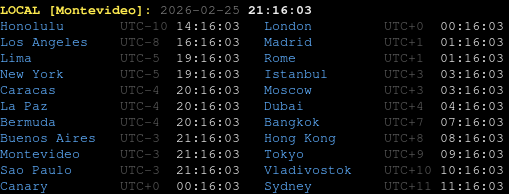
A terminal-based world clock that displays multiple timezones in real-time.
This program is a heavy refactor of a timezone clock I made in 2016.
Installation with uv
uv add worldclock-tty
Installation with pip
pip install worldclock-tty
Usage
Run the clock:
worldclock-tty
Press Ctrl+C to exit.
The display shows your local time at the top, followed by all configured timezones in two columns, updated every second.
Options
| Flag | Default | Description |
|---|---|---|
--sort / --no-sort |
on | Sort timezones by UTC offset (lowest first). |
--offset / --no-offset |
on | Show the UTC offset (e.g. UTC-3) next to each time. |
worldclock-tty --no-sort          # keep the order from config
worldclock-tty --no-offset        # hide UTC offset labels
worldclock-tty --no-sort --no-offset
Managing timezones
Timezones are stored in ~/.config/chronos/config.json. Use IANA timezone names (e.g. America/Chicago, Europe/Paris).
worldclock-tty add America/Chicago       # add a timezone
worldclock-tty remove America/Chicago    # remove a timezone
worldclock-tty list                      # show configured timezones
worldclock-tty reset                     # restore built-in defaults
Default timezones
America/Buenos_Aires, America/Caracas, America/La_Paz, America/Lima, America/Los_Angeles, America/Montevideo, America/New_York, America/Sao_Paulo, Asia/Bangkok, Asia/Dubai, Asia/Hong_Kong, Asia/Istanbul, Asia/Tokyo, Asia/Vladivostok, Atlantic/Bermuda, Atlantic/Canary, Australia/Sydney, Europe/London, Europe/Madrid, Europe/Moscow, Europe/Rome, Pacific/Honolulu.
Requirements
Python 3.10+
License
MIT
Release history Release notifications | RSS feed


Download files
Download the file for your platform. If you're not sure which to choose, learn more about installing packages.
Source Distribution
Built Distribution
Filter files by name, interpreter, ABI, and platform.
If you're not sure about the file name format, learn more about wheel file names.
Copy a direct link to the current filters
File details
Details for the file worldclock_tty-0.4.0.tar.gz.
File metadata
- Download URL: worldclock_tty-0.4.0.tar.gz
- Upload date:
- Size: 5.9 kB
- Tags: Source
- Uploaded using Trusted Publishing? No
- Uploaded via: twine/6.2.0 CPython/3.14.2
File hashes
| Algorithm | Hash digest | |
|---|---|---|
| SHA256 |
2caf9a7162f3fdefe11b3fd33e98806f7e1d22ec0f7d249a94c1ae3d1d624c76
|
|
| MD5 |
f954ac978cce877600fdc2d1d5a5cfe1
|
|
| BLAKE2b-256 |
0ea33fdb7cb8f9e2e08620b944aec6932d245b080b1a77c868843e96a6c9184d
|
File details
Details for the file worldclock_tty-0.4.0-py3-none-any.whl.
File metadata
- Download URL: worldclock_tty-0.4.0-py3-none-any.whl
- Upload date:
- Size: 5.9 kB
- Tags: Python 3
- Uploaded using Trusted Publishing? No
- Uploaded via: twine/6.2.0 CPython/3.14.2
File hashes
| Algorithm | Hash digest | |
|---|---|---|
| SHA256 |
e1120c27cae78c980e143e006a4fddb55fe4c7bbb31e13aaaa89eab0642019bd
|
|
| MD5 |
7f72912ecd1507e3a9b527f2dc30c6c6
|
|
| BLAKE2b-256 |
873e42237910755a2ec48787c6f1b3867d5e918ace70953e216353daa2fc1895
|






