
WorldFlow3D — hierarchical 3D scene generation (diffusers-native inference).
Verified details
These details have been verified by PyPIProject links
GitHub Statistics
Maintainers

Project description
WorldFlow3D


WorldFlow3D: Flowing Through 3D Distributions for Unbounded World Generation (ECCV 2026).
Amogh Joshi, Julian Ost, Felix Heide
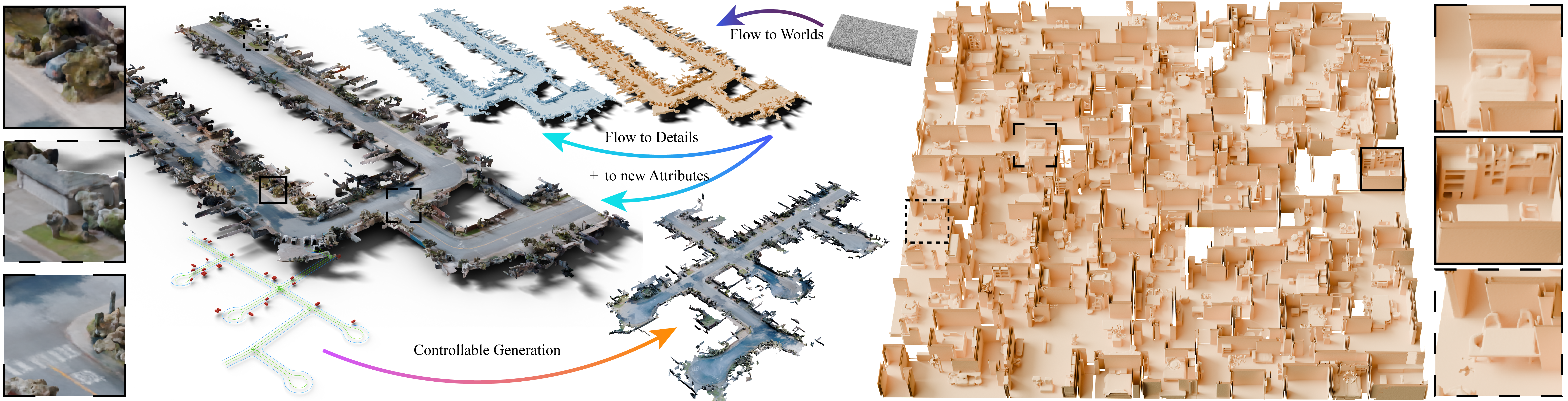
Diffusers-native inference for WorldFlow3D — hierarchical, map/layout-conditioned 3D scene generation via chunked flow matching. A self-contained inference package: pretrained cascades load straight from the Hugging Face Hub with nothing but PyTorch and diffusers.
Code is Apache-2.0. Released models are trained on datasets with their own terms. In particular the Waymo models are non-commercial (Waymo Open Dataset License) — see Licensing,
WAYMO_NOTICE.md, andTHIRD_PARTY_LICENSES.md.
Roadmap
✅ Inference code (worldflow3d package)
✅ Front3D (indoor) checkpoints
✅ Waymo (WOD) checkpoints
⬜ PyPI package (pip install worldflow3d) — early July 2026
⬜ Map processing (raw scenes → conditioning maps) — mid July 2026
⬜ Training code — mid July 2026
⬜ Additional indoor layouts — end of July 2026
Install
pip install worldflow3d            # core (torch, diffusers, trimesh, scikit-image, ...)
pip install "worldflow3d[layout]"  # + h5py, for loading Front3D/ScanNet++ .h5 layouts
PyTorch is expected to be installed for your CUDA/CPU platform. Requires
torch>=2.2 and diffusers>=0.29; tested on torch 2.2 / diffusers 0.29.2,
torch 2.5 / diffusers 0.38, and torch 2.12 / diffusers 0.38 (CUDA 13, aarch64)
(NumPy 1.x and 2.x both work).
Running on aarch64 / DGX Spark (GB10)
On an aarch64 host with a Blackwell GB10 (CUDA 13), the standard PyPI/conda torch
wheels don't target the platform — install torch from the CUDA-13 (cu130) index
first, then the package:
pip install torch torchvision --index-url https://download.pytorch.org/whl/cu130
pip install "worldflow3d[examples]"   # + tyro, for the CLI example scripts
pip install accelerate                # optional: quiets the model-load warning
Only the NVIDIA driver is needed — no separate CUDA toolkit — since the cu130
wheel ships its own CUDA runtime. For the fast path on GB10, add --simultaneous --compile to the CLI (Python: simultaneous=True, compile=True on from_hub /
from_converted).
Reference timings on GB10 (Waymo coarse→refine, cfg_scale=1.5, 30+30 steps,
smaller_map=True, fraction=0.12, segment 1172406780360799916, 1 coarse + 49
refine chunks): simultaneous=True + compile=True ~21 min,
simultaneous=False + compile=True ~50 min, simultaneous=False +
compile=False ~2h20m
GB10 is memory-bandwidth-bound here (~244 GB/s unified, vs ~768 GB/s on an A6000 and ~3.35 TB/s on an H100), so treat these as platform reference numbers, not a general benchmark — discrete GPUs are substantially faster.
Quickstart
Each cascade stage is a subfolder of a Hub repo (<dataset>-coarse, plus
<dataset>-refine / -color). The Waymo and Front3D cascades live in separate
repos (Waymo is non-commercial — see Licensing). Load with from_hub:
import torch
from worldflow3d import WorldFlow3DPipeline
from worldflow3d.pipeline.datatypes import LayoutContext
from worldflow3d.conditioning.waymo import load_waymo_map_json
from worldflow3d.recon import save_mesh

# Waymo coarse -> refine cascade, straight from the Hub (non-commercial).
pipe = WorldFlow3DPipeline.from_hub(
    "pci-lab/worldflow3d-waymo", stage="waymo-coarse", refinement_stages=["waymo-refine"],
    device="cuda",
)

# A shipped sample map -- self-contained: no coord transform or data root needed.
map_json = load_waymo_map_json("1172406780360799916", map_dir="examples/sample_maps")
ctx = LayoutContext("waymo", "1172406780360799916", map_json)

result = pipe(layout_context=ctx, cfg_scale=1.5, sampling_steps=30,
              refine=True, refine_sampling_steps=30, use_uniform_chunking=True,
              simultaneous=True, smaller_map=True, fraction=0.12)

save_mesh(result.voxels.cpu(), result.voxel_size, "scene.ply")
CLI (--repo/--stage for the Hub, or --model-dir for local dirs):
python -m worldflow3d.scripts.generate_streets \
    --repo pci-lab/worldflow3d-waymo --stage waymo-coarse --refine-stage waymo-refine \
    --segment 1172406780360799916 --map-dir examples/sample_maps \
    --cfg-scale 1.5 --coarse-steps 30 --refine-steps 30 \
    --smaller-map --fraction 0.12 --use-uniform-chunking --simultaneous \
    --output outputs/segment-1172406780360799916.ply
The sample maps used above ship in the repository under
examples/sample_maps/(they are not bundled in the PyPI wheel). Point--map-dir/map_dir=at any directory of map JSONs.
For a colored scene, use the color refinement stage. The color model is
tag-conditioned (location / time_of_day / weather) — pass tags for a
coherent result; without them the color channels are unconditioned and the mesh
shows color/surface artifacts. save_mesh also writes a colored <name>_color.ply.
python -m worldflow3d.scripts.generate_streets \
    --repo pci-lab/worldflow3d-waymo --stage waymo-coarse --refine-stage waymo-color \
    --segment 1172406780360799916 --map-dir examples/sample_maps \
    --cfg-scale 1.5 --coarse-steps 30 --refine-steps 30 \
    --smaller-map --fraction 0.12 --use-uniform-chunking --simultaneous \
    --coarse-tag location=location_sf \
    --refine-tag time_of_day=Dawn/Dusk --refine-tag weather=sunny \
    --output outputs/segment-1172406780360799916_color.ply
From Python, pass tags= / refine_tags= to the pipeline, e.g.
refinement_stages=["waymo-color"] with
tags={"location": "location_sf"}, refine_tags={"time_of_day": "Dawn/Dusk", "weather": "sunny"}.
Valid values: location ∈ {location_sf, location_phx, location_other};
time_of_day ∈ {Dawn/Dusk, Day, Night}; weather ∈ {sunny, rain}.
Indoor (Front3D), layout-conditioned coarse → color refinement:
python -m worldflow3d.scripts.generate_indoor \
    --repo pci-lab/worldflow3d --stage front3d-coarse --refine-stage front3d-color \
    --scene-id <uuid> --data-root front3d_scenes --refine --output outputs/scene.ply
Models / repo layout
Each stage is a self-contained diffusers layout in its own subfolder. The model
code is supplied by this package, so the subfolders carry only weights +
config (no duplicated .py). The Waymo and Front3D cascades are in separate
repos because they carry different licenses:
pci-lab/worldflow3d-waymo/   (NON-COMMERCIAL — Waymo Open Dataset License)
├── waymo-coarse/     model_index.json  unet/{config.json, *.safetensors}  scheduler/
├── waymo-refine/     "    (source-flow refinement, geometry only)
└── waymo-color/      "    (source-flow refinement, geometry + color, unet in=4)

pci-lab/worldflow3d/         (Front3D — 3D-FRONT terms)
├── front3d-coarse/   "
└── front3d-color/    "    (source-flow + color, unet in=4)
waymo-refine and waymo-color are alternative refinement stages for the same
coarse output — pick one. waymo-color also predicts per-voxel color, so save_mesh
writes an extra colored <name>_color.ply sidecar. Each unet/ folder is a distinct
trained model (different weights and configs), not a copy.
Loading
| Source | Call | Needs |
|---|---|---|
| Hub (cascade) | WorldFlow3DPipeline.from_hub(repo, stage, refinement_stages=[...]) |
pip install worldflow3d |
| Local dirs | WorldFlow3DPipeline.from_converted(coarse_dir, [refine_dir, ...]) |
converted dirs on disk |
| Bare diffusers | DiffusionPipeline.from_pretrained(repo, trust_remote_code=True) |
a model at the repo root only |
Why no
subfolder=one-liner?diffusers.DiffusionPipeline.from_pretraineddoes not applysubfolderat the pipeline level — it readsmodel_index.jsononly from the repo root (true even on the latest diffusers). So the subfolder/cascade layout is loaded viafrom_hub(this package). The bare-diffuserstrust_remote_codeone-liner works only for a model published at a repo root.
Design (diffusers-native)
| Component | Class | Notes |
|---|---|---|
| Model | WorldFlow3DUNet(ModelMixin, ConfigMixin) |
wraps the 3D UNet; save_pretrained/from_pretrained (safetensors) |
| Scheduler | WorldFlow3DFlowScheduler(SchedulerMixin, ConfigMixin) |
velocity-prediction Euler flow matching |
| Pipeline | WorldFlow3DPipeline(DiffusionPipeline) |
custom __call__: chunking, CFG, source-flow + standard reconstruction, coarse→refine cascade, sequential + simultaneous |
Default models are direct-diffusion (voxel-space; no VAE). A VAE-decode path is wired but optional. Classifier-free guidance, the model-time scaling, and the inpainting blend live in the pipeline; the scheduler does only the per-step Euler update.
Licensing
WorldFlow3D ships under multiple licenses depending on the artifact:
| Artifact | License |
|---|---|
Code (worldflow3d package) |
Apache-2.0 (LICENSE) |
Waymo models (waymo-coarse, waymo-refine) + sample maps |
Waymo Dataset License — non-commercial (WAYMO_NOTICE.md, https://waymo.com/open/terms) |
Front3D models (front3d-coarse, front3d-color) |
3D-FRONT terms (non-commercial) |
| Scenes / meshes / datasets generated with the Waymo models | "Distributed WOD Models" — also non-commercial |
The Apache-2.0 license covers the code only; it does not grant rights to the
Waymo- or Front3D-derived weights. Using the Waymo models or sample maps means
agreeing to the Waymo Open Dataset terms (non-commercial), providing the required
attribution, and passing the notice on to downstream recipients. See
WAYMO_NOTICE.md and THIRD_PARTY_LICENSES.md.
Supported
- Waymo (map-conditioned) coarse→refine cascade — sequential and simultaneous (feather-averaged) generation.
- Front3D (layout-conditioned) coarse→refine cascade including source-flow + color (unet in=4, with a color mesh sidecar).
- Hub loading via
from_hub(subfolder cascade) on both supported stacks (torch 2.2 / diffusers 0.29 and torch 2.5 / diffusers 0.38; NumPy 1.x and 2.x).
Citation
If you use WorldFlow3D in your research, please cite:
@inproceedings{joshi2026worldflow3d,
  title     = {WorldFlow3D: Flowing Through 3D Distributions for Unbounded World Generation},
  author    = {Joshi, Amogh and Ost, Julian and Heide, Felix},
  booktitle = {European Conference on Computer Vision (ECCV)},
  year      = {2026},
}
Project details
Verified details
These details have been verified by PyPIProject links
GitHub Statistics
Maintainers
Release history Release notifications | RSS feed

Download files
Download the file for your platform. If you're not sure which to choose, learn more about installing packages.
Source Distribution
Built Distribution
Filter files by name, interpreter, ABI, and platform.
If you're not sure about the file name format, learn more about wheel file names.
Copy a direct link to the current filters
File details
Details for the file worldflow3d-0.1.0.tar.gz.
File metadata
- Download URL: worldflow3d-0.1.0.tar.gz
- Upload date:
- Size: 83.4 kB
- Tags: Source
- Uploaded using Trusted Publishing? Yes
- Uploaded via: twine/6.1.0 CPython/3.13.12
File hashes
| Algorithm | Hash digest | |
|---|---|---|
| SHA256 |
fadfdfb539b58f099a1a0f7b3487c55317ed0132f43f935bc59dfc976d7647a2
|
|
| MD5 |
3fae6482cdde2ef038800f1323b5c2fc
|
|
| BLAKE2b-256 |
9a976558ed4dfce9d8ed5eb42ebc52d6f9d60e993b4df828433154cd2642b9d0
|
Provenance
The following attestation bundles were made for worldflow3d-0.1.0.tar.gz:
Publisher:
publish.yml on princeton-computational-imaging/WorldFlow3D
-
Statement:
-
Statement type:
https://in-toto.io/Statement/v1 -
Predicate type:
https://docs.pypi.org/attestations/publish/v1 -
Subject name:
worldflow3d-0.1.0.tar.gz -
Subject digest:
fadfdfb539b58f099a1a0f7b3487c55317ed0132f43f935bc59dfc976d7647a2 - Sigstore transparency entry: 2084388414
- Sigstore integration time:
-
Permalink:
princeton-computational-imaging/WorldFlow3D@cb091271d11b74f28e872f69ac6f62d7b0adc3c6 -
Branch / Tag:
refs/tags/v0.1.0 - Owner: https://github.com/princeton-computational-imaging
-
Access:
public
-
Token Issuer:
https://token.actions.githubusercontent.com -
Runner Environment:
github-hosted -
Publication workflow:
publish.yml@cb091271d11b74f28e872f69ac6f62d7b0adc3c6 -
Trigger Event:
release
-
Statement type:
File details
Details for the file worldflow3d-0.1.0-py3-none-any.whl.
File metadata
- Download URL: worldflow3d-0.1.0-py3-none-any.whl
- Upload date:
- Size: 98.8 kB
- Tags: Python 3
- Uploaded using Trusted Publishing? Yes
- Uploaded via: twine/6.1.0 CPython/3.13.12
File hashes
| Algorithm | Hash digest | |
|---|---|---|
| SHA256 |
026a4b74c8b267e3a10e6df3e08534a59bce37fc4dee70644fc9cf564e9034c7
|
|
| MD5 |
6306c375d7100b44cfb3d579049c44b3
|
|
| BLAKE2b-256 |
c031d1f0e474541dd335aebcd524a57238e299d3c8840320b8930c8e58124af4
|
Provenance
The following attestation bundles were made for worldflow3d-0.1.0-py3-none-any.whl:
Publisher:
publish.yml on princeton-computational-imaging/WorldFlow3D
-
Statement:
-
Statement type:
https://in-toto.io/Statement/v1 -
Predicate type:
https://docs.pypi.org/attestations/publish/v1 -
Subject name:
worldflow3d-0.1.0-py3-none-any.whl -
Subject digest:
026a4b74c8b267e3a10e6df3e08534a59bce37fc4dee70644fc9cf564e9034c7 - Sigstore transparency entry: 2084388433
- Sigstore integration time:
-
Permalink:
princeton-computational-imaging/WorldFlow3D@cb091271d11b74f28e872f69ac6f62d7b0adc3c6 -
Branch / Tag:
refs/tags/v0.1.0 - Owner: https://github.com/princeton-computational-imaging
-
Access:
public
-
Token Issuer:
https://token.actions.githubusercontent.com -
Runner Environment:
github-hosted -
Publication workflow:
publish.yml@cb091271d11b74f28e872f69ac6f62d7b0adc3c6 -
Trigger Event:
release
-
Statement type:






