

wormscore






Blind scoring of fluorescent neurons in C. elegans confocal stacks, with measurement and genetics statistics. You score coded images without knowing the genotype; wormscore keeps the key sealed, measures the cells, and writes the tables, the tests and a draft Methods paragraph when you unblind.
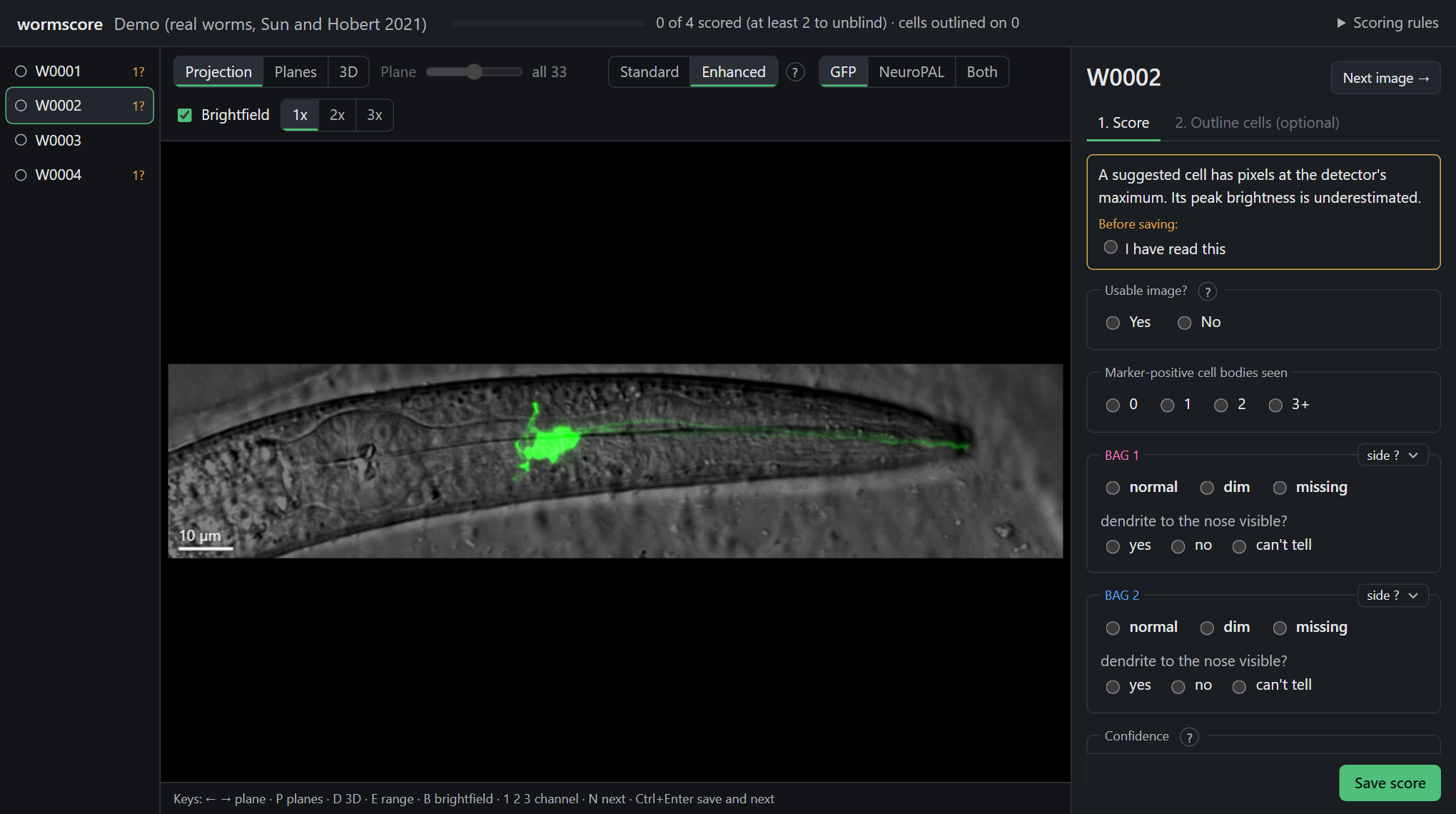
The scoring page. The image is from the real-worm demo: an L2 head with the BAG neurons and their dendrites marked (flp-17::GFP), from Sun and Hobert 2021 (Zenodo 5602160, CC BY 4.0).
- Blind: every image gets a random code. Genotypes and file names stay in a sealed key until you finish scoring.
- Fixed display: every image from the same microscope is shown with the same brightness range, in planes, as a projection or in 3D.
- Measured, not decided: suggested cells and the regions you draw are measured (peak, mean, local background, sharpest plane, saturation). The numbers are never shown while you score, and the software never makes a call for you.
- Traceable and reproducible: every number links to its file, series and SHA-256 checksum, and every
parameter and software version is written to the project's
log.md. - Local: it runs on your computer. Nothing is uploaded.
It reads microscope files as they are: Leica .lif, Zeiss .czi, Nikon .nd2, Olympus .oib, .oif and
.oir, OME-TIFF, and ImageJ hyperstack TIFF. Which channel is the reporter and which is brightfield is
read from the file's metadata, never guessed. GFP is the default reporter; mCherry, YFP, NeuroPAL and
others are settings. Nothing is tied to one neuron, marker or organism.
Install
Windows: click Download for Windows above, unzip, and double-click wormscore.exe. The app is
not signed, so the first time Windows asks before it runs. If it shows "Windows protected your PC", click
More info, then Run anyway; if it shows "The publisher could not be verified", click Run.
Mac (Apple silicon, M1 and newer): click Download for macOS above, unzip, and drag wormscore.app
into Applications. The app is not signed, so the first time macOS blocks it. To open it once:
- Double-click
wormscore.app. In the warning, click Done (not Move to Trash). - Open System Settings > Privacy & Security, scroll down to Security, and click Open Anyway next to wormscore. The button shows only after step 1; if it is not there, do step 1 again.
- Click Open Anyway again and confirm with your password or Touch ID.
Or, instead of steps 1 to 3, run this once in Terminal. It removes the mark macOS puts on downloaded files and changes nothing else:
xattr -dr com.apple.quarantine /Applications/wormscore.app
With Python 3.12 or newer (any system, including Intel Macs): pip install wormscore, then run
wormscore-launcher. For Nikon files add the extra: pip install "wormscore[nd2]".
The Windows app has its own window. On a Mac and with pip it opens in your web browser: use a normal window, since Safari Private windows, Brave and Firefox with fingerprinting protection change the image data (the scoring page warns if yours does).
Try it in two minutes
In the app, click Try a demo... and follow the five steps. Or from the command line:
wormscore demo my_demo
wormscore inventory my_demo
wormscore prepare my_demo
wormscore app my_demo
The demo is 20 simulated worm heads in two genotypes, with a demo_truth.csv to check your calls
against. Real worm images in the demo dialog (wormscore demo my_demo --real) downloads four real
larval heads with the BAG neurons marked (flp-17::GFP) from Sun and Hobert 2021
(Zenodo 5602160, CC BY 4.0).
How a project goes
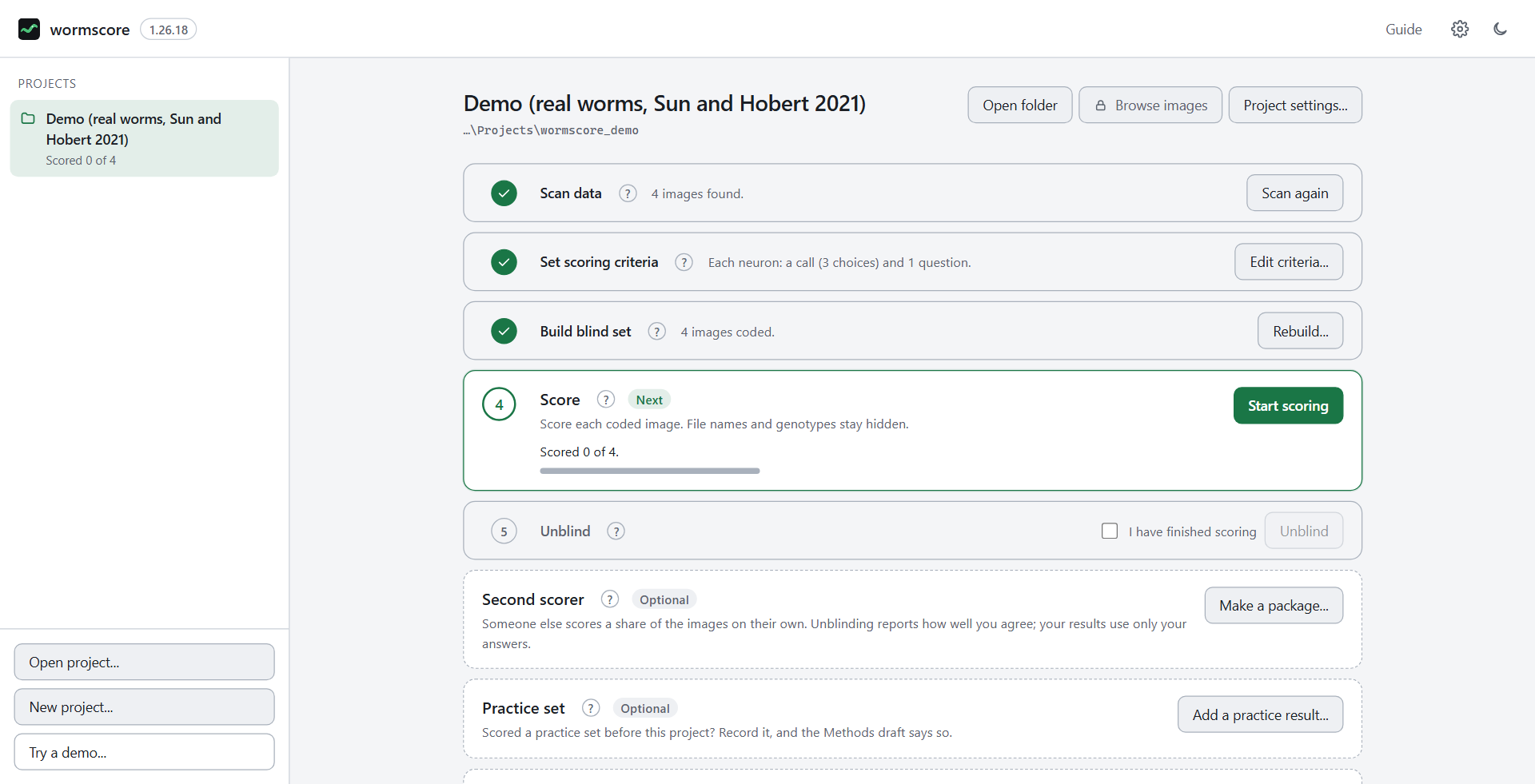
- Scan data: lists every image with its metadata and which channel is which.
- Set scoring criteria: what the scorer answers for each image. Start from a template (fate reporter, axon guidance, neurodegeneration, dendrite length, counts) or build your own.
- Build blind set: gives every image a random code and writes the sealed key.
- Score: answer the questions for each coded image, from the keyboard if you like, and optionally outline cells to measure them.
- Unblind: when scoring is finished, reveals the genotypes and writes the results.
Unblinding writes one row per image with scores, measurements and genotype, penetrance per genotype, Fisher's exact tests (and Mann-Whitney tests for scales and counts), and a draft Methods paragraph. The analysis settings are recorded before scoring and locked while you score.
Optional: a second scorer for agreement between scorers, hidden repeat images, practice sets for new scorers, flat-field correction, and checks for bleed-through and gut autofluorescence.
On a new microscope, check the reading first. Click Check the reading... under Scan data and
choose one of your files (or run wormscore check-reading <file>). It lists the objective, pixel size,
z-step, bit depth, which channel is the reporter, and the detector and laser settings, each with where
LAS X, ZEN, NIS-Elements or the FluoView software shows the same value. It reads the file and changes
nothing. If anything differs, open an issue.
Documentation
- User guide: every step and option, the scoring criteria, the results files.
- Methods: how everything is read, measured and tested, in plain language, for adapting into a Methods section.
- Comparison with other tools.
- Changelog: what changed in each version, and who is affected.
- Roadmap: what is planned.
Something wrong, unclear or missing? Open an issue
with what you did and what you saw. The project's log.md helps; it never names a code's genotype.
Updates
The downloaded app checks for a new version when it starts and offers Update and restart. The
previous version is kept: Settings > Go back restores it. Updating does not change your results: new
options only run if you set them, and projects, codes and scores are never touched. For a study, keep
one version from building the blind set to unblinding (the app reminds you) and cite that version.
Every version stays on the Releases page. With pip:
pip install -U wormscore. Details are in the user guide.
Privacy
This repository contains code only. .gitignore excludes image formats, keys, scores and outputs.
Do not commit or upload data that belongs to someone else.
wormscore never sends your images, projects or scores anywhere. The only network requests are the update check (one request to GitHub's releases API for the latest version, sending nothing but the app's version in the User-Agent; off switch in Settings), an update you choose to install, and the real-image demo download.
License and citation
MIT License (see LICENSE). If you use wormscore in research, please cite the version you used.
Each release has its own DOI on Zenodo; doi:10.5281/zenodo.23520610
lists all versions and resolves to the latest. GitHub's "Cite this repository" button (from
CITATION.cff) gives the reference, as does
Settings > Copy citation in the app. log.md in your project records which version ran each step.
wormscore reads Leica files with liffile, Zeiss files with
czifile, Olympus FluoView files with
oiffile, Olympus .oir files with
oirfile and Nikon files with nd2
(all BSD-3). The Windows and Mac
apps bundle these and other libraries; their licenses are in THIRD_PARTY_LICENSES.txt next to the app.
Development
pip install -e .[dev]
pytest
The tests build simulated projects and check the measurements, the statistics, the blinding (no genotype or file name reaches the scoring page) and the file readers. Real images are never committed. GitHub builds the Windows and Mac apps on every change and installs an update over them.
1 maintainer

Metadata
1 maintainer
Release files for wormscore 1.26.21
For a detailed explanation of source distributions (sdists) and built distributions (wheels), please see the package formats documentation.
Source distribution (sdist)
| File | Size | Uploaded | Provenance | Actions |
|---|---|---|---|---|
| wormscore-1.26.21.tar.gz | 584.2 kB | With provenance | Details for wormscore-1.26.21.tar.gz |
Built distribution (wheel)
| File | Interpreter | ABI | Platform | Actions Reset |
|---|---|---|---|---|
| wormscore-1.26.21-py3-none-any.whl | Python 3 | none | any | Details for wormscore-1.26.21-py3-none-any.whl |
Total release size: 1.0 MB
Release files / wormscore-1.26.21.tar.gz
| Download URL | wormscore-1.26.21.tar.gz |
|---|---|
| Size | 584.2 kB |
| Tags | Source |
|
SHA-256 checksum How to use checksums |
4fb54b7d7ff75a7b242fa20dae461d14e7fbc8356ce0e5058ea6367a185b959b
|
|
BLAKE2b-256 checksum How to use checksums |
deee12c3c6210b343d0e6e2e66d96624d826252f945a5f02a29cbbaac1b44650
|
| Upload date | |
|
Uploaded using Trusted Publishing? What is trusted publishing? |
Yes |
| Uploaded via |
twine/7.0.0 CPython/3.13.16
|
Provenance
Provenance describes where a file came from. On PyPI, provenance is shared via attestations, which provide a verifiable record of the build or publishing details. View details, limitations and caveats.


PyPI Publish Attestation
PyPI verified that this artifact, at this checksum, originated from the publisher listed below.
Signed by GitHub Actions, verified by PyPI on Nov 20, 2026.
Transparency logRelease files / wormscore-1.26.21-py3-none-any.whl
| Download URL | wormscore-1.26.21-py3-none-any.whl |
|---|---|
| Size | 420.6 kB |
| Tags | Python 3 |
|
SHA-256 checksum How to use checksums |
798e3702f9cd30f0c235adeab750cfeeef9ad47be6ff6a811e0262d36ff09cc3
|
|
BLAKE2b-256 checksum How to use checksums |
2353d845595c21cc4a6fe296ce25010e5ef3512e662f99ff0b5f5372e6aba7d2
|
| Upload date | |
|
Uploaded using Trusted Publishing? What is trusted publishing? |
Yes |
| Uploaded via |
twine/7.0.0 CPython/3.13.16
|
Provenance
Provenance describes where a file came from. On PyPI, provenance is shared via attestations, which provide a verifiable record of the build or publishing details. View details, limitations and caveats.
PyPI Publish Attestation
PyPI verified that this artifact, at this checksum, originated from the publisher listed below.
Signed by GitHub Actions, verified by PyPI on Nov 20, 2026.
Transparency logSecurity for wormscore 1.26.21
Provenance
Provenance describes where a file came from. On PyPI, provenance is shared via attestations, which provide a verifiable record of the build or publishing details. View details, limitations and caveats.
Full provenance
Both files in this release have been uploaded with provenance metadata.
Attestation for wormscore-1.26.21.tar.gz
PyPI Publish Attestation
PyPI verified that this artifact, at this checksum, originated from the publisher listed below.
Signed by GitHub Actions, verified by PyPI on Nov 20, 2026.
Transparency logA note on package security
PyPI is a repository for distributing packages, not a service for auditing them. While third-party security researchers and our staff do their best to detect and remove malicious packages, PyPI cannot guarantee the quality, security or suitability of any given package.
To learn more about protecting yourself from malicious actors, visit our package security documentation.














