
wp-enhanced
Wrapper of wp.py. Easy to premake, build, deploy and distribute wwise plugins.
Installation
-
Install wpe from pip
pip install wp-enhanced -
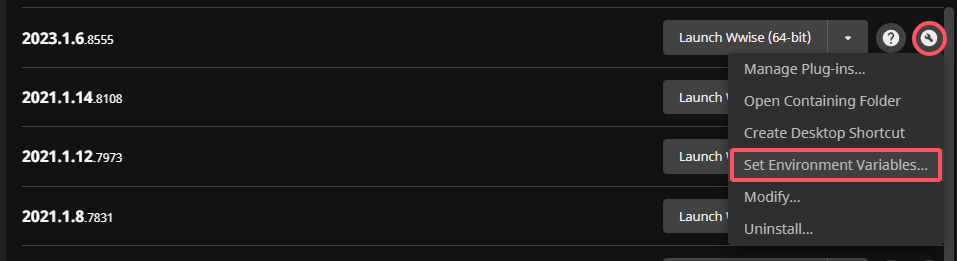
Set wwise environment variables
-
Windows:
- Set from Wwise Launcher
-
MacOS:
- Set
WWISEROOTandWWISESDKmanually
- Set
-
-
Check installation
wpe -h
Start to create your plugin
The following mentioned
wpecommand line parameters will use shorter subcommands aliases. For the full subcommands name, you can view them by runningwpe -h.Run
wpe <SUBCOMMAND> -hto view the help message of each subcommand.
Create new plugin project
Run wpe n to create new project just like original python wp.py new.
After creating new project, you can find .wpe directory in your project root which is created by wpe. The directory structure should be like:
./.wpe
|-- hooks
|   |-- post_build.py
|   |-- post_full_pack.py
|   `-- pre_premake.py
`-- wpe_project.toml
wpe_project.toml: wpe project configuration file.hooks: hooks for specific wpe actions. Refer to Hooks for more information.
Configure project
Head to $PROJECT_ROOT/.wpe/wpe_project.toml, the project configuration can is divided into four parts.
Version
Determine the version of plugin, which affects packing the plugin archive.
You can bump plugin version by running wpe B
[project]
version = 1
Platform support
Defines the supported platforms when using Premake to build the plugin.
win_targets/mac_targets means your develop machine platform. e.g. In default configuration, when developing on Windows, you can build for Windows Authoring, Windows_vc160, Android.
Currently developing on Windows is recommended, as MacOS authoring plugin is not supported yet.
[project]
version = 1
win_targets = [
    { platform = 'Authoring', architectures = ['x64'], toolset = 'vc160' },
    { platform = 'Windows_vc160', architectures = ['x64'] },
    { platform = 'Android', architectures = ['arm64-v8a', 'armeabi-v7a'] },
]
mac_targets = [
    { platform = 'iOS', architectures = ['iOS'] },
]
Plugin info
MenuPath: Plugins with the same menu path will be grouped in the Wwise plugin popup menu.platform_support: Inform Wwise Authoring where this plugin can be inserted and whether it can be rendered offline.
[plugin_info]
MenuPath = 'custom'

[plugin_info.platform_support.Any]
CanBeInsertOnBusses = true
CanBeInsertOnAudioObjects = true
CanBeRendered = true
Parameters
The initially generated configuration contains several typical parameter definition examples.
Run wpe gp to generate parameters code.
Be careful the followed files will be overwritten by template if [wp-enhanced template] comment is not found in file:
- ProjectNameFXParams.cpp
- ProjectNameFXParams.h
- ProjectName.xml
- ProjectNamePlugin.cpp
- ProjectNamePlugin.h
if -gui flag is set:
New plugin project will be created with default parameters: wpe_project.toml
Premake
Run wpe p. Default to premake all platforms defined in targets. You can also specify platforms by -plt flag.
Build
Run wpe b. Default to build all platforms defined in targets with Debug config. You can also specify platforms by -plt flag, and specify config by -c flag.
Pack
Run wpe P to package plugin. This will collect the build artifacts for all local platforms and generate the plugin archive in the dist directory.
Will NOT build plugin. If you need to fully build plugin and package it for distribution, try
wpe FP
Deploy
After package your plugin into an archive, you can run wpe d to deploy it to different places.
Currently supported:
- Pass WwiseRoot to
-dargument to deploy to Wwise Authoring. - Pass Wwise integrated UE project root to
-dargument to deploy to UE project.
Hooks
All hooks should be placed in $PROJECT_ROOT/.wpe/hooks folder.
pre/post_premake/generate_parameters/build/pack/full_pack are supported.
Hook scripts should contain a main function with **kwargs, the followed arguments are passed by wpe:
proj_root: project root directoryplugin_name- subcommand args. For example, build command will pass
platformsandconfiguration.
Some default are created when creating new project, you can modify them or add new hooks.
For more information about hooks, please refer to description of -H, --with-hooks in wpe -h
Integrate wpe to existing project
If your have existing project, you can integrate wpe to it by running wpe i in your project root.
CAUTION ❗❗: Make sure to stage your modified files before running wpe i, as the parameters code generation may overwrite your files.
1 maintainer

Metadata
1 maintainer
Release files for wp-enhanced 1.0.5
For a detailed explanation of source distributions (sdists) and built distributions (wheels), please see the package formats documentation.
Source distribution (sdist)
| File | Size | Uploaded | |
|---|---|---|---|
| wp_enhanced-1.0.5.tar.gz | 44.4 kB | Details |
Built distribution (wheel)
| File | Interpreter | ABI | Platform | Reset |
|---|---|---|---|---|
| wp_enhanced-1.0.5-py3-none-any.whl | Python 3 | none | any | Details |
Total release size: 106.7 kB
Release files / wp_enhanced-1.0.5.tar.gz
| Download URL | wp_enhanced-1.0.5.tar.gz |
|---|---|
| Size | 44.4 kB |
| Tags | Source |
|
SHA-256 checksum How to use checksums |
5f39bf24e16d029c64a2001eed44ddd4b92ae18e2e451449821e80cc6c4ab76e
|
|
BLAKE2b-256 checksum How to use checksums |
08e5823eaa8209b82bb2b171263af768a43ac805c6f03c7a8be00c0f860818c2
|
| Upload date | |
|
Uploaded using Trusted Publishing? What is trusted publishing? |
No |
| Uploaded via |
poetry/1.4.0 CPython/3.11.3 Windows/10
|
Release files / wp_enhanced-1.0.5-py3-none-any.whl
| Download URL | wp_enhanced-1.0.5-py3-none-any.whl |
|---|---|
| Size | 62.3 kB |
| Tags | Python 3 |
|
SHA-256 checksum How to use checksums |
fd93a3291783a429992aed200b3a979579bb521081b028715dc57d91c3cdb275
|
|
BLAKE2b-256 checksum How to use checksums |
2966cbcfaeb8f15187b1b06ab0bdec40cb46cc9f08e9537fd15df576a3482c51
|
| Upload date | |
|
Uploaded using Trusted Publishing? What is trusted publishing? |
No |
| Uploaded via |
poetry/1.4.0 CPython/3.11.3 Windows/10
|














