
Build C files without checking all its dependencies

Project description
:wrench: wrench

A simple build utility for your C project.
rye install wrench-build
# or if you don't mind polluting the environment
pip install wrench-build
Why and how
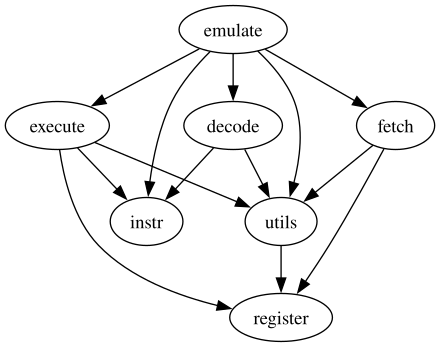
Consider a simple project:
decode.h decode.c
emulate.c
execute.c execute.h
fetch.c fetch.h
instr.h
register.c register.h
utils.c utils.h
The dependency graph looks like this:
To build it manually, you have to run:
gcc -c execute.c -o out/execute.o
gcc -c fetch.c -o out/fetch.o
gcc -c register.c -o out/register.o
gcc -c utils.c -o out/utils.o
gcc -c decode.c -o out/decode.o
gcc -c emulate.c -o out/emulate.o
gcc out/execute.o out/fetch.o out/register.o out/utils.o out/decode.o out/emulate.o -o emulate
That's very error prone and also gets really boring after a while, you may want to write a make file (or maybe tell chatgpt to write it).
CC = gcc

OBJDIR = out
SRCDIR = .
SRC = $(SRCDIR)/execute.c $(SRCDIR)/fetch.c $(SRCDIR)/register.c \
      $(SRCDIR)/utils.c $(SRCDIR)/decode.c $(SRCDIR)/emulate.c
OBJ = $(OBJDIR)/execute.o $(OBJDIR)/fetch.o $(OBJDIR)/register.o \
      $(OBJDIR)/utils.o $(OBJDIR)/decode.o $(OBJDIR)/emulate.o
TARGET = emulate
all: $(TARGET)
$(TARGET): $(OBJ)
	$(CC) $(OBJ) -o $(TARGET)
$(OBJDIR)/%.o: $(SRCDIR)/%.c
	$(CC) -c $< -o $@
clean:
	rm -f $(OBJ) $(TARGET)
Let's be honest, this is very hard to read and very cumbersome to write. Since C compiling follows simple rules, we can automate this. To do the same thing with wrench-build, just run wrb emulate to tell it what you want it to generate.
CC=gcc
CFLAGS=
Trying to build out/execute.o
gcc -c execute.c -o out/execute.o
Trying to build out/utils.o
gcc -c utils.c -o out/utils.o
Trying to build out/decode.o
gcc -c decode.c -o out/decode.o
Trying to build out/register.o
gcc -c register.c -o out/register.o
Trying to build out/fetch.o
gcc -c fetch.c -o out/fetch.o
Trying to build out/emulate.o
gcc -c emulate.c -o out/emulate.o
Trying to build emulate
gcc out/execute.o out/utils.o out/decode.o out/register.o out/fetch.o out/emulate.o -o emulate
Now wrb will read all your files and sort out the includes and give you the output. :tada:
OK, now that we can compile stuff easily we may wish to run something, maybe valgrind or a linter, or just some tests.
You can write a Wrenchfile, the full supported fields are listed below:
CC = clang
MY_VAR = -Iheaders
CFLAGS = -Wall -Werror -g $(MY_VAR)
BUILD = target1 target2
LIBDIRS = lib1 lib2 $(ERROR)
LIB= map set hash
ERROR =lib3

SHELL= fish

main(nvim -l -): task1, task2
  vim.print({hello = "world"})

task1(): task2
  set foo ${CFLAGS}
  echo $foo

task3(bash):
 if [ ${SHELL} == "lib3" ]; then
     echo ${SHELL}
 fi

task2():
  echo "fish"
Release history Release notifications | RSS feed


Download files
Download the file for your platform. If you're not sure which to choose, learn more about installing packages.
Source Distribution
Built Distribution
Filter files by name, interpreter, ABI, and platform.
If you're not sure about the file name format, learn more about wheel file names.
Copy a direct link to the current filters
File details
Details for the file wrench_build-0.1.9.tar.gz.
File metadata
- Download URL: wrench_build-0.1.9.tar.gz
- Upload date:
- Size: 19.3 kB
- Tags: Source
- Uploaded using Trusted Publishing? No
- Uploaded via: twine/4.0.2 CPython/3.12.3
File hashes
| Algorithm | Hash digest | |
|---|---|---|
| SHA256 |
9766143c39ad1a90eb4042801c8e47847b03113f9ceed7db13e421aa6349191a
|
|
| MD5 |
f07235d07900d163c2b4137698f7c804
|
|
| BLAKE2b-256 |
787b96a405465e25a4ea1ee4cb1e63fb2f231267f03734c858f845d921243444
|
File details
Details for the file wrench_build-0.1.9-py3-none-any.whl.
File metadata
- Download URL: wrench_build-0.1.9-py3-none-any.whl
- Upload date:
- Size: 20.4 kB
- Tags: Python 3
- Uploaded using Trusted Publishing? No
- Uploaded via: twine/4.0.2 CPython/3.12.3
File hashes
| Algorithm | Hash digest | |
|---|---|---|
| SHA256 |
65846b490106053852600de9c993dafa27b36c2465787f48fb1aded0c18c9540
|
|
| MD5 |
a8e29401338bb56afef2535a014f82ca
|
|
| BLAKE2b-256 |
c5bc402967696bc609e1da8685076cbadd58b1c9ab7ef69583514ea3ff2e2ce4
|






