
wrenchroom



Can a real hand tool reach, turn and remove every fastener in your assembly? wrenchroom finds out before the parts are made.
Give it a STEP file from any CAD program (Fusion, Onshape, SolidWorks, FreeCAD, CadQuery...), or shapes straight from build123d. For every screw, bolt and nut it does what a mechanic would: picks up a real tool at a standard size (a hex key, a spanner, a socket on its ratchet, a screwdriver), puts it on, tries to swing it far enough to turn, and checks that the screw can then come out. Then it tells you which ones can't be done, and exactly what is in the way.
$ wrenchroom check examples/bracket.step
5 fasteners: 3 turn, 0 held, 1 blocked, 1 stuck, 0 not covered
  M6 hex screw             spanner-10     x1    1 of 1 fail
  M6 socket screw          hex-key-5      x2    1 of 2 fail
  M8 hex screw             spanner-13     x1    all pass (ring, full length)
  M8 nut                   spanner-13     x1    all pass (ring, full length)
FAIL rear_screw  hex-key-5  blocked  shelf
FAIL side_bolt  spanner-10  stuck  cover
NOTE not checked: room for a hand (checks: {hand_room: true} turns it on); parts the model doesn't have
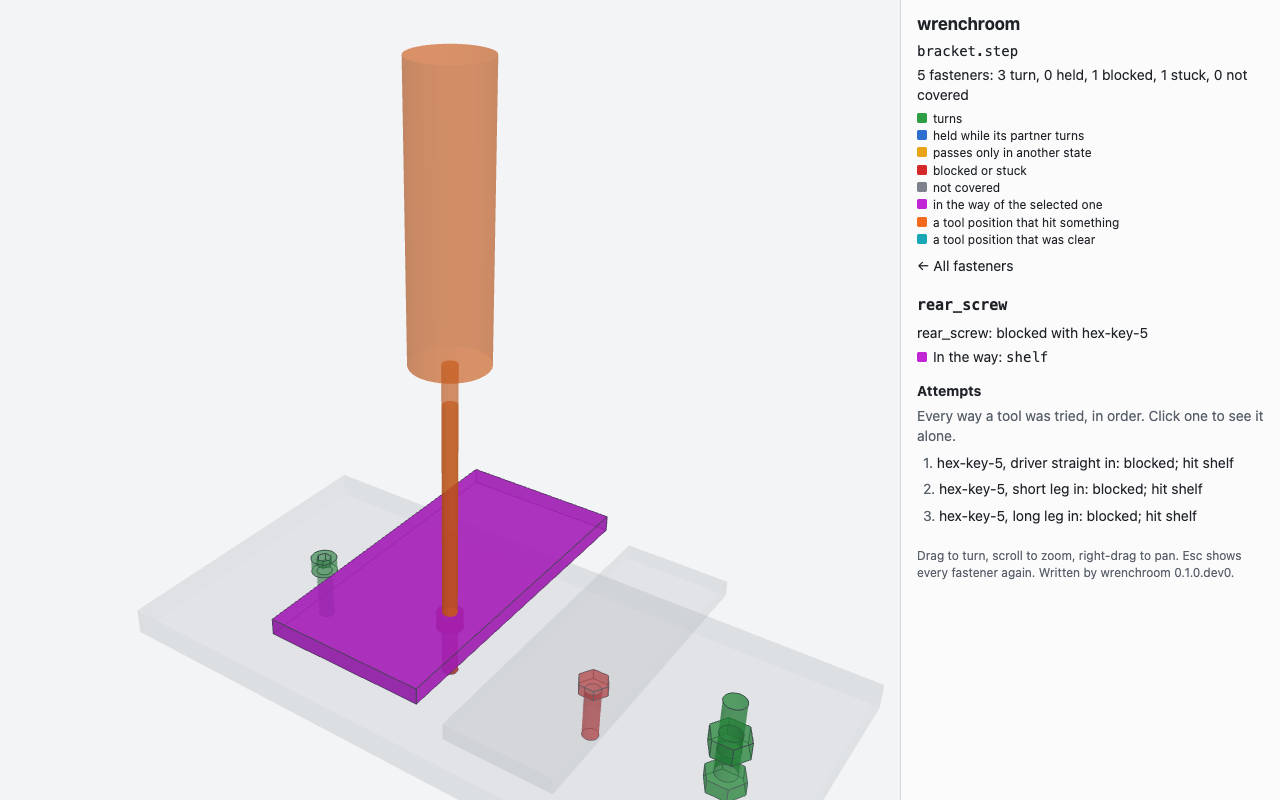
The same check as a 3D view (--html report.html), opened on the rear screw: the
5 mm key, straight in, meets the shelf (magenta) long before it reaches the screw.
No setup is needed when parts are named the way CAD models usually name them
(rear_screw, M6x20 SHCS, hex nut M8): the names say what each part is, and
the solids give the rest. It runs from the command line, from Python, from pytest,
and in CI, where an unreachable fastener fails the build like a broken test.
Contents
- Why
- Install
- Quick start
- A worked example
- Reading the report
- Describing your model: the sidecar
- Tool kits
- In CI
- From Python
- How it works
- What it doesn't check
- Development
Why
A collision check tells you the parts fit. It doesn't tell you the thing can be put together, or taken apart again for service. The classic miss is a bolt nobody can get a tool on, found when the parts arrive: an M6 socket head screw 15 mm under a shelf needs a 5 mm hex key, whose short leg alone is 33 mm long. Seen early, the fix costs nothing: move the shelf, or use a hex head a spanner turns from the side. Seen late, it's a re-order. A collision check can't see it either way, because the tool isn't in the model.
wrenchroom puts the tools in. What it catches:
- No room for the tool. Every way a tool goes on is tried: a hex key straight in like a driver, short leg in, long leg in; a spanner's ring, then its open end from the side, full length then stubby; a socket on its ratchet, then on each extension; a screwdriver; a nut driver.
- No room to swing. A spanner that fits but can't swing the 30 degrees it needs only holds. wrenchroom finds its best arc and names the two parts at its ends.
- Turns, but can't come out. A screw that turns but can't be drawn out along its
axis is
stuck, and the report names what's over it. - Nut and bolt. One side has to turn while the other is held. A nut and bolt pair passes when either side turns and the other can be held, or holds itself.
- A hex its own corners can't turn. A part inside the circle a nut's corners sweep stops it, whatever grips it.
- The wrong toolbox. A fastener that needs a tool your kit doesn't have (a 24 mm spanner, in a home toolbox) is reported with the kits that have it.
- Mistakes in the model. A nut drawn into the part beside it is a clash in the CAD, not a reach problem, and is reported as one, with the volume they share.
- Parts that come off. Take a lid off, or swing a lever up (a second model of the same mechanism), and retry: the report says where each fastener passed.
It's for mechanical designers checking serviceability before a design review, hardware teams who want a buried fastener to fail CI, and code-CAD users who want reach checked in their test suite.
Install
wrenchroom needs Python 3.13 or later. Install it as a command-line tool with uv:
$ uv tool install wrenchroom
or into an environment with pip install wrenchroom. It brings build123d
(OpenCascade, to read STEP) and manifold3d (the collision checks), both as prebuilt
wheels.
Quick start
- Check your model.
wrenchroom check model.step. It uses a home toolbox,metric-home, unless you choose another kit (--kit fullhas every size). - Ask about a failure.
wrenchroom explain model.step rear_screwlists every tool and way that was tried, and what each one hit. - See it in 3D.
wrenchroom check model.step --html report.html, then open the file in a browser. Click a fastener to see every tool position that was tried. - Correct what it misread.
wrenchroom detect model.step > wrenchroom.yamlwrites what it found as a sidecar file. Fix anything wrong, keep the file beside the model, and every later check reads it.
A worked example
examples/bracket.py builds a small bracket with build123d and
writes it as STEP. It has a base plate and five fasteners:
front_screwandrear_screw: M6 socket head cap screws, with a shelf 15 mm over the rear one;side_bolt: an M6 hex bolt, 20 mm long, with a cover 8 mm over its head;clamp_boltandclamp_nut: an M8 bolt up from under the plate, and its nut.
From a clone of this repository:
$ python examples/bracket.py
wrote examples/bracket.step
$ wrenchroom check examples/bracket.step
5 fasteners: 3 turn, 0 held, 1 blocked, 1 stuck, 0 not covered
  M6 hex screw             spanner-10     x1    1 of 1 fail
  M6 socket screw          hex-key-5      x2    1 of 2 fail
  M8 hex screw             spanner-13     x1    all pass (ring, full length)
  M8 nut                   spanner-13     x1    all pass (ring, full length)
FAIL rear_screw  hex-key-5  blocked  shelf
FAIL side_bolt  spanner-10  stuck  cover
NOTE not checked: room for a hand (checks: {hand_room: true} turns it on); parts the model doesn't have
There's no sidecar here. The names say screw, bolt and nut, and the solids give the rest: each head's shape, the size of its hex or hex socket, and so the thread. The summary groups fasteners by what they are and the tool they take; then each failure gets a line of its own. The exit code is 1, because a fastener failed.
Ask why the rear screw failed:
$ wrenchroom explain examples/bracket.step rear_screw
rear_screw: blocked with hex-key-5
  found by name+geometry: noun 'screw'; solid: socket, 5 across flats, M6 measured
  tried hex-key-5, driver straight in: blocked; hit shelf
  tried hex-key-5, short leg in: blocked; hit shelf
  tried hex-key-5, long leg in: blocked; hit shelf
It found the screw by its name, and measured an M6 socket head with a 5 mm hex socket. Then it tried the 5 mm key three ways: straight in like a driver, short leg in with the long arm swinging, and long leg in with the short arm swinging. The shelf stops all three.
And the side bolt:
$ wrenchroom explain examples/bracket.step side_bolt
side_bolt: stuck with spanner-10, ring, full length
  found by name+geometry: noun 'bolt'; solid: hex, 10 across flats, M6 measured
  tried spanner-10, ring, full length: turns; hit clamp_bolt, clamp_nut
  cannot come out: cover in the way
A 10 mm ring spanner turns it. On the way round its handle meets the clamp's bolt and nut, but it still has all the swing it needs. The bolt can't come out, though: there's 8 mm under the cover, and the bolt is 20 mm long.
Now fix both: raise the shelf to 45 mm, which is room for the key's short leg, and
cut a 14 mm hole in the cover for the bolt to come out through.
python examples/bracket.py --fixed writes that version:
$ python examples/bracket.py --fixed
wrote examples/bracket.step
$ wrenchroom check examples/bracket.step
5 fasteners: 5 turn, 0 held, 0 blocked, 0 stuck, 0 not covered
  M6 hex screw             spanner-10     x1    all pass (ring, full length)
  M6 socket screw          hex-key-5      x2    all pass (driver straight in)
  M8 hex screw             spanner-13     x1    all pass (ring, full length)
  M8 nut                   spanner-13     x1    all pass (ring, full length)
NOTE not checked: room for a hand (checks: {hand_room: true} turns it on); parts the model doesn't have
Everything passes, and the exit code is 0.
Reading the report
Each fastener gets one verdict:
| Verdict | What it means | Passes |
|---|---|---|
turns |
A tool gets on and swings far enough to turn it, and a screw can come out. | yes |
held |
It only needs holding while its partner turns (a bolt whose nut is turned), or it holds itself (a carriage bolt, a threaded insert). | yes |
blocked |
No tool turns it. The line names what's in the way, the parts that decided it first. | no |
stuck |
It turns, but can't come out along its axis. The line names what's over it. | no |
not covered |
wrenchroom can't judge it, and the line says why: no tool in the kit fits, it can't tell which end is free, or the model has a clash. | no |
A failure's line names at most three parts, the one hit at the most positions first, then how many more. When a plain list of parts isn't the whole story, the line says what is:
| You may see | Meaning |
|---|---|
only holds, and it has no nut; best arc between post_a and post_b |
A tool fits, but its swing is too short to turn it, and there's no partner to turn instead. |
only holds, and its partner clamp_nut does not turn |
Neither side of the pair can be turned. |
the nut's corners hit rib as it turns |
A part sits inside the circle the hex's corners sweep. No tool can turn it. |
drawn into lid (96.1 mm^3): fix the model |
The fastener's solid overlaps another part: a clash in the model. |
needs spanner-24, which kit metric-home does not hold (full has it) |
Choose a bigger kit, or add the tool to the sidecar. |
no room for a hand: the hand hits frame on its best arc |
With --hand-room: the tool would turn, but the hand on it can't follow. |
cannot tell the nut's free face: both ends are covered |
Say which way the tool comes from with axis: in the sidecar. |
Exit codes are for scripts and CI: 0 every fastener passes, 1 a fastener fails, 2 a fastener is not covered, or the sidecar has a problem (a rule that matches no part, say, which is usually a renamed part).
Every way to see it
-
The terminal table, as above. Part names come from the model, so control characters in them are written out rather than sent to your terminal.
-
explainfor one fastener: every tool and way tried, what each hit, and how the part was recognised. -
JSON (
--json report.json): every field, for scripts. One fastener's entry:{ "name": "rear_screw", "kind": "screw", "head": "socket", "size": "M6", "length": null, "axis": [0.0, 0.0, 1.0], "seat": [-20.0, 0.0, 6.0], "source": "name+geometry", "tool": "hex-key-5", "verdict": "blocked", "how": null, "swing_deg": 0.0, "state": null, "pair": null, "blocked_by": ["shelf"], "deciding": [], "stuck_on": [], "reason": null, "grazes": [], "notes": [] }
-
Markdown (
--md report.md) for a CI job summary or a pull request comment: the same tables, with every part name in a code span, so a crafted name can't post a link or an image. -
The 3D view (
--html report.html): one self-contained file that opens offline. The assembly is grey, and each fastener is coloured by how it fared: green turns, blue held, amber passes only in another state, red blocked or stuck, grey not covered. Click one, or pick it from the list, to see every tool position that was tried, drawn where the check put it (orange where it hit something), with the parts in its way in magenta.report.html#rear_screwopens on one fastener. The page loads nothing and runs nothing but its own scripts, so a report of a private model can't send anything anywhere.
- for a file writes that report to stdout and moves the table to stderr, so it can
be piped: --json - | jq, --md - >> "$GITHUB_STEP_SUMMARY".
Describing your model: the sidecar
Often you won't need one. When you do (a part's name says nothing, detection
misread a head, a nut's washer should go with it, a lid comes off for service), put a
wrenchroom.yaml beside the model. wrenchroom detect model.step > wrenchroom.yaml
writes a starting point: one rule per fastener it found, each with a comment saying
how sure it was and how the part fares now. Kept as written, the file reproduces
every verdict.
A sidecar with every section:
# wrenchroom.yaml
fasteners:
  - parts: "frame_bolt_*"        # a glob over part names
    kind: screw                  # screw, nut or insert
    head: hex                    # socket, button, flat, hex, torx, phillips,
                                 # slotted, carriage or shoulder
    size: M8                     # M8, #10, 1/4, ...
  - parts: frame_bolt_3          # a later rule replaces an earlier one, whole
    kind: screw
    head: hex
    size: M8
    tool: spanner-13             # try only this tool
    axis: -z                     # the way the tool comes from: +x ... -z, or [x, y, z]
  - parts: "frame_nut_*"
    kind: nut
    size: M8
    mates: ["frame_washer_*"]    # parts that go with it: not in its way
  - parts: cable_gland
    kind: nut
    across_flats: 24             # a hex of no thread size: give its size
    socket: false                # a cable runs through it: no socket goes over
  - parts: battery_screw_*
    state: lid-off               # reached only with the lid off

ignore: ["*_cable", "*_hose"]    # not solid obstacles: left out of every check

pairs:
  - [axle_bolt, axle_nut]        # pair these, where geometry wouldn't

states:
  lid-off:
    remove: [lid, "lid_screw_*"] # parts taken off
  lever-up:
    model: robot_lever-up.step   # the same parts, moved: another STEP

checks:
  try_states: [lid-off]          # retry each failure in these states
  hand_room: false               # also check room for a hand (untuned, off)
  detect: true                   # find fasteners the rules don't name

tools:                           # tools your kit doesn't have
  - name: stubby-key-5
    type: hex-key
    across_flats: 5
    long: 60
    short: 20
Mistakes are loud. An unknown key is an error, not ignored, and a glob that matches
no part fails the run (exit 2), because that's how a renamed part hides. A fastener
that passes only in another state passes, and explain, the JSON and the 3D view
(amber) say which state.
Your own tools
A kit lists the tools wrenchroom may use. A tool it doesn't have (a long-series key, a
short-arm key, a shop-made spanner, a thin-wall socket, a long screwdriver) goes in
the sidecar's tools: list, given by the same numbers the built-in tables hold for
its kind. It joins whatever kit you use: a fastener of its kind and size tries the
kit's own tools first, then yours, in order, and a rule's tool: may name one.
# wrenchroom.yaml
tools:
  - name: shop-spanner-24
    type: spanner
    across_flats: 24
    length: 300              # the head defaults to the built-in 24's
    ends: [ring]             # ring, open, or both (the default)
wrenchroom tools --config wrenchroom.yaml lists them after the kit's own. The
kinds and their numbers, all in mm, are in the reference.
Tool kits
| Kit | What's in it |
|---|---|
metric-home (default) |
A home toolbox: ISO 2936 hex keys 1.5 to 10 mm, combination spanners and 1/4 and 3/8 in drive sockets 5.5 to 19 mm, Phillips 1 to 3 and slotted drivers. |
imperial-home |
The same in inch sizes, as US home sets come: ASME B18.3 keys 0.050 to 3/8 in, spanners 1/4 to 3/4 in, sockets 3/16 to 3/4 in. |
full |
Every size the tables hold, both systems: keys to 19 mm and 3/4 in, ball-end keys, Torx keys T10 to T40, spanners and sockets to 50 mm (for large cable glands) and 1-1/2 in, nut drivers. |
wrenchroom tools --kit full lists every tool with its dimensions and where they
come from. Sizes are the standards' (ISO 2936, 4762, 7380-1, 10642, 4032; ASME B18.3,
B18.2.1, B18.2.2), and spanner lengths are makers', the longest of a few makers'
standard series at each size. Where a figure is an approximation, the listing says
so.
In CI
The exit code fails the job when a fastener fails; --md - puts the report in the
job summary, and the 3D view goes up as an artifact:
# .github/workflows/reach.yml
name: reach
on: [push, pull_request]
jobs:
  wrenchroom:
    runs-on: ubuntu-latest
    steps:
      - uses: actions/checkout@v7
      - uses: astral-sh/setup-uv@v10
      - run: uv tool install wrenchroom==0.1.0   # pinned: an Alpha's verdicts may move
      - run: wrenchroom check cad/robot.step --html reach.html --md - >> "$GITHUB_STEP_SUMMARY"
      - if: always()
        uses: actions/upload-artifact@v7
        with:
          name: reach
          path: reach.html
Or in pytest: installing wrenchroom registers a plugin. Name the model in your pytest settings (paths are relative to that file) and ask for the report:
[pytest]
wrenchroom_model = cad/robot.step
; optional: wrenchroom_config (default: wrenchroom.yaml beside the model),
; wrenchroom_kit, wrenchroom_state, wrenchroom_exact = true, wrenchroom_hand_room = true
def test_every_fastener_reachable(wrenchroom_report):
    wrenchroom_report.assert_all_pass()
A failure prints what wrenchroom check prints. The model is checked once per
session, the plugin loads nothing until a test asks for it, and -p no:wrenchroom
turns it off.
From Python
import wrenchroom as wr

report = wr.check(wr.Assembly.from_step("examples/bracket.step"), kit="metric-home")
print(report.summary)
for f in report.failures():
    print(f.headline, f.stuck_on or f.blocked_by)
{'fasteners': 5, 'turns': 3, 'held': 0, 'blocked': 1, 'stuck': 1, 'not_covered': 0}
rear_screw: blocked with hex-key-5 ('shelf',)
side_bolt: stuck with spanner-10, ring, full length ('cover',)
From build123d, skip the STEP file: wr.Assembly.from_shapes([(name, shape), ...])
takes the shapes as they are. wr.Config.load("wrenchroom.yaml")
reads a sidecar to pass as check's second argument, and a report writes itself with
report.to_json(path), to_markdown(path) and to_html(path).
How it works
- Read the model. A STEP assembly keeps its part names; repeated names are made unique, and a part drawn as several solids (a nut and its washer) is one part.
- Find the fasteners. From their names (ISO and DIN designations, McMaster-Carr
numbers, descriptions like
M6x20 SHCSorhex nut M8, code-CAD names likelift_link_bolt) and their solids: the drive the model shows, a hex, a hex socket, a cross or a slot, and the size it or the shank gives. Sidecar rules outrank both. - Orient each one. Its axis from its geometry, and the end a tool comes from: a screw's head, a nut's free face (the end nothing sits against).
- Try the tools. Each tool the kit has for that drive and size, every way it goes on, swung through its arc in 15 degree steps, the tool's own solid tested against the parts at every step. A tool on a hex needs the room the hex's corners sweep, and a socket the room for its wall.
- Decide. Turns, held, blocked, stuck or not covered, with what decided it. Pairs are resolved together, and failures retried in the states you named.
Collision checks run on meshes with manifold3d,
and anything too close to call is referred to exact OpenCascade booleans, so both
engines give the same report (--exact uses the exact one throughout). A
generated bench of 500 fasteners is read and checked in under 10 seconds on a laptop.
Every rule and figure, with the standards and the reasoning, is in docs/reference.md.
What it doesn't check
- Room for a hand is off by default (
--hand-roomturns it on): its figures aren't yet tuned against real hands. Every report says what it didn't check. - Parts the model doesn't have. Cables, hoses and anything not drawn aren't in
the way. Neither is a part you
ignore. - Torque. Whether a tool reaches and turns is checked, not whether it can apply the torque the joint needs. A pass that only a ball-end key reaches says so, as a ball end takes much less torque than a straight key.
- Assembly order. Each fastener is checked in the model as drawn, or in a state you name, not in the order the parts would be fitted.
Development
Python 3.13+, managed with uv.
$ uv sync
$ uv run python scripts/lanes.py          # the table of lanes
$ uv run python scripts/lanes.py gates    # ruff lint, ruff format, ty
$ uv run python scripts/lanes.py fast     # the unit suite, golden bench included
$ uv run python scripts/lanes.py golden   # only the bench: truth, counts, snapshot
$ uv run python scripts/lanes.py perf     # the bench at 500 fasteners, timed
$ uv run python scripts/lanes.py release-check  # build the release files and prove them
Releases are a version tag on main, published to PyPI by a workflow PyPI trusts;
docs/releasing.md
has the steps.
The golden bench (tests/golden/) is a generated assembly of small cells, one
mechanism each, with every verdict worked out by hand. It runs on both collision
engines against one snapshot, and again as three copies along the grid (a verdict
mustn't depend on where its cell sits). scripts/perf.py repeats it to 500 fasteners
and times it; CI reports that number on every push and fails if any verdict count
moves. uv run python scripts/golden.py --out some-dir writes bench.step and its
sidecars for you to open and check against, and a nightly job re-runs the bench
against upgraded dependencies, so a CAD-kernel update that moves a verdict shows up
before it lands. This README's examples are tests too: tests/test_readme.py runs
each command shown here and compares its output.
The bench's HTML report is tested in the page itself: Node runs the page's own
scripts against a stand-in DOM, and headless Chrome opens the file and draws it with
WebGL. Both come with CI's runners; locally each test skips, saying why, if its tool
is missing. The three.js bundle in src/wrenchroom/view/vendor/ is built by
scripts/vendor_three.py from a pinned npm tarball (its sha512 checked) and a pinned
esbuild; uv run python scripts/lanes.py vendor-check rebuilds it and compares byte
for byte, and the nightly job does the same.
CI runs the same lanes by the same names; scripts/lanes.py is the only spelling of
how this project runs its checks. main is protected: changes land by pull request,
rebased, with gates, every fast row and both perf rows green, and no new
high-severity CodeQL alert. The rule lives in .github/rulesets/main.json, exported
from GitHub; change both together. Security reports go through
SECURITY.md.
Licence
Apache-2.0. The 3D view bundles three.js (MIT), whose licence travels with it.
1 maintainer

Metadata
1 maintainer
Release files for wrenchroom 0.1.0
For a detailed explanation of source distributions (sdists) and built distributions (wheels), please see the package formats documentation.
Source distribution (sdist)
| File | Size | Uploaded | |
|---|---|---|---|
| wrenchroom-0.1.0.tar.gz | 656.9 kB | Details |
Built distribution (wheel)
| File | Interpreter | ABI | Platform | Reset |
|---|---|---|---|---|
| wrenchroom-0.1.0-py3-none-any.whl | Python 3 | none | any | Details |
Total release size: 954.0 kB
Release files / wrenchroom-0.1.0.tar.gz
| Download URL | wrenchroom-0.1.0.tar.gz |
|---|---|
| Size | 656.9 kB |
| Tags | Source |
|
SHA-256 checksum How to use checksums |
467b7a515f2a6ed21e32b23ad3e77f8bd7dee0cb08edc79d521a64ceff9993d7
|
|
BLAKE2b-256 checksum How to use checksums |
f59ab5285285ef36a4202c5942c1332673103311039f122679e0a565c48dba05
|
| Upload date | |
|
Uploaded using Trusted Publishing? What is trusted publishing? |
Yes |
| Uploaded via |
twine/7.0.0 CPython/3.13.14
|
Provenance
Provenance describes where a file came from. On PyPI, provenance is shared via attestations, which provide a verifiable record of the build or publishing details. View details, limitations and caveats.


PyPI Publish Attestation
PyPI verified that this artifact, at this checksum, originated from the publisher listed below.
Signed by GitHub Actions, verified by PyPI on Oct 7, 2026.
Transparency logRelease files / wrenchroom-0.1.0-py3-none-any.whl
| Download URL | wrenchroom-0.1.0-py3-none-any.whl |
|---|---|
| Size | 297.0 kB |
| Tags | Python 3 |
|
SHA-256 checksum How to use checksums |
99280e436eb792907160e95e4d804c870c2e763d2a832854217aacf17d14f871
|
|
BLAKE2b-256 checksum How to use checksums |
22b37027756aa2129b79509443e13aee569cd38134569cdf187170ce3a4e9892
|
| Upload date | |
|
Uploaded using Trusted Publishing? What is trusted publishing? |
Yes |
| Uploaded via |
twine/7.0.0 CPython/3.13.14
|
Provenance
Provenance describes where a file came from. On PyPI, provenance is shared via attestations, which provide a verifiable record of the build or publishing details. View details, limitations and caveats.
PyPI Publish Attestation
PyPI verified that this artifact, at this checksum, originated from the publisher listed below.
Signed by GitHub Actions, verified by PyPI on Oct 7, 2026.
Transparency log













