
A Python package to ingest global urban data into WRF geo_em files.

Project description
wrfup: WRF Urban Parameters
A Python Tool for Ingesting Urban Morphology Data into WRF Simulations

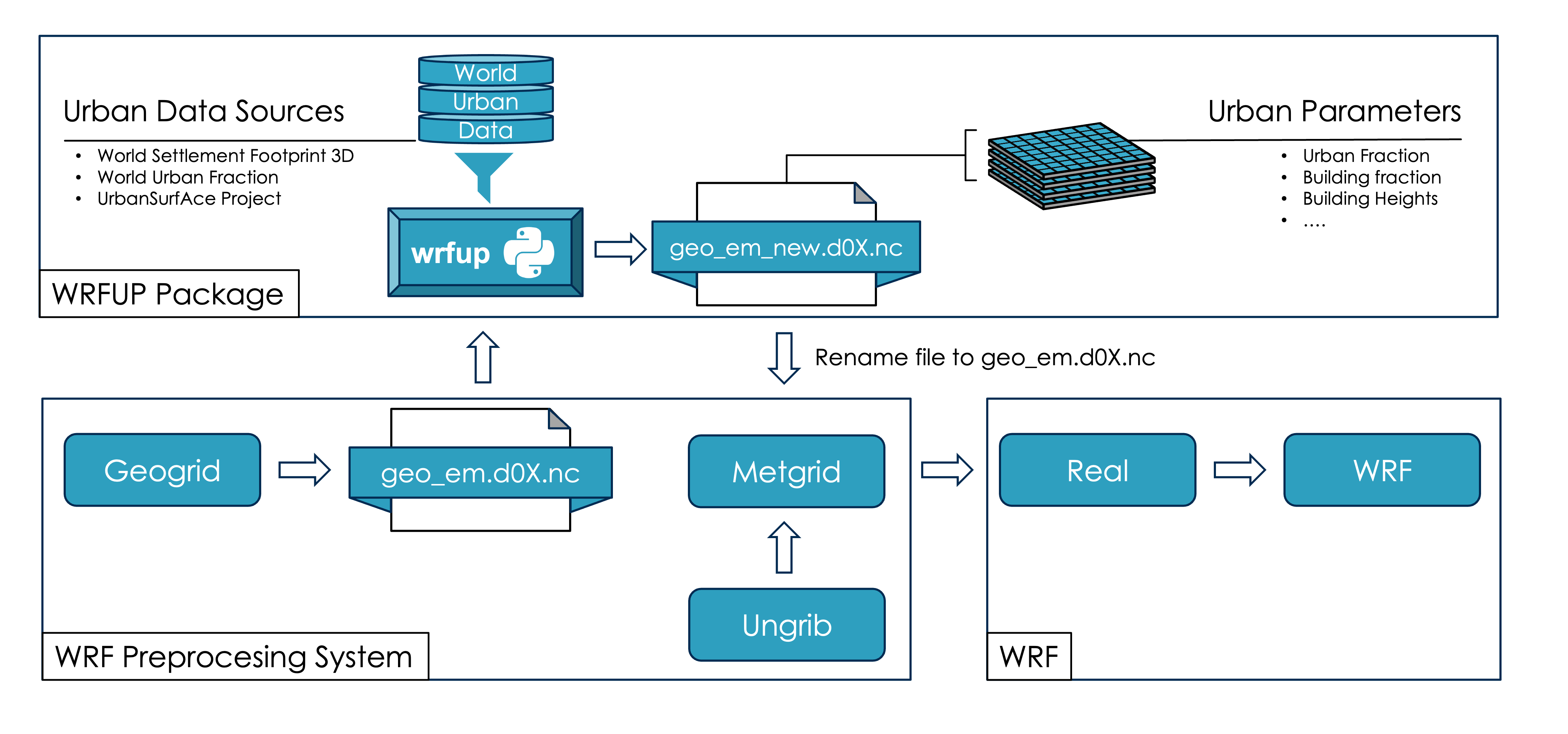
wrfup is a Python package that ingests high-resolution urban morphology data into WRF (Weather Research and Forecasting). It automatically downloads, calculates, and ingests urban fields like FRC_URB2D (Urban Fraction) and URB_PARAM (Urban Parameters) directly into WRF's geo_em files. These fields are essential for accurate urban weather simulations and are compatible with WRF parameterizations like BEP, BEP+BEM, and SLUCM, by following the system of National Urban Data and Access Portal Tool (NUDAPT).
The package integrates urban data such as urban fraction, building heights, building surface fraction and others from high-resolution sources like World Settlement Footprint 3D, Global Urban Fraction, and the UrbanSurfAce Project. This data improves the representation of urban surfaces, leading to more precise simulations of urban heat islands, microclimates, and energy exchanges.
Features
The package automatically:
- Downloads urban morphology data like building heights and urban fraction.
- Calculates the necessary urban fields for WRF: URB_PARAM and FRC_URB2D.
- Ingests these fields directly into WRF's geo_em files.
Installation
To install the wrfup package:
pip install wrfup
or install from TestPyPI:
pip install -i https://test.pypi.org/simple/ wrfup
Workflow
This diagram shows how wrfup integrates into the WRF preprocessing workflow:
Usage
Command-Line Interface (CLI)
You can use wrfup to calculate and ingest URB_PARAM or FRC_URB2D fields into geo_em files:
wrfup geo_em.d0X.nc URB_PARAM --work_dir YOUR_DIRECTORY
or
wrfup geo_em.d0X.nc FRC_URB2D --work_dir YOUR_DIRECTORY
Example Use Case
- Prepare your
geo_em.d0X.ncfile. - Run the following command to compute the URB_PARAM field:
wrfup geo_em.d03.nc URB_PARAM --work_dir /path/to/working_directory
- The updated file will be saved as
geo_em_URB_PARAM.d03.nc. - To compute FRC_URB2D, run the command:
wrfup geo_em_URB_PARAM.d03.nc FRC_URB2D --work_dir /path/to/working_directory
- Rename the final file for metgrid:
mv geo_em_URB_PARAM_FRC_URB2D.d03.nc geo_em.d03.nc
Documentation
For detailed instructions and documentation, visit the wrfup Documentation.
Development
Clone the repository and install the dependencies:
git clone https://github.com/jacobogabeiraspenas/wrfup.git
cd wrfup
pip install -r requirements.txt
License
This project is licensed under the MIT License. See the LICENSE file for details.
Contact
Questions or suggestions? Open an issue or reach out:
Jacobo Gabeiras Penas
Email: jacobogabeiras@gmail.com
Release history Release notifications | RSS feed

Download files
Download the file for your platform. If you're not sure which to choose, learn more about installing packages.
Source Distribution
Built Distribution
Filter files by name, interpreter, ABI, and platform.
If you're not sure about the file name format, learn more about wheel file names.
Copy a direct link to the current filters
File details
Details for the file wrfup-1.0.8.tar.gz.
File metadata
- Download URL: wrfup-1.0.8.tar.gz
- Upload date:
- Size: 17.2 kB
- Tags: Source
- Uploaded using Trusted Publishing? No
- Uploaded via: twine/5.1.1 CPython/3.9.4
File hashes
| Algorithm | Hash digest | |
|---|---|---|
| SHA256 |
2979bc3fd280d5a043c2aa8212e9a3426a87a8a80d0abef49a0e6ae8e47ea458
|
|
| MD5 |
85d28637dddd7a88f628c5745e3ee2ba
|
|
| BLAKE2b-256 |
51ae2ef6c27c265ace9b8892bae7b048764af492233feea602e1e86d255b63df
|
File details
Details for the file wrfup-1.0.8-py3-none-any.whl.
File metadata
- Download URL: wrfup-1.0.8-py3-none-any.whl
- Upload date:
- Size: 19.1 kB
- Tags: Python 3
- Uploaded using Trusted Publishing? No
- Uploaded via: twine/5.1.1 CPython/3.9.4
File hashes
| Algorithm | Hash digest | |
|---|---|---|
| SHA256 |
d3d69202bc09855520c67e94eb1156a2e9f90c5d6dcf93017b63377b001e500f
|
|
| MD5 |
9a6ad41dea277529531213d5250f87e7
|
|
| BLAKE2b-256 |
b9a910336dabcddea4d3ee3d623479c33b836cf405b463dbdfd12dde728efbd7
|






