
AI writing pattern analysis and scoring tool
Verified details
These details have been verified by PyPIProject links
GitHub Statistics
Maintainers

Project description
WriteScore









Identify AI patterns in your writing and get actionable feedback to sound more human.
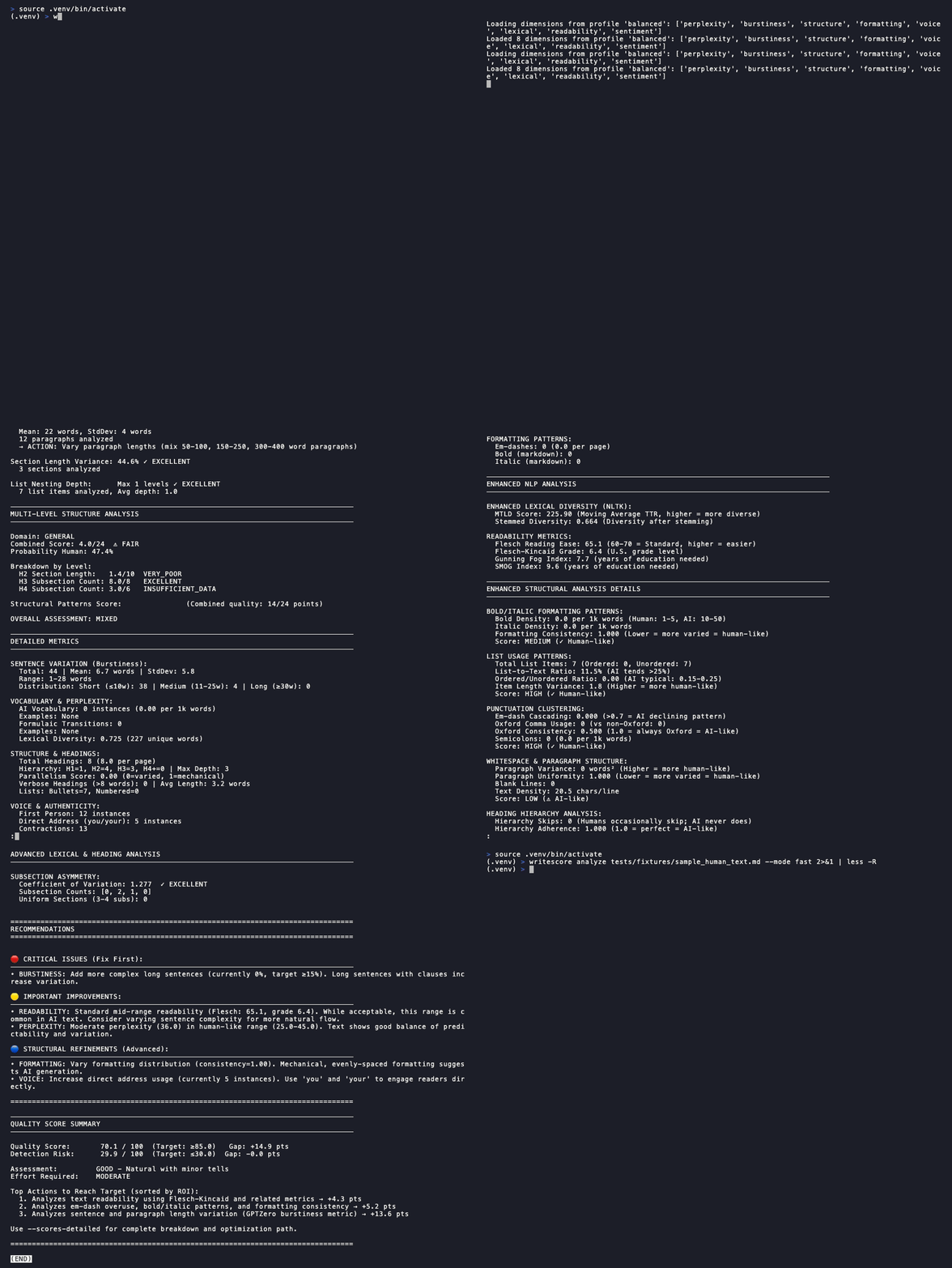
Quick Start
uv sync
uv run python -m spacy download en_core_web_sm
uv run writescore analyze README.md
That's it! You'll see a detailed analysis with scores and improvement suggestions.
Requirements
| Resource | Minimum | Recommended |
|---|---|---|
| Python | 3.9 | 3.11+ |
| RAM | 4 GB | 8 GB |
| Disk | 2 GB | 3 GB |
Note: First run downloads transformer models (~500MB) and spaCy model (~50MB). Subsequent runs use cached models.
Getting Started
Quickest path: Install Just, then run just setup. See all options below.
| Option | Local Install | CLI/IDE | Docker Required | Use WriteScore | Contribute |
|---|---|---|---|---|---|
| ✓ Native (Just) | Yes | CLI | No | just install |
just setup |
| Native (Just) | Yes | IDE | No | just install, open in any IDE |
just setup, open in any IDE |
| Native (Manual) | Yes | CLI | No | Instructions | Instructions |
| Native (Manual) | Yes | IDE | No | Instructions, open in any IDE | Instructions, open in any IDE |
| Devcontainer | No | CLI | Yes | Instructions | Instructions |
| Devcontainer | No | IDE | Yes | VS Code → "Reopen in Container" | Same |
| Codespaces | No | CLI | No | Instructions | Instructions |
| Codespaces | No | IDE | No | GitHub → Code → Create codespace | Same |
After setup, run just test (or uv run pytest for manual installs) to verify.
Installing Just
| OS | Command |
|---|---|
| Windows | winget install Casey.Just (or choco install just / scoop install just) |
| macOS | brew install just |
| Ubuntu/Debian | sudo apt install just |
| Fedora | sudo dnf install just |
| Arch Linux | sudo pacman -S just |
| Via Cargo | cargo install just |
| Via Conda | conda install -c conda-forge just |
Windows users: All
justcommands work in PowerShell and CMD. With uv, useuv runprefix instead of activating the venv.
Native Manual
For users who prefer not to install Just. Requires uv.
Use WriteScore:
uv sync
uv run python -m spacy download en_core_web_sm
Contribute:
uv sync --extra dev
uv run python -m spacy download en_core_web_sm
uv run pre-commit install
uv run pre-commit install --hook-type commit-msg
Devcontainer CLI
devcontainer up --workspace-folder "$(pwd)" && \
devcontainer exec --workspace-folder "$(pwd)" just install
For contributors, replace just install with just dev.
Codespaces CLI
gh codespace create -r BOHICA-LABS/writescore && \
gh codespace ssh
Then run just install (users) or just setup (contributors).
Available Commands
| Command | Description |
|---|---|
just |
List available commands |
just install |
Install package with all dependencies |
just setup |
Full dev setup (install + pre-commit hooks) |
just test |
Run fast tests (excludes slow markers) |
just test-all |
Run all tests including slow ones |
just test-cov |
Run tests with coverage report |
just lint |
Check code with ruff |
just lint-fix |
Auto-fix linting and format code |
just typecheck |
Run mypy type checking |
just check |
Run all checks (lint + typecheck) |
just clean |
Remove build artifacts and caches |
Why WriteScore?
The Problem: AI detection tools give binary "AI/human" verdicts without explaining why or how to improve.
The Solution: WriteScore analyzes 12+ writing dimensions to identify specific patterns that make text sound AI-generated, then provides actionable recommendations.
Key Differentiators:
- Actionable feedback — Know exactly what to fix, not just "this seems AI-generated"
- Multi-dimensional analysis — Examines vocabulary, sentence variety, formatting patterns, and more
- Quality-focused — Treats writing improvement as the goal, not accusation
- Transparent scoring — See how each dimension contributes to your score
When to use WriteScore:
- Polishing AI-assisted drafts to sound more natural
- Identifying mechanical patterns in your own writing
- Quality checks before publishing
When NOT to use:
- Academic integrity enforcement (use dedicated tools)
- Legal proof of authorship
- Detection of latest-generation models with high confidence
Features
- Dual Scoring — Detection risk + quality score in one analysis
- 12 Analysis Dimensions — From vocabulary patterns to syntactic complexity
- Multiple Modes — Fast checks to comprehensive analysis
- Actionable Insights — Specific recommendations ranked by impact
- Batch Processing — Analyze entire directories
- Score History — Track improvements over time
Usage
# Basic analysis
writescore analyze document.md

# Detailed findings with recommendations
writescore analyze document.md --detailed

# Show dual scores (detection risk + quality)
writescore analyze document.md --show-scores

# Fast mode for quick checks
writescore analyze document.md --mode fast

# Full analysis for final review
writescore analyze document.md --mode full

# Batch process a directory
writescore analyze --batch docs/
Analysis Modes
| Mode | Speed | Best For |
|---|---|---|
| fast | Fastest | Quick checks, CI/CD |
| adaptive | Balanced | Default, most documents |
| sampling | Medium | Large documents |
| full | Slowest | Final review, maximum accuracy |
See the Analysis Modes Guide for details.
Troubleshooting
Slow First Run
This is normal. First analysis downloads transformer models (~500MB) and caches them. Subsequent runs are much faster.
Out of Memory
Quick fix: Use --mode fast for lower memory usage:
writescore analyze document.md --mode fast
On macOS Apple Silicon, if you see MPS memory errors:
export PYTORCH_MPS_HIGH_WATERMARK_RATIO=0.0
writescore analyze document.md
ModuleNotFoundError / Command Not Found
Quick fix: Use uv run prefix or activate the venv: source .venv/bin/activate
Diagnostic table:
| Where did you install? | Current terminal | Fix |
|---|---|---|
uv (.venv/) |
Not using uv run |
Prefix with uv run or activate venv |
| Devcontainer | Native terminal | Run inside container or install natively |
| Codespaces | Local terminal | Install natively |
| Unknown | — | Run diagnostic commands below |
Diagnostic commands:
# Check if writescore is anywhere in PATH
which writescore

# Check if installed in current venv
uv pip show writescore

# Check common venv locations
ls -la .venv/bin/writescore 2>/dev/null || echo "Not in .venv"
Common fixes:
# Use uv run prefix
uv run writescore analyze README.md

# Or activate venv directly
source .venv/bin/activate  # Windows: .venv\Scripts\activate
writescore analyze README.md

# Run inside devcontainer (if installed there)
devcontainer exec --workspace-folder "$(pwd)" writescore analyze README.md

# Or reinstall natively
just install  # or: uv sync && uv run python -m spacy download en_core_web_sm
Can't find model 'en_core_web_sm'
python -m spacy download en_core_web_sm
NLTK Data Missing
If you see LookupError mentioning NLTK data:
python -c "import nltk; nltk.download('punkt'); nltk.download('averaged_perceptron_tagger')"
Documentation
| Document | Description |
|---|---|
| Architecture | System design, components, patterns |
| Analysis Modes Guide | Mode comparison and usage |
| Development History | Project evolution and roadmap |
| Migration Guide | Upgrading from AI Pattern Analyzer |
| Changelog | Version history |
Contributing
We welcome contributions! See CONTRIBUTING.md for guidelines.
Quick links:
- Label taxonomy — How we categorize issues and PRs
- Secret scanning setup — Required before your first commit
- Code of Conduct — Community guidelines
Updating the Demo GIF
The README demo GIF is generated using VHS. To regenerate after feature changes:
# Install VHS (macOS)
brew install vhs

# Generate new demo
vhs docs/assets/demo.tape
The tape file is at docs/assets/demo.tape. Edit it to change the demo script.
License
MIT License - see LICENSE for details.
Project details
Verified details
These details have been verified by PyPIProject links
GitHub Statistics
Maintainers


Download files
Download the file for your platform. If you're not sure which to choose, learn more about installing packages.
Source Distribution
Built Distribution
Filter files by name, interpreter, ABI, and platform.
If you're not sure about the file name format, learn more about wheel file names.
Copy a direct link to the current filters
File details
Details for the file writescore-6.4.0.tar.gz.
File metadata
- Download URL: writescore-6.4.0.tar.gz
- Upload date:
- Size: 778.0 kB
- Tags: Source
- Uploaded using Trusted Publishing? Yes
- Uploaded via: twine/6.1.0 CPython/3.13.7
File hashes
| Algorithm | Hash digest | |
|---|---|---|
| SHA256 |
118ebd7ff109790b427d7e3fe5a04fb41291a4ac927fe6a9cbe5ca29f766e4ea
|
|
| MD5 |
a3650fc2ed2c5764d2392493b161c49c
|
|
| BLAKE2b-256 |
600fe59a0f3012e8505471c4195be6e653bcb432de1f5497d1946590c1c8e655
|
Provenance
The following attestation bundles were made for writescore-6.4.0.tar.gz:
Publisher:
release.yml on BOHICA-LABS/writescore
-
Statement:
-
Statement type:
https://in-toto.io/Statement/v1 -
Predicate type:
https://docs.pypi.org/attestations/publish/v1 -
Subject name:
writescore-6.4.0.tar.gz -
Subject digest:
118ebd7ff109790b427d7e3fe5a04fb41291a4ac927fe6a9cbe5ca29f766e4ea - Sigstore transparency entry: 758835843
- Sigstore integration time:
-
Permalink:
BOHICA-LABS/writescore@f8db32f49446016653fd35fad6aa83fb480bf5ba -
Branch / Tag:
refs/tags/v6.4.0 - Owner: https://github.com/BOHICA-LABS
-
Access:
public
-
Token Issuer:
https://token.actions.githubusercontent.com -
Runner Environment:
github-hosted -
Publication workflow:
release.yml@f8db32f49446016653fd35fad6aa83fb480bf5ba -
Trigger Event:
push
-
Statement type:
File details
Details for the file writescore-6.4.0-py3-none-any.whl.
File metadata
- Download URL: writescore-6.4.0-py3-none-any.whl
- Upload date:
- Size: 832.6 kB
- Tags: Python 3
- Uploaded using Trusted Publishing? Yes
- Uploaded via: twine/6.1.0 CPython/3.13.7
File hashes
| Algorithm | Hash digest | |
|---|---|---|
| SHA256 |
0afe1887152cb5ff0bd1df5caaec3538b2c61e288935c1e01b569c622a4d46c4
|
|
| MD5 |
d3ee6d22820cd65e59d7eceea7c1b8e4
|
|
| BLAKE2b-256 |
1f5888e149ab72a2823ec1c9e48bcb48b1debddf5d299ec6e24375c670077d75
|
Provenance
The following attestation bundles were made for writescore-6.4.0-py3-none-any.whl:
Publisher:
release.yml on BOHICA-LABS/writescore
-
Statement:
-
Statement type:
https://in-toto.io/Statement/v1 -
Predicate type:
https://docs.pypi.org/attestations/publish/v1 -
Subject name:
writescore-6.4.0-py3-none-any.whl -
Subject digest:
0afe1887152cb5ff0bd1df5caaec3538b2c61e288935c1e01b569c622a4d46c4 - Sigstore transparency entry: 758835863
- Sigstore integration time:
-
Permalink:
BOHICA-LABS/writescore@f8db32f49446016653fd35fad6aa83fb480bf5ba -
Branch / Tag:
refs/tags/v6.4.0 - Owner: https://github.com/BOHICA-LABS
-
Access:
public
-
Token Issuer:
https://token.actions.githubusercontent.com -
Runner Environment:
github-hosted -
Publication workflow:
release.yml@f8db32f49446016653fd35fad6aa83fb480bf5ba -
Trigger Event:
push
-
Statement type:






