
Accompanying the paper:
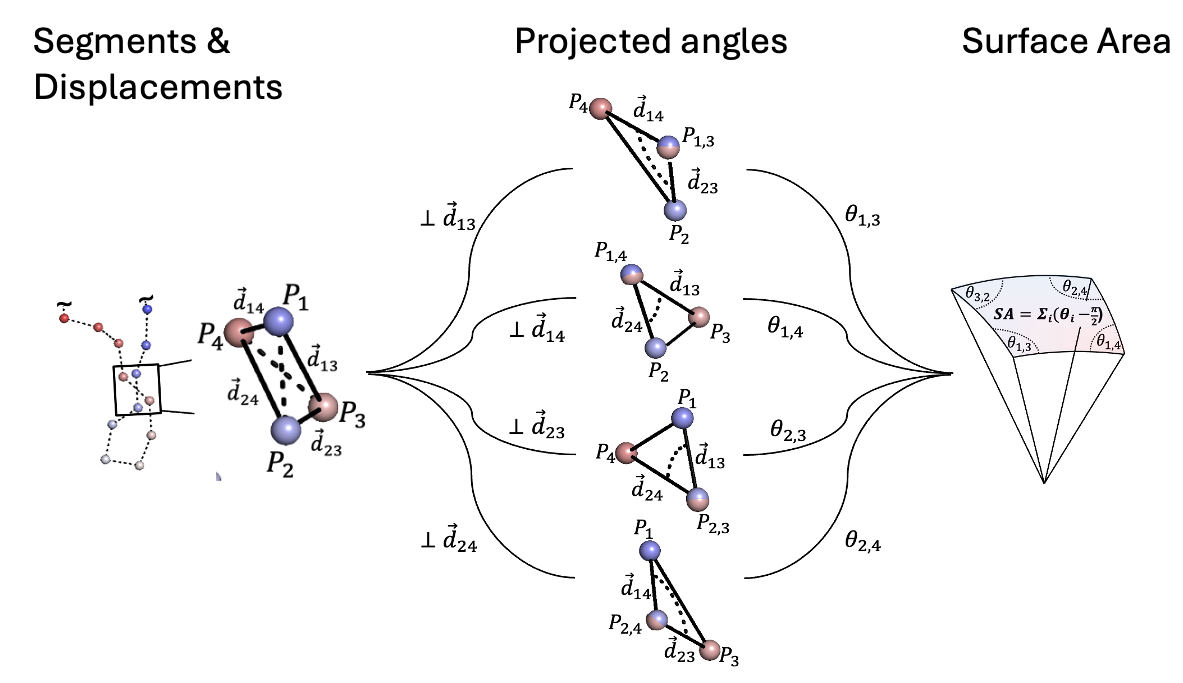
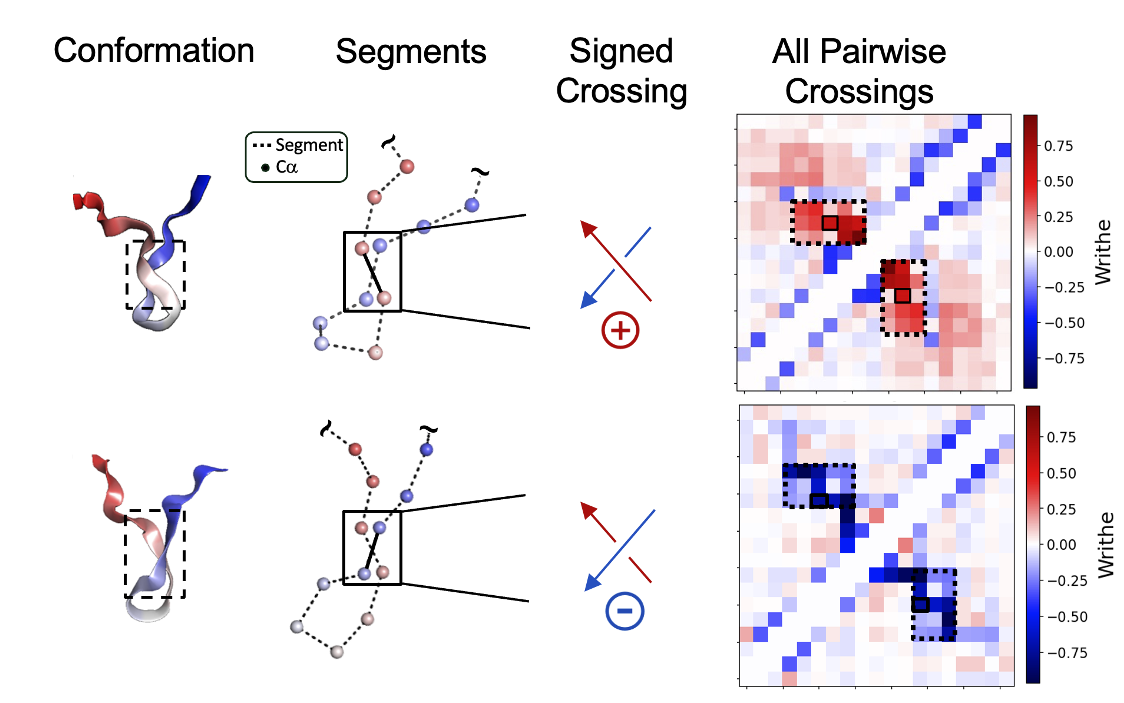
'Characterizing the kinetic and structural ensembles of intrinsically disordered proteins using writhe' By Thomas Sisk, Simon Olsson and Paul Robustelli. Preprint: https://www.biorxiv.org/content/10.1101/2025.04.26.650781v1
 |
 |
|---|
The package contains the following:
- Numerical routines for computing the writhe using CPU or GPU devices. In either case, computations are (optionally) parallelized over CPU / GPU cores / devices.
- A class architecture for writhe computation and visualization.
- A torch writhe-based neural network layer that computes pair-wise SE(3) scalar and vector features between nodes/atoms of a graph/molecule using the writhe 'graph Laplacian' described in the accompanying manuscript.
Supported Python versions: 3.7 – 3.10
Python 3.11 and above are not currently supported due to upstream compatibility constraints in numba and ray.
Simple installation:
pip install writhe-tools
Optional installations:
pip install writhe-tools[cuda11]
- Installs versions of core dependencies tested with older CUDA 11.x environments
- Uses version bounds such as:
torch >=2.0.1, <2.1.0numba <0.61.0numpy <2.0
- Compatible with manually installed CUDA-enabled versions of
torch - If needed, install
torchseparately using:pip install torch==2.0.1+cu117 --index-url https://download.pytorch.org/whl/cu117
pip install writhe-tools[stats]
- Installs additional dependencies to:
- compute tCCA via
writhe_tools.tcca.tCCA - helper functions to perform common tasks in MSM estimation via:
writhe_tools.statswrithe_tools.msm_tools
- compute tCCA via
pip install writhe-tools[cuda11_graph]
- Installs everything in
[cuda11]along with graph-related dependencies - Enables training of writhe-based neural networks on systems using CUDA 11.x
- Dependencies include version constrained:
torch-geometric,pytorch_lightning, andtensorboard
pip install writhe-tools[graph]
- Installs dependencies to:
- Enables training of writhe-based neural networks without constraining CUDA to 11.x
- Dependencies include unconstrained versions
torch-geometric,pytorch_lightning, andtensorboard
A working installation of mdtraj allows usage of a set of analysis tools in:
- writhe_tools.md_tools
Given that mdtraj is not maintained, issues may arise in its installation on some older linux machines.
After installing writhe-tools[stats], We have found that installing mdtraj using the following works reliably
pip install "mdtraj==1.10.3" --no-deps
To train score-based generative models using our writhe-base SE(3) equivariant messaging passing neural network 👉 scripts/
The main tool in this package is the class:
writhe_tools.writhe.Writhe
This class is instantiated with one argument, xyz, which should be an (N samples, D points or atoms, 3 coordinates) numpy array. For a molecular dynamics trajectory and structure file, the required input can be obtained as shown below.
Here, we use MDTraj to load the trajectory.
import mdtraj as md
xyz = md.load("example.xtc", top="example.pdb",
              atom_indices=md.load("example.pdb").top.select("name CA")
              ).center_coordinates().xyz
NOTE: it is generally sufficient to compute the writhe using only the coordinates of the alpha carbons. In principle, one could include all backbone atoms or any selection of contiguous atoms or points.
We can now instantiate an instance of the Writhe class.
from writhe_tools.writhe import Writhe
writhe = Writhe(xyz=xyz)
We can then compute the writhe at a given segment length, save the result for later and then restore the class from the saved result to continue analysis or visualization.
# compute the writhe using segment length 1 and default arguments

writhe.compute_writhe(length=1)

# OR use GPUs if they are available, will automatically distribute to all GPU devices

writhe.compute_writhe(length=1, cuda=True)

# results are stored to the class instance (see details in following cell about compute_writhe)

# save the result with default arguments (None, see below next code block)
writhe.save(path=None, dscr=None)

# restore the calculation at a later time using the CLASS method, load
restored_writhe = Writhe.load("./writhe_data_dict_length_1.pkl")
The results are saved as a pickled python dictionary with a template name that can be modified using the path and dscr (description) arguments of the save function:
f"{path}/{dscr}_writhe_data_dict_length_{self.length}.pkl"
Or if path and dscr are left to None:
f"./writhe_data_dict_length_{self.length}.pkl"
**Example Usage **
- NOTE it is recommended to access and plot writhe data using the class to avoid data duplication which may cause memory issues.
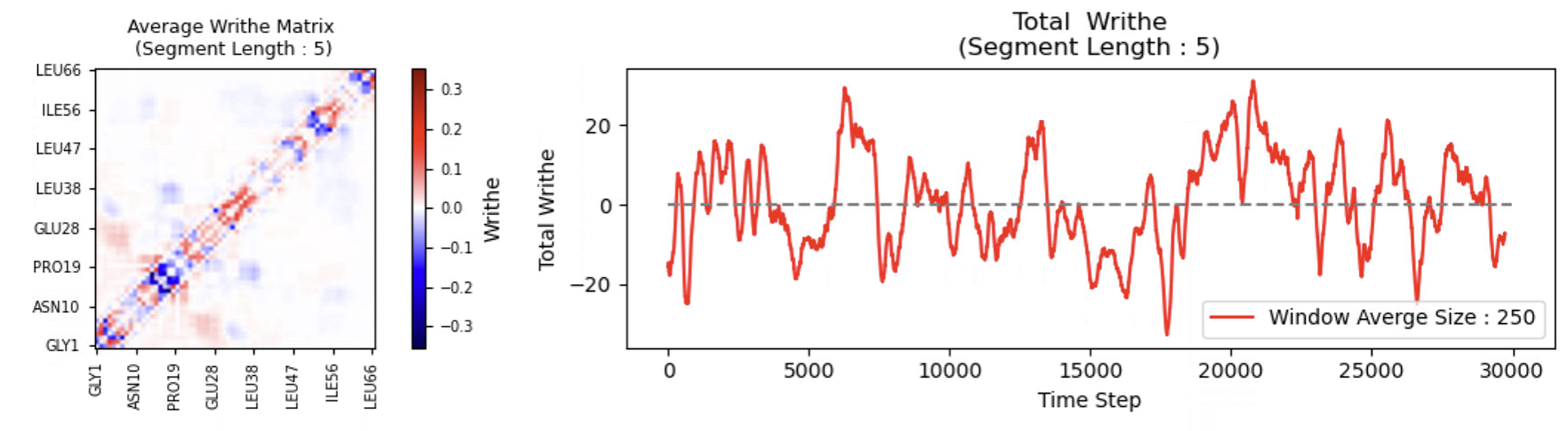
The results of the writhe calculation are accessible from the class for further analysis and visualization :
import matplotlib.pyplot as plt

# compute at length 5
writhe.compute_writhe(length=5)
fig, axes = plt.subplots(1, 2, figsize=(14, 3))
ax = axes.flat
writhe.plot_writhe_matrix(index=None, #can be int, list of array of indices to average over, None takes all vales
                          ax=ax[0],
                          label_stride=8,
                          dscr=None, # custom description if plotting a subset or cluster)
                          )
                        #  #xticks=residues, yticks=residues, to match example
writhe.plot_writhe_total(window=250, ax=ax[1])
ax[1].hlines(0, 0, len(xyz), ls="--", color="gray")
fig.tight_layout()
Further analysis, such as time-lagged canonical correlation analysis and VAMP-2 scoring, can be performed as follows
from writhe_tools.tcca import tCCA
from writhe_tools.plots import fes2d
from writhe_tools.stats import Kmeans
import matplotlib.pyplot as plt
writhe.compute_writhe(length=1)
tcca = tCCA(writhe.writhe_features, lag=30).fit()
print(f"VAMP2 Score (dim 10) : {(tcca.svals[:10]**2).sum()}")
projection = tcca.transform(dim=2, scale=False)
fes2d(projection)
dtraj, frames = Kmeans(projection, n_dim=2, n_clusters=4)
fig, axes = plt.subplots(2, 2, figsize=(7, 4))
for i, (ax, indices) in enumerate(zip(axes.flat, frames)):
    writhe.plot_writhe_matrix(index=indices, ax=ax, dscr=f'Cluster {i+1}')
fig.tight_layout()
Documentation
Writhe.compute_writhe
Description
compute_writhe is a method of the Writhe class that computes the writhe for a given segment length between all segments using parallel computation on CPU (Ray or Numba) or GPU (CUDA).
Method Signature
from writhe_tools.writhe import Writhe
writhe = Writhe(xyz=xyz) # xyz = np.ndarray with shape (samples, atoms, 3)
writhe.compute_writhe(self,
                      length: Optional[int] = None,
                      segments: Optional[np.ndarray] = None,
                      matrix: Optional[bool] = False,
                      store_results: Optional[bool] = True,
                      xyz: Optional[np.ndarray] = None,
                      n_points: Optional[int] = None,
                      speed_test: Optional[bool] = False,
                      cpus_per_job: Optional[int] = 1,
                      cuda: bool = Optional[bool],
                      cuda_batch_size: Optional[int] = None,
                      multi_proc: Optional[bool] = True,
                      use_cross: Optional[bool] = True,
                      cpu_method: Optional[str] = "ray"
                      ) -> Optional[dict]:
Arguments
| Parameter | Type | Default | Description |
|---|---|---|---|
length |
Optional[int] |
Required if segments is None | Segment length for computation.Prefered method of obtaining segments |
segments |
Optional[np.ndarray] |
Required if length is None | Segments to use in computation. General uses should leave this to None and provide the length (int) arg to generate the segments automatically. |
matrix |
bool |
False |
If True, generates a symmetric writhe matrix. Generating the full redndant matrix should be avoided and only done transiently for plotting! Using the class method plot_writhe_matrix is preferred |
store_results |
bool |
True |
If True, stores results in the Writhe instance. |
xyz |
Optional[np.ndarray] |
None |
Coordinate array used for computation. If None, uses self.xyz. |
n_points |
Optional[int] |
None |
Number of points in the topology. Defaults to xyz.shape[1]. |
speed_test |
bool |
False |
If True, performs a benchmark test without storing results. |
cpus_per_job |
int |
1 |
Number of CPUs allocated per batch. |
cuda |
bool |
False |
If True, enables CUDA acceleration for GPU computation. |
cuda_batch_size |
Optional[int] |
None |
Batch size for CUDA computation. |
multi_proc |
bool |
True |
If True, enables multiprocessing (parallel execution). |
use_cross |
bool |
True |
If True, uses cross product in computation. |
cpu_method |
str |
"ray" |
CPU computation method ("ray" for multiprocessing, "numba" for JIT-compiled CPU execution). 'ray' is substantially faster in most cases. |
lengths |
Optional[np.ndarray] |
None |
(n_frames, 3) array : Simulation unitcell / box lengths for PBC corrected calculation. |
Returns
A dict containing the writhe computation results:
- NOTE It is best to store the results in the class (store_result=True) and not set a variable to the output!
| Key | Type | Description |
|---|---|---|
length |
int |
The segment length used for computation. |
n_points |
int |
Number of points in the topology. |
n |
int |
Number of frames in xyz. |
writhe_features |
np.ndarray |
Computed writhe values for all segments. |
segments |
np.ndarray |
The set of segments used in the computation. |
(Optional) writhe_matrix |
np.ndarray |
If matrix=True, returns a symmetric writhe matrix. |
If speed_test=True, the function returns None and doesn't store results.
Additional Notes
- Calculation can be performed on multiple CPU cores (
multi_proc=True) or GPU devices (cuda=True,multi_proc=True). - If using CUDA, it is recommended (but not necessarily required) to :
- Avoid interactive environments like Jupyter notebooks, as they may not properly clear GPU memory.
- Prepare to manually set
cuda_batch_sizeto avoid out-of-memory (OOM) errors.
The class also has plotting methods with many options
writhe.plot_writhe_matrix(
    # (Averages the writhe matrix across frames by default)
    index=None,  # index: Optional[Union[int, List[int], str, np.ndarray]] = None
    # (Plots the average writhe matrix if index is None)
    absolute=False,  # absolute: bool = False
    # (Uses signed writhe values by default)
    xlabel=None,  # xlabel: Optional[str] = None
    # (No custom label for the x-axis, default will be used)
    ylabel=None,  # ylabel: Optional[str] = None
    # (No custom label for the y-axis, default will be used)
    xticks=None,  # xticks: Optional[np.ndarray] = None
    # (No custom xticks provided, default will be used)
    yticks=None,  # yticks: Optional[np.ndarray] = None
    # (No custom yticks provided, default will be used)
    label_stride=5,  # label_stride: int = 5
    # (Tick labels will be spaced every 5 units by default)
    dscr=None,  # dscr: Optional[str] = None
    # (No description for the subset of frames averaged)
    font_scale=1,  # font_scale: float = 1
    # (Font size will be at the default scale)
    ax=None  # ax: Optional[plt.Axes] = None
    # (No custom Axes object provided, so a new figure will be created)
)

writhe.plot_writhe_per_segment(
    # (Averages over all frames by default)
    index=None,  # index: Optional[Union[int, List[int], str, np.ndarray]] = None
    # (Plots the average writhe per segment if index is None)
    xticks=None,  # xticks: Optional[List[str]] = None
    # (No custom xticks are provided; default range is used)
    label_stride=5,  # label_stride: int = 5
    # (Tick labels are spaced every 5 segments by default)
    dscr=None,  # dscr: Optional[str] = None
    # (No description for the averaged indices)
    ax=None  # ax: Optional[plt.Axes] = None
    # (No custom Axes object provided; a new figure will be created)
)

self.plot_writhe_total(window=None, ax=None)
1 maintainer

Metadata
1 maintainer
Release files for writhe-tools 0.0.30
For a detailed explanation of source distributions (sdists) and built distributions (wheels), please see the package formats documentation.
Source distribution (sdist)
| File | Size | Uploaded | |
|---|---|---|---|
| writhe_tools-0.0.30.tar.gz | 104.3 kB | Details |
Built distribution (wheel)
| File | Interpreter | ABI | Platform | Reset |
|---|---|---|---|---|
| writhe_tools-0.0.30-py3-none-any.whl | Python 3 | none | any | Details |
Total release size: 209.1 kB
Release files / writhe_tools-0.0.30.tar.gz
| Download URL | writhe_tools-0.0.30.tar.gz |
|---|---|
| Size | 104.3 kB |
| Tags | Source |
|
SHA-256 checksum How to use checksums |
66158a973f7fb20d80e9d4e5371beb5a0af5d3aa720d2665e2d7472c038efd1b
|
|
BLAKE2b-256 checksum How to use checksums |
b9516bac53a36323ef929ae3d8bbea87b882233405041be1110206f006e3f38b
|
| Upload date | |
|
Uploaded using Trusted Publishing? What is trusted publishing? |
No |
| Uploaded via |
twine/6.1.0 CPython/3.11.11
|
Release files / writhe_tools-0.0.30-py3-none-any.whl
| Download URL | writhe_tools-0.0.30-py3-none-any.whl |
|---|---|
| Size | 104.8 kB |
| Tags | Python 3 |
|
SHA-256 checksum How to use checksums |
2d1c963952902383a198c76e1c7c24251f146b9dee8c5cc68f419c8ca06196f5
|
|
BLAKE2b-256 checksum How to use checksums |
49c27602bba0827ce3cb5094c5d35fa6f3cd7b6b338b8c5ebf8a397290a043ce
|
| Upload date | |
|
Uploaded using Trusted Publishing? What is trusted publishing? |
No |
| Uploaded via |
twine/6.1.0 CPython/3.11.11
|














