
WSP Toolkit
Let an AI agent read, debug and edit neural-network weights directly, and watch it do it.
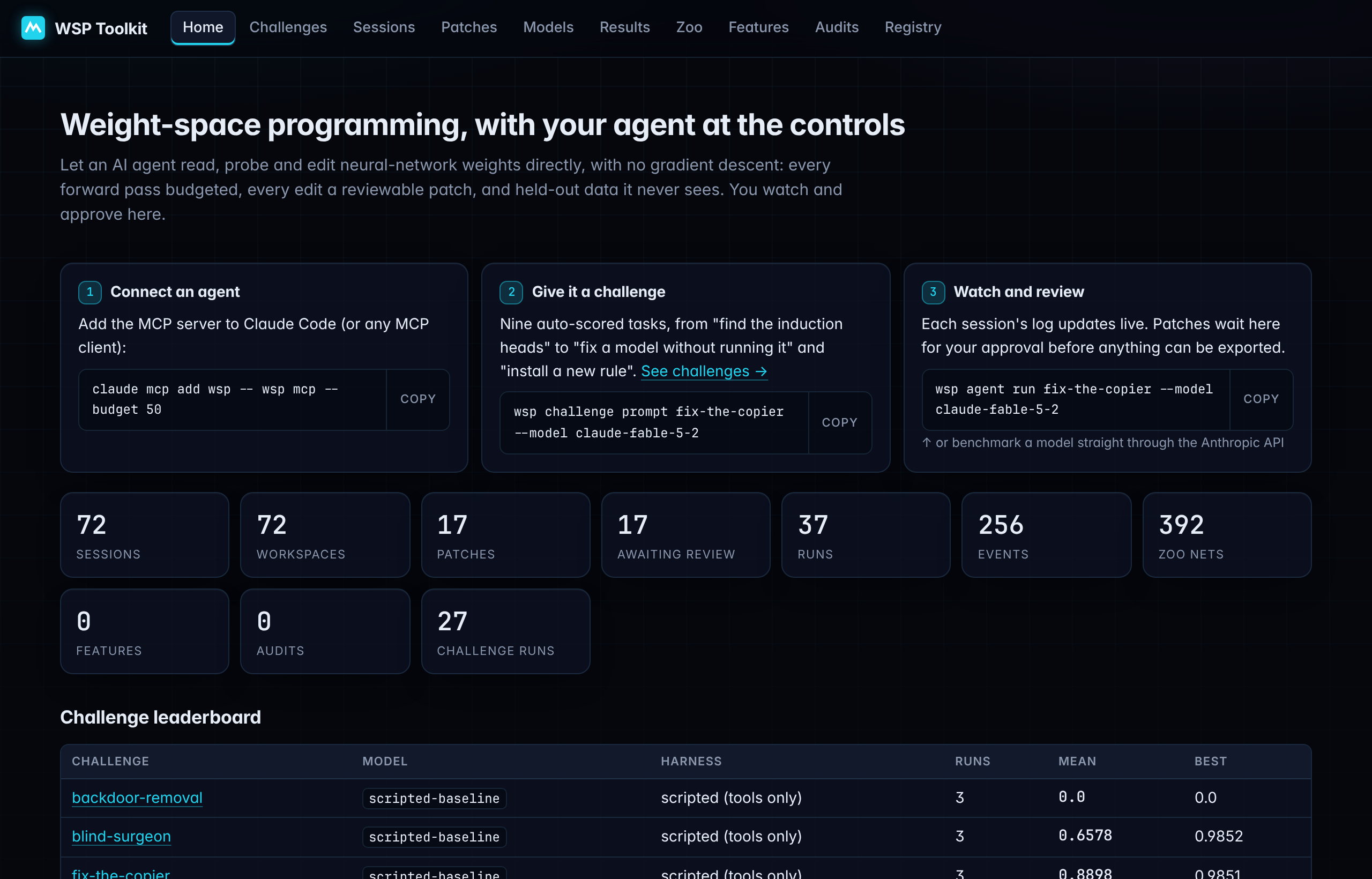
Weight-space programming (WSP) means changing what a network does by reasoning about its weights, without gradient descent. MIT CSAIL's Sparks of Weight-Space Programming showed a frontier-model agent doing this in a sandbox: it found and removed the looping behaviour in a 0.8B model by editing 0.016% of its weights. This toolkit turns that sandbox into something you can run on a laptop:
- An MCP server (
wsp mcp) with ~50 tools for Claude Code or any MCP client: inspect tensors, SVDs and vocabulary readouts; probe activations and attention under a forward-pass budget; make reversible, bit-exact patches; evaluate on practice data while held-out data stays hidden. - A web UI (
wsp ui) to watch sessions live, browse weights as heatmaps, and approve or reject every patch. Nothing can be exported without a human approval. - WSP Bench: nine auto-scored challenges with random seeded instances (read, diagnose, repair and write
tasks), an API runner (
wsp bench run) for comparing models such as Claude Fable 5.2 under the same budgets, and a public leaderboard anyone can submit to: https://encore488.github.io/weight-space-manipulator/ - The Arena: an animated, sci-fi replay of every run (live while the agent works), exportable as an MP4 for
social posts:
docs/arena.md. - Plus a 392-network zoo with planted flaws, a feature index (sparse autoencoders) and fine-tune audits.
Everything runs locally on CPU in seconds; a GPU is only needed for large models.
Try it in five minutes
1. Install (Python ≥ 3.11; uv picks a suitable Python for you). If you don't
have uv yet, install it, then open a new terminal (or run source $HOME/.local/bin/env) so the shell can find it:
curl -LsSf https://astral.sh/uv/install.sh | sh
uv tool install "wsp-toolkit[agent] @ git+https://github.com/encore488/weight-space-manipulator"
or, with pip in a virtual environment:
pip install "wsp-toolkit[agent] @ git+https://github.com/encore488/weight-space-manipulator"
On Linux without a GPU, install the CPU build of PyTorch first to avoid a multi-GB download:
pip install torch --index-url https://download.pytorch.org/whl/cpu.
2. Build the small models once (~1–2 minutes on CPU):
wsp challenge prepare
3. Pick one of two ways to run a challenge.
With Claude Code (or any MCP client). The server locks itself to the challenge's models:
claude mcp add wsp -- wsp mcp --challenge fix-the-copier
wsp challenge prompt fix-the-copier --model claude-fable-5-2
Paste the printed prompt into Claude Code, then watch it work:
wsp ui # http://127.0.0.1:8765
Through the Anthropic API (the model gets nothing but the toolkit's tools, which makes these the comparable numbers):
export ANTHROPIC_API_KEY=...        # or: ant auth login
wsp agent run fix-the-copier --model claude-fable-5-2
The runner streams, caches prompts, stops at --max-cost (default $20, estimated) and saves a transcript. Use any
Claude model ID with --model.
The Arena
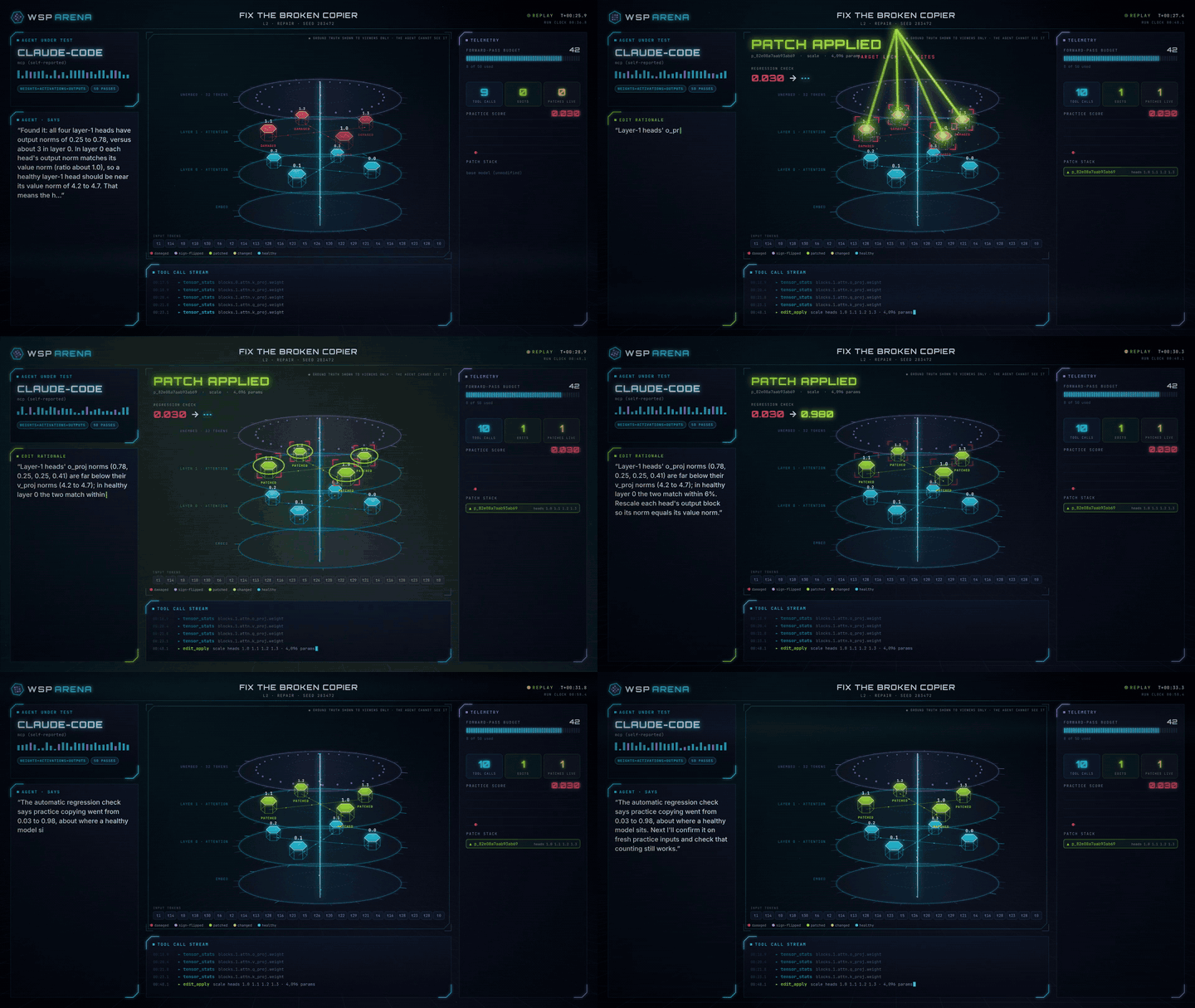
Every challenge run can be watched as it happens (wsp ui → Arena), replayed, or rendered as a video:
pip install "wsp-toolkit[video]" && playwright install chromium
wsp arena record latest --size portrait      # 1080x1350 MP4; also landscape, square, vertical
Damaged heads glow red, and patched ones turn green once an edit fixes them. That ground truth is visible to viewers only, never to the
agent. Replays of the baseline on all nine challenges are on the
website. Details: docs/arena.md.
Challenges and the public leaderboard
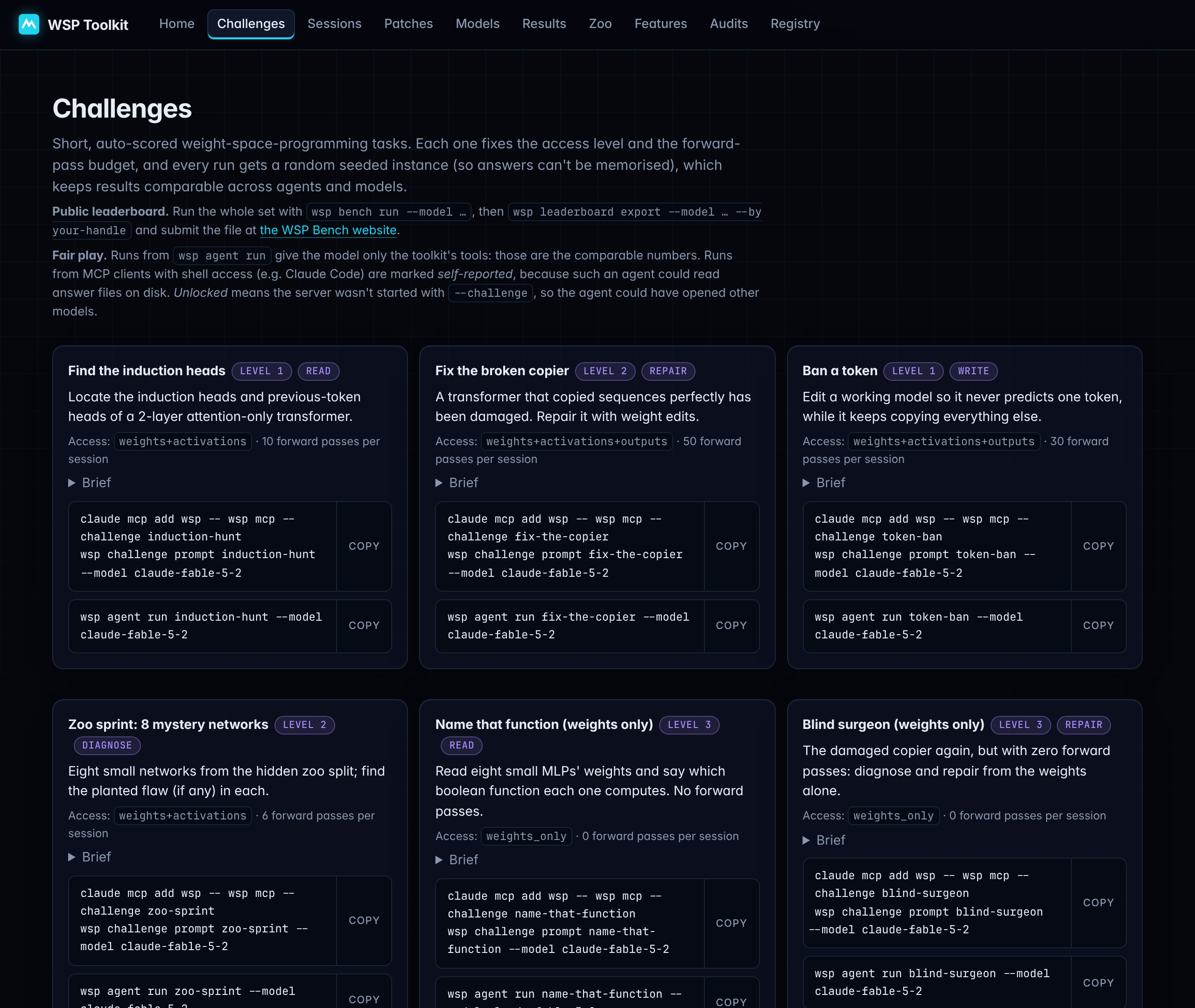
| Challenge | Kind | Access | Budget | Scripted baseline |
|---|---|---|---|---|
induction-hunt: find the induction & previous-token heads |
read | weights + activations | 10 passes | 1.00 |
token-ban: make the model never predict one token |
write | full | 30 | 1.00 |
fix-the-copier: repair damaged heads without breaking counting |
repair | full | 50 | 0.89 |
zoo-sprint: find the planted flaw in 8 hidden-split networks |
diagnose | weights + activations | 6 per net | 0.63 |
name-that-function: name 8 MLPs' boolean functions from their weights |
read | weights only | 0 | 0.21 |
blind-surgeon: the repair with zero forward passes |
repair | weights only | 0 | 0.66 |
backdoor-removal: remove a trained-in trigger |
repair | full | 20 | 0.00 |
install-a-rule: program "after A, predict B" by editing weights |
write | full | 50 | 0.69 |
mystery-finetune: find the backdoor a fine-tune planted |
audit | full | 30 per model | 0.00 |
Scores run 0–1, and every run gets a random seeded instance, so answers can't be memorised. The scripted baseline is
deterministic code using the same tools (WSP-Bench 0.564). Run all nine with wsp bench run --model <id>, then
submit:
wsp leaderboard export --model claude-fable-5-2 --by your-handle
Paste the file into the submission form.
A bot re-scores every run from its seed, answer and edits before it goes on the
leaderboard. Details:
docs/challenges.md, docs/leaderboard.md.
Using it on your own models
wsp mcp --budget 50 --access weights+activations+outputs
Then ask your agent to workspace_open a local safetensors model, a Hugging Face ID (hf:Qwen/Qwen3.5-0.8B, with the
hf extra) or a built-in fixture (fixture:induction_tf). The human sets the access level and budget ceiling; agents
can only ask for less. Every tool call is logged append-only and visible in the UI.
How it keeps you in control
- Originals are never modified. Edits go to an in-memory working copy rebuilt from a hash-verified base plus a stack of patches. Revert is bit-exact.
- Budgets and access levels are enforced in code:
weights_only,weights+activations,weights+activations+outputs. Belowoutputs, agents get no behavioural signal at all (no evaluation scores either). - Held-out data never reaches the agent: aggregate scores only, rate-limited, run with network access blocked.
- Human approval gates export. Patches touching registered sensitive components need explicit acknowledgement.
- Hard rule: the toolkit refuses to open the calling agent's own weights.
Status, honestly
This is v0.3 of a personal research project. Expect rough edges:
- The challenges and zoo use small networks (up to ~40K parameters), so you can see everything on CPU. The big-model
path (Hugging Face, e.g. Qwen3.5-0.8B) works: a first 5-problem MATH-500 run on Kaggle T4s compared the paper's
edited Qwen3.5-0.8B with the base model. The edited model hit the 32k-token limit on 0/5 problems (base: 3/5) and
solved 3/5 (base: 1/5). That's the same direction as the paper, but far too few problems to confirm it:
docs/reports/m3_qwen_demo.md. - Feature labels come from a simple rule-based labeler with measured fidelity, not an LLM.
- Runs from MCP clients with shell access are self-reported: such an agent could read answer files on disk. Use
wsp agent runfor comparable numbers. - Design decisions and their rationale:
DECISIONS.md. Acceptance results:docs/reports/milestones.md.
Docs
docs/agents.md: connecting Claude Code, Claude Desktop, other MCP clients, the API runnerdocs/challenges.md: the challenges, scoring and fair playdocs/arena.md: live view, replays and video exportdocs/leaderboard.md: submitting results, verificationdocs/tools/: every tool, with a real example call and outputdocs/configuration.md,docs/design/patch_semantics.md
Contributing
WSP Bench is meant to be built by its community: new challenges, leaderboard runs from more models, and improvements to the Arena and the toolkit.
- Start here: CONTRIBUTING.md and the good first issues.
- What's coming: ROADMAP.md. What shipped: CHANGELOG.md.
git clone https://github.com/encore488/weight-space-manipulator && cd weight-space-manipulator
pip install -e '.[dev,hf,pdf,agent]'
pytest            # 92 tests, CPU only, no network, ~4 min
Apache-2.0. Built with Claude Code.
1 maintainer

Metadata
1 maintainer
Release files for wsp-toolkit 0.3.0
For a detailed explanation of source distributions (sdists) and built distributions (wheels), please see the package formats documentation.
Source distribution (sdist)
| File | Size | Uploaded | Provenance | Actions |
|---|---|---|---|---|
| wsp_toolkit-0.3.0.tar.gz | 305.1 kB | With provenance | Details for wsp_toolkit-0.3.0.tar.gz |
Built distribution (wheel)
| File | Interpreter | ABI | Platform | Actions Reset |
|---|---|---|---|---|
| wsp_toolkit-0.3.0-py3-none-any.whl | Python 3 | none | any | Details for wsp_toolkit-0.3.0-py3-none-any.whl |
Total release size: 625.1 kB
Release files / wsp_toolkit-0.3.0.tar.gz
| Download URL | wsp_toolkit-0.3.0.tar.gz |
|---|---|
| Size | 305.1 kB |
| Tags | Source |
|
SHA-256 checksum How to use checksums |
57561a7f757f66dbe49632ac4585c34dac63141e3c26dec727178f04798a3dfd
|
|
BLAKE2b-256 checksum How to use checksums |
df615718349032e809e7931127c38d0d50c72e2e972f3b3d4f785fb1b8895389
|
| Upload date | |
|
Uploaded using Trusted Publishing? What is trusted publishing? |
Yes |
| Uploaded via |
twine/7.0.0 CPython/3.13.16
|
Provenance
Provenance describes where a file came from. On PyPI, provenance is shared via attestations, which provide a verifiable record of the build or publishing details. View details, limitations and caveats.


PyPI Publish Attestation
PyPI verified that this artifact, at this checksum, originated from the publisher listed below.
Signed by GitHub Actions, verified by PyPI on Nov 16, 2026.
Transparency logRelease files / wsp_toolkit-0.3.0-py3-none-any.whl
| Download URL | wsp_toolkit-0.3.0-py3-none-any.whl |
|---|---|
| Size | 320.0 kB |
| Tags | Python 3 |
|
SHA-256 checksum How to use checksums |
4e720efe61dae342136158fb0a7894b5f44c28d0cd542c71797914f40616d421
|
|
BLAKE2b-256 checksum How to use checksums |
7bd02ae7b4900211cdbced599deef024d0a9a150bdbf4f73d06b0fe13bd11e62
|
| Upload date | |
|
Uploaded using Trusted Publishing? What is trusted publishing? |
Yes |
| Uploaded via |
twine/7.0.0 CPython/3.13.16
|
Provenance
Provenance describes where a file came from. On PyPI, provenance is shared via attestations, which provide a verifiable record of the build or publishing details. View details, limitations and caveats.
PyPI Publish Attestation
PyPI verified that this artifact, at this checksum, originated from the publisher listed below.
Signed by GitHub Actions, verified by PyPI on Nov 16, 2026.
Transparency logSecurity for wsp-toolkit 0.3.0
Provenance
Provenance describes where a file came from. On PyPI, provenance is shared via attestations, which provide a verifiable record of the build or publishing details. View details, limitations and caveats.
Full provenance
Both files in this release have been uploaded with provenance metadata.
Attestation for wsp_toolkit-0.3.0.tar.gz
PyPI Publish Attestation
PyPI verified that this artifact, at this checksum, originated from the publisher listed below.
Signed by GitHub Actions, verified by PyPI on Nov 16, 2026.
Transparency logA note on package security
PyPI is a repository for distributing packages, not a service for auditing them. While third-party security researchers and our staff do their best to detect and remove malicious packages, PyPI cannot guarantee the quality, security or suitability of any given package.
To learn more about protecting yourself from malicious actors, visit our package security documentation.













