
Welcome String
Welcome String is a Python library for printing the Title in patterns
Installation
Use the package manager pip to install Welcome-String.
pip install wstring
Usage
The wstring takes 1 argument and 4 optional arguments
# Printing Welcome with default arguments
from wstring import Wstring

Wstring("Welcome")
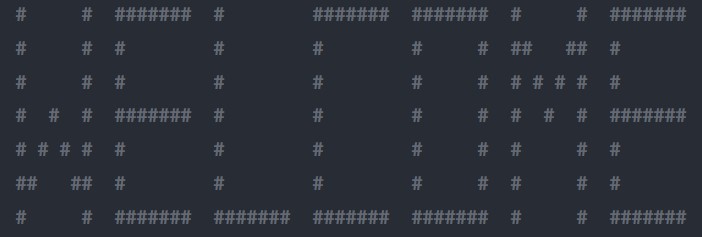
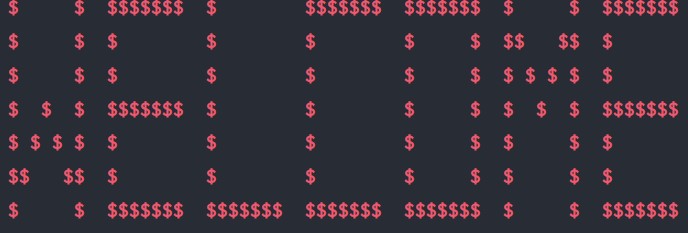
The 4 optional arguments are length,height,symbol and color
# Printing Welcome with all 4 arguments
from wstring import Wstring

Wstring("Welcome", length=5, height=5, symbol='$', color='red')
Features
-
Color
Color has been added to the welcome string which makes it more attractive. For now there are 5 different colors they are
- red
- green
- blue
- yellow
- purple
Users are allowed to pass the color name as an optional attribute, if the color you entered is not present in the mentioned above colors then it will print in the default color
- Windows --> black
- Linux --> white
Color has been inspired from the work of AbhijithAJ from the project clrprint Wstring is now platform independent and it works even in cmd in windows and terminal in linux
-
Exception
New exceptions has been included
- CharacterExpectedGotStringException
- EmptyCharacterFoundException
-
Command Line Interface
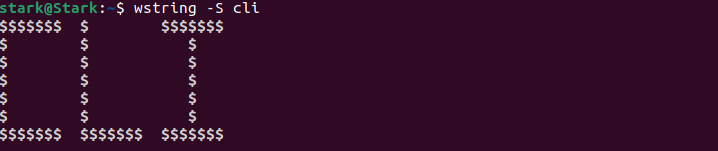
Command line interface has been added to this package
usage: wstring [-h] -S [STRING ...] [-s SYMBOL] [-l LENGTH] [-H HEIGHT]
               [-c COLOR]

Welcome string to print the given string in pattern

optional arguments:
  -h, --help            show this help message and exit
  -S [STRING ...], --string [STRING ...]
                        String to be printed as pattern
  -s SYMBOL, --symbol SYMBOL
                        A character to be used to print the given string as a
                        pattern
  -l LENGTH, --length LENGTH
                        Length of the pattern
  -H HEIGHT, --height HEIGHT
                        Height of the pattern
  -c COLOR, --color COLOR
                        Color the pattern should be printed
Test cases has been included

Contributing
Pull requests are welcome. For major changes, please open an issue first to discuss what you would like to change.
Please make sure to update tests as appropriate.
License
1 maintainer

Release files for wstring 1.0.3
For a detailed explanation of source distributions (sdists) and built distributions (wheels), please see the package formats documentation.
Source distribution (sdist)
| File | Size | Uploaded | |
|---|---|---|---|
| wstring-1.0.3.tar.gz | 8.1 kB | Details |
Built distribution (wheel)
| File | Interpreter | ABI | Platform | Reset |
|---|---|---|---|---|
| wstring-1.0.3-py3-none-any.whl | Python 3 | none | any | Details |
Total release size: 16.1 kB
Release files / wstring-1.0.3.tar.gz
| Download URL | wstring-1.0.3.tar.gz |
|---|---|
| Size | 8.1 kB |
| Tags | Source |
|
SHA-256 checksum How to use checksums |
aa7db7b526f06b30b05b0b69fbfc3fd5086f0c14eb5121017fa3660ee72f1499
|
|
BLAKE2b-256 checksum How to use checksums |
cf5bbb099187f38767effb1fab063c95a1070cc51e5cb215e2c6099ccc5e3756
|
| Upload date | |
|
Uploaded using Trusted Publishing? What is trusted publishing? |
No |
| Uploaded via |
twine/3.4.2 importlib_metadata/4.6.3 pkginfo/1.7.1 requests/2.22.0 requests-toolbelt/0.9.1 tqdm/4.62.0 CPython/3.8.10
|
Release files / wstring-1.0.3-py3-none-any.whl
| Download URL | wstring-1.0.3-py3-none-any.whl |
|---|---|
| Size | 8.0 kB |
| Tags | Python 3 |
|
SHA-256 checksum How to use checksums |
28bcd7d907ec31b4d98ec83411880bded924cf423fb4a84d00cf52c55a1886e7
|
|
BLAKE2b-256 checksum How to use checksums |
51b9ef684fa46af5f9f7db423a61d128775d45ac79395aac95758e1d9b9e0089
|
| Upload date | |
|
Uploaded using Trusted Publishing? What is trusted publishing? |
No |
| Uploaded via |
twine/3.4.2 importlib_metadata/4.6.3 pkginfo/1.7.1 requests/2.22.0 requests-toolbelt/0.9.1 tqdm/4.62.0 CPython/3.8.10
|














