
Passive host and domain name lookup tool for non-robots

Project description
wtfis


Passive host and domain name lookup tool for non-robots

WTF is it?
wtfis is a commandline tool that gathers information about a domain or FQDN using various OSINT services. Unlike other tools of its kind, it's built specifically for human consumption, providing results that are pretty (YMMV) and easy to read and understand.
This tool assumes that you are using free tier / community level accounts, and so makes as few API calls as possible to minimize hitting quotas and rate limits.
The project name is a play on "whois".
Data Sources
Virustotal
The primary source of information. Retrieves:
- Hostname (FQDN) or domain
- Latest analysis stats with vendor detail
- Reputation score (based on VT community votes)
- Popularity ranks (Alexa, Cisco Umbrella, etc.)
- Last DNS record update date
- Date DNS record was last retrieved by VT
- Resolutions
- Last n IP addresses (default: 3, max: 10)
- Latest analysis stats of each IP above
- Whois
- Fallback only: if Passivetotal creds are not available
- Various whois data about the domain itself
Passivetotal (RiskIQ)
Optionally used if creds are provided. Retrieves:
- Whois
- Various whois data about the domain itself
Passivetotal is recommended over Virustotal for whois data for a couple of reasons:
- VT whois data format is less consistent
- PT whois data tends to be of better quality than VT. Also, VT's registrant data is apparently anonymized.
- You can save one VT API call by offloading to PT
IPWhois
IP address enrichments for VT resolutions. For each IP, retrieves the ASN, Org, ISP and Geolcoation.
Shodan
Alternative IP address enrichment source. GETs data from the /shodan/host/{ip} endpoint (see doc). For each IP, retrieves:
- ASN, Org, ISP and Geolocation
- Operating system (if available)
- List of open ports and detected services
- Tags (assigned by Shodan)
Install
$ pip install wtfis
Setup
wtfis uses these environment variables:
VT_API_KEY(required) - Virustotal API keyPT_API_KEY(optional) - Passivetotal API keyPT_API_USER(optional) - Passivetotal API userSHODAN_API_KEY(optional) - Shodan API key
Set these using your own method.
Alternatively, create a file in your home directory ~/.env.wtfis with the above declarations. See .env.wtfis.example for a template. NOTE: Don't forget to chmod 400 the file!
Usage
usage: wtfis [-h] [-m N] [-s] [-n] [-1] [-V] hostname

positional arguments:
  hostname              Hostname or domain

optional arguments:
  -h, --help            show this help message and exit
  -m N, --max-resolutions N
                        Maximum number of resolutions to show (default: 3)
  -s, --use-shodan      Use Shodan to enrich IPs
  -n, --no-color        Show output without colors
  -1, --one-column      Display results in one column
  -V, --version         Print version number
Basically:
$ wtfis FQDN_OR_DOMAIN
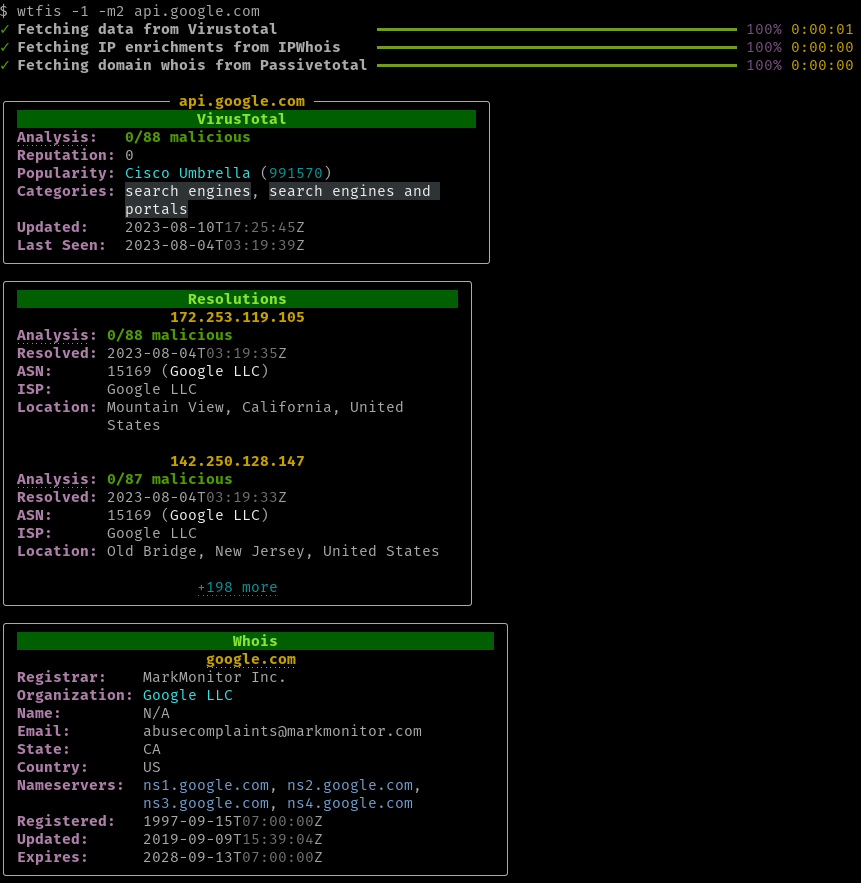
and you will get results organized by panel, similar to the image above.
If your terminal supports it, FQDN, domain, and IP headings are clickable hyperlinks that point to the appropriate pages on the VT or PT (RiskIQ) website.
Shodan enrichment
Shodan can be used to enrich the IP addresses (instead of IPWhois). Invoke with the -s or --use-shodan flag.
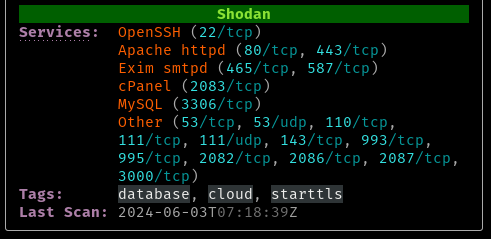
The IP address hyperlink also changes to point to the Shodan web interface.
Display options
You can increase or decrease the maximum number of displayed IP resolutions with -m NUMBER or --max-resolutions=NUMBER. The upper limit is 10. If you don't need resolutions at all, set the number to 0.
To show all panels in one column, use the -1 or --one-column flag.
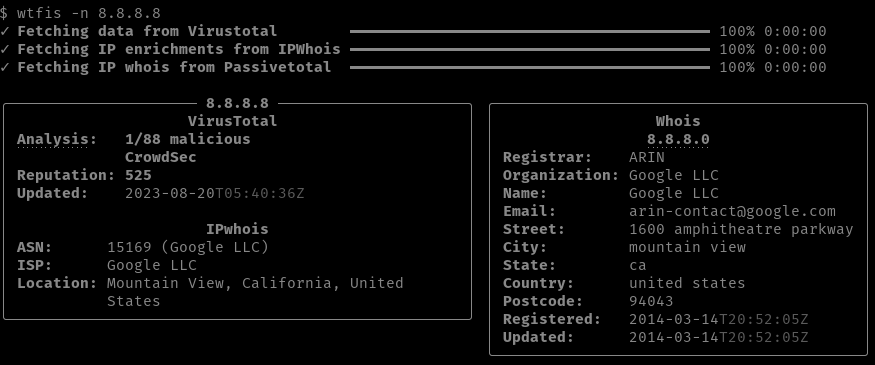
Panels can be displayed with no color with -n or --no-color.
TODOs
- IP address lookup
- Keyring support
- JSON output
Release history Release notifications | RSS feed


Download files
Download the file for your platform. If you're not sure which to choose, learn more about installing packages.
Source Distribution
Built Distribution
Filter files by name, interpreter, ABI, and platform.
If you're not sure about the file name format, learn more about wheel file names.
Copy a direct link to the current filters
File details
Details for the file wtfis-0.1.0.tar.gz.
File metadata
- Download URL: wtfis-0.1.0.tar.gz
- Upload date:
- Size: 443.3 kB
- Tags: Source
- Uploaded using Trusted Publishing? No
- Uploaded via: twine/4.0.1 CPython/3.9.13
File hashes
| Algorithm | Hash digest | |
|---|---|---|
| SHA256 |
a36f2d67963cdc5748c851b10289c1edc4156f96e5554b9f1ddfa8611fd9302d
|
|
| MD5 |
99a544e3cb3b1da9e495258ed0fe7a56
|
|
| BLAKE2b-256 |
b7e9c92fac00982cd4c981a974380f329b663fa41855d31ac89c717242b70f1e
|
File details
Details for the file wtfis-0.1.0-py3-none-any.whl.
File metadata
- Download URL: wtfis-0.1.0-py3-none-any.whl
- Upload date:
- Size: 17.6 kB
- Tags: Python 3
- Uploaded using Trusted Publishing? No
- Uploaded via: twine/4.0.1 CPython/3.9.13
File hashes
| Algorithm | Hash digest | |
|---|---|---|
| SHA256 |
2665aa6f6fe267c86056e68a9c59101ee7cfdcb08c369bba66ee5641bbd2e2e6
|
|
| MD5 |
de6b5c6f28336c05aa6ddb3bf89f44d3
|
|
| BLAKE2b-256 |
417d3729bba8bd238eae3a1c958793a0f396ada49487ee8e69ab6b3885b7cfc2
|






