
CLI tool to watch system port usage

Project description
wtfport
A terminal-based tool that provides developers with an intuitive, human-friendly way to identify, inspect, and interact with processes bound to specific ports on their system.
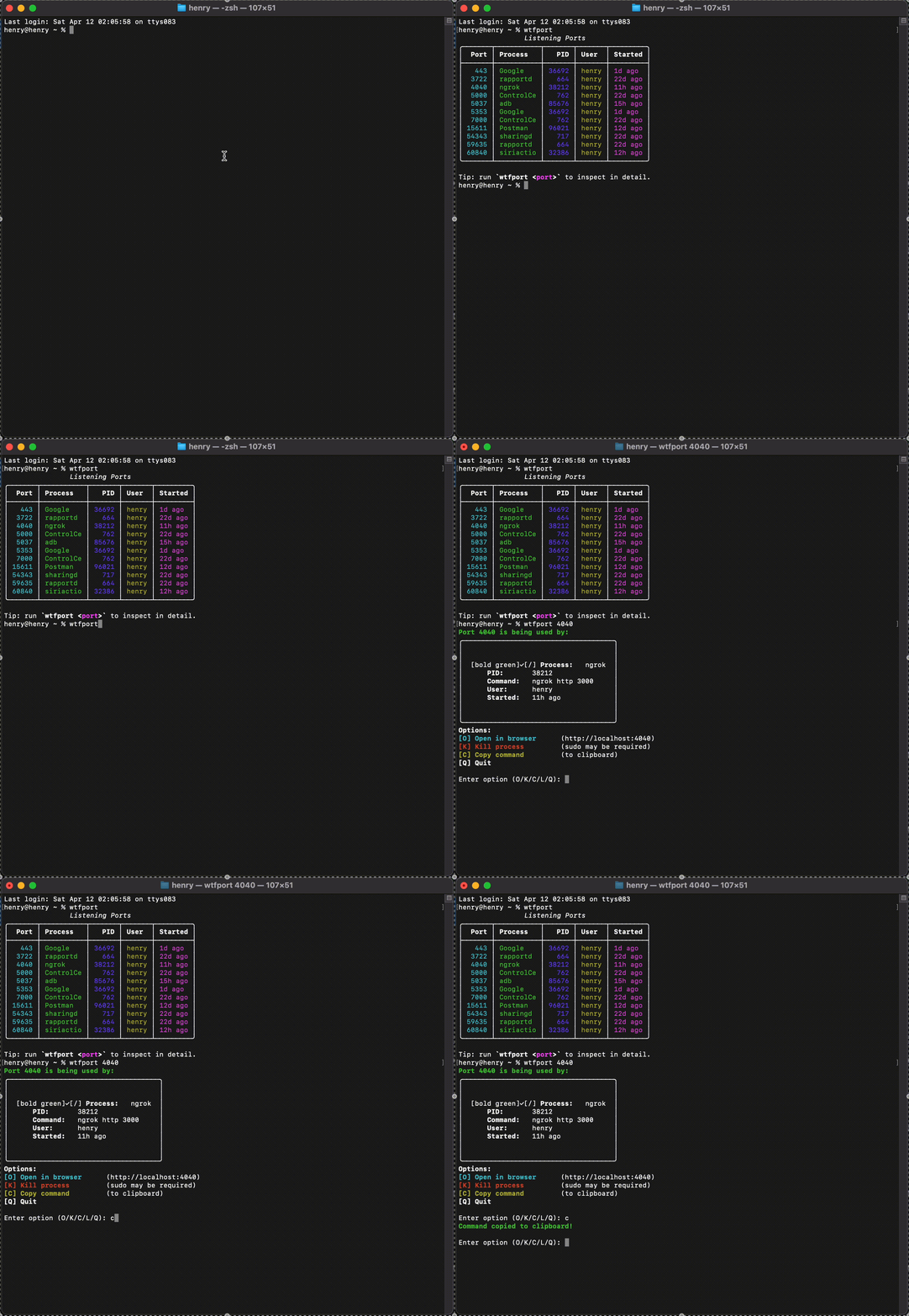
Features
- Port Lookup: Quickly show details about the process using a specific port
- Process Management: Kill a process running on a port with a simple command
- Cross-Platform Support: Available for macOS, Linux, and Windows
- Colorized Output: Clear, visually appealing terminal output
- Watch Mode: Continuously monitor and update port usage
- Interactive Mode: Simple interface for interacting with processes
- Clipboard Support: Copy process commands directly to clipboard
- Web Server Detection: Quick access to open web servers in browser
- Log Tailing: Ability to detect and tail logs for processes
- Port Statistics: Track and analyze your most frequently used ports
- Notifications: Get alerted when a specific port becomes active
Installation
Using pip
pip install wtfport
Using Homebrew (macOS/Linux)
brew install wtfport
From Source
git clone https://github.com/yourusername/wtfport.git
cd wtfport
pip install -e .
Usage
Basic Commands
Check a specific port:
wtfport 3000
Show all listening ports:
wtfport
# or
wtfport --all
Kill a process on a port:
wtfport 3000 --kill
Monitoring Features
Watch a port for changes:
wtfport 3000 --watch
Get notified when a port becomes active:
wtfport --notify 5000
For Web Developers
Open a web server in browser:
wtfport 3000 --open
Port Statistics and History
View port usage statistics:
wtfport --stats
View detailed history for a specific port:
wtfport --stats-detail 3000
Automation & Scripting
Get JSON output for scripting:
wtfport 3000 --json
Copy the command to clipboard:
wtfport 3000 --copy
Interactive Mode
When running wtfport <port> without additional flags, you'll enter interactive mode where you can:
- Open the port in a browser
- Kill the process
- Copy the command to clipboard
- Tail logs (if available)
Examples
Finding What's Using a Port
$ wtfport 3000

Port 3000 is being used by:
╭──────────────────────────────────────────────────────────────────╮
│                                                                  │
│ ✓ Process:   node                                                │
│    PID:       1234                                               │
│    Command:   node server.js                                     │
│    User:      yourname                                           │
│    Started:   3m ago                                             │
│                                                                  │
╰──────────────────────────────────────────────────────────────────╯

Options:
[O] Open in browser      (http://localhost:3000)
[K] Kill process         (sudo may be required)
[C] Copy command         (to clipboard)
[Q] Quit
Viewing All Listening Ports
$ wtfport

Listening Ports:
┏━━━━━━━┳━━━━━━━━━━━━━━━┳━━━━━━━┳━━━━━━━━━━━┳━━━━━━━━━━━━━┓
┃  Port ┃ Process       ┃   PID ┃ User      ┃ Started     ┃
┡━━━━━━━╇━━━━━━━━━━━━━━━╇━━━━━━━╇━━━━━━━━━━━╇━━━━━━━━━━━━━┩
│   22  │ sshd          │   122 │ root      │ 4h ago      │
│  443  │ httpd         │   436 │ www       │ 2d ago      │
│ 3000  │ node          │  1234 │ yourname  │ 3m ago      │
│ 5432  │ postgres      │   983 │ postgres  │ 2d ago      │
└───────┴───────────────┴───────┴───────────┴─────────────┘

Tip: run `wtfport <port>` to inspect in detail.
Port Statistics
$ wtfport --stats

Port Usage Statistics:

Tracking data for 15 ports and 7 processes.
Last updated: 2023-06-15T14:30:22.456789

Top Ports:
┏━━━━━━━┳━━━━━━━━━━━━━━┳━━━━━━━━━━━━━━━━━━━━━━━━━━━━┳━━━━━━━━━━━━━┓
┃  Port ┃ Access Count ┃ Processes                  ┃ Last Seen    ┃
┡━━━━━━━╇━━━━━━━━━━━━━━╇━━━━━━━━━━━━━━━━━━━━━━━━━━━━╇━━━━━━━━━━━━━┩
│ 3000  │ 42           │ node, python, ruby         │ 2023-06-15   │
│ 8080  │ 27           │ java, tomcat               │ 2023-06-14   │
│ 5432  │ 18           │ postgres                   │ 2023-06-15   │
│ 443   │ 15           │ nginx, apache              │ 2023-06-15   │
│ 27017 │ 10           │ mongod                     │ 2023-06-13   │
└───────┴──────────────┴────────────────────────────┴──────────────┘

Top Processes:
┏━━━━━━━━━━━┳━━━━━━━━━━━━━━┳━━━━━━━━━━━━━━━━━━━━━━━━━━━━━━━━━━┓
┃ Process   ┃ Access Count ┃ Used Ports                       ┃
┡━━━━━━━━━━━╇━━━━━━━━━━━━━━╇━━━━━━━━━━━━━━━━━━━━━━━━━━━━━━━━━━┩
│ node      │ 45           │ 3000, 8000, 9000, 4200, 4000     │
│ postgres  │ 18           │ 5432                             │
│ nginx     │ 15           │ 443, 80                          │
│ java      │ 12           │ 8080, 8443                       │
│ mongod    │ 10           │ 27017                            │
└───────────┴──────────────┴─────────────────────────────────┘

Tip: Use `wtfport --stats-detail <port>` to see detailed history for a specific port.
Requirements
- Python 3.7 or higher
- Dependencies (automatically installed):
- typer
- rich
- psutil
- pyperclip
Privacy
wtfport runs completely locally on your machine. The statistics feature stores data only in a local file (~/.wtfport/stats.json) and no data is ever sent outside your computer.
Contributing
Contributions are welcome! Please feel free to submit a Pull Request.
- Fork the repository
- Create your feature branch (
git checkout -b feature/amazing-feature) - Commit your changes (
git commit -m 'Add some amazing feature') - Push to the branch (
git push origin feature/amazing-feature) - Open a Pull Request
License
This project is licensed under the MIT License - see the LICENSE file for details.
Credits
Created by Hungwa Henry
Release history Release notifications | RSS feed


Download files
Download the file for your platform. If you're not sure which to choose, learn more about installing packages.
Source Distribution
Built Distribution
Filter files by name, interpreter, ABI, and platform.
If you're not sure about the file name format, learn more about wheel file names.
Copy a direct link to the current filters
File details
Details for the file wtfport-0.1.0.tar.gz.
File metadata
- Download URL: wtfport-0.1.0.tar.gz
- Upload date:
- Size: 20.6 kB
- Tags: Source
- Uploaded using Trusted Publishing? No
- Uploaded via: twine/6.1.0 CPython/3.13.2
File hashes
| Algorithm | Hash digest | |
|---|---|---|
| SHA256 |
c3abdfd5d092c9a7817dff0612a2eb99d03317cfcb1d4b8e3ba70f2c85d6f78c
|
|
| MD5 |
384046f281cda992b7a85946d45bd6de
|
|
| BLAKE2b-256 |
846601982df0515e6aceb964e8fa0e14c77c738fd61d02e8731c9a749551a28c
|
File details
Details for the file wtfport-0.1.0-py3-none-any.whl.
File metadata
- Download URL: wtfport-0.1.0-py3-none-any.whl
- Upload date:
- Size: 22.0 kB
- Tags: Python 3
- Uploaded using Trusted Publishing? No
- Uploaded via: twine/6.1.0 CPython/3.13.2
File hashes
| Algorithm | Hash digest | |
|---|---|---|
| SHA256 |
a9af7308dd39c6ab8d65e4cf9dbe5c1a1033bc80908b03769d43b3cc3826c8ca
|
|
| MD5 |
d852328ac68510900beb2e2a4c73df6b
|
|
| BLAKE2b-256 |
43775415ca3703752d0a014c6d827ef80f5cf52d504540619852793122dbfc75
|






