
Wuddz Search Gui
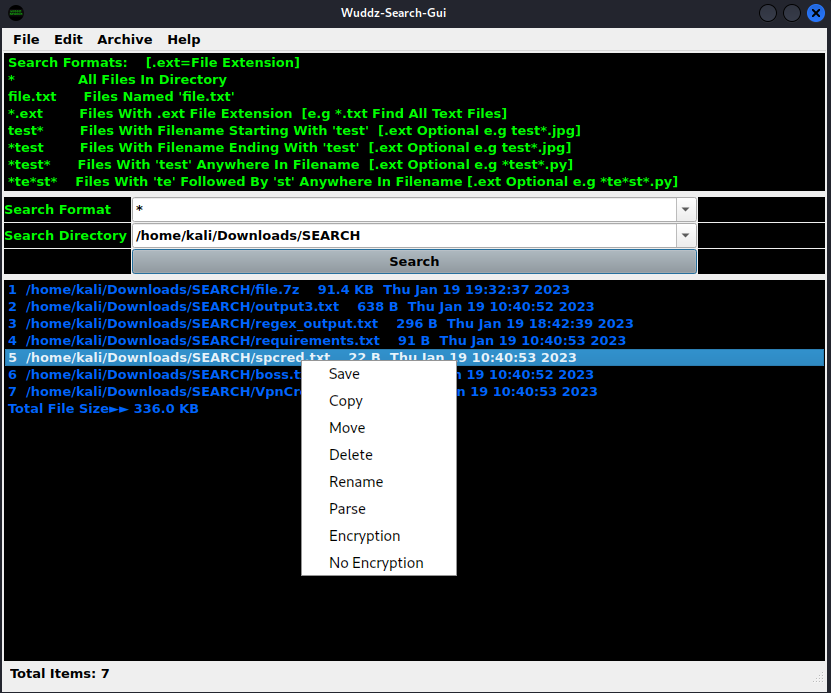
A Python File/Folder Explorer GUI Application, Search, Open, Save, Copy, Move, Rename, Delete, Parse & Archive (Encryption Optional).
Description
-
Wuddz-Search-Gui Is An Update Of My Wuddz-Search Repository, As A More User Friendly & Eye Pleasing GUI Application.
-
Search A Specific Folder/Entire OS Platform Root Folder For Files Containing Specified String And/Or File Extension.
-
Parse Searched Files For A Preconfigured Regex Pattern Or Enter Specific Regex Pattern.
-
Archive File(s) Or Folder(s) With Or Without Encryption, Using The Free & Open Source 7zip Software.
-
Save Searched File List As Text In Specified Output Text File.
-
Open Any File/Program On Your OS System With Adequate Permissions.
Prerequisites
-
Install Free Open Source 7zip Application 7zip
-
Add 7zip To Os Path i.e if you type '7z' anywhere in terminal/cmd/powershell it will launch 7zip Application
-
Python : 3.7
Installation
Install using PyPI:
$ pip install wuddz-search-gui
Install locally by cloning or downloading and extracting the repo, then cd into 'dist' directory and execute:
$ pip install wuddz_search_gui-1.0.4.tar.gz
Then to run it, execute the following in the terminal:
$ wudz-sgui
Usage
-
Once Launched Follow Tooltips Provided.
-
If You're Using Windows OS & Prefer Not To Install Python, Simply Download Latest Release, Extract & Run 'wudz-sgui.exe'
-
You Can Create A Shortcut For 'wudz-sgui.exe' & Paste Anywhere To Launch Wuddz-Search-Gui With 1 Click.
-
If You Prefer A Quicker, More Condensed Way To Search, Archive & Parse Files On Your OS, Then Look No Further.
-
Execute OS Platform Tasks With Consumate Ease & Efficiency, Using This Cool Python Coded Application.
-
It's Just An Awesome Way Of Doing Everyday OS Platform Tasks In A Much Quicker & Efficient Manner.
-
To Close Opened Windows Simply Hit "Esc" Or "Ctrl+Q" To Close The Program.
Contact Info:
- Email: wuddz_devs@protonmail.com
- Github: https://github.com/wuddz-devs
- Reddit: https://reddit.com/user/wuddz-devs
- Telegram: https://t.me/wuddz_devs
- Youtube: https://youtube.com/@wuddz-devs
Video:
- https://youtu.be/GTvM5_gxhsk (Edited No Restrictions)
If You're Feeling Generous & Appreciative, Buy Me A Coffee
- ERC20: 0x1F1C47dD653Af628D394eac7bAA9Ccf774fd784f
Peace & Love Always!!
1 maintainer

Metadata
1 maintainer
Release files for wuddz-search-gui 1.0.4
For a detailed explanation of source distributions (sdists) and built distributions (wheels), please see the package formats documentation.
Source distribution (sdist)
| File | Size | Uploaded | Provenance | Actions |
|---|---|---|---|---|
| wuddz_search_gui-1.0.4.tar.gz | 322.8 kB | Without provenance | Details for wuddz_search_gui-1.0.4.tar.gz |
Built distribution (wheel)
| File | Interpreter | ABI | Platform | Actions Reset |
|---|---|---|---|---|
| wuddz_search_gui-1.0.4-py3-none-any.whl | Python 3 | none | any | Details for wuddz_search_gui-1.0.4-py3-none-any.whl |
Total release size: 337.2 kB
Release files / wuddz_search_gui-1.0.4.tar.gz
| Download URL | wuddz_search_gui-1.0.4.tar.gz |
|---|---|
| Size | 322.8 kB |
| Tags | Source |
|
SHA-256 checksum How to use checksums |
30f0e8e2c6b24c85048ca918863228857feae658dd6e59ed646ac501f235a481
|
|
BLAKE2b-256 checksum How to use checksums |
8e2bf544183e19dd60e3f78a74faf9213f61a998c72ecbbcac0fe92d7eada3ec
|
| Upload date | |
|
Uploaded using Trusted Publishing? What is trusted publishing? |
No |
| Uploaded via |
twine/4.0.2 CPython/3.10.8
|
Release files / wuddz_search_gui-1.0.4-py3-none-any.whl
| Download URL | wuddz_search_gui-1.0.4-py3-none-any.whl |
|---|---|
| Size | 14.4 kB |
| Tags | Python 3 |
|
SHA-256 checksum How to use checksums |
9c996d03e06271af6c8d97b2d76250015191df8f59af3184235f4747d52ccae1
|
|
BLAKE2b-256 checksum How to use checksums |
2ce4fa7df036781038ef549e0e2c34be8f23c283da69c3cd046044c7b62662ed
|
| Upload date | |
|
Uploaded using Trusted Publishing? What is trusted publishing? |
No |
| Uploaded via |
twine/4.0.2 CPython/3.10.8
|
Security for wuddz-search-gui 1.0.4
Provenance
Provenance describes where a file came from. On PyPI, provenance is shared via attestations, which provide a verifiable record of the build or publishing details. View details, limitations and caveats.
No provenance found
None of the files in this release were uploaded with provenance metadata.
A note on package security
PyPI is a repository for distributing packages, not a service for auditing them. While third-party security researchers and our staff do their best to detect and remove malicious packages, PyPI cannot guarantee the quality, security or suitability of any given package.
To learn more about protecting yourself from malicious actors, visit our package security documentation.














