
This release is a pre-release and may not be stable for production use.
WUF Unifies Footprints



Wuf shows local Git and filesystem timestamp activity as a representative Monday-to-Sunday week or an exact chronological timeline. It makes work patterns visible and marks events outside your intended working hours without pretending that timestamps are hours worked.
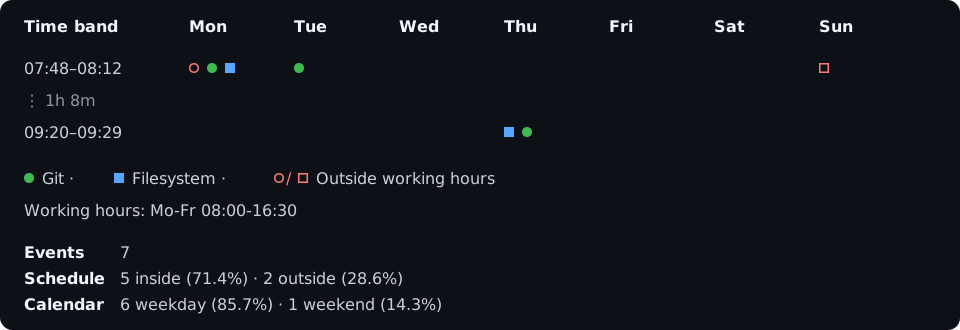
Wuf is local, terminal-only, and currently alpha.
Install
pip install wuf
wuf --help
For an isolated installation, use uv tool install wuf or pipx install wuf.
Standalone archives are available from
GitHub Releases.
Wuf is the new name of Workfold. The transitional
workfoldpackage and command continue to invoke Wuf, but new installations and configuration should usewuf.
Start with your current week
Run Wuf inside a Git repository:
wuf
The default view uses commit author timestamps from local branches, the current ISO week, your operating system's timezone, and working hours of Monday-Friday 08:00-16:30.
Common variations are deliberately composable:
wuf ~/code/project -t 2w3d
wuf -t 2026-W31
wuf -p fs
wuf -p both -t 2w
wuf -p portable -t all
wuf -e git:tag:tagger fs:file:modified
wuf --view timeline -t 2w
-t/--timechooses the period.-p/--profilechooses a named event set.-e/--eventsreplaces the profile with exact event selectors.--view timelineshows exact chronological events instead of folding them.
Profiles include git, fs, both, portable, and full. They change only
which timestamp kinds are selected—not the time period, Git reachability, or
filesystem ignore policy.
Set your schedule
wuf --hours 'Mo-Thu 08:00-16:30; Fr 08:00-14:00'
wuf --hours 'Mo-Fr 08:00-12:00,13:00-16:30'
wuf --hours all
Use --timezone Europe/Berlin or another IANA zone when local time is not the
desired reference.
Save your defaults
Add a wuf.toml to a project, or use [tool.wuf] in pyproject.toml:
timezone = "Europe/Berlin"
hours = "Mo-Thu 08:00-16:30; Fr 08:00-14:00"
profile = "portable"
grid = "vertical"
hide-empty-days = ["weekend"]
Personal defaults may live in the platform configuration directory. Inspect the effective values and where each came from with:
wuf --show-config
What the chart means
Each marker is a discrete timestamp observation, not a work session. Git history can be rewritten, reflogs can expire, and filesystem metadata is a mutable snapshot. Wuf reports incomplete or unsupported collection rather than silently inventing evidence.
Collection stays local: Wuf does not contact GitHub, GitLab, or another remote service.
Documentation
Run wuf --help for the complete option and event-selector reference for your
installed version.
1 maintainer

Metadata
1 maintainer
Release files for wuf 0.1.0a9
For a detailed explanation of source distributions (sdists) and built distributions (wheels), please see the package formats documentation.
Source distribution (sdist)
| File | Size | Uploaded | Provenance | |
|---|---|---|---|---|
| wuf-0.1.0a9.tar.gz | 324.8 kB | With provenance | Details |
Built distribution (wheel)
| File | Interpreter | ABI | Platform | Reset |
|---|---|---|---|---|
| wuf-0.1.0a9-py3-none-any.whl | Python 3 | none | any | Details |
Total release size: 587.5 kB
Release files / wuf-0.1.0a9.tar.gz
| Download URL | wuf-0.1.0a9.tar.gz |
|---|---|
| Size | 324.8 kB |
| Tags | Source |
|
SHA-256 checksum How to use checksums |
194b7821372b8f8e87a5996ae1b17769548a5476b65335a550519f72e4a97996
|
|
BLAKE2b-256 checksum How to use checksums |
693e0a2b6bba1e3e76c136f00f8bbcc519ff57dbeb17af4ff969188e17d0032a
|
| Upload date | |
|
Uploaded using Trusted Publishing? What is trusted publishing? |
Yes |
| Uploaded via |
twine/6.1.0 CPython/3.13.7
|
Provenance
Provenance describes where a file came from. On PyPI, provenance is shared via attestations, which provide a verifiable record of the build or publishing details. View details, limitations and caveats.


PyPI Publish Attestation
PyPI verified that this artifact, at this checksum, originated from the publisher listed below.
Signed by GitHub Actions, verified by PyPI on Sep 1, 2026.
Transparency logRelease files / wuf-0.1.0a9-py3-none-any.whl
| Download URL | wuf-0.1.0a9-py3-none-any.whl |
|---|---|
| Size | 262.6 kB |
| Tags | Python 3 |
|
SHA-256 checksum How to use checksums |
cd9b68b249397c83eb7acd1d54940f42b9feaaf6157d357322f84675743b46cc
|
|
BLAKE2b-256 checksum How to use checksums |
06ef2d39b97facfcb81da6afc59cee0fcf4820943f049eb6cf2fb48155c8130b
|
| Upload date | |
|
Uploaded using Trusted Publishing? What is trusted publishing? |
Yes |
| Uploaded via |
twine/6.1.0 CPython/3.13.7
|
Provenance
Provenance describes where a file came from. On PyPI, provenance is shared via attestations, which provide a verifiable record of the build or publishing details. View details, limitations and caveats.
PyPI Publish Attestation
PyPI verified that this artifact, at this checksum, originated from the publisher listed below.
Signed by GitHub Actions, verified by PyPI on Sep 1, 2026.
Transparency logSecurity for wuf 0.1.0a9
Provenance
Provenance describes where a file came from. On PyPI, provenance is shared via attestations, which provide a verifiable record of the build or publishing details. View details, limitations and caveats.
Full provenance
All 2 files in this release have been uploaded with provenance metadata.
Attestation for wuf-0.1.0a9.tar.gz
PyPI Publish Attestation
PyPI verified that this artifact, at this checksum, originated from the publisher listed below.
Signed by GitHub Actions, verified by PyPI on Sep 1, 2026.
Transparency logA note on package security
PyPI is a repository for distributing packages, not a service for auditing them. While third-party security researchers and our staff do their best to detect and remove malicious packages, PyPI cannot guarantee the quality, security or suitability of any given package.














