
wxdiagram
A zoomable shape-and-connector canvas for wxPython.

wxdiagram gives a wxPython application a modern diagram canvas without the
ceremony of wx.lib.ogl: shapes, edges, selection, zoom/pan, and JSON
persistence in a small MIT-licensed package.
It began life as ogl2, an internal canvas for
pynsource. The name is now retired; this
repository is the standalone library. See NOTICE.md for the wx.lib.ogl and
OGLlike attribution.

Documentation
- Getting started
- Tutorials: canvas and shapes, edges, labels and arrows, images, composites and export
- Cookbook
- API reference
- Migration from wx.lib.ogl
Features
- Canvas with real zoom/pan:
ZoomIn,ZoomOut,ZoomTo,ZoomReset,ZoomToFit,CenterOn; Ctrl+wheel and macOS pinch zoom anchored at the pointer; drag empty canvas to pan; mouse-wheel scrolling; virtual size tracks the diagram so panning cannot wander into empty space. - Selection and editing: marquee select (plain drag on empty canvas), Shift/Ctrl add, Esc clear, arrow-key nudge, duplicate, z-order, undo/redo, corner resize handles (proportional by default, Shift = free aspect, Alt = from centre), and drag from a side dot onto another shape to connect. Non-connectable shapes also get edge handles.
- Grid and guides: optional background grid, snap-to-grid and magnetic alignment guides to other shapes' edges and centres.
- Connectors: attached lines whose endpoints are clipped to the shapes'
perimeters, so edges always meet the facing sides and re-route when shapes
move. Explicit lines support arrowheads (start/middle/end), splines, dashed
pens, bend control points, editable labels and per-edge routing modes
(
straight,auto,avoid,curved,orthogonal). - Shapes: resizable rectangles, ellipses, polygons (interior hit-testing), points, lines, resizable bitmaps, divided (UML-style) shapes, labelled blocks, composite shapes with layout constraints that scale their children, non-interactive text labels and movable text captions.
- Layout and routing hooks: an optional spring layout
(
ShapeCanvas.ApplyLayout), crossing-aware refinement, and experimental injectable edge routers (LineShape.SetRouter,ShapeCanvas.SetDefaultRouter, batchroute_many). - Export: render the diagram to PNG at any scale (
ShapeCanvas.ExportPng). - JSON persistence:
Diagram.Save(path)/Diagram.Load(path)orwxdiagram.persistence; versioned, portable, no pickle. - Keyboard: Delete, Tab cycle, Ctrl+A, Ctrl+C/V.
- Headless-friendly: shapes and the diagram model work without showing a window.
Installation
Requires Python 3.10+ and wxPython 4.2+.
pip install wxdiagram
On PyPI: https://pypi.org/project/wxdiagram/
or from source with uv:
git clone https://github.com/abulka/wxdiagram.git
cd wxdiagram
uv sync
Quickstart
import wx
import wxdiagram

app = wx.App(redirect=False)
frame = wx.Frame(None, title="wxdiagram minimal", size=(600, 400))

canvas = wxdiagram.ShapeCanvas(frame)
canvas.SetDiagram(wxdiagram.Diagram())

shape = wxdiagram.RectangleShape(100, 100, 300, 200)
shape.AddText("hello world")
canvas.InsertShape(shape, 999)

frame.Show()
canvas.update_virtual_size()
app.MainLoop()
Connect two blocks with an attached line:
canvas.join_shapes(left_block, right_block)
The edge routes through the box perimeters, so it stays correct from any direction and follows the shapes when they move.
Demos and examples
There are three demos:
# 1. Kitchen sink: the full canvas API.
uv run python -m wxdiagram.demo

# 2. Shape editor: Shape Studio-style properties panel and tools.
uv run python -m wxdiagram.shapesdemo

# 3. Layout playground: spring layout, sizes and routing modes.
uv run python -m wxdiagram.layoutdemo
The same entry points are wrapped by ./bin/run, ./bin/run-shapes and
./bin/run-layout.
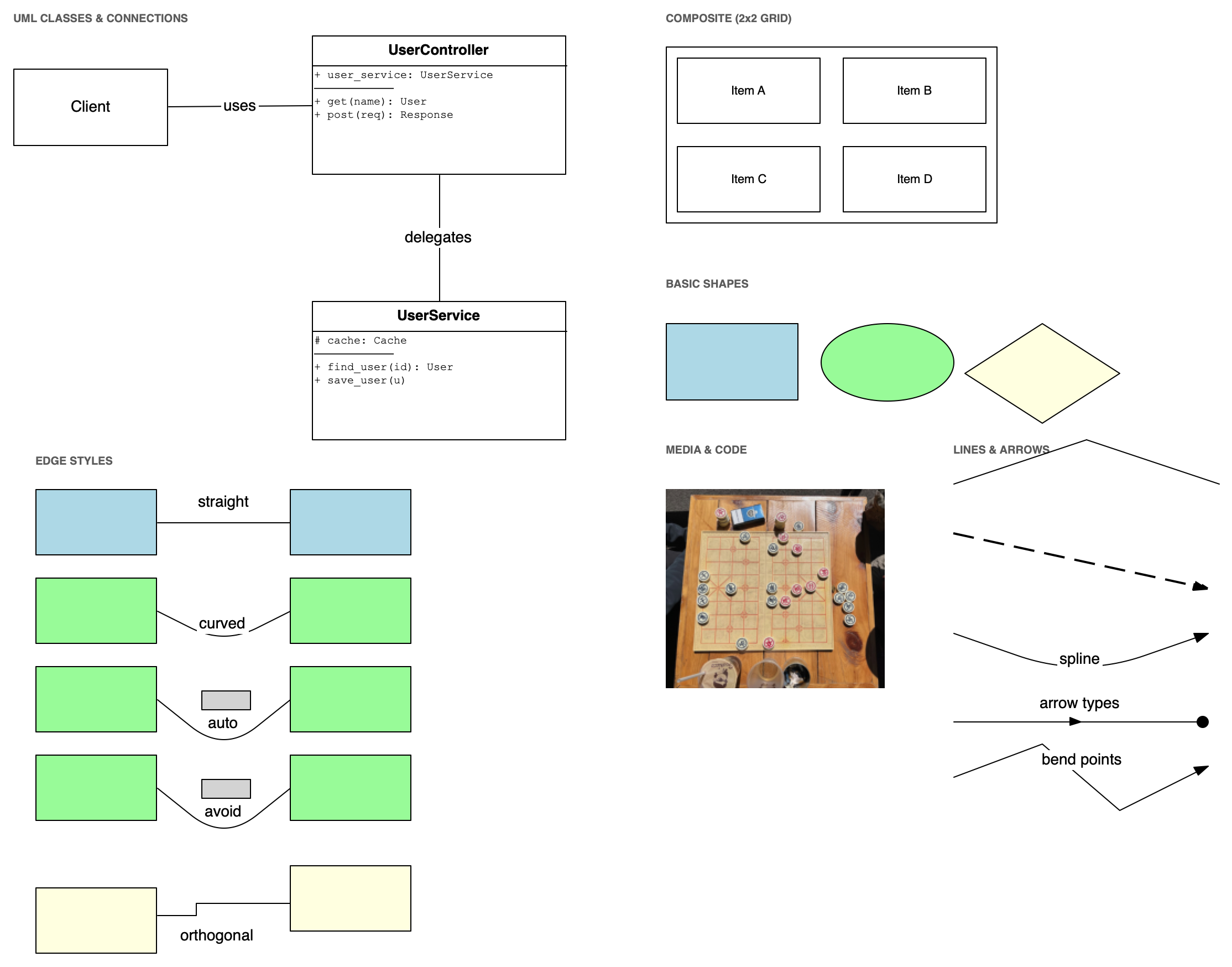
The kitchen-sink demo is a tour of UML-style class boxes, a composite, a basic-shape gallery, bitmaps, captions, a polyline and an arrowed line. The File/Edit/Add/Arrange/View menus expose JSON save/load, undo/redo, duplicate, delete, z-order, image import and zoom.
The shape editor adds rectangles, circles, ellipses, triangles and free lines; edit name, position, size, colours and border width in the resizable, wrapping properties panel on the right; connect shapes by dragging a round side dot onto another shape; group/ungroup, duplicate and reorder. File/Edit/Add/Arrange/View/Help menus and right-click menus match the main demo, and View > Theme switches between System, Light and Dark.
The layout playground builds a small graph, runs the spring layout, and lets you switch route modes, randomise sizes and reset the graph. (Router injection is experimental and is not exposed in the playground.)
See the layout tutorial for using
ApplyLayout and RouteEdges in your own app.
Small runnable scripts live in examples/:
minimal_canvas.py— the 30-line hello worldconnect_two_blocks.py— attached-line connectionszoom_to_fit.py— zoom and pansave_load.py— save and load with JSON
Scope
wxdiagram is a canvas library, not a UML framework or a full layout
engine. It deliberately does not include:
- a UML parser or graph model
- application menus, licensing, or PlantUML integration
- a Sugiyama/A* layout engine
- complete
wx.lib.oglAPI parity
Layout is pluggable; an application can run its own layout and hand positions
to the canvas. See docs/migration-from-wx-lib-ogl.md for a detailed
comparison with wx.lib.ogl.
Status
Beta (0.2.5). The public API is still settling, so pin a version if you
depend on it. pynsource is the main downstream consumer.
License
MIT, see LICENSE.md. The wx.lib.ogl and OGLlike attribution is in
NOTICE.md.
1 maintainer

Metadata
1 maintainer
Release files for wxdiagram 0.2.5
For a detailed explanation of source distributions (sdists) and built distributions (wheels), please see the package formats documentation.
Source distribution (sdist)
| File | Size | Uploaded | Provenance | Actions |
|---|---|---|---|---|
| wxdiagram-0.2.5.tar.gz | 161.4 kB | With provenance | Details for wxdiagram-0.2.5.tar.gz |
Built distribution (wheel)
| File | Interpreter | ABI | Platform | Actions Reset |
|---|---|---|---|---|
| wxdiagram-0.2.5-py3-none-any.whl | Python 3 | none | any | Details for wxdiagram-0.2.5-py3-none-any.whl |
Total release size: 297.1 kB
Release files / wxdiagram-0.2.5.tar.gz
| Download URL | wxdiagram-0.2.5.tar.gz |
|---|---|
| Size | 161.4 kB |
| Tags | Source |
|
SHA-256 checksum How to use checksums |
5b1180735fe255c3dd785210ed552d8073d16177ef7ad946ca2f494109dac845
|
|
BLAKE2b-256 checksum How to use checksums |
fd54e8814361e671bb7789cc2da46ca8aa6202493ae9800924aa125839044b79
|
| Upload date | |
|
Uploaded using Trusted Publishing? What is trusted publishing? |
Yes |
| Uploaded via |
twine/7.0.0 CPython/3.13.16
|
Provenance
Provenance describes where a file came from. On PyPI, provenance is shared via attestations, which provide a verifiable record of the build or publishing details. View details, limitations and caveats.


PyPI Publish Attestation
PyPI verified that this artifact, at this checksum, originated from the publisher listed below.
Signed by GitHub Actions, verified by PyPI on Nov 18, 2026.
Transparency logRelease files / wxdiagram-0.2.5-py3-none-any.whl
| Download URL | wxdiagram-0.2.5-py3-none-any.whl |
|---|---|
| Size | 135.7 kB |
| Tags | Python 3 |
|
SHA-256 checksum How to use checksums |
7472c79fe43404d49acdda17cf1611ab51c887b1258a5a72746fa5855eae845e
|
|
BLAKE2b-256 checksum How to use checksums |
a5421a35c3ded9c7c273544f06ee9c1db734b5f599553b78cf1779ec868af19a
|
| Upload date | |
|
Uploaded using Trusted Publishing? What is trusted publishing? |
Yes |
| Uploaded via |
twine/7.0.0 CPython/3.13.16
|
Provenance
Provenance describes where a file came from. On PyPI, provenance is shared via attestations, which provide a verifiable record of the build or publishing details. View details, limitations and caveats.
PyPI Publish Attestation
PyPI verified that this artifact, at this checksum, originated from the publisher listed below.
Signed by GitHub Actions, verified by PyPI on Nov 18, 2026.
Transparency logSecurity for wxdiagram 0.2.5
Provenance
Provenance describes where a file came from. On PyPI, provenance is shared via attestations, which provide a verifiable record of the build or publishing details. View details, limitations and caveats.
Full provenance
Both files in this release have been uploaded with provenance metadata.
Attestation for wxdiagram-0.2.5.tar.gz
PyPI Publish Attestation
PyPI verified that this artifact, at this checksum, originated from the publisher listed below.
Signed by GitHub Actions, verified by PyPI on Nov 18, 2026.
Transparency logA note on package security
PyPI is a repository for distributing packages, not a service for auditing them. While third-party security researchers and our staff do their best to detect and remove malicious packages, PyPI cannot guarantee the quality, security or suitability of any given package.
To learn more about protecting yourself from malicious actors, visit our package security documentation.














