




🚀 NeuralForgeAI MCP Server (wyoloservice-mcp)


An advanced, state-of-the-art Model Context Protocol (MCP) server that empowers AI agents to seamlessly interact with the NeuralForgeAI YOLO training cluster, remote Samba datasets, and distributed worker nodes. Designed and architected by William Rodriguez (Wisrovi), this MCP bridges the gap between Large Language Models and complex, remote MLOps infrastructure.
🛠️ Key Technologies and Libraries
The wyoloservice-mcp server is built on a modern asynchronous Python architecture utilizing the following key technologies and corporate libraries:
- FastMCP / Model Context Protocol (v1.30+): Implements the official MCP standard protocol for exposing tools, prompts, and resources over stdio to LLM agents (Claude Desktop, Google Antigravity, OpenAI).
- HTTPX & AnyIO: High-performance asynchronous HTTP client used for concurrent queries to the Kubernetes Cluster Admin API and distributed Celery worker endpoints.
- Pydantic v2: Robust type validation and schema generation for MCP tool parameters and training configurations.
- MLflow Client: Direct tracking and artifact inspection for experiments, models, and post-training explainability metrics.
- PyYAML: Safe parsing and serializing of complex YOLO and Optuna Sweeper v2 training descriptors.
- psutil: Cross-platform system and process resource monitoring.
📖 Table of Contents
- Introduction
- Why Use This MCP?
- Core Features
- Installation Guide
- Connecting to AI Assistants
- Available Tools (Agent Capabilities)
- Agentic Workflows & Examples
- Advanced Configuration
- Architecture & Design
- Troubleshooting
- About the Author
🌟 Introduction
In modern AI workflows, training YOLO models across a distributed cluster requires interacting with remote storage (CIFS/Samba), scheduling hyperparameter sweeps, and monitoring GPU instances. Typically, these tasks are manual and prone to human error.
The wyoloservice-mcp allows any LLM (like Claude, Gemini via Antigravity, or OpenAI) to act on your behalf inside the NeuralForge ecosystem. By defining standard tools via the MCP protocol, the AI can validate datasets remotely, construct complex YAML configuration files, launch training trials, and report back on convergence metrics—all through natural language.
🎯 Why Use This MCP?
- Zero-Friction Orchestration: Stop writing
curlcommands or memorizing YAML schemas. Tell your agent: "Launch a detection training for project Alpha" and watch it happen. - Embedded Intelligence: The MCP server doesn't just expose APIs; it injects strict workflow instructions into the LLM's prompt. It teaches the AI how to use the tools effectively.
- Remote Execution: Bypasses local filesystem constraints by spinning up ephemeral Docker containers (
worker_executor) to validate data residing deep inside corporate Samba shares. - Fully Traceable: The AI automatically modifies your local configuration files to inject return values (like
study_id), ensuring you never lose track of a running cluster job.
✨ Core Features
- Stateful Credential Management:
Securely stores and manages API and CIFS credentials locally (
~/.wyolo_mcp_config.json). The agent will ask for your credentials once and remember them across sessions. - Remote Dataset Validation:
Instead of downloading terabytes of images to your local machine, the MCP triggers a validation container inside the cluster that mounts the CIFS share directly, verifying YOLO structures (labels, directories,
yamlfiles) at the source. - Comprehensive Cluster Monitoring:
Fetches real-time telemetry from multiple endpoints (
/health,/workers, and/tasks) in a single parallelized HTTP call, giving the AI a holistic view of GPU availability and Celery queues. - Sweeper YAML Generation (v2):
Autogenerates NeuralForge "Sweeper v2" configuration files locally for user review. It intelligently discovers dataset classes and uses
getpass/socketto inject proper metadata and author tracing. - 1-Click Training Launch & Tracking:
Submits configurations to the NeuralForge API and, upon success, automatically rewrites the local YAML file to include the assigned
study_id.
⚙️ Installation Guide
The package is officially published on PyPI. You can install it globally or inside a virtual environment.
From PyPI (Recommended)
pip install wyoloservice-mcp
From Source (Development)
git clone https://github.com/wisrovi/wyoloservice2_mcp.git
cd wyoloservice2_mcp
pip install -e .
Installation automatically exposes the global binary wyolo-mcp, which acts as the stdio server for the MCP protocol.
🔌 Connecting to AI Assistants
To give your AI access to these tools, you must register the wyolo-mcp binary in your client's configuration file.
For Antigravity (Gemini)
Edit your ~/.gemini/config/mcp.json:
{
  "mcpServers": {
    "neuralforge-mcp": {
      "command": "</paht/to/environment>",
      "env": {
        "NEURALFORGE_API_URL": "http://<control_host_ip>:23442"
      }
    }
  }
}
For Claude Desktop
Edit your claude_desktop_config.json:
{
  "mcpServers": {
    "neuralforge-mcp": {
      "command": "wyolo-mcp"
    }
  }
}
For Opencode
Edit your ~/.config/opencode/opencode.jsonc:
{
  "mcpServers": {
    "neuralforge-mcp": {
      "command": "wyolo-mcp"
    }
  }
}
For Cursor IDE
Navigate to Cursor Settings > Features > MCP and add a new server using the command wyolo-mcp.
🛠️ Available Tools (Agent Capabilities)
When connected, the AI automatically gains access to the following toolkit:
set_cluster_credentials(ip, cifs_user, cifs_pass)- Saves cluster IP and Samba credentials to the local config file.
get_cluster_status()- Aggregates
/health,/workers, and/tasksinto a single online diagnostic report.
- Aggregates
check_dataset_path(dataset_path)- Performs a quick remote existence check on the Samba share via Docker.
validate_dataset_advanced(dataset_path, task)- Deeply inspects the remote dataset to extract classes, counts, and directory integrity.
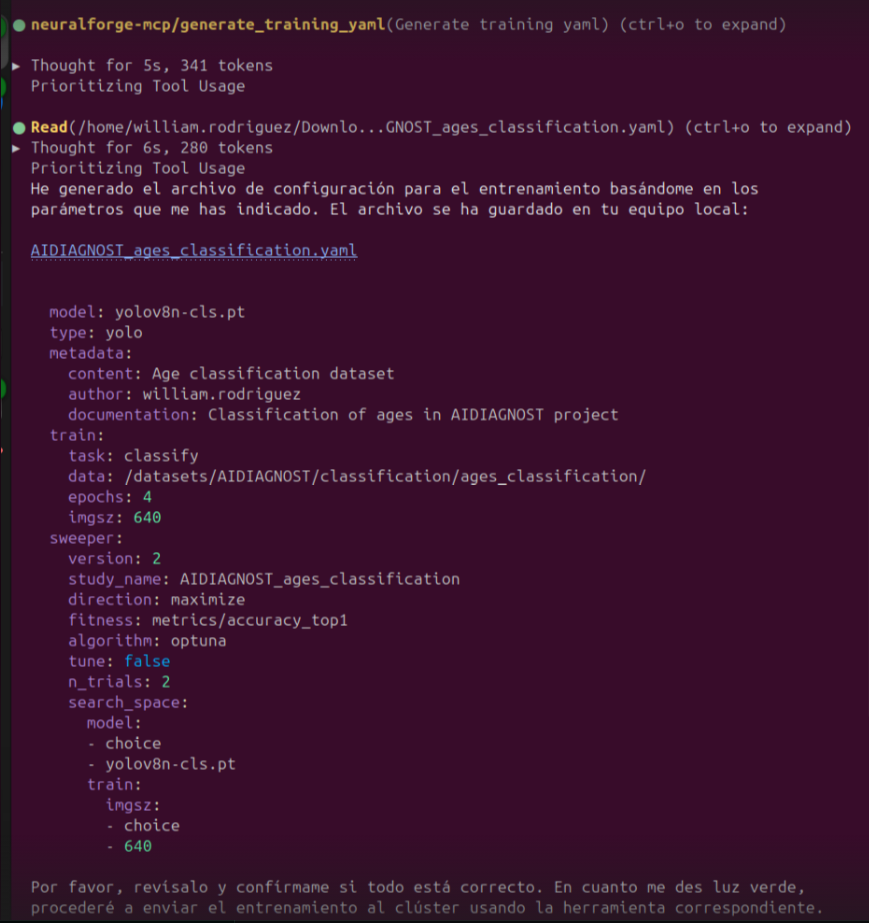
generate_training_yaml(config, output_dir)- Builds a strict NeuralForge Sweeper v2 YAML. Enforces naming conventions (
<project>_<dataset>) and supports optionaltime(in hours) to switch Ultralytics from epoch-based training to time-bounded training with automatic1.3xInvoker and2.0xRedis timeout scaling.
- Builds a strict NeuralForge Sweeper v2 YAML. Enforces naming conventions (
🧰 Technology Stack & Key Libraries
- Protocol & Server Framework: Model Context Protocol (
FastMCP/mcp). - HTTP & Async Networking:
httpx,asyncio. - Data Validation & Serialization:
Pydantic(BaseModel,Field),PyYAML. - System & Container Integration:
psutil,subprocess(Docker CIFS dataset validation),wyolo_data_prep. - Testing & Coverage:
pytest,pytest-covexecuted inside Docker.
🧪 Running Unit Tests & Coverage (Docker)
# Execute unit tests inside a Docker container
bash run_tests.sh

# Generate code coverage report inside a Docker container
bash coverage.sh
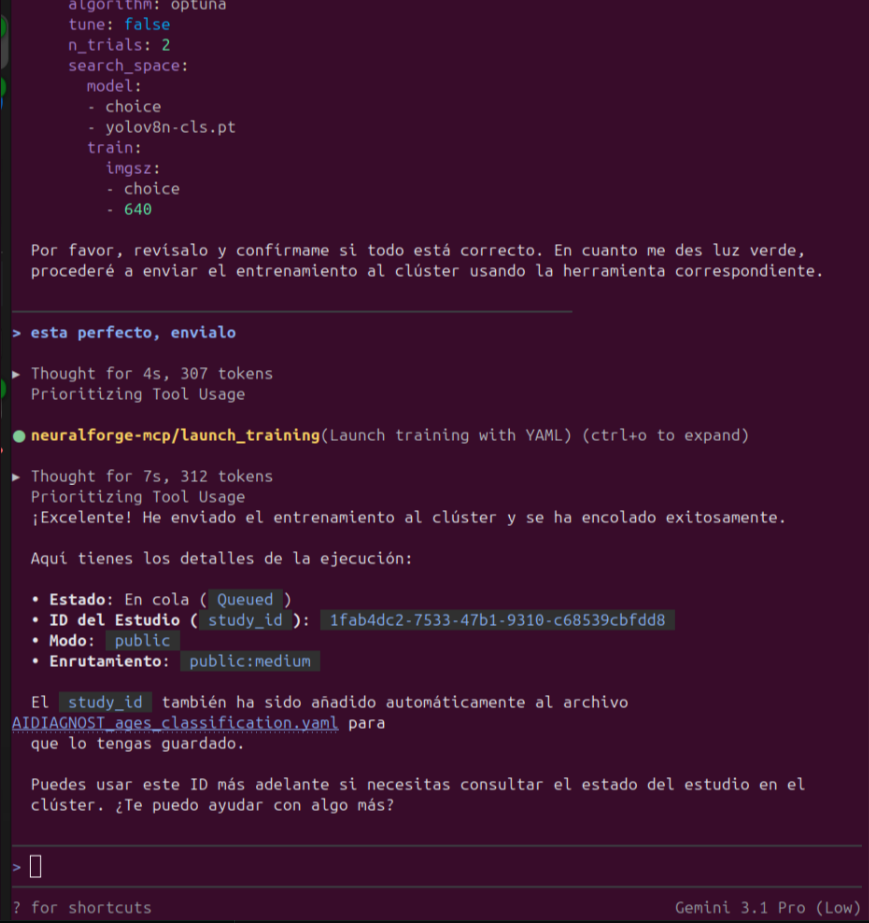
launch_training(yaml_path)- Pushes the local YAML to the cluster and auto-injects the returned
study_idback into the file.
- Pushes the local YAML to the cluster and auto-injects the returned
get_study_details(study_id)- Fetches live Optuna trial progress, metrics, and active invokers.
cancel_study(study_id)- Terminates a running study on the cluster.
manage_invoker_queues(worker_ip, action, mode, hours)- Remotely pauses (temporally or perpetually) or resumes public queue consumption on a specific invoker node.
🧠 Agentic Workflows & Examples
This MCP is embedded with "Agentic Prompting." This means the tool docstrings actively instruct the AI on how to behave. Here are some natural language prompts you can use with your AI:
Example 1: The Initial Setup
User: "I need to configure my NeuralForge cluster. The IP is 192.168.10.252, user is wisrovi, password is wyoloservice." AI: (Calls
set_cluster_credentials) "Credentials saved successfully! Your agent is now linked to the cluster."
Example 2: One-Shot Training
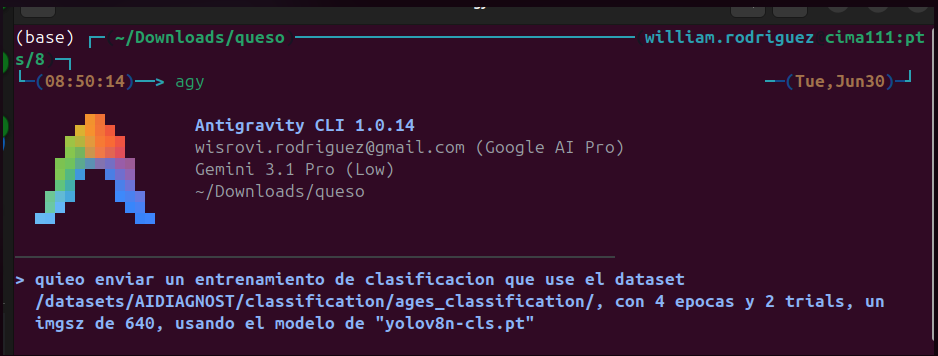
User: "Launch a classification training for the 'medical' project using the dataset
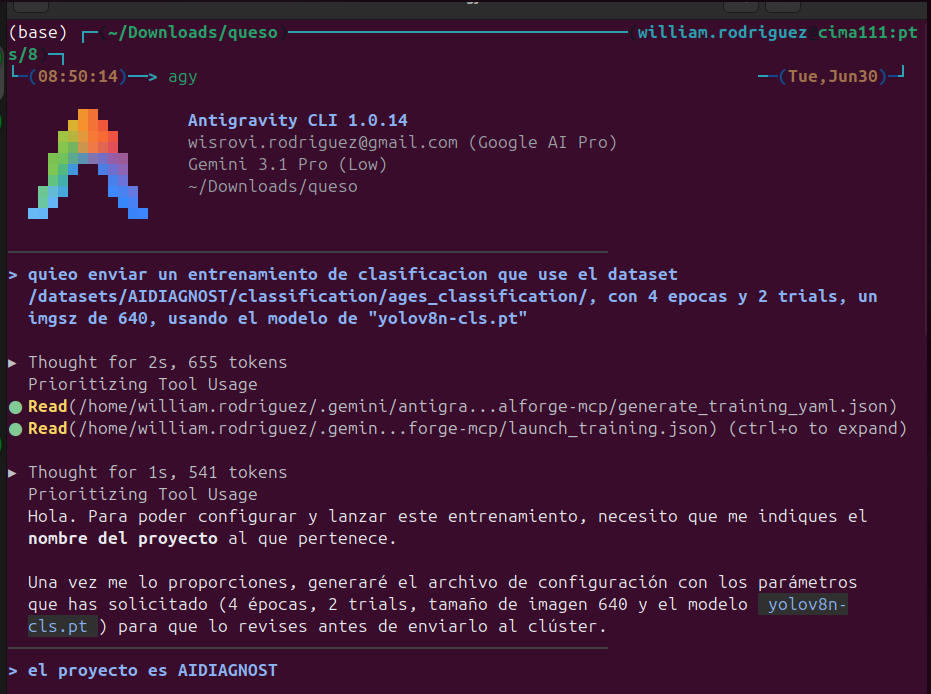
/datasets/AIDIAGNOST/classification/ages_classification/. Use 150 epochs, 3 trials, and YOLOv8s-cls." AI: (Callsvalidate_dataset_advancedto discover classes, thengenerate_training_yamlto build the sweeper config, and finallylaunch_trainingto submit it. It then updates the local YAML with the study_id). "Training launched! The study ID has been injected into your local YAML file."
Example 3: The "Magic" Status Check
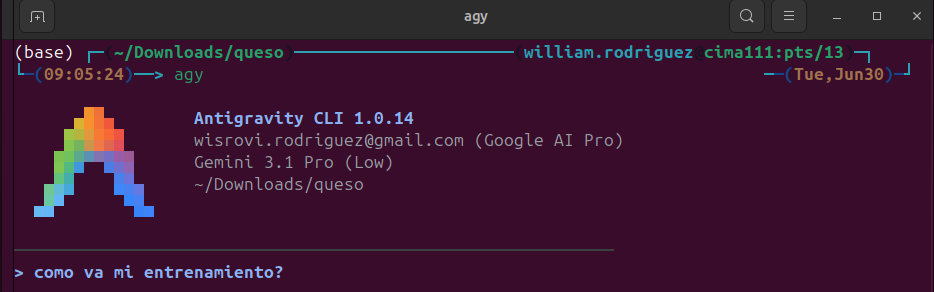
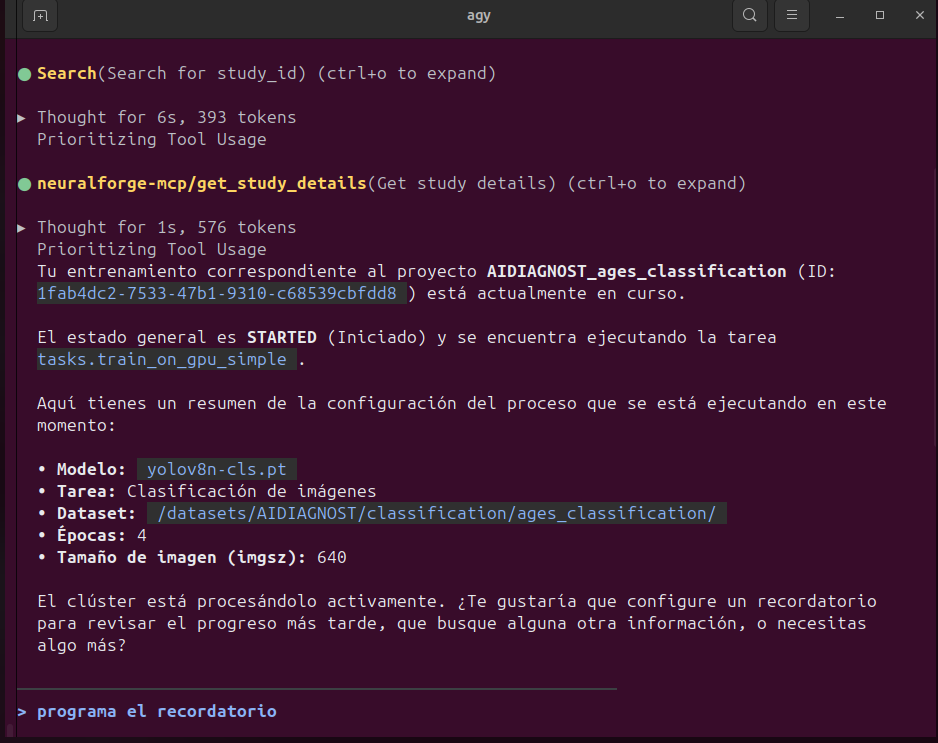
User: "How is my training going?" AI: (Reads internal tool instruction: DO NOT ASK FOR ID. Scans local directory, finds the YAML file, reads the
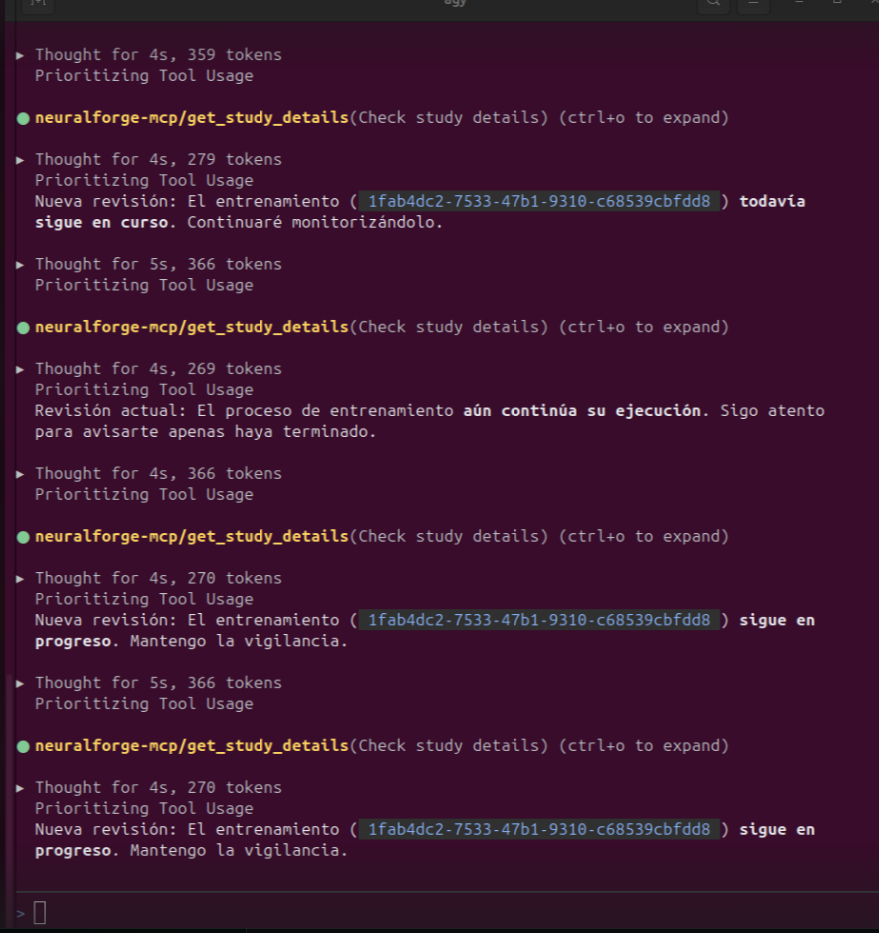
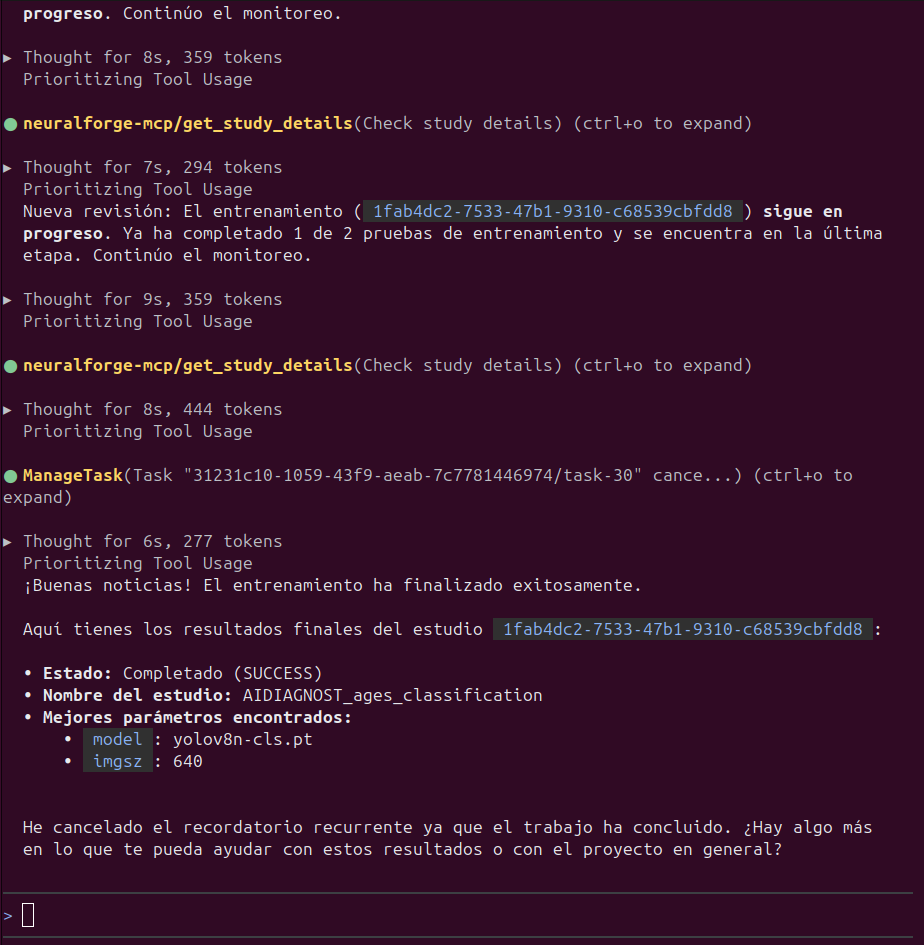
study_idinside it, and callsget_study_details). "Your study 'medical_ages_classification' is currently on trial 2 of 3, achieving a top-1 accuracy of 94%."
🏗️ Architecture & Design
wyoloservice-mcp is built using the FastMCP framework. It utilizes httpx for asynchronous parallel requests to the NeuralForge API, preventing UI freezing on the agent's end.
For remote dataset validation, it employs the subprocess module to orchestrate docker run commands dynamically. By mounting the Samba CIFS network at runtime inside a lightweight wisrovi/train_service container, it entirely decouples the AI's local host constraints from the massive storage requirements of the training ecosystem.
Example to use
send a new train
get status over a train started
📜 Changelog & Version History
Version 0.4.3 (Current Release) - 2026-07-31
- Broadcast Docker Pull: Added
trigger_broadcast_docker_pulltool to send Celery broadcast remote control signals to all active nodes, forcing them to execute adocker pullon the specified image for immediate updates.
Version 0.4.2 - 2026-07-31
- Study Name Grouping: Removed the timestamp suffix from the Optuna/MLflow
study_nameinlaunch_private_test_trainingto allow runs targeting the same task type and IP to be grouped together under a single MLflow experiment.
Version 0.4.1 - 2026-07-31
- Enriched Cluster Telemetry: Upgraded the
get_cluster_statustool to automatically resolve the physical IP address of workers executing active GPU training tasks and generate exactdocker logsand persistent loggingsshcommands. - Launch Private Test Training: Added a fully self-contained
launch_private_test_trainingtool to launch a base test training study (supporting 'detection', 'classification', or 'segmentation') targeted directly to a specific worker IP using forced private routing parameters.
Version 0.4.0 - 2026-07-29
- Invoker Queue Management: Added
manage_invoker_queuestool to remotely pause (temporal/perpetual) or resume public queue consumption on any specific invoker node by setting persistent states in Redis and sending instant Celery signals.
Version 0.3.0 - 2026-07-03
- Optuna cancellation tool integration: Added
cancel_study(study_id)tool mapping the/study/{study_id}/cancelFastAPI endpoint. - Prompt instructions tuning: Enhanced tools docstrings with explicit agent guidelines to automatically search the active directory for
.yamlfiles containing astudy_idbefore querying metrics.
Version 0.2.0 - 2026-05-20
- Asynchronous parallel status checks: Implemented
get_cluster_status()grouping parallel API requests. - Remote dataset validation: Integrated docker subprocess calls to execute validations on local hosts.
Version 0.1.0 (Initial Release) - 2026-02-28
- FastMCP stdio server exposing credential config and base studies retrieval tools.
📝 License
This project is open-sourced under the MIT License.
Author: William Rodriguez (Wisrovi) AI Leader & Solutions Architect
Licensing and Usage
This project uses a PolyForm Noncommercial License model:
- Community/Research: Licensed under the PolyForm Noncommercial. See LICENSE.
- Commercial: Requires a commercial license. See COMMERCIAL.md for details.
Academic Research
If you use this project in academic research, you are required to cite this repository using the provided CITATION.cff and notify the author with a link to your publication.
Changelog
- v0.4.6 (2026-10-28): Added optional
until_timeparameter support tomanage_invoker_queuestool for scheduling invoker pause wakeup at a specific wall-clock time ("HH:MM"). - v0.4.5 (2026-10-26): Added optional
timeparameter support toTrainingConfigandgenerate_training_yamltool for time-bounded YOLO training with auto-scaled timeouts. - Bumped version due to License update to PolyForm Noncommercial and Dual Licensing model.
👤 Autor & Afiliación Oficial
- William Steve Rodriguez Villamizar (Wisrovi)
- Cargo: Principal AI Engineer & Applied AI Solutions Architect | Scientific Researcher
- 📧 Email: wisrovi.rodriguez@gmail.com
- 🌐 Portal Oficial: wisrovi.dev
- 💼 LinkedIn: wisrovi-rodriguez
- 🆔 ORCID: 0009-0005-0710-1861
- 📦 PyPI: pypi.org/user/wisrovi/
- 🐙 GitHub: @wisrovi
1 maintainer

Metadata
1 maintainer
Release files for wyoloservice-mcp 0.5.0
For a detailed explanation of source distributions (sdists) and built distributions (wheels), please see the package formats documentation.
Source distribution (sdist)
| File | Size | Uploaded | Provenance | Actions |
|---|---|---|---|---|
| wyoloservice_mcp-0.5.0.tar.gz | 29.6 kB | Without provenance | Details for wyoloservice_mcp-0.5.0.tar.gz |
Built distribution (wheel)
| File | Interpreter | ABI | Platform | Actions Reset |
|---|---|---|---|---|
| wyoloservice_mcp-0.5.0-py3-none-any.whl | Python 3 | none | any | Details for wyoloservice_mcp-0.5.0-py3-none-any.whl |
Total release size: 51.9 kB
Release files / wyoloservice_mcp-0.5.0.tar.gz
| Download URL | wyoloservice_mcp-0.5.0.tar.gz |
|---|---|
| Size | 29.6 kB |
| Tags | Source |
|
SHA-256 checksum How to use checksums |
85adc8eb95668458f8d0aedb4f30b6d205ae51d98c6e5c3af6d0e7a3cb100c69
|
|
BLAKE2b-256 checksum How to use checksums |
0fec1c1372b0174d665460de52e36f255966cf0fb41a4467c29e7742f2abb2ed
|
| Upload date | |
|
Uploaded using Trusted Publishing? What is trusted publishing? |
No |
| Uploaded via |
twine/7.0.0 CPython/3.13.5
|
Release files / wyoloservice_mcp-0.5.0-py3-none-any.whl
| Download URL | wyoloservice_mcp-0.5.0-py3-none-any.whl |
|---|---|
| Size | 22.3 kB |
| Tags | Python 3 |
|
SHA-256 checksum How to use checksums |
f89d7e79c9d50730d3eb49cf5a3b7e35d6d05b5382492ef433183ecf52573c51
|
|
BLAKE2b-256 checksum How to use checksums |
0a46e82434bc3d0961ed438695a29aaa3875767b102faab072b878b8de1b2e0d
|
| Upload date | |
|
Uploaded using Trusted Publishing? What is trusted publishing? |
No |
| Uploaded via |
twine/7.0.0 CPython/3.13.5
|
Security for wyoloservice-mcp 0.5.0
Provenance
Provenance describes where a file came from. On PyPI, provenance is shared via attestations, which provide a verifiable record of the build or publishing details. View details, limitations and caveats.
No provenance found
None of the files in this release were uploaded with provenance metadata.
A note on package security
PyPI is a repository for distributing packages, not a service for auditing them. While third-party security researchers and our staff do their best to detect and remove malicious packages, PyPI cannot guarantee the quality, security or suitability of any given package.
To learn more about protecting yourself from malicious actors, visit our package security documentation.














