
ZORO-DL - Download DUAL-AUDIO Multi SUBS Anime from ZORO

Project description

🔥ZORO-DL - A Python Package to Download Anime from ZORO [DUAL AUDIO] [MULTI SUBS]
ZORO-DL is a powerful Python package designed to simplify the process of downloading your favorite anime content from ZORO
You can Download Anime in DUAL AUDIO (JPN-ENG) with MULTI-SUBS
📋Details
- 🔎Why ZORO-DL
- ⚠️ Disclaimer
- 💡Pre Requisite
- ⚙️Installation
- 🚀Initialization
- 📚USAGE GUIDE
- 📋TERMINAL OUTPUT
- 📂MEDIAINFO
- 🌟Show Your Support
- 👨💻Developement
- 🤝Contributors
- 🙌🏼Thanks To
- 💻Authors
🔎Why ZORO-DL
Navigating through the ads on ZORO.to can be a bit of a hassle, Pop-ups left and right, interrupting your anime viewing experience While ad blockers work online, what if you want to enjoy your shows offline? That's where ZORO-DL comes into play.
Most sites offer those massive Video files that eat up your storage. But ZORO? They've got thier own encodes which are very tiny. They just have a small watermark for once or twice, hardly noticeable.You can get both the Audios Japanese and English with Multi Subs in around 300 MB for 1080p modern animes
Perfect for ZORO fans who want their favorite episodes ready to watch anytime, anywhere. No more hassle, just straightforward anime enjoyment.
⚠️ Disclaimer
ZORO-DL is a tool that uses the API provided by consumet.org to fetch streaming links from ZORO.to. It does not claim any ownership or affiliation with ZORO.to or consumet.org. ZORO-DL is solely developed to enhance the user experience by providing a convenient way to download and enjoy anime content from ZORO.to. Use this tool responsibly and in accordance with the terms of use of the respective websites.
The essence of this project lies in the seamless integration of automation and efficiency to harness the content available on the internet. It's important to note that all the content accessed through this project is sourced from external, non-affiliated platforms.
💡Pre Requisite
🔨FFmpeg
Before using this tool, please ensure that you have FFmpeg installed and added to your system's PATH. FFmpeg is a crucial component for video processing and manipulation, which ZORO-DL relies on. Follow the steps below to install FFmpeg on different operating systems:
Linux (Ubuntu/Debian):
sudo apt install ffmpeg
MacOS:
- Open Terminal
- Install Homebrew if you haven't already. Paste this command and press Enter:
/bin/bash -c "$(curl -fsSL https://raw.githubusercontent.com/Homebrew/install/HEAD/install.sh)"
- Install FFmpeg by typing:
brew install ffmpeg
Windows:
Click here to download the zip file of the latest version.
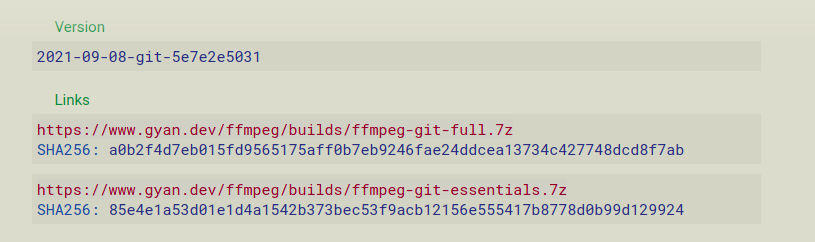
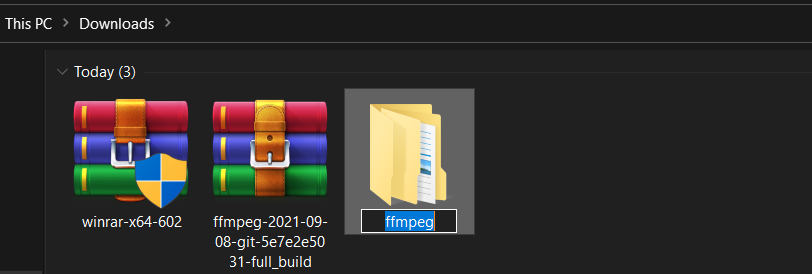
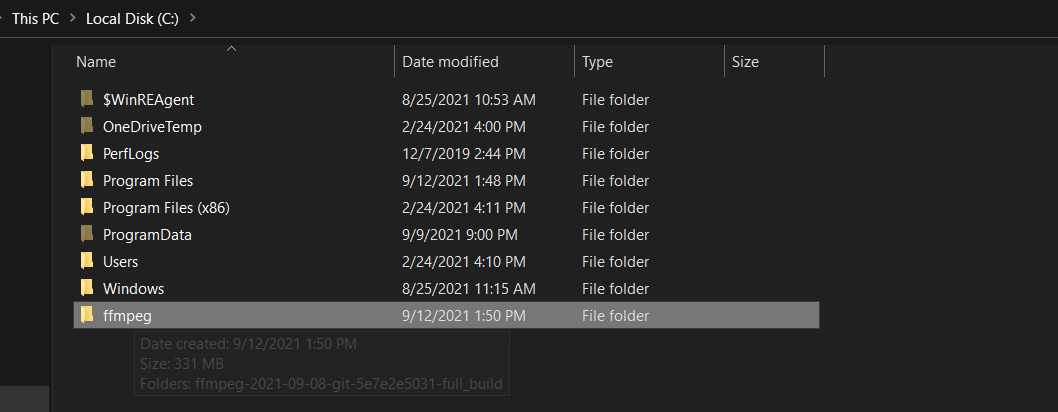
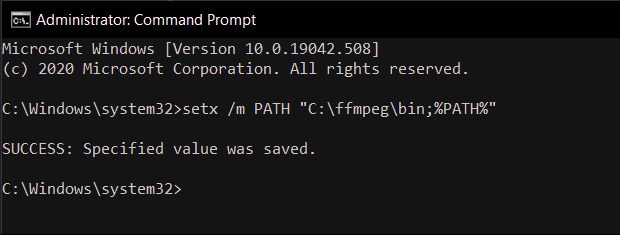
cmd as an administrator and set the environment path variable for ffmpeg by running the following command:
setx /m PATH "C:\ffmpeg\bin;%PATH%"
GUIDE SOURCE - GEEKSFORGEEKS
⚙️Installation
Open your terminal or command prompt and enter the following command:
pip install git+https://github.com/weebzone/wzmlx-dl@main
🚀Initialization
To get started, you need to initialize an instance of the ZORO class
from wzmlx_dl import ZORO

# Initialize ZORO class with required parameters
zoro = ZORO(
    url="ZORO_URL",
    season="1",
    episode="1-5",
    resolution="1080p",
    dl_type="both",
    group_tag="YourGroupTag",
    downloader="yt-dlp",
    server="vidcloud"
)
| Parameter | Type | Description | Example |
|---|---|---|---|
url |
str |
Required. The URL of the anime series on ZORO.to that you want to download from. | https://aniwatch.to/watch/baki-hanma-son-of-ogre-15723 |
season |
str |
Optional. The season which will be added to the filename. Defaults to "1". Since ZORO have different URL for different seasons of a particular, This is important to be passed inorder to generate appropiate filenames | 1 |
episode |
str or None |
Optional. Episodes to be downloaded. Can be a range of episodes (e.g., "1-5"), a single episode (e.g., "10"), or None to download the complete season. Defaults to None. | 1-5 |
resolution |
str or None |
Optional. The resolution for downloading (e.g., "1080p" , "720p"). Defaults to "1080p". | 720p |
dl_type |
str or None |
Optional. Download type: "sub", "dub", or "both". Defaults to "both". "sub" will download in JPN Audio with All Available Subtitles, "dub" will download only in ENG Audio and "both" with download in JPN-ENG with All Available Subtitles. Make sure to verify the series which you want to DL in "both",If it has same duration in both sub and dub player on ZORO, Only then it will work or else you will have audio sync issues | both |
group_tag |
str or None |
Optional. Custom group tag for metadata. Defaults to "NOGRP" | S3BS |
downloader |
str |
Optional. The downloader to use for video source retrieval. "yt-dlp" or "m3u8-Re". Defaults to "yt-dlp". | yt-dlp |
server |
str |
Optional. The server to use for video source retrieval. "vidcloud" or "vidstreaming". Defaults to "vidcloud". | vidcloud |
📚USAGE GUIDE
🌍DUAL-AUDIO MULTI-SUBS
Make sure to verify the series which you want to DL in "both",If it has same duration in both sub and dub player on ZORO, Only then it will work or else you will have audio sync issues
Will download in JPN-ENG Audio with All Available Subtitles
dl_type = "both"
from wzmlx_dl import ZORO

zoro = ZORO(
    url="ZORO_URL",
    season="1",
    episode="1-5",
    resolution="1080p",
    dl_type="both",
    group_tag="YourGroupTag",
    downloader="yt-dlp",
    server="vidcloud"
)
zoro.start_dl()
🎧JPN AUDIO MULTI-SUBS
Will download in JPN Audio with All Available Subtitles
dl_type = "sub"
from wzmlx_dl import ZORO

zoro = ZORO(
    url="ZORO_URL",
    season="1",
    episode="1-5",
    resolution="1080p",
    dl_type="sub",
    group_tag="YourGroupTag",
    downloader="yt-dlp",
    server="vidcloud"
)
zoro.start_dl()
🔊ENG AUDIO
Will download in ENG Audio with No Subtitles
dl_type = "dub"
from wzmlx_dl import ZORO

zoro = ZORO(
    url="ZORO_URL",
    season="1",
    episode="1-5",
    resolution="1080p",
    dl_type="dub",
    group_tag="YourGroupTag",
    downloader="yt-dlp",
    server="vidcloud"
)
zoro.start_dl()
📋 TERMINAL OUTPUT
----------------------------------------------------------------------
EXTRACTING STREAMS
[+] DOWNLOADING - Baki Hanma: Son of Ogre S01E01 The World's Strongest Senior - 1080p
[+] DOWNLOADING JPN VIDEO SOURCE
[+] DOWNLOADING ENG VIDEO SOURCE
[+] DOWNLOADING SUBTITLES (TOTAL - 34 FOUND)
[+] MUXING FILES
[+] TASK COMPLETED IN 41s
[+] FILE [Conan76] Baki Hanma: Son of Ogre S01E01 The World's Strongest Senior [1080p] [WEB] [JPN-ENG] [MULTI-SUBS].mkv
[+] Cleaning Temp Video Files
[+] Cleaning Temp Subtitle Files
📂 MEDIAINFO
Unique ID                                : 27636542821203888231540861625285126985 (0x14CA9AC2FE6B696FCA68967ED0FEAB49)
Complete name                            : /content/[Conan76] Baki: Dai Raitaisai-hen S01E03 Revived! [1080p] [WEB] [JPN-ENG] [MULTI-SUBS].mkv
Format                                   : Matroska
Format version                           : Version 4
File size                                : 286 MiB
Duration                                 : 23 min 57 s
Overall bit rate                         : 1 670 kb/s
Encoded by                               : Conan76
Writing application                      : Lavf58.76.100
Writing library                          : Lavf58.76.100
ErrorDetectionType                       : Per level 1
DATE                                     : 2023-08-29T19:40:38.1290870+00:00

Video
ID                                       : 1
Format                                   : AVC
Format/Info                              : Advanced Video Codec
Format profile                           : High@L5
Format settings                          : CABAC / 5 Ref Frames
Format settings, CABAC                   : Yes
Format settings, Reference frames        : 5 frames
Codec ID                                 : V_MPEG4/ISO/AVC
Duration                                 : 23 min 57 s
Width                                    : 1 920 pixels
Height                                   : 1 080 pixels
Display aspect ratio                     : 16:9
Frame rate mode                          : Constant
Frame rate                               : 25.000 FPS
Color space                              : YUV
Chroma subsampling                       : 4:2:0
Bit depth                                : 8 bits
Scan type                                : Progressive
Title                                    : Conan76 - Sourced from ZORO
Writing library                          : x264 core 148 r2795 aaa9aa8
Encoding settings                        : cabac=1 / ref=5 / deblock=1:0:0 / analyse=0x3:0x113 / me=hex / subme=8 / psy=1 / psy_rd=1.00:0.00 / mixed_ref=1 / me_range=16 / chroma_me=1 / trellis=2 / 8x8dct=1 / cqm=0 / deadzone=21,11 / fast_pskip=1 / chroma_qp_offset=-2 / threads=24 / lookahead_threads=4 / sliced_threads=0 / nr=0 / decimate=1 / interlaced=0 / bluray_compat=0 / constrained_intra=0 / bframes=3 / b_pyramid=2 / b_adapt=1 / b_bias=0 / direct=3 / weightb=1 / open_gop=0 / weightp=2 / keyint=250 / keyint_min=25 / scenecut=40 / intra_refresh=0 / rc_lookahead=50 / rc=crf / mbtree=1 / crf=25.0 / qcomp=0.60 / qpmin=0 / qpmax=69 / qpstep=4 / ip_ratio=1.40 / aq=1:1.00
Default                                  : Yes
Forced                                   : No
VENDOR_ID                                : [0][0][0][0]

Audio #1
ID                                       : 2
Format                                   : AAC LC
Format/Info                              : Advanced Audio Codec Low Complexity
Codec ID                                 : A_AAC-2
Duration                                 : 23 min 57 s
Channel(s)                               : 2 channels
Channel layout                           : L R
Sampling rate                            : 48.0 kHz
Frame rate                               : 46.875 FPS (1024 SPF)
Compression mode                         : Lossy
Delay relative to video                  : -80 ms
Title                                    : Conan76
Language                                 : Japanese
Default                                  : Yes
Forced                                   : No
VENDOR_ID                                : [0][0][0][0]

Audio #2
ID                                       : 3
Format                                   : AAC LC
Format/Info                              : Advanced Audio Codec Low Complexity
Codec ID                                 : A_AAC-2
Duration                                 : 23 min 57 s
Channel(s)                               : 2 channels
Channel layout                           : L R
Sampling rate                            : 48.0 kHz
Frame rate                               : 46.875 FPS (1024 SPF)
Compression mode                         : Lossy
Delay relative to video                  : -80 ms
Title                                    : Conan76
Language                                 : English
Default                                  : No
Forced                                   : No
VENDOR_ID                                : [0][0][0][0]

Text #1
ID                                       : 4
Format                                   : D_WEBVTT/SUBTITLES
Codec ID                                 : D_WEBVTT/SUBTITLES
Duration                                 : 23 min 43 s
Title                                    : Arabic
Language                                 : Arabic
Default                                  : Yes
Forced                                   : No

Text #2
ID                                       : 5
Format                                   : D_WEBVTT/SUBTITLES
Codec ID                                 : D_WEBVTT/SUBTITLES
Duration                                 : 23 min 43 s
Title                                    : Chinese
Language                                 : Chinese
Default                                  : No
Forced                                   : No

..... (OTHER 27 SUBTITLE TRACKS)
🌟Show Your Support
- If you find this project useful or interesting, please consider giving it a star on GitHub. It's a simple way to show your support and help others discover the project.

👨💻Developement
Thank you for your interest in contributing to this project! There are several ways you can get involved:
- Opening Issues: If you encounter a bug, have a feature request, or want to suggest an improvement, please open an issue. We appreciate your feedback!
- Cloning the Project: To work on the project locally, you can clone the repository by running:
git clone https://github.com/weebzone/wzmlx-dl.git
- Sending Pull Requests: If you'd like to contribute directly to the codebase, you can fork the repository, make your changes, and then send a pull request. We welcome your contributions!
🤝Contributors
A Big Thanks to those who helped make our project better.
Karan Adhikari
- GitHub: @weebzone
🙌🏼Thanks To
- ZORO
- CONSUMET API - https://github.com/consumet/api.consumet.org
💻Authors
Release history Release notifications | RSS feed


Download files
Download the file for your platform. If you're not sure which to choose, learn more about installing packages.
Source Distribution
Built Distribution
Filter files by name, interpreter, ABI, and platform.
If you're not sure about the file name format, learn more about wheel file names.
Copy a direct link to the current filters
File details
Details for the file wzmlx-dl-1.0.14.tar.gz.
File metadata
- Download URL: wzmlx-dl-1.0.14.tar.gz
- Upload date:
- Size: 13.4 MB
- Tags: Source
- Uploaded using Trusted Publishing? No
- Uploaded via: twine/4.0.2 CPython/3.9.18
File hashes
| Algorithm | Hash digest | |
|---|---|---|
| SHA256 |
094adfaf8fec896b2b3eb4384a784f840d2da67b007a02ea2a84e847b304e64f
|
|
| MD5 |
df1df1941302fe98145407529022cb9e
|
|
| BLAKE2b-256 |
68b74200e1febbe1e1c4b0aa90a1d164a92cdf115b8a0a237b94d08588b12553
|
File details
Details for the file wzmlx_dl-1.0.14-py3-none-any.whl.
File metadata
- Download URL: wzmlx_dl-1.0.14-py3-none-any.whl
- Upload date:
- Size: 13.4 MB
- Tags: Python 3
- Uploaded using Trusted Publishing? No
- Uploaded via: twine/4.0.2 CPython/3.9.18
File hashes
| Algorithm | Hash digest | |
|---|---|---|
| SHA256 |
be993d414945227aae482c78af5805bb2bf6c349dff68b93b5c8ef3818467d61
|
|
| MD5 |
9dd9e09da93e76236b4ed4c1f3fe24b0
|
|
| BLAKE2b-256 |
21a73e6e7ed96825e64af05dba789ede3578f1f9e073df85151bee403d51cafd
|






