
RESTful web service which makes any storage system X available as an S3-compatible REST API


Project description
x2s3

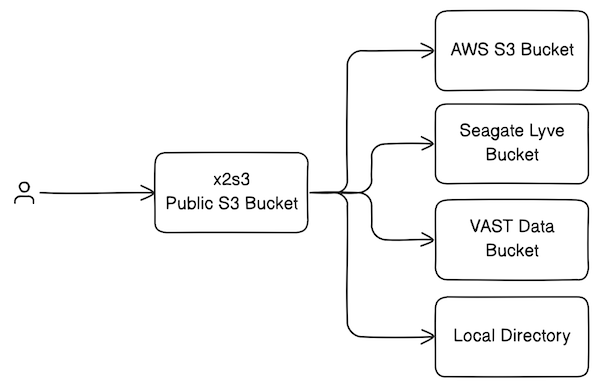
RESTful web service which makes any storage system X available as an S3-compatible REST API, hence the name "X to S3". It was initially built to support cloud-compatible microscopy image viewers such as N5 Viewer (BigDataViewer) and Neuroglancer.
At Janelia, we use x2s3 to make private buckets on Seagate Lyve appear public, and to proxy internal resources (e.g. VAST S3). It can also be used as a pop-up file service for quickly viewing local images in BigDataViewer or Neuroglancer.
Features
- Extensible support for backend storage systems
- Optional web-based bucket explorer
- Hidden buckets
- Partial buckets (chroot-like prefixes)
- Non-blocking object streaming
Inspired by S3 proxies such as oxyno-zeta/s3-proxy and pottava/aws-s3-proxy, this service goes a step further to implement enough of the AWS S3 API to be useable by AWS clients, such as BigDataViewer. The S3 proxy implements which do this well (e.g. gaul/s3proxy) only proxy a single bucket at a time.
S3 endpoints implemented:
S3 features omitted:
- Permissions
- Encryption
- Versioning
- RequestPayer
- etc.
Running
Create a config.yaml file that contains all of the buckets you want to serve. You can get started quickly by using the provided example template:
cp config.template.yaml config.yaml
See the documentation for more information about the configuration file.
The simplest way to run the service is to use Docker:
docker run -it -p 8000:8000 -v ./config.yaml:/app/x2s3/config.yaml ghcr.io/janeliascicomp/x2s3:latest
You can also run the service with Python/Uvicorn directly. See the development documentation for more information on setting that up.
Production Deployment
For production deployments, we recommend using an orchestrator (like Docker Compose) to run the prebuilt Docker container along with an Nginx reverse proxy which provides caching and TLS termination.
Create a ./docker/.env file that looks like this:
CONFIG_FILE=/path/to/config.yaml
VAR_DIR=/path/to/var/dir
CERT_DIR=/path/to/certs
NGINX_CACHE_DIR=/path/to/cache
These properties configure the service as follows:
CONFIG_FILE: path to theconfig.yamlsettings fileVAR_DIR: optional path to the var directory containing access keys referenced byconfig.yamlCERT_FILE: optional path to the SSL cert fileKEY_FILE: optional path to the SSL key fileNGINX_CACHE_DIR: path for Nginx response caching (you can disable caching by editingnginx.conf)
Now you can bring up the container:
cd docker/
docker compose up -d
Additional Documentation
- Configuation - how to use
config.yamlto configure the service - Development - notes on developing the service codebase
Attributions
- Proxy icons created by Uniconlabs - Flaticon
- AWS S3 API Reference
Release history Release notifications | RSS feed


Download files
Download the file for your platform. If you're not sure which to choose, learn more about installing packages.
Source Distribution
Built Distribution
Filter files by name, interpreter, ABI, and platform.
If you're not sure about the file name format, learn more about wheel file names.
Copy a direct link to the current filters
File details
Details for the file x2s3-1.3.0.tar.gz.
File metadata
- Download URL: x2s3-1.3.0.tar.gz
- Upload date:
- Size: 32.7 kB
- Tags: Source
- Uploaded using Trusted Publishing? No
- Uploaded via: twine/6.2.0 CPython/3.9.25
File hashes
| Algorithm | Hash digest | |
|---|---|---|
| SHA256 |
64f5b201b6e88e366a783839f09793fff27f34b2b0bfe5e800734f538b0bee75
|
|
| MD5 |
d974b24401850b98237a49890825bdb4
|
|
| BLAKE2b-256 |
6bbd981b1b6faf2280a7bd045f75139aec945f9cf0cd334d12baea85142b41d3
|
File details
Details for the file x2s3-1.3.0-py3-none-any.whl.
File metadata
- Download URL: x2s3-1.3.0-py3-none-any.whl
- Upload date:
- Size: 26.6 kB
- Tags: Python 3
- Uploaded using Trusted Publishing? No
- Uploaded via: twine/6.2.0 CPython/3.9.25
File hashes
| Algorithm | Hash digest | |
|---|---|---|
| SHA256 |
deb292575bd242004a903ba1bd1892d6528a91f501d348b932322fbf4f4131fe
|
|
| MD5 |
35327fa27a774198640012c6c8895393
|
|
| BLAKE2b-256 |
b06cc25618e34b8ba7c26ef4f3f84df70e9e6c0fc8aa3806d04c1ab952051c8f
|






