
x9k3
x9k3 Injects SCTE-35 Into HLS
Current Version: v1.0.37
Please Upgrade to v1.0.37 for a critical mmap fix.
x9k3 will now automatically match the segment time and window size for live ABR HLS inputs.
Rendition Process Started ../i5/0
auto segment time: 1.92
auto window size: 5
Rendition Process Started ../i5/1
auto segment time: 1.92
auto window size: 5
Rendition Process Started ../i5/2
auto segment time: 1.92
auto window size: 5
Rendition Process Started ../i5/3
auto segment time: 1.92
auto window size: 5
Features
- All SCTE-35 HLS Tags are Supported.
- Add SCTE-35 Tags to ABR HLS
- Segment MPEGTS streams into HLS and transfer SCTE-35 or add new SCTE-35 Tags
- SCTE-35 Cues in Mpegts Streams are Translated into HLS tags.
- SCTE-35 Cues can be added from a Sidecar File.
- Segments are Split on SCTE-35 Cues as needed.
- Segments Start on iframes.
- Supports h264 and h265 .
- Multi-protocol. Input sources may be Files, Http(s), Multicast, SRT, or Unicast UDP streams.
- Supports Live Streaming.
News
- SRT support for input videos is now working.
- SCTE-35 part 2 support for Event Descriptors and Property objects.
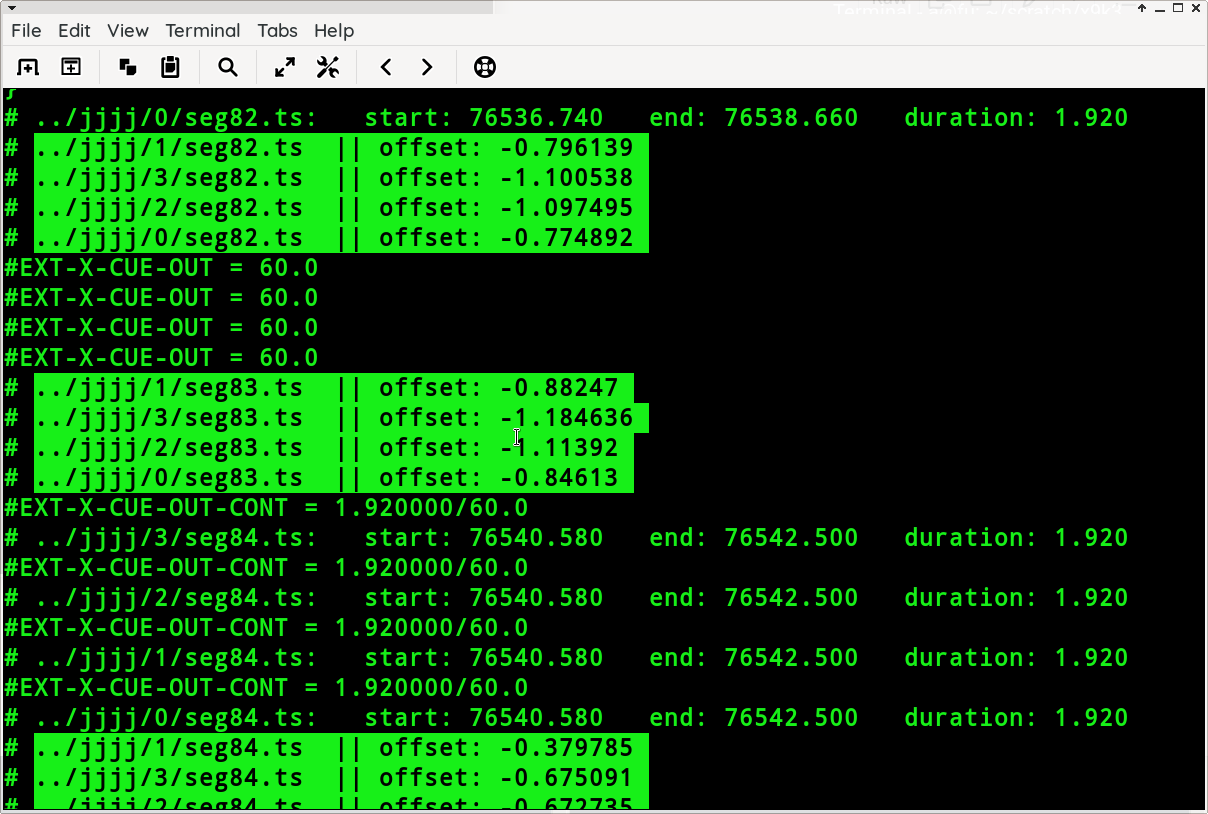
Adrian - throttling is now handled by a nanosecond accurate timer, SuperTimer. It keeps ABR HLS renditions in sync with each other. It's pretty cool.
- SuperTimer is in v1.0.31.
- [ cool terminal screenshot ]
Documentation
- Install
- Use
- Cli
- Switches ( --this and --that)
- Usage Examples
- Lib (how to use x9k3 as a library)
- Sidecar Files (these are how you add the SCTE-35, super important)
- Adding SCTE-35 in real time
- SCTE-35 Splice Immediate (not the same as real time)
- SCTE-35 Generation with adbreak3
- Playlists (make a playlist of MPEGTS or M3u8 files and feed it to x9k3 as input)
- Cli
- HLS Stuff
- HLS as Input
- ABR HLS (there are some terms and conditions)
- ABR in Code (in less than ten lines)
- Byterange HLS
- Live HLS (sliding windows, deleting segments, all that jazz)
- Looping videos (play the same thing over and over)
- Cues
- SCTE-35 Tags
Install
- Use pip to install the x9k3 lib and the executable scripts x9k3, adbreak3, and adinterval3.
# python3

python3 -mpip install x9k3

# pypy3

pypy3 -mpip install x9k3
- Both OpenBSD and Debian now require '--break-system-packages' to be appended to the pip install command if you are not using a venv.
Details
-
X-SCTE35, X-CUE, X-DATERANGE, or X-SPLICEPOINT HLS tags can be generated. set with the
--hls_tagswitch. -
reading from stdin now available
-
Segments are cut on iframes.
-
Segment time is 2 seconds or more, determined by GOP size. Can be set with the
-tswitch or by settingX9K3.args.time -
Segments are named seg1.ts seg2.ts etc...
-
For SCTE-35, Video segments are cut at the the first iframe >= the splice point pts.
-
If no pts time is present in the SCTE-35 cue, the segment is cut at the next iframe.
-
SCTE-35 cues with a preroll are inserted at the splice point.
-
x9k3 can continue an existing m3u8 file. You can switch or resume streams, x9k3 handles the details.
How to Use
cli
do the simplest thing that can possibly work
- There are a lot of command line switches available, but you do not have to use them all.
Try it like this first
x9k3 -i video.ts -o output_dir
later you can add as many switches as you like.
Super Important Tip
-t TIME, --time TIME Segment time in seconds [default:2]can be a float. If you are adding SCTE-35 to existing HLS and want to retain the segments as much as possible, if the segment times are mostly 1.92, put-t 1.92.
Switches
a@fu:~/x9k3$ x9k3 --help

usage: x9k3 [-h] [-i INPUT] [-b] [-c] [-d] [-l] [-n]
            [-no_adrian_is_cool_tags_at_splice_points_because_I_suck] [-N]
            [-o OUTPUT_DIR] [-e] [-p] [-r] [-s SIDECAR_FILE] [-S] [-t TIME]
            [-T HLS_TAG] [-w WINDOW_SIZE] [-v]

optional arguments:

  -h, --help            show this help message and exit

  -i INPUT, --input INPUT
                        The Input video can be mpegts or m3u8 with mpegts
                        segments, or a playlist with mpegts files and/or
                        mpegts m3u8 files. The input can be a local video,
                        http(s), udp, multicast or stdin.

  -b, --byterange       Flag for byterange hls [default:False]

  -c, --continue_m3u8   Resume writing index.m3u8 [default:False]

  -d, --delete          delete segments (enables --live) [default:False]

  -l, --live            Flag for a live event (enables sliding window m3u8)
                        [default:False]

  -n, --no_discontinuity
                        Flag to disable adding #EXT-X-DISCONTINUITY tags at
                        splice points [default:False]

  -no_adrian_is_cool_tags_at_splice_points_because_I_suck
                        Flag to disable adding #EXT-X-ADRIAN-IS-COOL tags at
                        splice points [default:False]

  -N, --no-throttle,
                        Flag to disable live throttling [default:False]

  -o OUTPUT_DIR, --output_dir OUTPUT_DIR
                        Directory for segments and index.m3u8(created if
                        needed) [default:'.']

  -e, --exclude_mpegts  Flag to exclude parsing SCTE-35 from MPEGTS.
                        [default:False]

  -p, --program_date_time
                        Flag to add Program Date Time tags to index.m3u8  [default:False]

  -r, --replay          Flag for replay aka looping (enables --live,--delete)
                        [default:False]

  -s SIDECAR_FILE, --sidecar_file SIDECAR_FILE
                        Sidecar file of SCTE-35 (pts,cue) pairs.
                        [default:None]

  -S, --shulga          Flag to enable Shulga iframe detection mode
                        [default:False]

  -t TIME, --time TIME  Segment time in seconds [default:2]

  -T HLS_TAG, --hls_tag HLS_TAG
                        x_scte35, x_cue, x_daterange, or x_splicepoint
                        [default:x_cue]

  -w WINDOW_SIZE, --window_size WINDOW_SIZE
                        sliding window size (enables --live) [default:5]

  -v, --version         Show version
Example Usage
local file as input
x9k3 -i video.mpegts
multicast stream as input with a live sliding window
x9k3 --live -i udp://@235.35.3.5:3535 -o output_dir
Live mode works with a live source or static files.
- x9k3 will throttle segment creation to mimic a live stream.
x9k3 --live -i /some/video.ts -o output_dir
live sliding window and deleting expired segments
x9k3 -i udp://@235.35.3.5:3535 --delete -o output_dir
https stream for input, and writing segments to an output directory
- directory will be created if it does not exist.
x9k3 -i https://iodisco.com/neworder.ts --output_dir /home/a/variant0
https hls m3u8 for input, and inserting SCTE-35 from a sidecar file, and continuing from a previously create index.m3u8 in the output dir
x9k3 -i https://bigcorp.ltd/longb2.m3u8 --output_dir /home/a/variant0 --continue_m3u8 -s sidecar.txt
using stdin as input
cat video.ts | x9k3 -o output_dir
live master.m3u8 file as input, add SCTE-35 from a sidecar file, output as live stream
x9k3 -i https://example.com/master.m3u8 -s sidecar.txt -l -o output-dir
VOD master.m3u8 file as input, add SCTE-35 from a sidecar file, output as live stream
x9k3 -i https://example.com/master.m3u8 -s sidecar.txt -l -o output-dir
Programmatically
Up and Running in three Lines
        from x9k3 import X9K3            # 1
        x9 = X9K3('/home/a/cool.ts')     # 2
        x9.decode()                      # 3
Writing Code with x9k3
- you can get a complete set of args and the defaults like this
from x9k3 import X9K3
x9 = X9K3()

>>>> {print(k,':',v) for k,v in vars(x9.args).items()}

input : <_io.BufferedReader name='<stdin>'>
continue_m3u8 : False
delete : False
live : False
no_discontinuity : False
no_throttle : False
output_dir : .
program_date_time : False
replay : False
sidecar_file : None
shulga : False
time : 2
hls_tag : x_cue
window_size : 5
version : False
- or just
>>>> print(x9.args)

Namespace(input=<_io.BufferedReader name='<stdin>'>, continue_m3u8=False, delete=False, live=False, no_discontinuity=False, no_throttle=False, output_dir='.', program_date_time=False, replay=False, sidecar_file=None, shulga=False, time=2, hls_tag='x_cue', window_size=5, version=False)
- Setting parameters
from x9k3 import X9K3
x9 = X9K3()
input source
x9.args.input = "https://futzu.com/xaa.ts"
hls_tagcan be x_scte35, x_cue, x_daterange, or x_splicepoint
x9.args.hls tag = x_cue
output directorydefault is "."
x9.args.output_dir="/home/a/stuff"
live
x9.args.live = True
replay(loop video) ( also sets live )
x9.args.replay = True
deletesegments when they expire ( also sets live )
x9.args.delete = True
- add
program date timetags ( also sets live )
x9.args.program_date_time= True
- set
window sizefor live mode ( requires live )
x9.args.window_size = 5
- run
x9.decode()
HLS as input
- x9k3 can use HLS manifests as input.
- HLS Must be MPEGTS with audio and video together in the segment.
- No audio only or separate audio.
- Existing HLS SCTE-35 Tags in input manifests will be dropped.
- ABR HLS has additional restrictions
Byterange
- with the cli tool1.92
- use full path to video file when creating byterange m3u8.
x9k3 -i /home/a/input.ts -b
- programmatically
from x9k3 import X9K3
x9 = X9K3()
x9.args.input='/home/a/input.ts'
x9.args.byterange = True
x9.decode()
- output
#EXTM3U
#EXT-X-VERSION:4
#EXT-X-TARGETDURATION:3
#EXT-X-MEDIA-SEQUENCE:0
#EXT-X-DISCONTINUITY-SEQUENCE:0
#EXT-X-X9K3-VERSION:0.2.55
#EXTINF:2.000000,
#EXT-X-BYTERANGE:135548@0
msnbc1000.ts
#EXTINF:2.000000,
#EXT-X-BYTERANGE:137992@135548
msnbc1000.ts
#EXTINF:2.000000,
#EXT-X-BYTERANGE:134796@273540
msnbc1000.ts
#EXTINF:2.000000,
#EXT-X-BYTERANGE:140436@408336
msnbc1000.ts
#EXTINF:2.000000,
#EXT-X-BYTERANGE:130096@548772
msnbc1000.ts
<SNIP>
ABR HLS
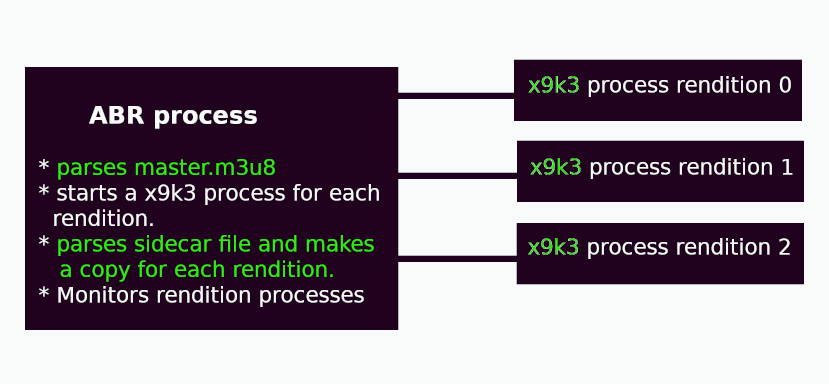
if you are passing a master.m3u8 file to x9k3, it's best if it's on the same server, especially if you have a lot of Renditions. x9k3 works just fine over a network, make sure you have the bandwidth. For x9k3 to add SCTE-35 to ABR HLS, it has to parse all of the renditions, at the same time. To handle this efficiently, x9k3 starts a separate process for each rendition, which means x9k3 will scale very well.
Here's how it works.
- When x9k3 detects a master.m3u8 as input, it starts up an ABR instance.
- The ABR instance parses the master.m3u8 and finds rendtitions.
- For each rendition an x9k3 process is started.
- The ABR process also parses the SCTE-35 sidecar file and writes a sidecar file for each rendition.
- The master.m3u8 is written to the output_dir.
- Rendition segments and manifest files are written to output_dir/0, output_dir/1, etc.
- any args passed in are set for all rendtions.
The terms and condtions.
- HLS version 3 support only
- Use a Sidecar file for SCTE-35
- Only MPEGTS segments
- Audio and Video MUST be in the same stream.
- No separate Audio tracks
- No Audio only
- No WebVTT
- Pass a local master.m3u8 as input for x9k3
x9k3 -i ~/o21/master.m3u8 -t 3 -l -s sidecar.txt
- ABR works well over a network, if you have the bandwidth to download all renditions simultaneously.
- If you don't have the bandwidth, the renditions will get out of sync.
- The throttle time is a good indicator. throttle must be greater than half of target duration for all renditions.
- throttle time is shown in the x9k3 output
./0/seg0.ts:   start: 0.160   end: 10.000   duration: 9.840  # <-- duration
throttling 8.22                        # <--- throttle time        throttle time > (duration / 2) GOOD


./2/seg0.ts:   start: 0.160   end: 10.000   duration: 9.840  # <-- duration
throttling 4.23                       # <--- throttle time          throttle time < (duration / 2)  BAD
ABR in Code
Python 3.9.16 (7.3.11+dfsg-2+deb12u3, Dec 30 2024, 22:36:23)
[PyPy 7.3.11 with GCC 12.2.0] on linux
Type "help", "copyright", "credits" or "license" for more information.
>>>> from x9k3 import argue
>>>> from x9k3.x9mp import do
>>>> url = 'https://demo.unified-streaming.com/k8s/live/scte35.isml/.m3u8'
>>>> args = argue()
>>>> args.input=url
>>>> do(args)
- imports
from x9k3 import argue
from x9k3.x9mp import do
- define source
url = 'https://demo.unified-streaming.com/k8s/live/scte35.isml/.m3u8'
- generate the args.
- more about args
args = argue()
- args is the Namespace returned by the standard library's argparser.
- These are same options as the cli x9k3.
args
Namespace(input=<_io.BufferedReader name='<stdin>'>, byterange=False, continue_m3u8=False,
  delete=False, live=False, no_discontinuity=False, no_adrian_is_cool_tags_at_splice_points_because_I_suck=False,
  no_throttle=False, output_dir='.', exclude_mpegts=False,program_date_time=False, replay=False, sidecar_file=None,
  shulga=False, time=2, hls_tag='x_cue', window_size=5, version=False)
- use dot notation to set what you need
args.input=url
- call do(args)
from x9k3.x9mp import do
- That's it.
Playlists
-
playlists can be used as input
-
playlist files must end in
.playlist -
lines are video or video, sidecar
- if video,sidecar, the sidecar file only applies to that video
-
playlists can have mpegts video, mpegts m3u8, and playlists.
-
example playlist
f10.ts,f10sidecar.txt # comments can be here
f17.ts
f60.ts
flat-striped.ts
# Comments can go here too.
flat.ts
input.ts
nmax.ts
nmx.ts,nmx-sidecar.txt
https://futzu.com/xaa.ts
https://example.com/index.m3u8,another-sidecar.txt
- using
x9k3 -i out.playlist
Sidecar Files
load scte35 cues from a Sidecar file
Sidecar Cues will be handled the same as SCTE35 cues from a video stream.
line format for text file insert_pts, cue
pts is the insert time for the cue, A four second preroll is standard. cue can be base64,hex, int, or bytes
a@debian:~/x9k3$ cat sidecar.txt

38103.868589, /DAxAAAAAAAAAP/wFAUAAABdf+/+zHRtOn4Ae6DOAAAAAAAMAQpDVUVJsZ8xMjEqLYemJQ==
38199.918911, /DAsAAAAAAAAAP/wDwUAAABef0/+zPACTQAAAAAADAEKQ1VFSbGfMTIxIxGolm0=
x9k3 -i noscte35.ts -s sidecar.txt
adbreak3 writes to sidecar files for you.
In Live Mode you can do dynamic cue injection with a Sidecar file
touch sidecar.txt

x9k3 -i vid.ts -s sidecar.txt -l

# Open another terminal and printf cues into sidecar.txt

printf '38103.868589, /DAxAAAAAAAAAP/wFAUAAABdf+/+zHRtOn4Ae6DOAAAAAAAMAQpDVUVJsZ8xMjEqLYemJQ==\n' > sidecar.txt
adbreak3 also does dynamic injection.
Sidecar files can now accept 0 as the PTS insert time for Splice Immediate.
Specify 0 as the insert time, the cue will be insert at the start of the next segment. Using 0 only works in live mode
printf '0,/DAhAAAAAAAAAP/wEAUAAAAJf78A/gASZvAACQAAAACokv3z\n' > sidecar.txt
A CUE-OUT can be terminated early using a sidecar file.
In the middle of a CUE-OUT send a splice insert with the out_of_network_indicator flag not set and the splice immediate flag set. Do the steps above , and then do this
printf '0,/DAcAAAAAAAAAP/wCwUAAAABfx8AAAEAAAAA3r8DiQ==\n' > sidecar.txt
It will cause the CUE-OUT to end at the next segment start.
#EXT-X-CUE-OUT 13.4
./seg5.ts:	start:112.966667	end:114.966667	duration:2.233334
#EXT-X-CUE-OUT-CONT 2.233334/13.4
./seg6.ts:	start:114.966667	end:116.966667	duration:2.1
#EXT-X-CUE-OUT-CONT 4.333334/13.4
./seg7.ts:	start:116.966667	end:118.966667	duration:2.0
#EXT-X-CUE-OUT-CONT 6.333334/13.4
./seg8.ts:	start:117.0	        end:119.0	duration:0.033333
#EXT-X-CUE-IN None
./seg9.ts:	start:119.3	        end:121.3	duration:2.3
Using 0 only works in live mode ⇪ top
Cues
CUE-OUT
A CUE-OUT is defined as:
-
A Splice Insert Commandwith:- the
out_of_network_indicatorset toTrue - a
break_duration.
- the
-
A Time Signal Commandand a Segmentation Descriptor with:- a
segmentation_duration - a
segmentation_type_idof:- 0x22: "Break Start",
- 0x30: "Provider Advertisement Start",
- 0x32: "Distributor Advertisement Start",
- 0x34: "Provider Placement Opportunity Start",
- 0x36: "Distributor Placement Opportunity Start",
- 0x44: "Provider Ad Block Start",
- 0x46: "Distributor Ad Block Start",
- a
CUE-IN
A CUE-IN is defined as:
-
A Splice Insert Command- with the
out_of_network_indicatorset toFalse
- with the
-
A Time Signal Commandand a Segmentation Descriptor with:-
a
segmentation_type_idof:- 0x23: "Break End",
- 0x31: "Provider Advertisement End",
- 0x33: "Distributor Advertisement End",
- 0x35: "Provider Placement Opportunity End",
- 0x37: "Distributor Placement Opportunity End",
- 0x45: "Provider Ad Block End",
- 0x47: "Distributor Ad Block End",
-
-
For CUE-OUT and CUE-IN,
only the first Segmentation Descriptor will be used
Supported HLS Tags
- #EXT-X-CUE
- #EXT-X-DATERANGE
- #EXT-X-SCTE35
- #EXT-X-SPLICEPOINT
x_cue
- CUE-OUT
#EXT-X-DISCONTINUITY
#EXT-X-CUE-OUT:242.0
#EXTINF:4.796145,
seg32.ts
- CUE-OUT-CONT
#EXT-X-CUE-OUT-CONT:4.796145/242.0
#EXTINF:2.12,
- CUE-IN
#EXT-X-DISCONTINUITY
#EXT-X-CUE-IN
#EXTINF:5.020145,
seg145.ts
x_scte35
- CUE-OUT
#EXT-X-DISCONTINUITY
#EXT-X-SCTE35:CUE="/DAvAAAAAAAAAP/wFAUAAAKWf+//4WoauH4BTFYgAAEAAAAKAAhDVUVJAAAAAOv1oqc=" ,CUE-OUT=YES
#EXTINF:4.796145,
seg32.ts
- CUE-OUT-CONT
#EXT-X-SCTE35:CUE="/DAvAAAAAAAAAP/wFAUAAAKWf+//4WoauH4BTFYgAAEAAAAKAAhDVUVJAAAAAOv1oqc=" ,CUE-OUT=CONT
#EXTINF:2.12,
seg33.ts
- CUE-IN
#EXT-X-DISCONTINUITY
#EXT-X-SCTE35:CUE="/DAqAAAAAAAAAP/wDwUAAAKWf0//4rZw2AABAAAACgAIQ1VFSQAAAAAtegE5" ,CUE-IN=YES
#EXTINF:5.020145,
seg145.ts
x_daterange
- CUE-OUT
#EXT-X-DISCONTINUITY
#EXT-X-DATERANGE:ID="1",START-DATE="2022-10-14T17:36:58.321731Z",PLANNED-DURATION=242.0,SCTE35-OUT=0xfc302f00000000000000fff01405000002967fefffe16a1ab87e014c562000010000000a00084355454900000000ebf5a2a7
#EXTINF:4.796145,
seg32.ts
- CUE-IN
#EXT-X-DISCONTINUITY
#EXT-X-DATERANGE:ID="2",END-DATE="2022-10-14T17:36:58.666073Z",SCTE35-IN=0xfc302a00000000000000fff00f05000002967f4fffe2b670d800010000000a000
843554549000000002d7a0139
#EXTINF:5.020145,
seg145.ts
x_splicepoint
- CUE-OUT
#EXT-X-DISCONTINUITY
#EXT-X-SPLICEPOINT-SCTE35:/DAvAAAAAAAAAP/wFAUAAAKWf+//4WoauH4BTFYgAAEAAAAKAAhDVUVJAAAAAOv1oqc=
#EXTINF:4.796145,
seg32.ts
- CUE-IN
#EXT-X-DISCONTINUITY
#EXT-X-SPLICEPOINT-SCTE35:/DAqAAAAAAAAAP/wDwUAAAKWf0//4rZw2AABAAAACgAIQ1VFSQAAAAAtegE5
#EXTINF:5.020145,
seg145.ts
VOD
- x9k3 defaults to VOD style playlist generation.
- All segment are listed in the m3u8 file.
Live
- Activated by the
--live,--delete, or--replayswitch or by settingX9K3.live=True
--live
- Like VOD except:
- M3u8 manifests are regenerated every time a segment is written
- Segment creation is throttled when using non-live sources to simulate live streaming. ( like ffmpeg's "-re" )
- default Sliding Window size is 5, it can be changed with the
-wswitch or by settingX9k3.window.size
--delete
- implies
--live - deletes segments when they move out of the sliding window of the m3u8.
--replay
- implies
--live - implies
--delete - loops a video file and throttles segment creation to fake a live stream.
adbreak3
- included with x9k3
- adbreak3 is a cli tool to generate SCTE-35 for sidecar files.
- by default adbreak3 generates 2 SCTE35 Cues with Splice Inserts for CUE-OUT and CUE-IN and writes it to a sidecar file.
a@fu:~$ adbreak3 -h
usage: adbreak3 [-h] [-d DURATION] [-e EVENT_ID] [-i] [-o] [-p PTS] [-P] [-s SIDECAR] [-v]

optional arguments:
  -h, --help            show this help message and exit
  -d DURATION, --duration DURATION
                        Set duration of ad break. [ default: 60.0 ]
  -e EVENT_ID, --event-id EVENT_ID
                        Set event id for ad break. [ default: 1 ]
  -i, --cue-in-only     Only make a cue-in SCTE-35 cue [ default: False ]
  -o, --cue-out-only    Only make a cue-out SCTE-35 cue [ default: False ]
  -p PTS, --pts PTS     Set start pts for ad break. Not setting pts will generate a Splice Immediate CUE-OUT. [default: 0.0 ]
  -P, --preroll         Add SCTE data four seconds before splice point. Used with MPEGTS. [ default: False ]
  -s SIDECAR, --sidecar SIDECAR
                        Sidecar file of SCTE-35 (pts,cue) pairs. [ default: sidecar.txt ]
  -v, --version         Show version
- Usage:
a@fu:~$ adbreak3 --pts 1234.567890 --duration 30 --sidecar sidecar.txt

Writing to sidecar file: sidecar.txt

		CUE-OUT   PTS:1234.567889   Id:1   Duration: 30.0
		CUE-IN    PTS:1264.567889   Id:2
- Sidecar file has SCTE-35 Cues for CUE-OUT and CUE-IN
a@fu:~$ cat sidecar.txt
1234.56789,/DAlAAAAAAAAAP/wFAUAAABNf+/+Bp9rxv4AKTLgAE0AAAAAFz4v5A==
1264.56789,/DAgAAAAAAAAAP/wDwUAAABOf0/+BsiepgBOAAAAABSgtGA=
- Pass to x9k3
x9k3 -i input.ts -s sidecar.txt
Super Cool Feature: adbreak3 can be used in real time to add SCTE-35 on the fly to live HLS manifest.
1 maintainer

Release files for x9k3 1.0.37
For a detailed explanation of source distributions (sdists) and built distributions (wheels), please see the package formats documentation.
Source distribution (sdist)
| File | Size | Uploaded | |
|---|---|---|---|
| x9k3-1.0.37.tar.gz | 33.1 kB | Details |
Built distribution (wheel)
| File | Interpreter | ABI | Platform | Reset |
|---|---|---|---|---|
| x9k3-1.0.37-py3-none-any.whl | Python 3 | none | any | Details |
Total release size: 61.3 kB
Release files / x9k3-1.0.37.tar.gz
| Download URL | x9k3-1.0.37.tar.gz |
|---|---|
| Size | 33.1 kB |
| Tags | Source |
|
SHA-256 checksum How to use checksums |
b3e4bc620d473621dcd4aefa400d79ba57034e39d62a0b0cbecae214737d6ced
|
|
BLAKE2b-256 checksum How to use checksums |
3d3df899d60bbea2a813fbd4c062c5d48c2299982f6e59a6cd989a62f0c97709
|
| Upload date | |
|
Uploaded using Trusted Publishing? What is trusted publishing? |
No |
| Uploaded via |
twine/6.2.0 CPython/3.14.6
|
Release files / x9k3-1.0.37-py3-none-any.whl
| Download URL | x9k3-1.0.37-py3-none-any.whl |
|---|---|
| Size | 28.3 kB |
| Tags | Python 3 |
|
SHA-256 checksum How to use checksums |
b2316f68b39c37cd8db2b5a54e733f5a31e520a3d62fb50d7a790527841bd53e
|
|
BLAKE2b-256 checksum How to use checksums |
a35d5e5d072d3f7a857d053806f0f517e1754d88a694b248c04cc3466639b520
|
| Upload date | |
|
Uploaded using Trusted Publishing? What is trusted publishing? |
No |
| Uploaded via |
twine/6.2.0 CPython/3.14.6
|














