
COunterfactual explanations with Limited Actions (COLA)

Project description

COunterfactual explanations with Limited Actions (COLA)



Explainable AI (XAI) aims to make models transparent and trustworthy (Arrieta et al., 2020). Within XAI, counterfactual explanations (CE) show minimal feature changes that flip model outcomes (Wachter et al., 2017). Given diverse goals and settings, no single CE method fits all (Guidotti, 2022). Objectives vary across: (i) instance-level CEs—single or multiple per case (Mothilal et al., 2020); (ii) global/dataset-level CEs that indicate movement directions (Rawal & Lakkaraju, 2020; Ley et al., 2022; Carrizosa et al., 2024); and (iii) distributional CEs that shift groups while preserving shape and cost (You et al., 2024). Methods also differ in model assumptions (differentiable vs. tree/ensemble).
What is COLA?
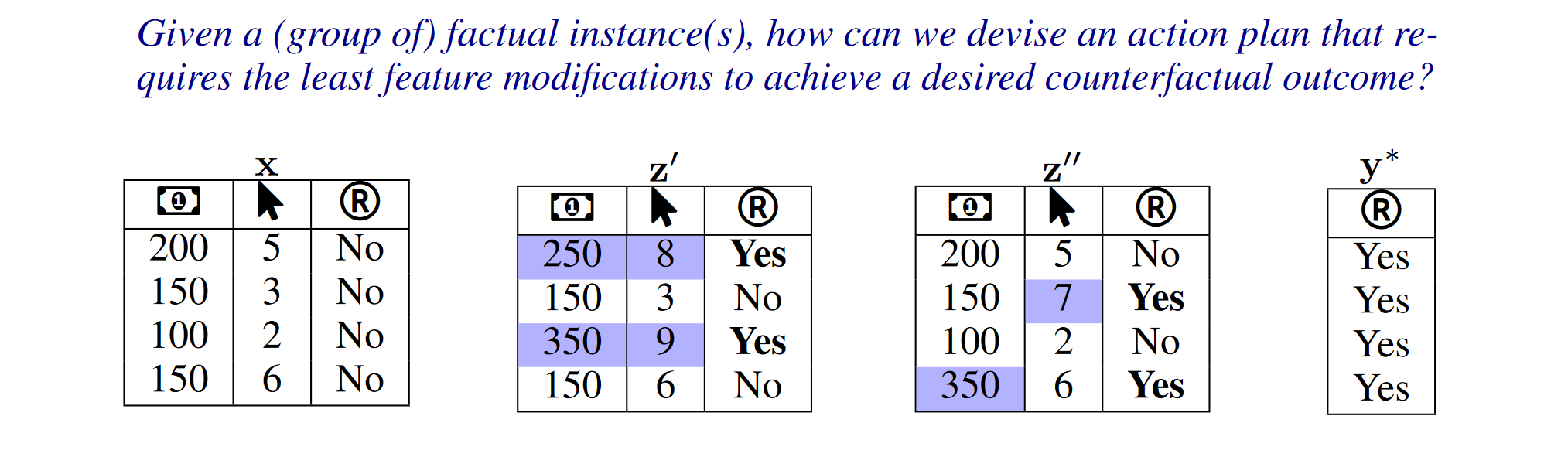
COLA adapts to various CE methods and ML models. Extensive simulations show that the framework produces action plans that require significantly fewer feature changes to achieve outcomes similar (or sometimes equal) to those generated by various CE algorithms. Especially, COLA is shown to have near-optimal performance under certain circumstances.
START COLA!
Installation
Option 1: Install from PyPI
pip install xai-cola
Option 2: Install from source
git clone https://github.com/understanding-ml/COLA.git
cd COLA
pip install -e .
pip install -r requirements.txt
Usage Guide
COLA is a python package that helps sparsify the results of generated counterfactual explanations. We also provide built-in counterfactual algorithms like DiCE, DisCount, and built-in German Credit dataset for testing. Note: COLA only addresses tabular data with numerical and categorical features.
Do the following steps to start sparsifying counterfactuals (You have already prepared your data, preprocessor and trained model):
- Initialize the data interface
- Initialize the model interface
- Generate counterfactual explanations
- Sparsify the counterfactual explanations
- Visualize results
Preparation: Prepare your data, preprocessor, and trained model
from xai_cola.datasets.german_credit import GermanCreditDataset
from sklearn.pipeline import Pipeline
from sklearn.compose import ColumnTransformer
from sklearn.preprocessing import StandardScaler, OneHotEncoder
from sklearn.linear_model import LogisticRegression

# Load the Built-in German Credit dataset
dataset = GermanCreditDataset()
X_train, y_train, X_test, _ = dataset.get_original_train_test_split()


# Define feature lists
numerical_features = ['Age', 'Credit amount', 'Duration']
categorical_features = ['Sex', 'Job', 'Housing', 'Saving accounts', 'Checking account', 'Purpose']

# Create the preprocessor for original data
preprocessor = ColumnTransformer(
    transformers=[
        ('num', StandardScaler(), numerical_features),  # Scale numerical features
        ('cat', OneHotEncoder(drop='first', handle_unknown='ignore'), categorical_features)
    ],
    remainder='passthrough'
)

# Logistic Regression classifier
lr_classifier = LogisticRegression(
    max_iter=1000,
    C=1.0,  # Inverse of regularization strength
    class_weight='balanced',  # Handle class imbalance
    random_state=42,
    solver='lbfgs'  # Suitable for small datasets
)

# merge preprocessor and classifier into a pipeline
pipe = Pipeline([
    ('preprocessor', preprocessor),
    ('classifier', lr_classifier)
])


for c in categorical_features:
    X_train[c] = X_train[c].astype(str)
    X_test[c] = X_test[c].astype(str)

# Train the model
pipe.fit(X_train, y_train)
Step1: Initialize the data interface
(1) COLA can accept two kinds of data: PandasData and NumpyData(provide column names). (2) If you don't have your personal dataset, you can use the built-in test_dataset.
from xai_cola.ce_sparsifier.data import COLAData

numerical_features = ['Age', 'Credit amount', 'Duration']
categorical_features = ['Sex', 'Job', 'Housing', 'Saving accounts', 'Checking account', 'Purpose']
data = COLAData(
    factual_data=df, # dataframe with label column
    label_column='Risk',
    numerical_features=numerical_features
)
Step2: Initilize the model interface
COLA can accept two kinds of model: sklearn model and pytorch model. The model can be provided in two forms:
- As a pipeline (preprocessor + classifier combined)
- As separate components (preprocessor and classifier separately)
from xai_cola.ce_sparsifier.models import Model

ml_model = Model(model=pipe, backend="sklearn")
Note: Alternative: If your preprocessor and classifier are NOT combined in a pipeline
If you trained your classifier separately (i.e.,
lr_classifierwas trained on data that has already been processed bypreprocessor), you can initialize the model interface as follows:ml_model = PreprocessorWrapper( model=lr_classifier, # The classifier alone backend="sklearn", preprocessor=preprocessor # Pass the preprocessor separately )
Step3: Generate counterfactual explanations
(1) You can choose DiCE(instance-wise counterfactual generator), DisCount(distributional counterfactual generator) as the counterfactual explainer. (2) Or You can use your own explainer.
from xai_cola.ce_generator import DiCE

explainer = DiCE(ml_model=ml_model)
factual, counterfactual = explainer.generate_counterfactuals(
    data=data,
    factual_class=1, # class of target column of the factual instances
    total_cfs=2, # number of counterfactuals to generate per factual instance
    features_to_keep=['Age','Sex'],
    continuous_features=numerical_features
)

# Add generated counterfactuals to the COLAData class
data.add_counterfactuals(counterfactual, with_target_column=True)
data.summary()
Step4: Initialize COLA and sparsify counterfactuals
from xai_cola.ce_sparsifier import COLA

# Initialize COLA - it will automatically extract factual and counterfactual from data
sparsifier = COLA(
    data=data,
    ml_model=ml_model
)

# Set the sparsification policy
sparsifier.set_policy(
    matcher="ot", # optimal transport matcher
    attributor="pshap", # SHAP attributor
    random_state=1 # Set random seed for reproducibility
)

# Query minimum actions
limited_actions = sparsifier.query_minimum_actions()

# Sparsify counterfactuals
sparsified_counterfactuals_df = sparsifier.sparsify_counterfactuals(limited_actions=limited_actions)
display(sparsified_counterfactuals_df)
Step5: Visualization
We provide several visualization methods to help users better understand the sparsified results. For complete visualization options, see the full documentation.
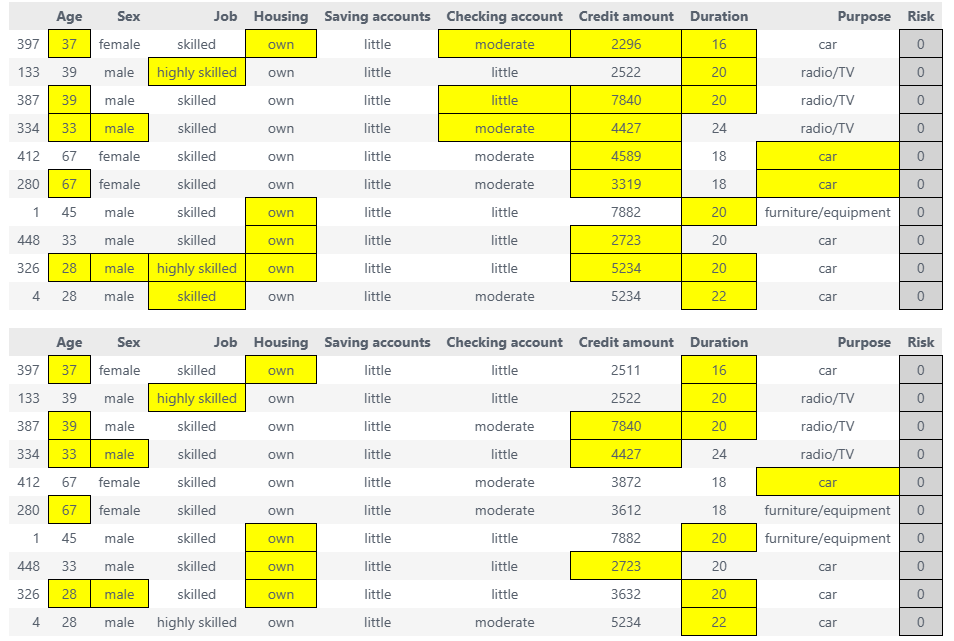
factual_df, ce_style, ace_style = sparsifier.highlight_changes_final()
display(ce_style, ace_style)  # display the highlighted dataframes
# ce_style.to_html('final.html') # save to html file
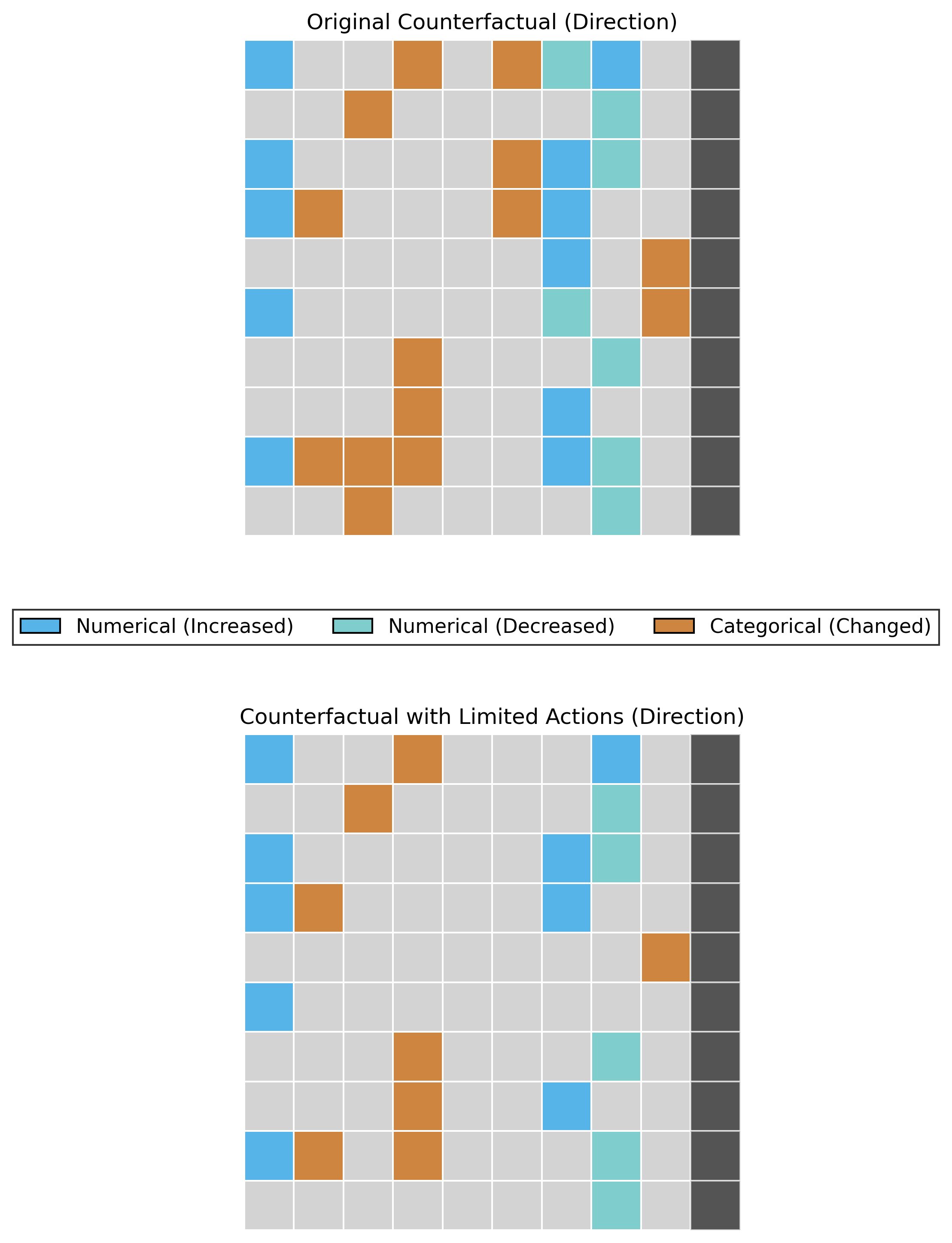
# Heatmap of Change Direction(increase or decrease)
sparsifier.heatmap_direction(save_path='./results', save_mode='combined',show_axis_labels=False)
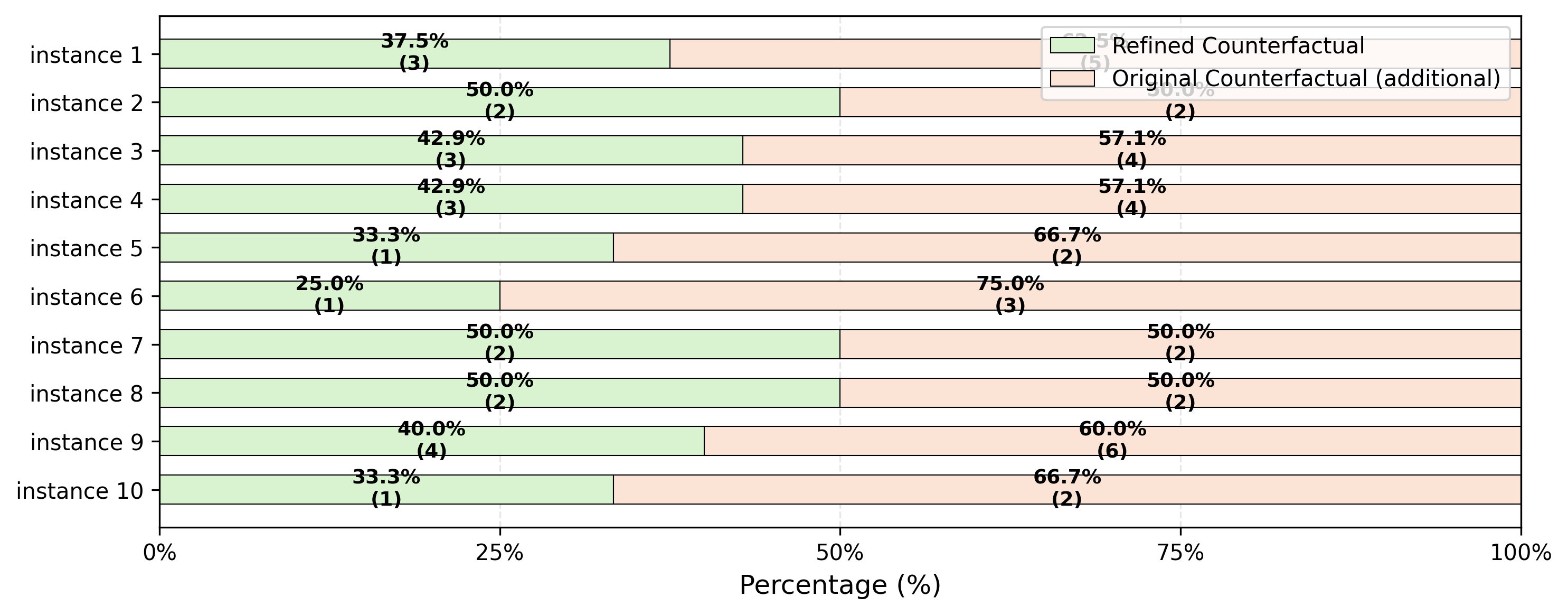
# Actions required to flip the target per instance: sparsified counterfactuals vs. original counterfactuals
fig = sparsifier.stacked_bar_chart(save_path='./results')
Citing
The python library xai-cola is described in the following paper: Lin Zhu, Lei You (2025). xai-cola: A python library for sparsifying counterfactual explanations.
What's more, the theoretical foundation of COLA is described in the following paper: Lei You, Yijun Bian, and Lele Cao (2024). Refining Counterfactual Explanations With Joint-Distribution-Informed Shapley Towards Actionable Minimality.
Contributing
This project welcomes contributions and suggestions. If you have some questions about it, please feel free to reach out.
- Lin Zhu (s232291@student.dtu.dk)
- Lei You (leiyo@dtu.dk)
Release history Release notifications | RSS feed


Download files
Download the file for your platform. If you're not sure which to choose, learn more about installing packages.
Source Distribution
Built Distribution
Filter files by name, interpreter, ABI, and platform.
If you're not sure about the file name format, learn more about wheel file names.
Copy a direct link to the current filters
File details
Details for the file xai_cola-0.1.0.tar.gz.
File metadata
- Download URL: xai_cola-0.1.0.tar.gz
- Upload date:
- Size: 1.5 MB
- Tags: Source
- Uploaded using Trusted Publishing? No
- Uploaded via: twine/6.2.0 CPython/3.14.0
File hashes
| Algorithm | Hash digest | |
|---|---|---|
| SHA256 |
16faf1255129bac8c11d13ba8c8762b35ee5c8a4b5ae8144ea935600847cdc5b
|
|
| MD5 |
6da285ebf1f1be077d2f80185bf27e5e
|
|
| BLAKE2b-256 |
c23c97d658902b966ab46de6b8076db441bc82dcad285d588305352dad524fea
|
File details
Details for the file xai_cola-0.1.0-py3-none-any.whl.
File metadata
- Download URL: xai_cola-0.1.0-py3-none-any.whl
- Upload date:
- Size: 96.1 kB
- Tags: Python 3
- Uploaded using Trusted Publishing? No
- Uploaded via: twine/6.2.0 CPython/3.14.0
File hashes
| Algorithm | Hash digest | |
|---|---|---|
| SHA256 |
88be45143dac690e06f954fbeffb4b1cee8e8f480afa7ccbc6a26c373e24a568
|
|
| MD5 |
df28cd0536b1fca3afc959f6543afbd0
|
|
| BLAKE2b-256 |
caa5d6f407993d0e71e3a076e3376316936737c094ac8e5e5d0bcaa98db9946c
|






