

Give your AI coding agent memory across sessions.
Search past conversations. Maintain structured context. All local.
Install
uv tool install xarc-memory
memory init
That two-step sequence:
- Installs xarc-memory as a persistent user-level tool in
~/.local/bin - Then (via
memory init) registers the MCP server, installs the SessionEnd auto-ingest hook, installs/memory-search//memory-stats//memory-recall//memory-forgetslash commands, scaffolds.context/, updates your CLAUDE.md, and runs the initial ingest
After that, your agent has memory. You don't have to think about it again.
Why uv tool install and not uvx? uvx runs tools from an ephemeral cache that can be garbage-collected. Since the memory init flow registers a hook and MCP server that point at the installed binary, we need a durable location — that's what uv tool install provides. memory init will warn you if it detects an ephemeral path.
Don't have uv?
curl -LsSf https://astral.sh/uv/install.sh | sh
uv is a single Rust binary, ~30 MB. The fastest way to install and run Python tools.
Quick one-off trial (no persistent install)
Just want to see the CLI without installing anything durable?
uvx xarc-memory --help
uvx xarc-memory stats
This works, but don't use it for init / install-hook / install-mcp — those write paths into Claude Code's config, and the ephemeral uvx path may disappear later.
Pip install (for Python developers)
pip install --user xarc-memory[mcp]
memory init
Or in an isolated virtualenv if you prefer. Both memory and xarc-memory entry points are provided; use whichever you like.
Alternative install methods
# macOS / Linux: Homebrew (after the formula is published)
brew tap x-arc-ai/memory
brew install xarc-memory

# Windows: Scoop
scoop bucket add x-arc https://github.com/x-arc-ai/scoop-bucket
scoop install xarc-memory

# Direct download (no package manager)
curl -L https://github.com/x-arc-ai/memory/releases/latest/download/memory-ubuntu-latest.pyz -o memory
chmod +x memory
./memory --help
How Your Agent Uses It
Once installed, the agent searches your conversation history as a native tool — no copy-paste, no manual lookup.
You: Why did we switch from MongoDB to PostgreSQL?

Agent: Let me search your conversation history for that discussion.
       [invokes search_sessions("MongoDB PostgreSQL migration")]

Agent: On March 15, you discussed this with your agent. The key reasons were:
       1. Need for ACID transactions in the billing pipeline
       2. PostGIS for location queries
       3. Team familiarity with PostgreSQL
       The migration was completed on March 22 via PR #47.
You can also drive it directly via slash commands:
/memory-search auth flow
/memory-stats
/memory-recall feature flag rollout
Enhance with CLAUDE.md (Optional)
For better results, add this to your project's CLAUDE.md or ~/.claude/CLAUDE.md:
When answering questions about past decisions, architecture context, or
debugging history, use the search_sessions tool to find relevant
conversations before responding.
Context Management
memory init scaffolds a .context/ directory and adds instructions to
your CLAUDE.md. Your agent then maintains structured context automatically.
.context/
  README.md           How the system works (for humans)
  active/             Current work: decisions, status, plans
  reference/          Stable info: architecture, conventions, people
  archive/            Completed or superseded items
The agent captures decisions, architecture choices, project status, and conventions as they come up in conversation. Nothing is deleted. When something is no longer current, it moves to archive/ with a date prefix.
What makes it work: The CLAUDE.md instructions teach the agent a routing convention (where different types of information go) and an immediate capture rule (write context in the same response, not "next time"). The structure adapts to your project. A solo developer gets different context than a team lead managing multiple services.
# Initialize in any project
cd /path/to/your/project
memory init

# Or specify a directory
memory init --dir /path/to/project

# Reinitialize (overwrites .context/)
memory init --force
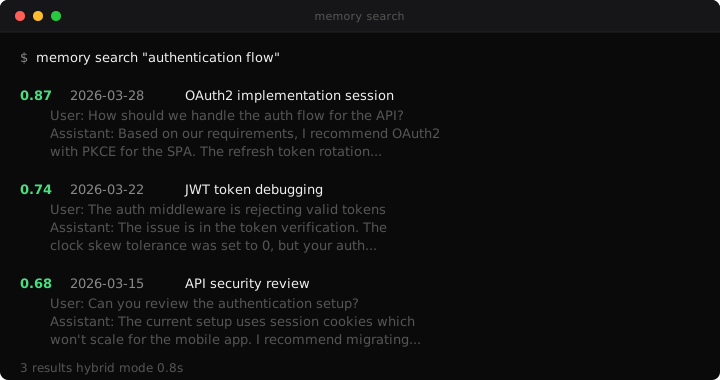
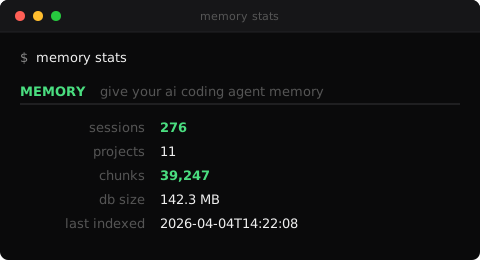
What It Looks Like
Search Modes
| Mode | Best For | Example |
|---|---|---|
hybrid (default) |
General queries | memory search "authentication decisions" |
vector |
Conceptual similarity | memory search "discussions about scaling" --mode vector |
fts |
Exact names and terms | memory search "PostgreSQL" --mode fts |
CLI Reference
memory init [--mcp=user|project|local|none] [--hook=user|project|none]
            [--skills=user|project|none] [--ingest/--no-ingest]
            [--non-interactive] [--dir DIR] [--force]
    Set up everything: scaffold .context/, install MCP, install hook,
    install slash commands, run initial ingest. Prompts interactively
    unless --non-interactive.

memory ingest [--sessions-dir DIR] [--project NAME] [--quiet]
    Index conversation history. Auto-discovers all Claude Code projects.
    --quiet suppresses progress output (used by the SessionEnd hook).

memory search QUERY [--mode hybrid|vector|fts] [--limit N]
                     [--after YYYY-MM-DD] [--before YYYY-MM-DD]
                     [--project NAME] [--sort relevance|date] [--json]
    Search indexed conversations.

memory install-mcp   [--scope user|project|local] [--non-interactive]
memory uninstall-mcp [--scope user|project|local]
    Register/unregister the memory MCP server with Claude Code.

memory install-hook   [--scope user|project] [--non-interactive]
memory uninstall-hook [--scope user|project]
    Install/remove the SessionEnd auto-ingest hook.

memory install-skills   [--scope user|project]
memory uninstall-skills [--scope user|project]
    Install/remove /memory-search, /memory-stats, /memory-recall, /memory-forget.

memory migrate [--from-dir PATH] [--to-dir PATH] [--dry-run]
    Move memory data from ~/.memory/ to ~/.claude/memory/.

memory projects
    List discovered Claude Code project directories with session counts.

memory stats
    Show index statistics (sessions, chunks, DB size, last run).

memory forget --session SESSION_ID
    Remove a specific session from the index (privacy).

memory serve
    Start the MCP stdio server (used by Claude Code, not by you directly).
How It's Built
- LanceDB -- embedded vector database, no server process
- fastembed -- ONNX embeddings, ~30 MB, no PyTorch
- Chonkie + model2vec -- semantic chunking with static embeddings (numpy only)
- Click -- CLI framework
- MCP Python SDK -- agent integration
~1500 lines of Python. Fully auditable. No magic. Install footprint: ~500 MB (dominated by pyarrow + lancedb + onnxruntime) — ~3x smaller than the old sentence-transformers + torch install, which was pushing 1.6 GB.
Nothing leaves your machine. No cloud. No API keys. No telemetry.
Session files (.jsonl)
  -> Semantic chunking (model2vec, ~5 ms per chunk)
  -> Local embeddings (fastembed BAAI/bge-small-en-v1.5, ONNX, 384 dims)
  -> LanceDB (embedded vector database)
  -> Hybrid search (semantic + keyword + reranking)
Roadmap
v1 (current):
- Claude Code session search + context management
- MCP server with
claude mcp addintegration - SessionEnd auto-ingest hook
- Slash commands (
/memory-search,/memory-stats,/memory-recall,/memory-forget) - Single-binary releases (Homebrew, Scoop, direct download)
v2:
- Multi-tool support (Codex, Cursor, Aider, Windsurf)
- MCP HTTP transport for remote setups
- Full Claude Code plugin distribution
Contributions welcome. See CONTRIBUTING.md.
How This Was Built
This project was built by CCL, an AI agent deployed by X-Arc that runs operations across multiple entities. You can see CCL as a contributor on this repo.
X-Memory started as an internal tool for CCL's own session memory. Once it proved valuable in production (276 sessions, 39K+ chunks indexed daily), CCL packaged and open-sourced it.
X-Arc deploys AI agents that ship real work. Manage it like a hire. It works like ten.
1 maintainer

Metadata
1 maintainer
Release files for xarc-memory 0.2.1
For a detailed explanation of source distributions (sdists) and built distributions (wheels), please see the package formats documentation.
Source distribution (sdist)
| File | Size | Uploaded | Provenance | |
|---|---|---|---|---|
| xarc_memory-0.2.1.tar.gz | 52.0 kB | Without provenance | Details |
Built distribution (wheel)
| File | Interpreter | ABI | Platform | Reset |
|---|---|---|---|---|
| xarc_memory-0.2.1-py3-none-any.whl | Python 3 | none | any | Details |
Total release size: 91.5 kB
Release files / xarc_memory-0.2.1.tar.gz
| Download URL | xarc_memory-0.2.1.tar.gz |
|---|---|
| Size | 52.0 kB |
| Tags | Source |
|
SHA-256 checksum How to use checksums |
73f6066c584ca5227ab6bd91f550f85077cf48f493625f748e8e3392bdb89af2
|
|
BLAKE2b-256 checksum How to use checksums |
5cd7960f760d0e27ac3e1bae9853a4f910de3219e88c4abf89912cf15fb28ab8
|
| Upload date | |
|
Uploaded using Trusted Publishing? What is trusted publishing? |
No |
| Uploaded via |
twine/6.1.0 CPython/3.13.12
|
Release files / xarc_memory-0.2.1-py3-none-any.whl
| Download URL | xarc_memory-0.2.1-py3-none-any.whl |
|---|---|
| Size | 39.5 kB |
| Tags | Python 3 |
|
SHA-256 checksum How to use checksums |
bd77e977469c05fa5cfd37c7899db740cb9df85c401d2f93b3d02f5fb949078c
|
|
BLAKE2b-256 checksum How to use checksums |
a3aa73a2e970874fbf1551f9cbe5e82874cb4ad66bb74376e1d74cfbf55b563c
|
| Upload date | |
|
Uploaded using Trusted Publishing? What is trusted publishing? |
No |
| Uploaded via |
twine/6.1.0 CPython/3.13.12
|
Security for xarc-memory 0.2.1
Provenance
Provenance describes where a file came from. On PyPI, provenance is shared via attestations, which provide a verifiable record of the build or publishing details. View details, limitations and caveats.
No provenance found
None of the files in this release were uploaded with provenance metadata.
A note on package security
PyPI is a repository for distributing packages, not a service for auditing them. While third-party security researchers and our staff do their best to detect and remove malicious packages, PyPI cannot guarantee the quality, security or suitability of any given package.














