
Introduction
xbot is a lightweight, easy-to-use, and extensible test automation framework.
Installation
Install xbot via pip:
pip install xbot.framework
Type xbot --help to check:
$ xbot --help
usage: xbot [-h] [-d DIRECTORY] [-b TESTBED] [-s TESTSET] [-f {verbose,brief}] [-v] {init,run}

positional arguments:
{init,run}

optional arguments:
-h, --help            show this help message and exit
-d DIRECTORY, --directory DIRECTORY
                        directory to init (required by `init` command)
-b TESTBED, --testbed TESTBED
                        testbed filepath (required by `run` command)
-s TESTSET, --testset TESTSET
                        testset filepath (required by `run` command)
-f {verbose,brief}, --outfmt {verbose,brief}
                        output format (option for `run` command, options: verbose/brief, default: brief)
-v, --version         show program's version number and exit
Getting Started
Initialize a test project:
$ xbot init -d ./testproj
Initialized ./testproj
The test project directory structure:
./testproj
├── README.md
├── lib  # test libraries
│   ├── __init__.py
│   ├── testbed.py  # testbed base
│   └── testcase.py  # testcase base
├── requirements.txt
├── testbeds  # directory storing testbeds
│   └── testbed_example.yml
├── testcases  # directory storing testcases
│   ├── __init__.py
│   └── examples
│       ├── __init__.py
│       ├── nonpass
│       │   ├── __init__.py
│       │   ├── tc_eg_nonpass_error_clsname.py
│       │   ├── tc_eg_nonpass_error_syntax.py
│       │   ├── tc_eg_nonpass_fail_setup_with_failfast_false.py
│       │   ├── tc_eg_nonpass_fail_setup_with_failfast_true.py
│       │   ├── tc_eg_nonpass_fail_step_with_failfast_false.py
│       │   ├── tc_eg_nonpass_fail_step_with_failfast_true.py
│       │   ├── tc_eg_nonpass_skip_excluded.py
│       │   ├── tc_eg_nonpass_skip_not_included.py
│       │   └── tc_eg_nonpass_timeout.py
│       └── pass
│           ├── __init__.py
│           ├── tc_eg_pass_create_dirs_and_files.py
│           └── tc_eg_pass_get_values_from_testbed.py
└── testsets  # directory storing testsets
    └── testset_example.yml
Testbed example(testbeds/testbed_example.yml):
# Testbed is used to store the information about the test environment.
# The information can be accessed by self.testbed.get() in the testcases.
example:
  key1: value1
  key2:
    key2-1: value2-1
    key2-2: value2-2
  key3:
    - value3-1
    - value3-2
    - value3-3
  key4:
    - name: jack
      age: 20
    - name: tom
      age: 30
Testset example(testsets/testset_example.yml):
# Testset is used to organize testcases to be executed.
tags:  # `exclude` has higher priority than `include`.
  include:  # Include testcases with these tags.
    - tag1
  exclude:  # Exclude testcases with these tags.
    - tag2
paths:
  - testcases/examples/pass/tc_eg_pass_get_values_from_testbed.py
  - testcases/examples/pass/tc_eg_pass_create_dirs_and_files.py
  # Recursively include all testcases in the directory,
  # only match files with the prefix 'tc_' and suffix '.py'.
  - testcases/examples/nonpass/
Run the testcases(must execute under the test project directory):
$ xbot run -b testbeds/testbed_example.yml -s testsets/testset_example.yml
(1/11)   PASS     0:00:01  tc_eg_pass_get_values_from_testbed
(2/11)   PASS     0:00:01  tc_eg_pass_create_dirs_and_files
(3/11)   ERROR    0:00:00  tc_eg_nonpass_error_clsname
(4/11)   ERROR    0:00:00  tc_eg_nonpass_error_syntax
(5/11)   FAIL     0:00:01  tc_eg_nonpass_fail_setup_with_failfast_false
(6/11)   FAIL     0:00:01  tc_eg_nonpass_fail_setup_with_failfast_true
(7/11)   FAIL     0:00:01  tc_eg_nonpass_fail_step_with_failfast_false
(8/11)   FAIL     0:00:01  tc_eg_nonpass_fail_step_with_failfast_true
(9/11)   SKIP     0:00:00  tc_eg_nonpass_skip_excluded
(10/11)  SKIP     0:00:00  tc_eg_nonpass_skip_not_included
(11/11)  TIMEOUT  0:00:03  tc_eg_nonpass_timeout

report: /Users/wan/CodeProjects/xbot.framework/testproj/logs/testbed_example/2024-07-02_12-19-43/report.html
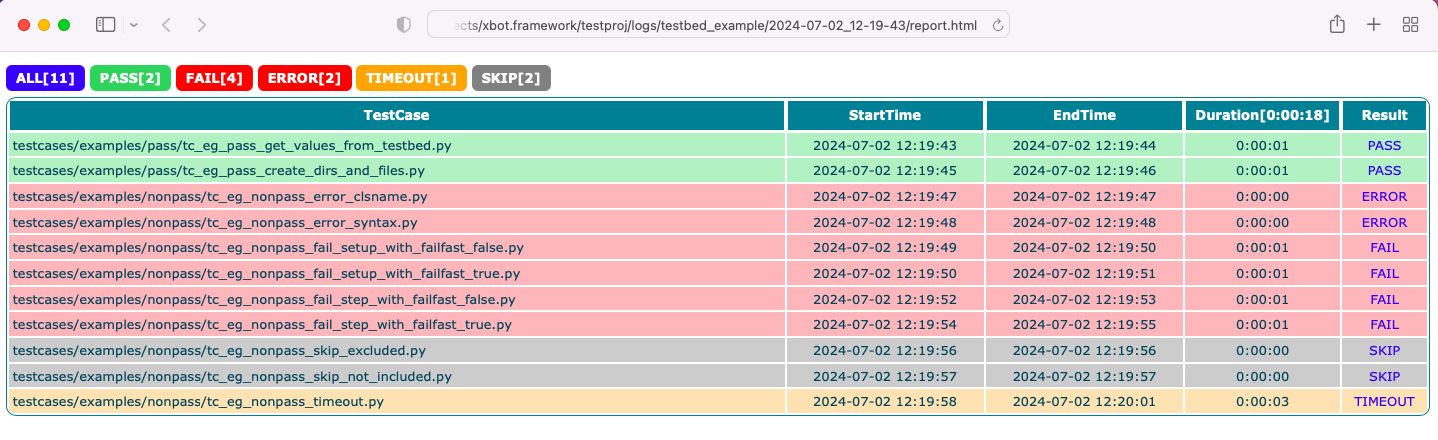
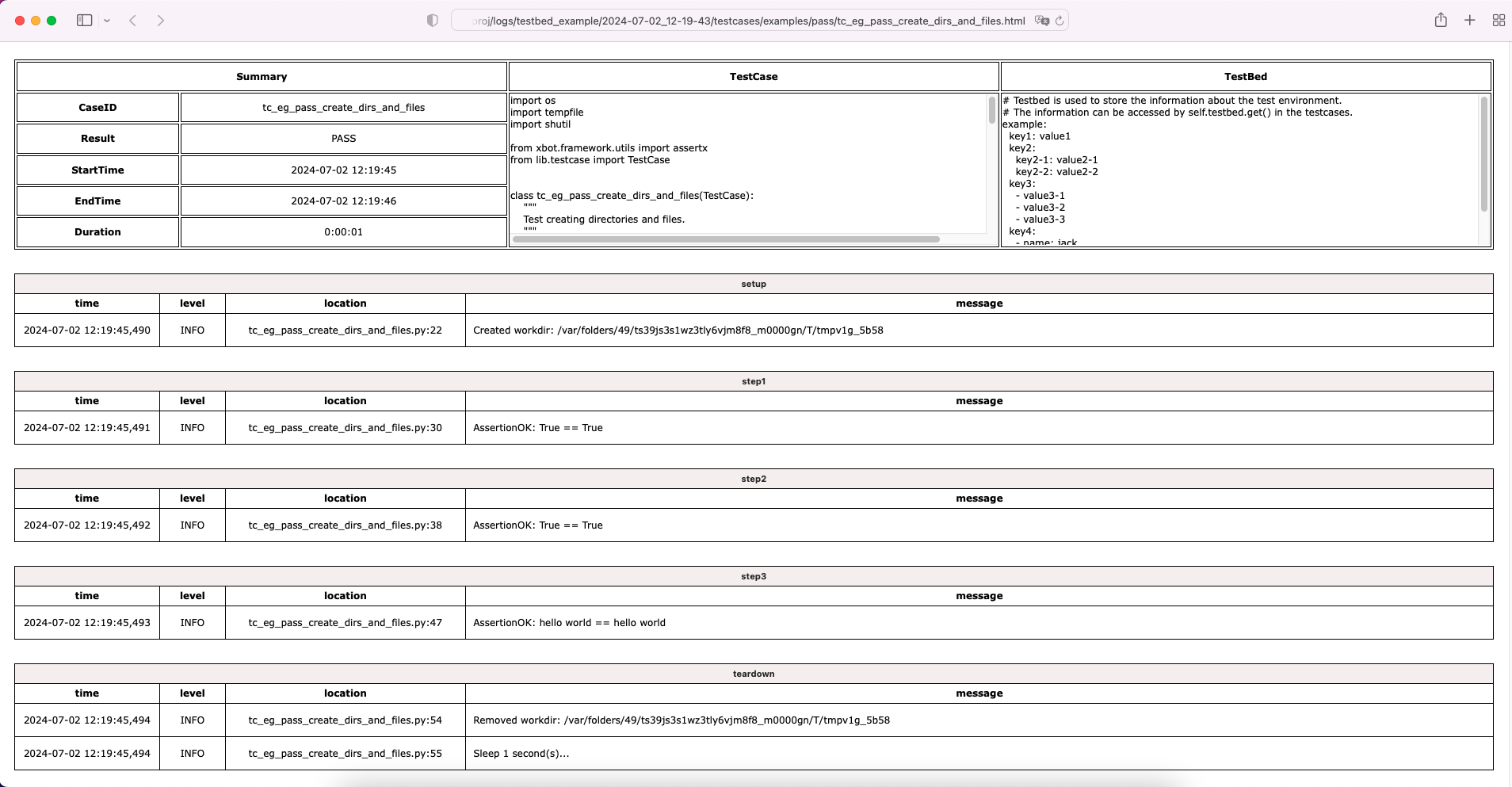
Test report and logs will be generated in the logs subdirectory.
Example report:
Example log:
Testcase Development
Testcases are stored in the testcases subdirectory, below is a example(testcases/examples/pass/tc_eg_pass_create_dirs_and_files.py):
import os
import tempfile
import shutil

from xbot.framework.utils import assertx
from lib.testcase import TestCase


class tc_eg_pass_create_dirs_and_files(TestCase):
    """
    Test creating directories and files.
    """
    TIMEOUT = 60
    FAILFAST = True
    TAGS = ['tag1']

    def setup(self):
        """
        Prepare test environment.
        """
        self.workdir = tempfile.mkdtemp()
        self.info('Created workdir: %s', self.workdir)

    def step1(self):
        """
        Create a subdirectory 'dir' under the temporary working directory and check if it is created successfully.
        """
        self.dir1 = os.path.join(self.workdir, 'dir1')
        os.mkdir(self.dir1)
        assertx(os.path.exists(self.dir1), '==', True)

    def step2(self):
        """
        Create an empty file 'file1' under 'dir1' and check if it is created successfully.
        """
        self.file1 = os.path.join(self.dir1, 'file1')
        open(self.file1, 'w').close()
        assertx(os.path.exists(self.file1), '==', True)

    def step3(self):
        """
        Write 'hello world' to 'file1' and check if it is written successfully.
        """
        with open(self.file1, 'w') as f:
            f.write('hello world')
        with open(self.file1, 'r') as f:
            assertx(f.read(), '==', 'hello world')

    def teardown(self):
        """
        Clean up test environment.
        """
        shutil.rmtree(self.workdir)
        self.info('Removed workdir: %s', self.workdir)
        self.sleep(1)
- Testcase
MUSTinherit from theTestCasebase class; - Testcase
MUSTimplement the preset steps in the setup method, write pass if there are no specific steps; - Testcase
MUSTimplement the cleanup steps in the teardown method, write pass if there are no specific steps; - Test steps are named in the form of
step1, step2, ..., the number at the end is the execution order; - The
TIMEOUTattribute defines the maximum execution time of the testcase(unit:seconds), the testcase will be forced to end and the result will be set to TIMEOUT if it exceeds the time limit; - When
FAILFASTattribute is True, the subsequent test steps will be skipped and the teardown will be executed immediately if a test step fails; - The
TAGSattribute defines the testcase tags, which can be used to filter testcases to be executed in the testset;
Test libraries development
Test libraries are stored in the lib subdirectory, write the test libraries according to the business requirements, import and use them in the testcases.
Plugins
| Name | Description |
|---|---|
| xbot.plugins.ssh | SSH library for xbot.framework |
| xbot.plugins.pgsql | PostgreSQL library for xbot.framework |
| xbot.plugins.docker | Docker library for xbot.framework |
简介
xbot 是一个 轻量、易用、可扩展 的自动化测试框架。
安装
使用 pip 进行安装:
pip install xbot.framework
安装成功后即可调用 xbot 命令:
$ xbot --help
usage: xbot [-h] [-d DIRECTORY] [-b TESTBED] [-s TESTSET] [-f {verbose,brief}] [-v] {init,run}

positional arguments:
{init,run}

optional arguments:
-h, --help            show this help message and exit
-d DIRECTORY, --directory DIRECTORY
                        directory to init (required by `init` command)
-b TESTBED, --testbed TESTBED
                        testbed filepath (required by `run` command)
-s TESTSET, --testset TESTSET
                        testset filepath (required by `run` command)
-f {verbose,brief}, --outfmt {verbose,brief}
                        output format (option for `run` command, options: verbose/brief, default: brief)
-v, --version         show program's version number and exit
入门
初始化工程目录:
$ xbot init -d ./testproj
Initialized ./testproj
工程目录结构如下:
./testproj
├── README.md
├── lib  # 测试库目录
│   ├── __init__.py
│   ├── testbed.py  # 测试床基类
│   └── testcase.py  # 测试用例基类
├── requirements.txt
├── testbeds  # 测试床目录
│   └── testbed_example.yml
├── testcases  # 测试用例目录
│   ├── __init__.py
│   └── examples
│       ├── __init__.py
│       ├── nonpass
│       │   ├── __init__.py
│       │   ├── tc_eg_nonpass_error_clsname.py
│       │   ├── tc_eg_nonpass_error_syntax.py
│       │   ├── tc_eg_nonpass_fail_setup_with_failfast_false.py
│       │   ├── tc_eg_nonpass_fail_setup_with_failfast_true.py
│       │   ├── tc_eg_nonpass_fail_step_with_failfast_false.py
│       │   ├── tc_eg_nonpass_fail_step_with_failfast_true.py
│       │   ├── tc_eg_nonpass_skip_excluded.py
│       │   ├── tc_eg_nonpass_skip_not_included.py
│       │   └── tc_eg_nonpass_timeout.py
│       └── pass
│           ├── __init__.py
│           ├── tc_eg_pass_create_dirs_and_files.py
│           └── tc_eg_pass_get_values_from_testbed.py
└── testsets  # 测试套目录
    └── testset_example.yml
测试床示例(testbeds/testbed_example.yml):
# Testbed is used to store the information about the test environment.
# The information can be accessed by self.testbed.get() in the testcases.
example:
  key1: value1
  key2:
    key2-1: value2-1
    key2-2: value2-2
  key3:
    - value3-1
    - value3-2
    - value3-3
  key4:
    - name: jack
      age: 20
    - name: tom
      age: 30
测试套示例(testsets/testset_example.yml):
# Testset is used to organize testcases to be executed.
tags:  # `exclude` has higher priority than `include`.
  include:  # Include testcases with these tags.
    - tag1
  exclude:  # Exclude testcases with these tags.
    - tag2
paths:
  - testcases/examples/pass/tc_eg_pass_get_values_from_testbed.py
  - testcases/examples/pass/tc_eg_pass_create_dirs_and_files.py
  # Recursively include all testcases in the directory,
  # only match files with the prefix 'tc_' and suffix '.py'.
  - testcases/examples/nonpass/
执行测试(测试工程目录下执行命令):
$ xbot run -b testbeds/testbed_example.yml -s testsets/testset_example.yml
(1/11)   PASS     0:00:01  tc_eg_pass_get_values_from_testbed
(2/11)   PASS     0:00:01  tc_eg_pass_create_dirs_and_files
(3/11)   ERROR    0:00:00  tc_eg_nonpass_error_clsname
(4/11)   ERROR    0:00:00  tc_eg_nonpass_error_syntax
(5/11)   FAIL     0:00:01  tc_eg_nonpass_fail_setup_with_failfast_false
(6/11)   FAIL     0:00:01  tc_eg_nonpass_fail_setup_with_failfast_true
(7/11)   FAIL     0:00:01  tc_eg_nonpass_fail_step_with_failfast_false
(8/11)   FAIL     0:00:01  tc_eg_nonpass_fail_step_with_failfast_true
(9/11)   SKIP     0:00:00  tc_eg_nonpass_skip_excluded
(10/11)  SKIP     0:00:00  tc_eg_nonpass_skip_not_included
(11/11)  TIMEOUT  0:00:03  tc_eg_nonpass_timeout

report: /Users/wan/CodeProjects/xbot.framework/testproj/logs/testbed_example/2024-07-02_12-19-43/report.html
执行完成后会在测试工程下根据测试床名称和时间戳生成日志目录保存 html 格式的用例日志和测试报告。
测试报告:
用例日志:
用例开发
测试用例存放在工程目录的 testcases 子目录下,以下为 testcases/examples/pass/tc_eg_pass_create_dirs_and_files.py 用例内容:
import os
import tempfile
import shutil

from xbot.framework.utils import assertx
from lib.testcase import TestCase


class tc_eg_pass_create_dirs_and_files(TestCase):
    """
    Test creating directories and files.
    """
    TIMEOUT = 60
    FAILFAST = True
    TAGS = ['tag1']

    def setup(self):
        """
        Prepare test environment.
        """
        self.workdir = tempfile.mkdtemp()
        self.info('Created workdir: %s', self.workdir)

    def step1(self):
        """
        Create a subdirectory 'dir' under the temporary working directory and check if it is created successfully.
        """
        self.dir1 = os.path.join(self.workdir, 'dir1')
        os.mkdir(self.dir1)
        assertx(os.path.exists(self.dir1), '==', True)

    def step2(self):
        """
        Create an empty file 'file1' under 'dir1' and check if it is created successfully.
        """
        self.file1 = os.path.join(self.dir1, 'file1')
        open(self.file1, 'w').close()
        assertx(os.path.exists(self.file1), '==', True)

    def step3(self):
        """
        Write 'hello world' to 'file1' and check if it is written successfully.
        """
        with open(self.file1, 'w') as f:
            f.write('hello world')
        with open(self.file1, 'r') as f:
            assertx(f.read(), '==', 'hello world')

    def teardown(self):
        """
        Clean up test environment.
        """
        shutil.rmtree(self.workdir)
        self.info('Removed workdir: %s', self.workdir)
        self.sleep(1)
- 用例
必须继承自 TestCase 基类; - 用例
必须在 setup 方法内实现预置步骤,如无具体步骤则写 pass; - 用例
必须在 teardown 方法内实现清理步骤,如无具体步骤则写 pass; - 测试步骤以
step1, step2, ...这样的方式命名,末尾数字为执行顺序; TIMEOUT属性定义测试用例最大执行时长(单位:秒),超过该时长将被强制结束且置结果为 TIMEOUT;FAILFAST属性为 True 时,当某个测试步骤失败时,则会跳过后续测试步骤立即执行清理步骤;TAGS属性定义用例 标签,可用于测试套中对待执行测试用例列表进行筛选;
测试库开发
测试库存放在工程目录的 lib 子目录下,根据业务开发所需测试库放入该目录下,然后在测试用例中导入使用即可。
插件
| Name | Description |
|---|---|
| xbot.plugins.ssh | SSH library for xbot.framework |
| xbot.plugins.pgsql | PostgreSQL library for xbot.framework |
| xbot.plugins.docker | Docker library for xbot.framework |
1 maintainer

Metadata
1 maintainer
Release files for xbot.framework 0.5.2
For a detailed explanation of source distributions (sdists) and built distributions (wheels), please see the package formats documentation.
Source distribution (sdist)
| File | Size | Uploaded | |
|---|---|---|---|
| xbot_framework-0.5.2.tar.gz | 324.4 kB | Details |
Built distribution (wheel)
| File | Interpreter | ABI | Platform | Reset |
|---|---|---|---|---|
| xbot_framework-0.5.2-py3-none-any.whl | Python 3 | none | any | Details |
Total release size: 657.3 kB
Release files / xbot_framework-0.5.2.tar.gz
| Download URL | xbot_framework-0.5.2.tar.gz |
|---|---|
| Size | 324.4 kB |
| Tags | Source |
|
SHA-256 checksum How to use checksums |
8297918ab1c7555a17be7f8864fa1eb0b790b26cf7e0a4b98d3936eb625bfc5f
|
|
BLAKE2b-256 checksum How to use checksums |
caa112538503ceebb70c3fa1618aa926224682341479b9ce6b3f31438d128502
|
| Upload date | |
|
Uploaded using Trusted Publishing? What is trusted publishing? |
No |
| Uploaded via |
twine/6.2.0 CPython/3.10.20
|
Release files / xbot_framework-0.5.2-py3-none-any.whl
| Download URL | xbot_framework-0.5.2-py3-none-any.whl |
|---|---|
| Size | 332.9 kB |
| Tags | Python 3 |
|
SHA-256 checksum How to use checksums |
3b6c44f7c0abb04ed8439c915186c709352832d71f190790fc78c68b1bb77efb
|
|
BLAKE2b-256 checksum How to use checksums |
1df6271650f2230ee34dc90459200742e5e3790855b03962f5aae02141cffa0f
|
| Upload date | |
|
Uploaded using Trusted Publishing? What is trusted publishing? |
No |
| Uploaded via |
twine/6.2.0 CPython/3.10.20
|














