
XCGUI for Python


介绍
- 本库封装自炫彩界面库,功能丰富(1000多个API接口),简单易用,轻量级,高度DIY自定义,支持一键换肤。
- 炫彩界面库是由C/C++语言开发:软件运行效率高,不需要第三方库的支持,不依赖MFC,ATL,WINDOWS标准控件等。
- DirectUI设计思想:在窗口内没有子窗口,界面元素都是逻辑上的区域(无HWND句柄,安全,灵活),所有UI元素都是自主开发(不受系统限制),更加灵活的实现各种程序界面,满足不同用户的需求。
- 拥有免费的UI设计器:快速开发工具,所见即所得,高度自定义系统(DIY),让UI开发变的更加简单。
- 支持Direct2D,硬件加速,能更大程度的发挥硬件特性,创建高性能,高质量的2D图形。
- 有完善的中文官方文档:中文官方文档
获取
pip install xcgui
国内源安装
pip install -i https://pypi.tuna.tsinghua.edu.cn/simple xcgui
可视化UI设计器
使用UI设计器可以快速设计界面,节省大量代码。
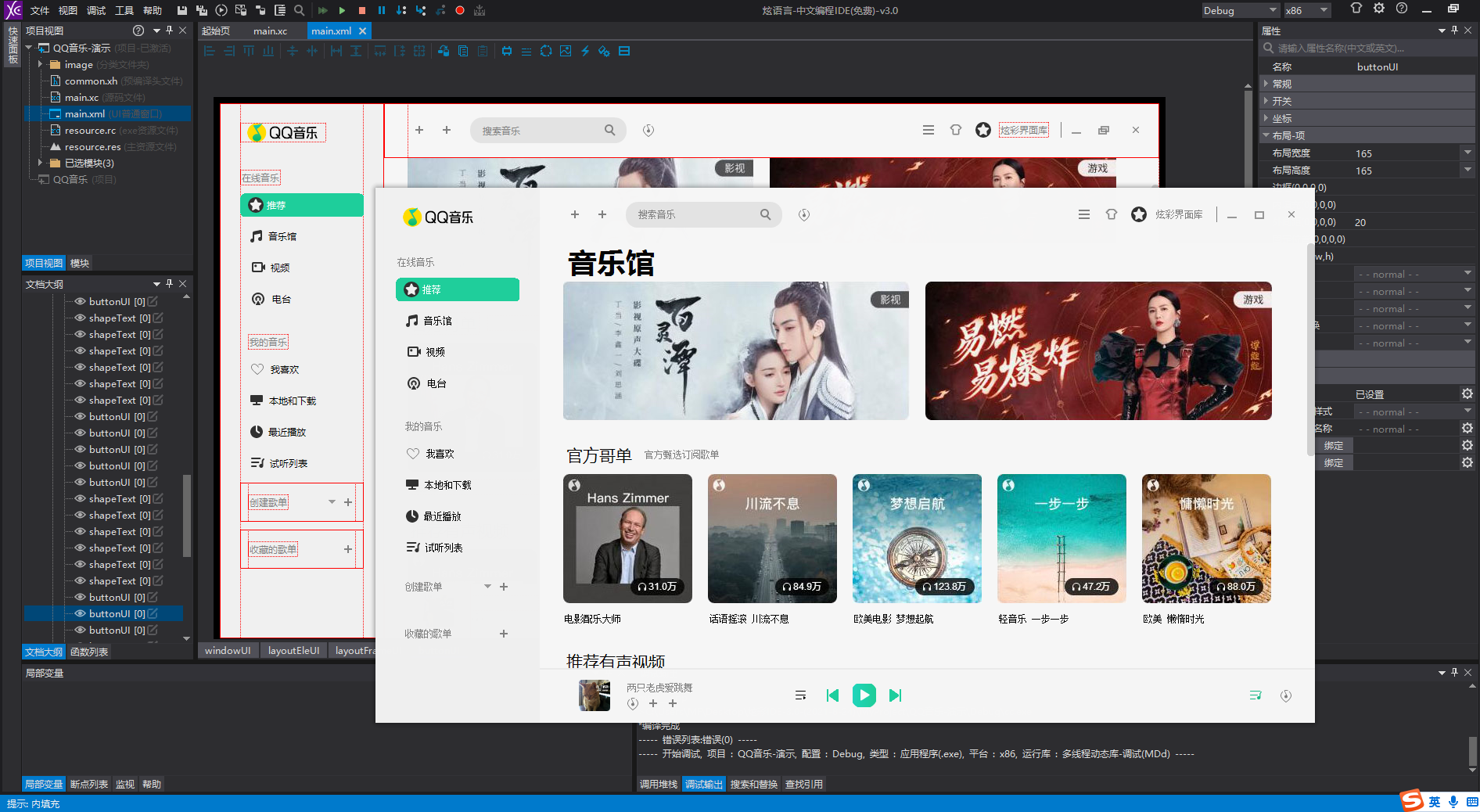
[设计器使用例子]只有这么多代码:
from xcgui import XApp, XWindow, XDesigner

app = XApp()
app.enableDPI(True)
XDesigner.loadResource("baidu\\resource.res")


class BaiduWindow(XWindow):
    def __init__(self):
        super(BaiduWindow, self).__init__()
        self.loadLayout("baidu\\main.xml")


window = BaiduWindow()
window.showWindow()
app.run()
app.exit()
简单窗口(纯代码)
# -*- coding: utf8 -*-
import xcgui
from xcgui import XApp, XWindow, XButton, XEdit


class DemoWindow(XWindow):
    def __init__(self):
        super(DemoWindow, self).__init__(400, 300, "XCGUI界面库 for python")
        self.enableLayout(True)
        self.setAlignV(xcgui.layout_align_center)
        self.setAlignH(xcgui.layout_align_center)
        self.enableHorizon(False)
        self.setSpace(20)
        self.btn = XButton(100, 30, "测试", self)
        self.btn.regEvent(xcgui.XE_BNCLICK, self.onBtnClick)
        self.edit = XEdit(200, 30, self)

    def onBtnClick(self, event, userdata):
        self.edit.setText("你好,世界!")
        self.edit.redraw(True)


def main():
    app = XApp()
    app.enableDPI(True)
    window = DemoWindow()
    window.showWindow()
    app.run()
    app.exit()


if __name__ == '__main__':
    main()
1 maintainer

Metadata
1 maintainer
Release files for xcgui 0.1.9
For a detailed explanation of source distributions (sdists) and built distributions (wheels), please see the package formats documentation.
Built distributions (wheels)
| File | Reset | |||
|---|---|---|---|---|
| xcgui-0.1.9-cp314-cp314-win_amd64.whl | CPython 3.14 | CPython 3.14 | Windows x86-64 | Details |
| xcgui-0.1.9-cp313-cp313-win_amd64.whl | CPython 3.13 | CPython 3.13 | Windows x86-64 | Details |
| xcgui-0.1.9-cp312-cp312-win_amd64.whl | CPython 3.12 | CPython 3.12 | Windows x86-64 | Details |
| xcgui-0.1.9-cp311-cp311-win_amd64.whl | CPython 3.11 | CPython 3.11 | Windows x86-64 | Details |
| xcgui-0.1.9-cp310-cp310-win_amd64.whl | CPython 3.10 | CPython 3.10 | Windows x86-64 | Details |
| xcgui-0.1.9-cp39-cp39-win_amd64.whl | CPython 3.9 | CPython 3.9 | Windows x86-64 | Details |
Total release size: 10.1 MB
Release files / xcgui-0.1.9-cp314-cp314-win_amd64.whl
| Download URL | xcgui-0.1.9-cp314-cp314-win_amd64.whl |
|---|---|
| Size | 1.7 MB |
| Tags | CPython 3.14 Windows x86-64 |
|
SHA-256 checksum How to use checksums |
f3d8d44abd78c74b87298db7cfa99632ae02ad1a7a499aa0b68a7dfa345bf984
|
|
BLAKE2b-256 checksum How to use checksums |
e3cfa7e14177ecd791367b5c001e122f1adfda3527437ec1884d6479061cede8
|
| Upload date | |
|
Uploaded using Trusted Publishing? What is trusted publishing? |
No |
| Uploaded via |
twine/6.2.0 CPython/3.11.3
|
Release files / xcgui-0.1.9-cp313-cp313-win_amd64.whl
| Download URL | xcgui-0.1.9-cp313-cp313-win_amd64.whl |
|---|---|
| Size | 1.7 MB |
| Tags | CPython 3.13 Windows x86-64 |
|
SHA-256 checksum How to use checksums |
d03326945f5a3fafa43042af715d83690e9e51446f4f49253053c7e411da0136
|
|
BLAKE2b-256 checksum How to use checksums |
e948988c2d0d1d05d7fd0c0319a5d5d324a5f7c41a2d597cbb84e5cd4159273a
|
| Upload date | |
|
Uploaded using Trusted Publishing? What is trusted publishing? |
No |
| Uploaded via |
twine/6.2.0 CPython/3.11.3
|
Release files / xcgui-0.1.9-cp312-cp312-win_amd64.whl
| Download URL | xcgui-0.1.9-cp312-cp312-win_amd64.whl |
|---|---|
| Size | 1.7 MB |
| Tags | CPython 3.12 Windows x86-64 |
|
SHA-256 checksum How to use checksums |
e09005253596acd4d2728f7bceebfbd09f0c26cc83ac6e61c0f7fc36638da60d
|
|
BLAKE2b-256 checksum How to use checksums |
9dbf690daf6117b92ebd3d1a4dbd6ae1f881dab58074a52c86a7570e5278fb6a
|
| Upload date | |
|
Uploaded using Trusted Publishing? What is trusted publishing? |
No |
| Uploaded via |
twine/6.2.0 CPython/3.11.3
|
Release files / xcgui-0.1.9-cp311-cp311-win_amd64.whl
| Download URL | xcgui-0.1.9-cp311-cp311-win_amd64.whl |
|---|---|
| Size | 1.7 MB |
| Tags | CPython 3.11 Windows x86-64 |
|
SHA-256 checksum How to use checksums |
ee8081ad56c9d56ae6bd3e2dc0dae849dc4411bfb70bade9c1de6e3d2be32e13
|
|
BLAKE2b-256 checksum How to use checksums |
dabd749c71916b400a05b9c188bdbd5403a1bf8e44899237d04e715e1076c0e6
|
| Upload date | |
|
Uploaded using Trusted Publishing? What is trusted publishing? |
No |
| Uploaded via |
twine/6.2.0 CPython/3.11.3
|
Release files / xcgui-0.1.9-cp310-cp310-win_amd64.whl
| Download URL | xcgui-0.1.9-cp310-cp310-win_amd64.whl |
|---|---|
| Size | 1.7 MB |
| Tags | CPython 3.10 Windows x86-64 |
|
SHA-256 checksum How to use checksums |
bf39c4406334d1669c3d3d68cbfeef436a840b9207e648137963ac992fead434
|
|
BLAKE2b-256 checksum How to use checksums |
ea459b62d24e7dff5e5364a881d3ec0e6f6a1ef20ac4b8bb751091a5942c6f2e
|
| Upload date | |
|
Uploaded using Trusted Publishing? What is trusted publishing? |
No |
| Uploaded via |
twine/6.2.0 CPython/3.11.3
|
Release files / xcgui-0.1.9-cp39-cp39-win_amd64.whl
| Download URL | xcgui-0.1.9-cp39-cp39-win_amd64.whl |
|---|---|
| Size | 1.7 MB |
| Tags | CPython 3.9 Windows x86-64 |
|
SHA-256 checksum How to use checksums |
6439511164d51246ee422e0fc6d560afa2f2fb5478391c34276e79af2c81b759
|
|
BLAKE2b-256 checksum How to use checksums |
0467fb6f4fde89209b9740d06ce764cfa51818fc03deac2d795e26739daa3aa3
|
| Upload date | |
|
Uploaded using Trusted Publishing? What is trusted publishing? |
No |
| Uploaded via |
twine/6.2.0 CPython/3.11.3
|














