
xcoding by @c7s89r — a local-model coding agent. Claude Code, but powered by Ollama or llama.cpp.

Project description
xcoding · by @c7s89r
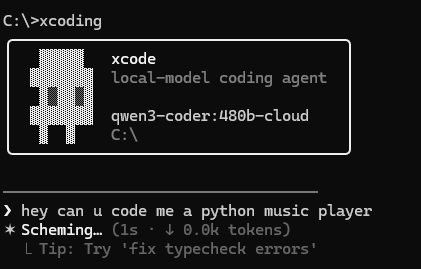
A local-model coding agent by @c7s89r — like Claude Code, but it talks to a model running on your own machine instead of a cloud API.
✅ Works with Ollama for now. Just install Ollama, pull a tool-capable model, then
pip install xcodingand runxcoding. (llama.cpp support is in too, but Ollama is the tested path.)
It auto-detects whichever backend is running, gives the model tools to read/write
files and run shell commands, and loops until your task is done. Every file write
and every shell command asks for your approval first.
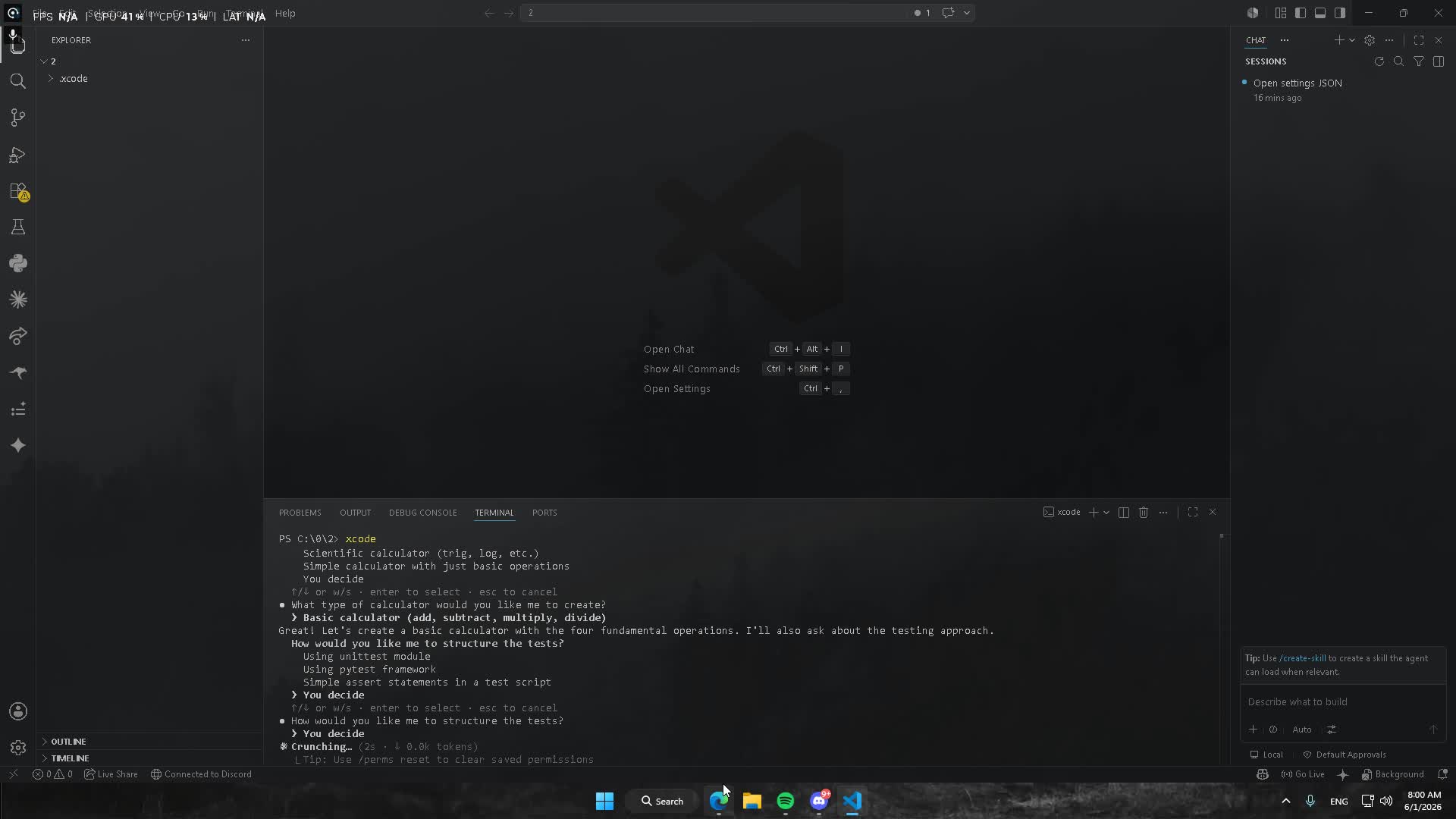
Quick start (Ollama)
ollama serve
ollama pull qwen2.5-coder     # a model that's good at tool use
pip install xcoding
xcoding
Install
pip install xcoding
Then just run xcoding from any project folder.
Or from source:
pip install -e .
(Python 3.9+. Pulls in openai, httpx, rich.)
xcoding: command not found after installing?
Install worked, but your shell can't find the command? This almost always
means pip put the xcoding launcher in its Scripts folder, which isn't on
your PATH. (Having python on PATH is not the same thing — the launcher
lives in a separate directory.) pip usually prints a warning about this during
install, e.g. "The script xcoding.exe is installed in '...\Scripts' which is
not on PATH."
Two ways to fix it:
-
Just run it as a module (works whenever
pythonis on PATH):python -m xcode
-
Put pip's scripts folder on PATH. Find where it is:
pip show -f xcoding                                          # lists installed files
python -c "import sysconfig; print(sysconfig.get_path('scripts'))"
Add that printed folder to your
PATH, then open a new terminal. Typical locations:- Windows:
%APPDATA%\Python\Python3X\Scripts(user install) or...\PythonXX\Scriptsnext topython.exe - macOS/Linux:
~/.local/bin
On Windows you can also reinstall without
--userso the launcher lands next topython.exe, or usepy -m pip install xcoding. - Windows:
Run a backend
Ollama (easiest — supports tool-calling natively):
ollama serve
ollama pull qwen2.5-coder        # a model that's good at tool use
llama.cpp (raw GGUF files):
llama-server -m your-model.gguf # listens on :8080, OpenAI-compatible
Tool-calling quality depends heavily on the model. Use a model trained for it (e.g.
qwen2.5-coder,llama3.1,mistral-nemo). Tiny models will struggle.
Use it
xcoding
# same thing:  xcode
# or:          python -m xcode
xcoding and xcode are interchangeable — type whichever you like.
Then just talk to it:
› add a /health endpoint to app.py that returns {"ok": true}
Type / to see every command. There's a full Claude-Code-style set:
/help, /model, /models, /auto, /theme, /vim, /status, /cost,
/doctor, /config, /mcp, /agents, /init, /memory, /todos, /perms,
/export, /compact, /clear, /sessions, /resume, /reset, /upgrade,
/release-notes, /bug, /login, /logout, /privacy, /terminal-setup,
/exit.
- Press
escwhile it's replying to interrupt — it stops mid-thought and hands the prompt back, just like Claude Code. - 16 color themes — run
/themeto browse the gallery,/theme nordto switch (ghost, matrix, dracula, ember, mono, nord, gruvbox, solarized, neon, ocean, rose, sunset, ice, forest, vapor, coffee). - Replies stream live; the prompt shows a context meter (
~3.2k/8k). - Writes/commands ask
y / n / a; a ("always") is saved to.xcode/permissions.json. Edits show a colored diff preview. - Attach files inline with
@path(e.g.explain @xcode/agent.py). - The agent tracks a todo list for multi-step work (
/todosto view). - Old turns are auto-compacted when the context meter fills;
/compactforces it. Conversations are saved per project —xcoding --resumeor/resumeto pick up where you left off. - Drop an XCODE.md at the repo root (or run
/init) and it's auto-loaded as project memory.
Modes (shift+tab to cycle)
- ·· normal — asks before writes/commands
- ⏵⏵ auto — runs & writes without asking
- ◷ plan — read-only; explores but makes no changes
Sub-agents, web, MCP, hooks
spawn_agentlets the model delegate an isolated subtask to a fresh context.web_search(DuckDuckGo) andweb_fetchgive it internet access.- Drop a
.xcode/settings.jsonto add hooks (run a formatter after every edit), env vars, seed permissions, and declare MCP servers:
{
  "hooks": { "after_edit": ["ruff format {path}"] },
  "permissions": { "commands": ["git", "ls", "python"] },
  "mcpServers": {
    "fs": { "command": "npx",
            "args": ["-y", "@modelcontextprotocol/server-filesystem", "."] }
  }
}
MCP tools show up to the model as mcp__<server>__<tool>.
Headless / scripting
xcoding -p "summarize what this repo does"        # read-only, prints, exits
xcoding -p "bump the version to 0.2.0" --yes      # auto-approve writes
xcoding -p "what changed?" --resume               # continue last session
Configuration (env vars)
| var | meaning |
|---|---|
XCODE_BASE_URL |
point straight at any OpenAI-compatible /v1 URL |
XCODE_MODEL |
force a specific model name |
XCODE_API_KEY |
token if your endpoint needs one (default local) |
XCODE_MAX_STEPS |
max tool round-trips per turn (default 25) |
How it works
cli.py       REPL + permission prompts (the only UI code)
agent.py     the loop: model ⇄ tools until it stops calling tools
backends.py  auto-detect Ollama (:11434) / llama.cpp (:8080)
tools.py     read_file, write_file, list_dir, run_command + JSON schemas
config.py    system prompt + knobs
Roadmap
- Streaming token output
-
edit_file(targeted edits instead of full rewrites) -
grep/glob_filessearch tools - Persistent permission rules ("always allow
git …") -
/modelpicker + smart default-model selection - Context compaction for long sessions + context meter
- Diff-style preview when confirming edits
- Project memory (XCODE.md) +
/init - Todo/task tracking
- Session save +
--resume - Headless mode (
-p) +@filementions - Web fetch / web search tools
- Sub-agents (delegate a subtask to a fresh context)
- MCP server support
- Hooks + settings.json
- Themes + ghost logo, shift+tab mode cycling (normal/auto/plan)
Made by
Built by @c7s89r (nzv).
- GitHub: @c7s89r
- Discord:
c7s89r
MIT licensed — see LICENSE.
Release history Release notifications | RSS feed


Download files
Download the file for your platform. If you're not sure which to choose, learn more about installing packages.
Source Distribution
Built Distribution
Filter files by name, interpreter, ABI, and platform.
If you're not sure about the file name format, learn more about wheel file names.
Copy a direct link to the current filters
File details
Details for the file xcoding-0.1.7.tar.gz.
File metadata
- Download URL: xcoding-0.1.7.tar.gz
- Upload date:
- Size: 43.6 kB
- Tags: Source
- Uploaded using Trusted Publishing? No
- Uploaded via: twine/6.2.0 CPython/3.12.7
File hashes
| Algorithm | Hash digest | |
|---|---|---|
| SHA256 |
bbbb04ee0855637e4187cbf3af5c1abf63ec16096a83bdd6e73d3b8a0fa6f132
|
|
| MD5 |
989e543897b7d58df42feeca18642828
|
|
| BLAKE2b-256 |
1466b2797d80c1c099e2f8a8c5edea2fade7d0e6185dc2bea4ed71f1d60741f4
|
File details
Details for the file xcoding-0.1.7-py3-none-any.whl.
File metadata
- Download URL: xcoding-0.1.7-py3-none-any.whl
- Upload date:
- Size: 45.6 kB
- Tags: Python 3
- Uploaded using Trusted Publishing? No
- Uploaded via: twine/6.2.0 CPython/3.12.7
File hashes
| Algorithm | Hash digest | |
|---|---|---|
| SHA256 |
6bd4c069a8271a170f00a1b5a0bd6fe2ee1d2884d590efee408f15f16f33c44c
|
|
| MD5 |
d0425241ffbb58f0de849ede0cac60b0
|
|
| BLAKE2b-256 |
ad46bb7a76c98012f8304e1ca4c610e14ffed5c3365fd03d50c455e81c947f34
|






