
xcshot
Real iOS simulator screenshots from Linux (or Windows, or anything). No Mac,
no Xcode, no xcresulttool.
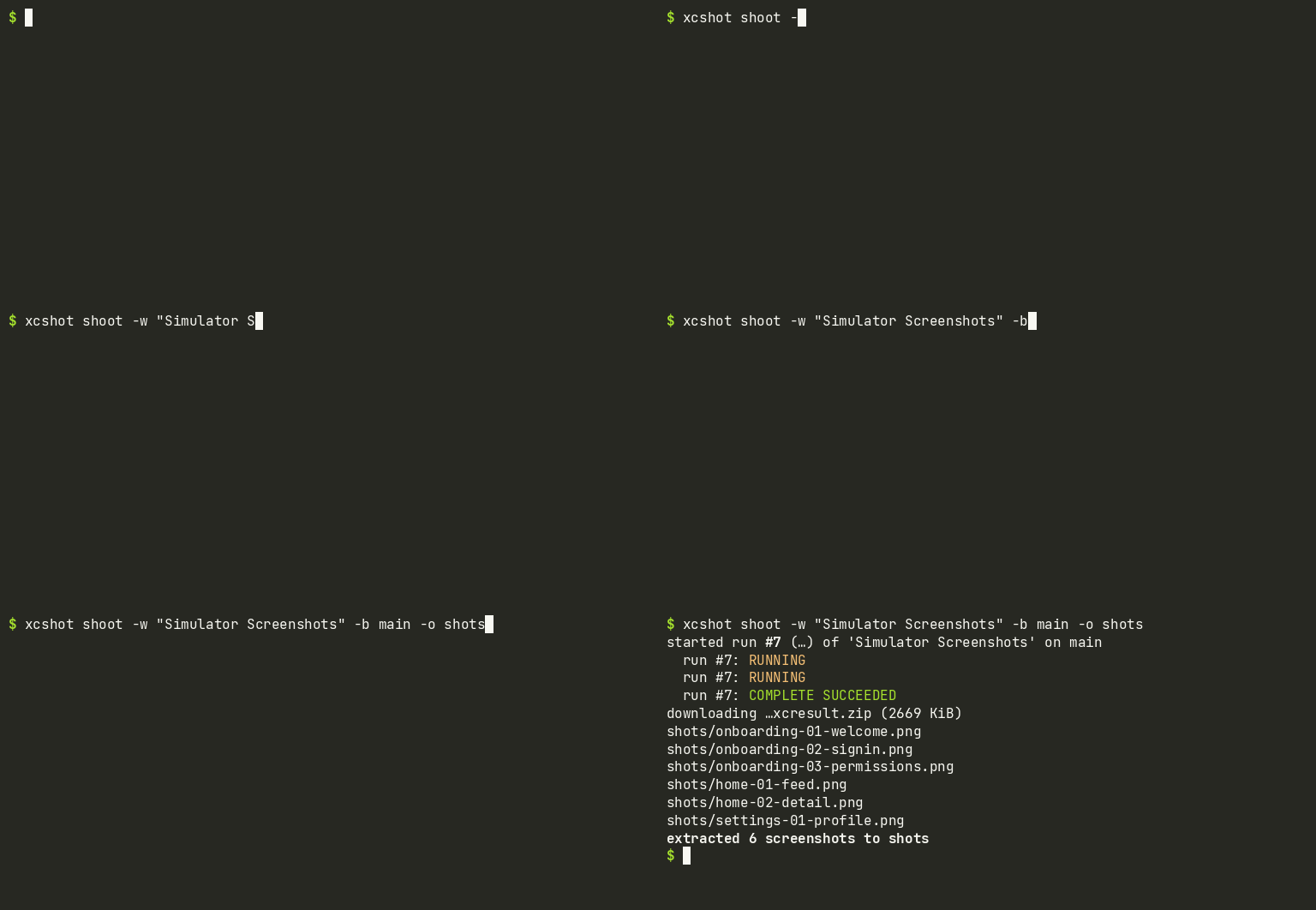
xcshot drives Xcode Cloud through
the App Store Connect API: it triggers a UI-test workflow on an Apple-hosted
simulator, waits, downloads the .xcresult artifact, and extracts labeled
PNG screenshots — entirely with portable Python.
Why this exists
Every existing .xcresult tool (xcparse, XCResultKit, xcresultparser, …) is
Swift and shells out to Apple's xcresulttool, so they only run on macOS.
But an xcresult's Data/ directory is just a content-addressed store of raw
or zstd-compressed blobs — and a PNG can carry its own name in a tEXt
chunk. So xcshot's extractor byte-scans the store for PNG magic, reads the
embedded names, and writes labeled files. Any OS, no Apple tooling.
Pair that with Xcode Cloud (25 free compute hours/month with an Apple Developer membership) and a $200 laptop can see a real iOS app running on a real simulator.
Install
pipx install xcshot # or: pip install xcshot
Commands
| command | what it does |
|---|---|
xcshot extract <bundle.xcresult> -o dir |
extract labeled PNGs from any xcresult — fully offline |
xcshot products -w |
list your Xcode Cloud products and workflows |
xcshot runs <workflow> |
list recent build runs |
xcshot pull --latest -w <workflow> |
download + extract an existing run's screenshots |
xcshot shoot -w <workflow> -b <branch> |
trigger → wait → download → extract, one command |
xcshot workflow-create --product <id> --scheme <s> --container <p> |
create the manual-start simulator TEST workflow via API |
Auth: three env vars (ASC_API_KEY_ID, ASC_API_ISSUER_ID,
ASC_API_KEY_P8). See docs/SETUP.md for the full
walkthrough, including the one-time Xcode Cloud onboarding (the only step
that ever needs Xcode) and the
templates/Screenshots.swift UI-test capture
template. Running from CI instead of a laptop? There's a copy-pasteable
GitHub Actions recipe. Agents: there's a ready-made
Agent Skill.
MCP server
Agents can use xcshot as MCP tools:
pip install "xcshot[mcp]" and point your client at the xcshot-mcp
command. See docs/mcp.md for client config and the tool list.
What it is / isn't
- Is: a way to get real simulator pixels from a machine that can't run a simulator — for visual review, App Store listing shots, agents, docs.
- Isn't: an interactive dev loop. Each shot is a ~10-minute Xcode Cloud round trip; you can't tap on things between frames. Unsigned builds, hot reload, and on-device installs are a different problem (see ios-builder).
Requirements
- Apple Developer Program membership (Xcode Cloud requires it; the free tier is 25 compute hours/month ≈ ~150 screenshot runs).
- A native Xcode project with a UI-test target (generated projects work via a
ci_scripts/ci_post_clone.shhook — see SETUP.md). - One-time product onboarding in Xcode: the ASC API can create workflows
but not products (no
POST /v1/ciProducts), so the very first link between app and Xcode Cloud needs Xcode once. Mac-free forever after.
License
MIT
1 maintainer

Download files
Download the file for your platform. If you're not sure which to choose, learn more about installing packages.
Source Distribution
Built Distribution
Filter files by name, interpreter, ABI, and platform.
If you're not sure about the file name format, learn more about wheel file names.
Copy a direct link to the current filters
File details
Details for the file xcshot-0.2.0.tar.gz.
File metadata
- Download URL: xcshot-0.2.0.tar.gz
- Upload date:
- Size: 74.7 kB
- Tags: Source
- Uploaded using Trusted Publishing? No
- Uploaded via:
twine/7.0.0 CPython/3.10.12
File hashes
| Algorithm | Hash digest | |
|---|---|---|
| SHA256 |
0bf6d6e8754f8e03e4f2dc77756e8c89f98fe6ace5e56c138b36b59b718f999f
|
|
| MD5 |
29c410f3e19a3e1571cbeaf697eba56e
|
|
| BLAKE2b-256 |
cf84f89a4b5503b9145bfb0292c8d0bb606dccca217b7626fa4476d18ab840c8
|
File details
Details for the file xcshot-0.2.0-py3-none-any.whl.
File metadata
- Download URL: xcshot-0.2.0-py3-none-any.whl
- Upload date:
- Size: 17.6 kB
- Tags: Python 3
- Uploaded using Trusted Publishing? No
- Uploaded via:
twine/7.0.0 CPython/3.10.12
File hashes
| Algorithm | Hash digest | |
|---|---|---|
| SHA256 |
a9282f90aca4d2bac11038d87495de99f8babe2da4a213c04162d5a53b565c32
|
|
| MD5 |
6cf05c8b470ea73d55fdbc805e72e10e
|
|
| BLAKE2b-256 |
70097883d21ff4821f964361517e08e850d710b7698da1ead861e81a009ee908
|







