
X-Diff
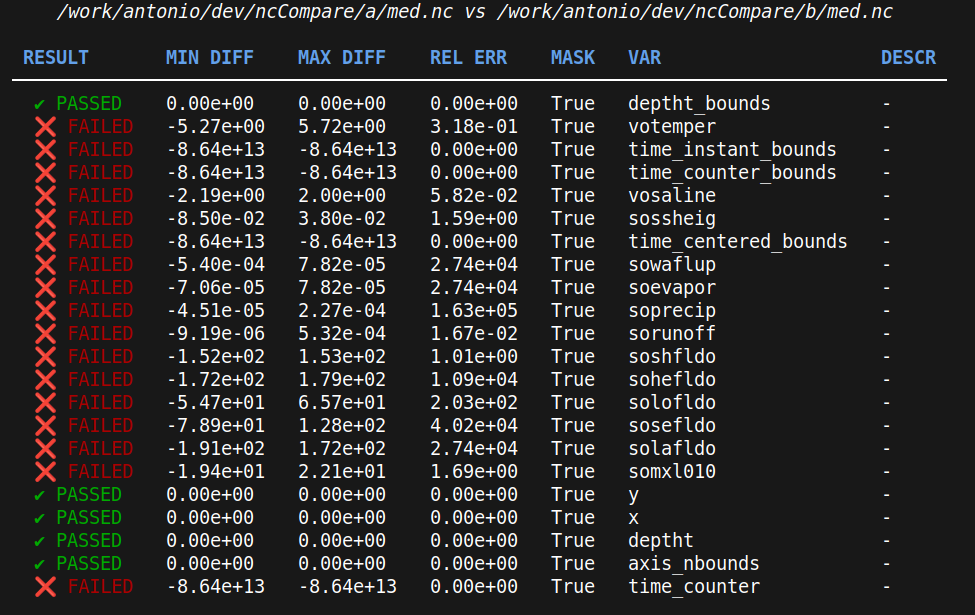
xdiff is the CLI for X-Diff, a general diff tool name where X can stand for different comparison targets.
Today, X-Diff supports detailed comparison of netCDF files and helps users identify differences between datasets stored
in netCDF format.



Installation
Install uv
Follow the official installer:
curl -LsSf https://astral.sh/uv/install.sh | sh
Install in a local virtual environment (recommended for development)
xdiff currently supports Python 3.11 through 3.14. Create the project-local environment and install dependencies from uv.lock with:
uv sync --python 3.14
Run the CLI through uv:
uv run xdiff --help
Install globally with uv tool
The package is published on PyPI as xdiffly; it installs the xdiff command.
uv tool install --python 3.14 xdiffly
uv tool install installs xdiffly in uv's global tool environment (similar to pipx), not inside this repository's .venv. After installation, run it as xdiff.
The base install runs serially and is intentionally lightweight. To enable Dask-backed parallel execution, install the optional dask extra:
uv tool install --python 3.14 "xdiffly[dask]"
The plot subcommand needs the optional plot extra (matplotlib for static images; holoviews/panel/bokeh/datashader for the live server):
uv tool install --python 3.14 "xdiffly[plot]"
Usage
From a source checkout, prefix commands with uv run. If you installed with uv tool install, use xdiff directly.
uv run xdiff [OPTIONS] COMMAND [ARGS]...

  Explore differences between datasets.

Options:
  --version   Show the version and exit.
  -h, --help  Show this message and exit.

Commands:
  dirs   Compare two directories of datasets.
  files  Compare two dataset files directly, even if their filenames differ.
  plot   Plot where two netCDF files differ (static image or live server).
Select Variables
It is possible to choose which parameter to compare:
uv run xdiff dirs folder1 folder2 -v votemper -v vosaline
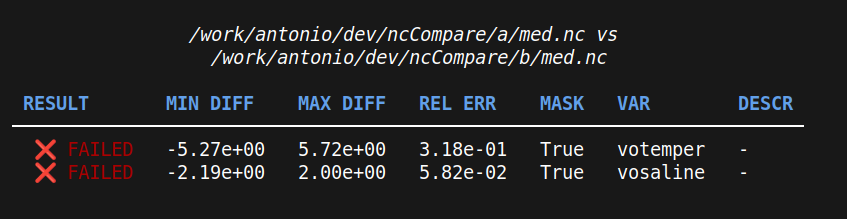
To compare variables that are named differently between the two inputs, use REF=CMP:
uv run xdiff files reference.nc comparison.nc -v thetao=votemper -v lon=longitude
Restrict to a lon/lat box
When two inputs share the same grid but cover different extents (e.g. a global file vs a regional subset), crop both to a common --bbox LON_MIN LON_MAX LAT_MIN LAT_MAX before comparing. Both 1-D (rectilinear) and 2-D (curvilinear, e.g. NEMO nav_lon/nav_lat) coordinates are supported:
uv run xdiff files global.nc regional.nc -v thetao --bbox -6 36 30 46
Inputs on different grids or resolutions need regridding first — that is out of scope for --bbox.
Plot where two files differ
xdiff plot turns the comparison from numbers into a picture of where two files differ. The difference is the focus — drawn on a diverging colormap centered at 0, so red/blue shows the sign of the disagreement. It reuses the comparison options — -v (including REF=CMP), --bbox, and --last-time-step — so you plot exactly what you would compare. Requires the plot extra.
Both modes draw a plain lon/lat map (no projection or coastlines): land is the data's own NaN mask, painted grey. There are two modes, selected by the presence of -o:
Static image — render the difference map (one full-size figure per variable) to a file and exit, for reports and scripting. The map is smoothly shaded and drawn with a latitude-corrected aspect so the domain is not distorted. The extension picks the format (.png, .pdf, .svg); with multiple variables the label is inserted into the filename (diff.png → diff_thetao.png, …):
uv run xdiff plot reference.nc comparison.nc -v thetao -o diff.png
Live interactive server — omit -o to start a local server, open the browser, and block until Ctrl-C. A sidebar drives everything: pick any variable in the file, step through time/depth levels, adjust the colour limit and colormap live (zoom preserved), toggle smooth ↔ blocks rendering, and optionally overlay a web-map basemap (Carto, OSM, Esri, …; needs internet). The difference is shown large and datashaded, so it re-aggregates server-side as you zoom (scroll to zoom) and scales to large grids; the min/max readout shows the true magnitude and hovering reads off values. The reference and comparison maps sit in a collapsed card at the bottom. Nothing is written to disk; when xdiff exits, the server stops.
uv run xdiff plot reference.nc comparison.nc -v thetao
The server binds localhost only. On a remote/HPC login node, forward the port over SSH and open the URL locally:
# on your laptop
ssh -L 5006:localhost:5006 user@login-node
# then, in that session
xdiff plot reference.nc comparison.nc -v thetao --no-open
# finally, open http://localhost:5006 in your local browser
Use --port N if 5006 is taken (a busy port fails immediately with a clear message — it is never silently moved, which would break the tunnel). --no-open skips launching a browser and just prints the URL, for headless sessions.
Filter files
By default xdiff iterates over all files in folder1 and expects to find them in folder2. Using filters, it is possible to select only a subset of input files. For example:
uv run xdiff dirs folder1 folder2 -f "*_grid_T.nc"
Compare files with different filenames
It is possible to compare two files with different filenames directly:
uv run xdiff files a/my-simu_19820101_grid_T.nc b/another-exp_19820101_grid_T.nc
For directory comparisons, files with different names can still be matched if they share a common substring. For example, given:
a/my-simu_19820101_grid_T.ncb/another-exp_19820101_grid_T.nc
Pass the common part as a regex pattern:
uv run xdiff dirs folder1 folder2 --common-pattern "\d{8}"
The pattern is matched against both filenames using re.findall. Two files are considered a pair when the
pattern produces the same match in both names — in this case the shared date 19820101.
Dask file-level execution
xdiff defaults to serial execution. Dask-backed file-level execution is opt-in and requires the optional dask extra (uv tool install "xdiffly[dask]", or uv sync --extra dask from a source checkout). See docs/dask.md for local-cluster and external-scheduler examples.
Testing
GitHub Actions runs the test suite on every pull request and on pushes to master. Coverage is uploaded from CI to Codecov, which powers the README coverage badge.
To run the same checks locally, install the project and dev dependencies with a single command:
uv sync --group dev
Then run the suite:
uv run pytest --cov --cov-report=term-missing --cov-report=xml
The Codecov badge will start showing a real percentage after the workflow runs successfully on GitHub and the repository is connected to Codecov.
Changelog
This repository uses towncrier for release notes. Every pull request must include a changelog entry under changes.d/ for user-facing changes, for example:
changes.d/123.bugfix.md
changes.d/124.doc.md
changes.d/+internal-cleanup.misc.md
Use the pull request number as the filename prefix when you want Towncrier to render a linked PR reference. With the current configuration, changes.d/123.bugfix.md will render as [#123] in CHANGES.md. Use + instead of a number when there is no associated PR to link.
Create a changelog entry with the Towncrier CLI:
uv run towncrier create 123.bugfix.md --content "Improved CLI filtering so directory comparisons skip unrelated files more reliably."
Create an orphan entry when there is no associated PR:
uv run towncrier create +internal-cleanup.misc.md --content "Cleaned up internal comparison helpers and simplified related tests."
If you omit --content, towncrier create will open your editor so you can write the entry interactively.
Validate or preview changelog entries locally with:
uv run towncrier build --draft --version 0.2.6
To mirror the CI-style branch check after committing or staging your changelog entry:
git fetch origin master:refs/remotes/origin/master
uv run towncrier check --compare-with origin/master --staged
Release notes are generated from release/X.Y.Z branches. Open a PR from release/X.Y.Z to master, and CI will:
- set
pyproject.tomlto versionX.Y.Z - run
towncrier build --yes --version X.Y.Z - commit the updated
CHANGES.mdand consumed changelog entries back to the release branch
In normal feature work, contributors should create entries with towncrier create and optionally preview them with towncrier build --draft. The final non-draft towncrier build --yes step is handled by the release workflow in .github/workflows/release-changelog.yml.
After the release PR is merged, merge master back into develop so the generated changelog and consumed entry deletions return to the integration branch.
Author
- Antonio Mariani (antonio.mariani@cmcc.it)
Contributing
Contributions are welcome! Please open an issue or submit a pull request for any improvements or bug fixes.
Contact
For any questions or suggestions, please open an issue on the project's GitHub repository.
1 maintainer

Metadata
1 maintainer
Release files for xdiffly 0.4.0
For a detailed explanation of source distributions (sdists) and built distributions (wheels), please see the package formats documentation.
Source distribution (sdist)
| File | Size | Uploaded | |
|---|---|---|---|
| xdiffly-0.4.0.tar.gz | 45.4 kB | Details |
Built distribution (wheel)
| File | Interpreter | ABI | Platform | Reset |
|---|---|---|---|---|
| xdiffly-0.4.0-py3-none-any.whl | Python 3 | none | any | Details |
Total release size: 105.6 kB
Release files / xdiffly-0.4.0.tar.gz
| Download URL | xdiffly-0.4.0.tar.gz |
|---|---|
| Size | 45.4 kB |
| Tags | Source |
|
SHA-256 checksum How to use checksums |
4e87acf9fb741197a7be618786ebade232bea686efada2df234e4ba94786c206
|
|
BLAKE2b-256 checksum How to use checksums |
988aaf7446993e15c38d7485f579235b5af0a4675d6353f4c664a3a0cc432f3a
|
| Upload date | |
|
Uploaded using Trusted Publishing? What is trusted publishing? |
Yes |
| Uploaded via |
uv/0.11.29 {"installer":{"name":"uv","version":"0.11.29","subcommand":["publish"]},"python":null,"implementation":{"name":null,"version":null},"distro":{"name":"Ubuntu","version":"24.04","id":"noble","libc":null},"system":{"name":null,"release":null},"cpu":null,"openssl_version":null,"setuptools_version":null,"rustc_version":null,"ci":true}
|
Release files / xdiffly-0.4.0-py3-none-any.whl
| Download URL | xdiffly-0.4.0-py3-none-any.whl |
|---|---|
| Size | 60.2 kB |
| Tags | Python 3 |
|
SHA-256 checksum How to use checksums |
4a2f49227db6b99bb0211d2d47b4b466429ac12471946833477ac77c60a3ad9e
|
|
BLAKE2b-256 checksum How to use checksums |
cb1052177aab45f85a95c08a1f781dba1ab147c2ab38b17536a2e8b6aeae2d34
|
| Upload date | |
|
Uploaded using Trusted Publishing? What is trusted publishing? |
Yes |
| Uploaded via |
uv/0.11.29 {"installer":{"name":"uv","version":"0.11.29","subcommand":["publish"]},"python":null,"implementation":{"name":null,"version":null},"distro":{"name":"Ubuntu","version":"24.04","id":"noble","libc":null},"system":{"name":null,"release":null},"cpu":null,"openssl_version":null,"setuptools_version":null,"rustc_version":null,"ci":true}
|














