
XED /TUI
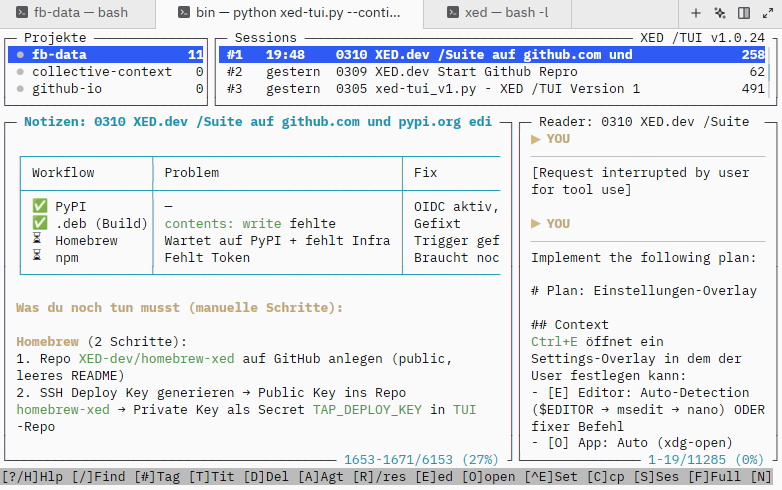
Browse, search and resume your Claude Code sessions — right in the terminal.
🇩🇪 Deutsche Version: de/README.md
Install
curl -fsSL https://tui.xed.dev/install.sh | bash
Or: pipx install xed-tui · uv tool install xed-tui · brew install xed-dev/xed/xed-tui
Requires: Claude Code installed · Python 3.11+ · Linux, macOS, or WSL
30-Second Demo
xed-tui          # browse all sessions
↑↓  Enter        # navigate and read
/schema           # search across everything
a                 # resume in Claude Code
e                 # write a note
?                 # help (DE/EN/FR/JA/ES)
Why XED /TUI?
| XED /TUI | Alternatives | |
|---|---|---|
| Dependencies | ✅ None (Python stdlib) | Go compiler / Node.js |
| Per-session notes | ✅ Smart sync | Not available |
| Markdown rendering | ✅ Bold, code, tables | Raw text |
| Multi-language | ✅ 5 languages | English only |
| Install time | ✅ ~5 seconds | Compile required |
Features
- 4-Panel Layout — Projects · Sessions · Reader · Notes
aResume — start Claude Code with--resume <uuid>(CWD automatic)rClipboard — copy/resume <uuid>for a running Claude Code instanceeNotes — per-session notes with auto-sync/Search — live full-text search across titles and notes#Tags — label sessions, filter by tag (/#bugfix)Ctrl+R— hot-reload, state preserved- Multi-language help — DE / EN / FR / JA / ES
→ Full documentation: Wiki · Quickstart · Keybindings
→ Landing page: tui.xed.dev · XED /Suite: xed.dev
Keybindings
| Key | Action |
|---|---|
↑↓ / j k |
Navigate |
Tab / ← → |
Switch panel |
Enter |
Open session |
a |
Resume in Claude Code |
e |
Edit note |
/ |
Search |
# |
Tags |
f / n / m |
Fullscreen / Notes / Swap |
? |
Help (5 languages) |
q |
Quit |
Backup
XED /TUI is strictly local — no cloud, no telemetry. The library lives under
~/.xed/tui/ (archive + state). If you want cross-machine sync or off-site
backups, use the tool of your choice:
- Syncthing — peer-to-peer sync of
~/.xed/tui/between your machines - rsync — periodic snapshots to an external drive or remote host
- git-annex — versioned history with large-file handling
This is an infrastructure decision, not a tool decision — XED /TUI ships no built-in sync on purpose.
Contribute
All languages welcome. → CONTRIBUTING.md · Issues · Discussions
Collective Context · MIT License
1 maintainer

Metadata
1 maintainer
Release files for xed-tui 1.26.6
For a detailed explanation of source distributions (sdists) and built distributions (wheels), please see the package formats documentation.
Source distribution (sdist)
| File | Size | Uploaded | Provenance | |
|---|---|---|---|---|
| xed_tui-1.26.6.tar.gz | 274.6 kB | With provenance | Details |
Built distribution (wheel)
| File | Interpreter | ABI | Platform | Reset |
|---|---|---|---|---|
| xed_tui-1.26.6-py3-none-any.whl | Python 3 | none | any | Details |
Total release size: 314.6 kB
Release files / xed_tui-1.26.6.tar.gz
| Download URL | xed_tui-1.26.6.tar.gz |
|---|---|
| Size | 274.6 kB |
| Tags | Source |
|
SHA-256 checksum How to use checksums |
c58aca9e27eeb6c318972c35b07a2c8d798b40009d3ccbdff7899584f9b2f786
|
|
BLAKE2b-256 checksum How to use checksums |
6ffab956cb33f4786026f50563344ba955561f9ccdffdf519be35d1e221588d3
|
| Upload date | |
|
Uploaded using Trusted Publishing? What is trusted publishing? |
Yes |
| Uploaded via |
twine/6.1.0 CPython/3.13.12
|
Provenance
Provenance describes where a file came from. On PyPI, provenance is shared via attestations, which provide a verifiable record of the build or publishing details. View details, limitations and caveats.


PyPI Publish Attestation
PyPI verified that this artifact, at this checksum, originated from the publisher listed below.
Signed by GitHub Actions, verified by PyPI on Apr 16, 2026.
Transparency logRelease files / xed_tui-1.26.6-py3-none-any.whl
| Download URL | xed_tui-1.26.6-py3-none-any.whl |
|---|---|
| Size | 40.0 kB |
| Tags | Python 3 |
|
SHA-256 checksum How to use checksums |
878b344fe53f5e0f3fcbc006af08cde0fc4e9674b84d49c2b91a251abe332809
|
|
BLAKE2b-256 checksum How to use checksums |
931c146937950dbaac1e61d3e7d65c7eab5a43545061691dd774c6d8ab8d203d
|
| Upload date | |
|
Uploaded using Trusted Publishing? What is trusted publishing? |
Yes |
| Uploaded via |
twine/6.1.0 CPython/3.13.12
|
Provenance
Provenance describes where a file came from. On PyPI, provenance is shared via attestations, which provide a verifiable record of the build or publishing details. View details, limitations and caveats.
PyPI Publish Attestation
PyPI verified that this artifact, at this checksum, originated from the publisher listed below.
Signed by GitHub Actions, verified by PyPI on Apr 16, 2026.
Transparency logSecurity for xed-tui 1.26.6
Provenance
Provenance describes where a file came from. On PyPI, provenance is shared via attestations, which provide a verifiable record of the build or publishing details. View details, limitations and caveats.
Full provenance
All 2 files in this release have been uploaded with provenance metadata.
Attestation for xed_tui-1.26.6.tar.gz
PyPI Publish Attestation
PyPI verified that this artifact, at this checksum, originated from the publisher listed below.
Signed by GitHub Actions, verified by PyPI on Apr 16, 2026.
Transparency logA note on package security
PyPI is a repository for distributing packages, not a service for auditing them. While third-party security researchers and our staff do their best to detect and remove malicious packages, PyPI cannot guarantee the quality, security or suitability of any given package.
To learn more about protecting yourself from malicious actors, visit our package security documentation.














