
 xFinder: Robust and Pinpoint Answer Extraction for Large Language Models







Qingchen Yu1,*, Zifan Zheng1,*, Shichao Song2,*, Zhiyu Li1,†, Feiyu Xiong1, Bo Tang1, Ding Chen1
1Institute for Advanced Algorithms Research, Shanghai, 2Renmin University of China
For business inquiries, please contact us at lizy@iaar.ac.cn.
🎯 Who Should Pay Attention to Our Work?
- If you are developing a Benchmark, you can use our xFinder to replace traditional RegEx methods for extracting key answers from LLM responses. This will help you improve the accuracy of your evaluation results, enabling more reliable and meaningful comparisons and validation of model performance.
- If you are a designer of evaluation frameworks, you can integrate our xFinder into your framework's answer extraction component to enhance the robustness and reliability of the evaluation process.
[!IMPORTANT]
🌟 Star Us! By starring our project on GitHub, you'll receive all release notifications instantly. We appreciate your support!
📢 News
- [2024/10] We have open-sourced the KAF-Dataset and released xFinder as a PyPI package.
- [2024/09] xFinder has been successfully integrated into OpenCompass! 🔥🔥🔥
- [2024/08] We updated xFinder: The model now supports processing both English and Chinese.
- [2024/05] We released xFinder: Robust and Pinpoint Answer Extraction for Large Language Models. Check out the paper.
Overview
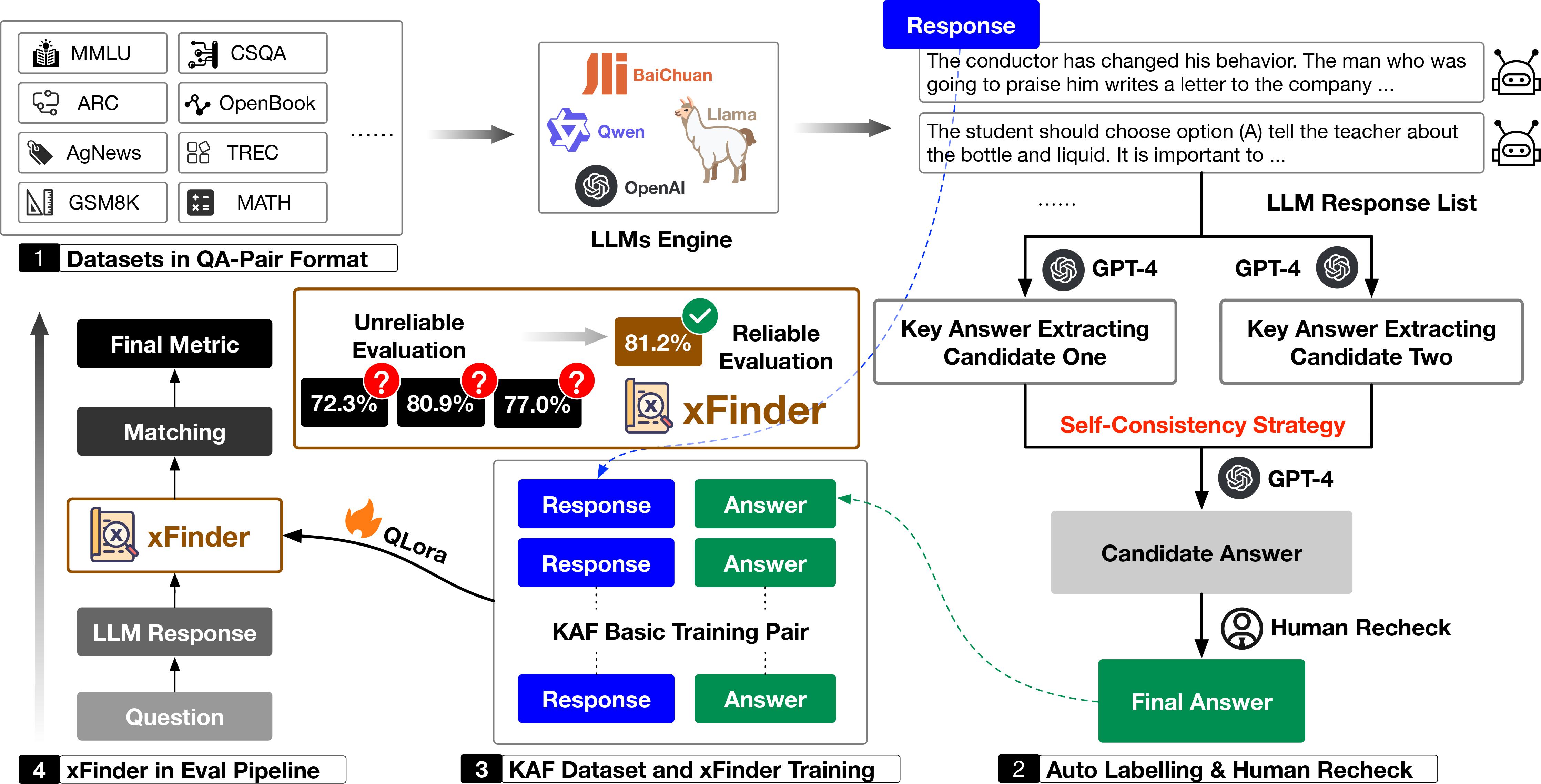
Abstract
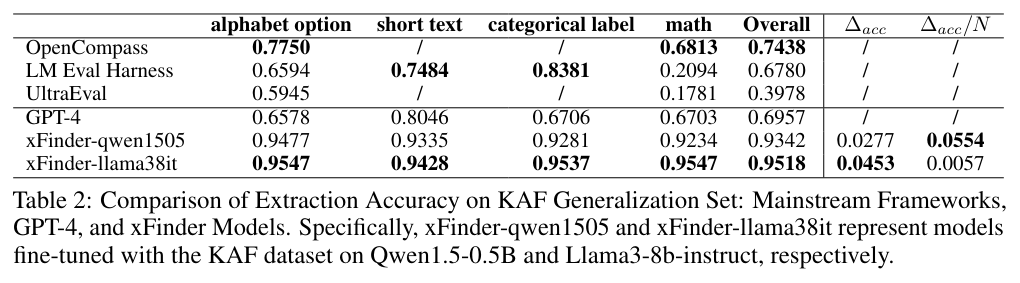
The continuous advancement of large language models (LLMs) has brought increasing attention to the critical issue of developing fair and reliable methods for evaluating their performance. Particularly, the emergence of subjective or non-subjective cheating phenomena, such as test set leakage and prompt format overfitting, poses significant challenges to the reliable evaluation of LLMs. Since evaluation frameworks often utilize Regular Expression (RegEx) for answer extraction, some models may adjust their responses to comply with specific formats that are easily extractable by RegEx. Nevertheless, the key answer extraction module based on RegEx frequently suffers from extraction errors. This paper conducts a comprehensive analysis of the entire LLM evaluation chain, demonstrating that optimizing the key answer extraction module can improve extraction accuracy, reduce LLMs' reliance on specific answer formats, and enhance the reliability of LLM evaluation. To address these issues, we propose xFinder, a model specifically designed for key answer extraction. As part of this process, we create a specialized dataset, the Key Answer Finder (KAF) dataset, to ensure effective model training and evaluation. Through generalization testing and evaluation in real-world scenarios, the results demonstrate that the smallest xFinder model with only 500 million parameters achieves an average answer extraction accuracy of 93.42%. In contrast, RegEx accuracy in the best evaluation framework is 74.38%. xFinder exhibits stronger robustness and higher accuracy compared to existing evaluation frameworks.We summarize our primary contributions as follows:
- We provide a comprehensive review of LLM evaluation processes in the industry, identifying critical factors that can lead to unreliable evaluation results.
- We introduce xFinder, a model specifically designed for key answer extraction. The KAF dataset supports its effective training and evaluation.
- In our extensive experiments, we demonstrate that RegEx-based evaluation methods are unreliable, while our xFinder model significantly improves reliability.
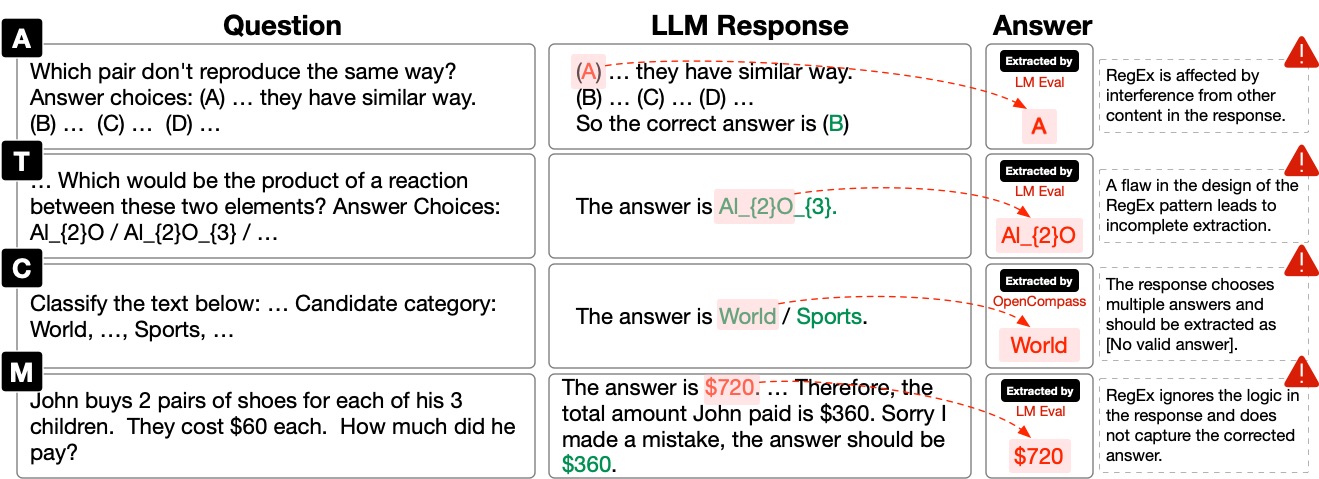
As shown in the figure, instances where evaluation frameworks such as LM Eval Harness and OpenCompass failed to extract key answers are illustrated. Specifically, A/T/C/M represent tasks with alphabet / short text / categorical label / math options, respectively.
Quick Start
-
Create Benchmark Dataset: To streamline the evaluation process using xFinder, we have standardized various mainstream benchmark datasets into a unified JSON format. For implementation details, refer to create_benchmark_dataset.py. If you wish to evaluate your own datasets using xFinder, please refer to our provided script template benchmark_dataset_template.py for format conversion guidance.
-
Prepare QA Pairs & LLM Outputs: Gather the LLM outputs you wish to evaluate. Ensure your data includes the following elements:
- Original question
- Key answer type (options: alphabet, short_text, categorical_label, math)
- LLM output
- Standard answer range
-
Deploy the xFinder Model: Select one of the following models for deployment:
After deploying the xFinder model, follow these steps to run an evaluation:
# Install xfinder
conda create -n xfinder_env python=3.10 -y
conda activate xfinder_env
pip install xfinder

# Perform an evaluation with xFinder (a built-in example)
CUDA_VISIBLE_DEVICES=0 python -m xfinder.eval --run-example --model-name xFinder-qwen1505 --inference-mode local --model-path-or-url /path/to/anonymized/model/xFinder-qwen1505
📊 xFinder supports two forms of evaluation
📚 Batch Evaluation of Summarized Experimental Results
This method allows you to evaluate multiple examples stored in a JSON file.
# Initialize Evaluator object
evaluator = Evaluator(
    model_name="xFinder-qwen1505",   # Model name
    inference_mode="api",            # Inference mode, 'local' or 'api'
    model_path_or_url="http://your-anonymized-url/generate",  # Anonymized model path or URL
)
# Perform batch evaluation
data_path = "/path/to/your/data/example.json"  # User needs to provide their own data path
accuracy = evaluator.evaluate(data_path)

print(f"Batch evaluation accuracy: {accuracy}")
📄 Single-Instance Evaluation Mode
This method allows you to evaluate individual examples, which can be integrated into a LLM evaluation framework.
# Initialize Evaluator object
evaluator = Evaluator(
    model_name="xFinder-qwen1505",   # Model name
    inference_mode="local",            # Inference mode, 'local' or 'api'
    model_path_or_url="IAAR-Shanghai/xFinder-qwen1505",  # Anonymized model path or URL
)
# Define input for a single evaluation
question = "What is the capital of France?"
llm_output = "The capital of France is Paris."
standard_answer_range = "[\"Paris\", \"Lyon\", \"Marseille\"]"
key_answer_type = "short_text"
correct_answer = "Paris"
# Perform single example evaluation
result = evaluator.evaluate_single_example(
    question,
    llm_output,
    standard_answer_range,
    key_answer_type,
    correct_answer
)
[!Tip]
- Refer to
demo.ipynbfor more detailed examples.- Run
export HF_ENDPOINT=https://hf-mirror.comto use the Chinese mirror if you cannot connect to Hugging Face.- xFinder currently supports loading via the API method deployed by vllm.
- We provide scripts for fine-tuning xFinder in xfinder_training.
Examples: RegEx vs. xFinder
We demonstrate instances across four types of questions where RegEx fails to extract or frequently extracts incorrect answers, whereas xFinder accurately extracts the key answers.
{
    "key_answer_type": "alphabet option",
    "question": "A man is seen playing guitar on a stage with others playing instruments behind him. The man grabs a guitar from the audience and begins playing both one after the other ...",
    "llm_output": "Option A is the correct choice as it describes ...",
    "standard_answer_range": "[['A', 'strums the guitar in the end, continues playing the guitar with the crowd following him as well as lining up next to him.'], ['B', 'continues playing the instruments and ends by waving to the crowd and walking off stage.'], ['C', 'then turns to the audience and gives a stuffed toy to the audience and continues playing.'], ['D', 'finally stops playing and moves his hands for the crowd to see.']]",
    "gold_label": "A",
    "xFinder_output": "A",
},
{
    "key_answer_type": "short text",
    "question": "If you really wanted a grape, where would you go to get it? Answer Choices: winery / fruit stand / field / kitchen / food",
    "llm_output": "The answer is winery / fruit stand / field / kitchen / food ...",
    "standard_answer_range": "[\"winery\", \"fruit stand\", \"field\", \"kitchen\", \"food\"]",
    "gold_label": "[No valid answer]",
    "xFinder_output": "[No valid answer]",
},
{
    "key_answer_type": "categorical label",
    "question": "How tall is the Sears Building ?",
    "llm_output": "The Sears Building is a specific structure, so the answer would be a Location ...",
    "standard_answer_range": "['Abbreviation', 'Entity', 'Description', 'Person', 'Location', 'Number']",
    "gold_label": "Location",
    "xFinder_output": "Location",
},
{
    "key_answer_type": "math",
    "question": " Mike made 69 dollars mowing lawns over the summer. If he spent 24 dollars buying new mower blades, how many 5 dollar games could he buy with the money he had left? ",
    "llm_output": "To find out how many 5 dollar ... Let's calculate that:\n\n$45 / $5 = 9\n\nSo, Mike could buy 9 5 dollar games with the money he had left.",
    "standard_answer_range": "a(n) number / set / vector / matrix / interval / expression / function / equation / inequality",
    "gold_label": "9",
    "xFinder_output": "9",
}
Results of Extraction Accuracy
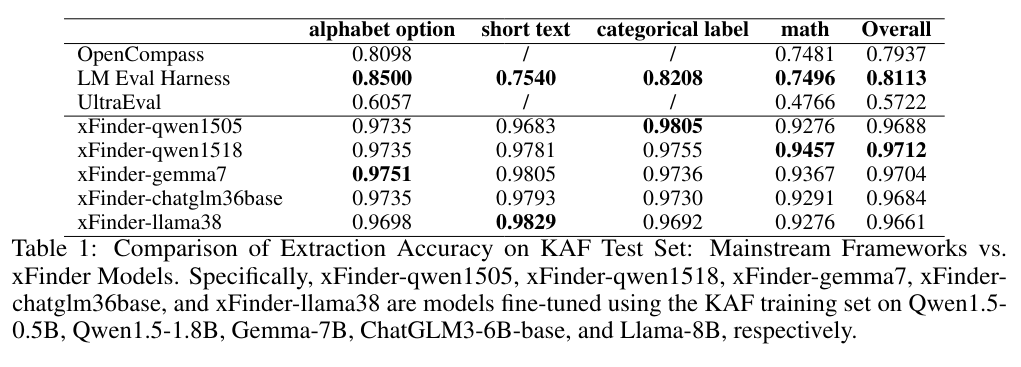
Baseline: OpenCompass, LM Eval Harness, UltraEval, GPT-4. Our Method: xFinder-qwen1505, xFinder-qwen1518, xFinder-gemma7, xFinder-chatglm36base, xFinder-llama38, xFinder-llama38it.
We evaluated their accuracy in extracting key answers from both the KAF test set and generalization sets. The metric in the table is accuracy.
Citation
@article{xFinder,
      title={xFinder: Robust and Pinpoint Answer Extraction for Large Language Models},
      author={Qingchen Yu and Zifan Zheng and Shichao Song and Zhiyu Li and Feiyu Xiong and Bo Tang and Ding Chen},
      journal={arXiv preprint arXiv:2405.11874},
      year={2024},
}
TODOs
Click me to show all TODOs
- feat: support quick replacement of RegEx in OpenCompass.
- feat: add additional example datasets to the xfinder PyPI package.
- feat: add model loading methods.
- docs: extend dataset construction documents.
- docs: add video tutorial.
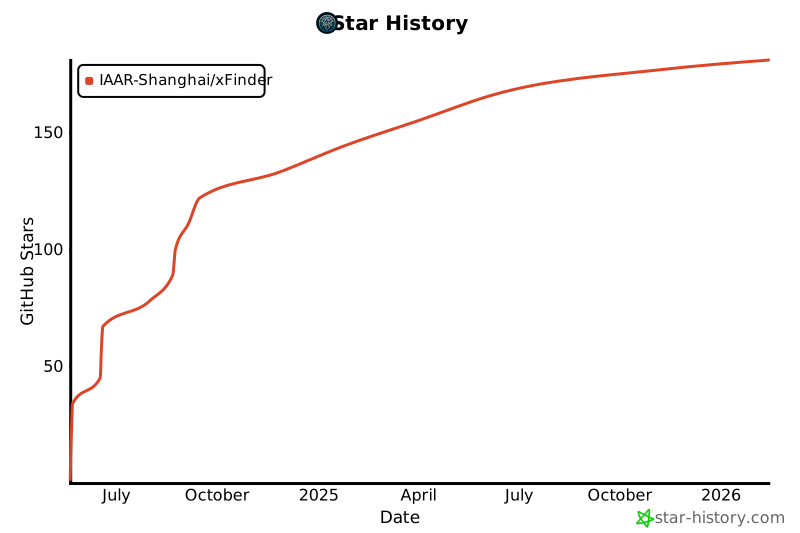
Star Trends
1 maintainer

Metadata
1 maintainer
Release files for xfinder 0.2.6
For a detailed explanation of source distributions (sdists) and built distributions (wheels), please see the package formats documentation.
Source distribution (sdist)
| File | Size | Uploaded | Provenance | Actions |
|---|---|---|---|---|
| xfinder-0.2.6.tar.gz | 34.9 kB | Without provenance | Details for xfinder-0.2.6.tar.gz |
Built distribution (wheel)
| File | Interpreter | ABI | Platform | Actions Reset |
|---|---|---|---|---|
| xfinder-0.2.6-py3-none-any.whl | Python 3 | none | any | Details for xfinder-0.2.6-py3-none-any.whl |
Total release size: 64.4 kB
Release files / xfinder-0.2.6.tar.gz
| Download URL | xfinder-0.2.6.tar.gz |
|---|---|
| Size | 34.9 kB |
| Tags | Source |
|
SHA-256 checksum How to use checksums |
f8f34cba9ed919bdaaf7006db9965709a7c0a494d180341bf7aae047caba20a5
|
|
BLAKE2b-256 checksum How to use checksums |
17ff874fd85d350d81fdf1f62b3cf14d41363f83e281b5cf707f4f928cf389fd
|
| Upload date | |
|
Uploaded using Trusted Publishing? What is trusted publishing? |
No |
| Uploaded via |
twine/6.0.1 CPython/3.10.14
|
Release files / xfinder-0.2.6-py3-none-any.whl
| Download URL | xfinder-0.2.6-py3-none-any.whl |
|---|---|
| Size | 29.5 kB |
| Tags | Python 3 |
|
SHA-256 checksum How to use checksums |
b37be38f135cbcfc63c0b4fa10e7eeeda58713d508e06e7a4af9c86a169470ae
|
|
BLAKE2b-256 checksum How to use checksums |
814a52275b5e0c798d3a13d072abf31dbc8a4b2cf4c3d7832022c9a9173634bc
|
| Upload date | |
|
Uploaded using Trusted Publishing? What is trusted publishing? |
No |
| Uploaded via |
twine/6.0.1 CPython/3.10.14
|
Security for xfinder 0.2.6
Provenance
Provenance describes where a file came from. On PyPI, provenance is shared via attestations, which provide a verifiable record of the build or publishing details. View details, limitations and caveats.
No provenance found
None of the files in this release were uploaded with provenance metadata.
A note on package security
PyPI is a repository for distributing packages, not a service for auditing them. While third-party security researchers and our staff do their best to detect and remove malicious packages, PyPI cannot guarantee the quality, security or suitability of any given package.
To learn more about protecting yourself from malicious actors, visit our package security documentation.














