
Convert a list of backgammon XGIDs into an interactive Anki study deck.

Project description
🧩 xgid2anki
Convert a list of backgammon XGIDs into an interactive Anki study deck.


xgid2anki is a command-line tool that converts a list of backgammon positions (XGIDs) into an Anki deck for spaced-repetition study using the Anki flashcard software.
Each card includes a rendered board diagram, cube or move decision, and evaluation data extracted from GNU Backgammon.
📑 Table of Contents
- Features
- Installation
- Quick Start
- Command-Line Reference
- Configuration
- Custom Board Themes
- First-Run Download
- Known Limitations
- License
- Example Screenshots
- Acknowledgments
🚀 Features
- Analyzes positions using GNU Backgammon
- Renders boards with bglog and headless Chromium
- Generates ready-to-import
.apkgAnki decks with interactive note templates - Supports multiple card types:
- Cube decisions (Double / No Double and Take / Pass)
- Checker plays (Move decisions)
- Customizable board themes — create and save your own theme files using bglog
- Light and dark themes automatically match system theme or user-configured preference
- Configurable via YAML file or CLI flags
- Cross-platform: macOS, Linux, Windows
- Designed for both desktop and mobile Anki clients
📦 Installation
You need Python ≥ 3.10, GNU Backgammon, and a working Playwright (headless) Chromium browser install.
⚙️ Required dependency:
xgid2ankicalls GNU Backgammon (gnubg) to analyze positions and extract evaluation data.
Make suregnubgis installed and available on your systemPATH.
Installing GNU Backgammon
-
macOS:
The recommended method is via MacPorts. If you do not have MacPorts installed, please download and install it here.sudo port install gnubg
-
Linux (Debian/Ubuntu):
sudo apt install gnubg
-
Windows:
Download and install the latest Windows build from the GNU Backgammon website.
💡 Tip
On Windows, GNU Backgammon’s command-line tool (
gnubg-cli.exe) is separate from the GUI app (gnubg.exe) and is not added to your PATH automatically.
You must add it manually:
- Locate the installation folder (typically):
C:\Users\<username>\AppData\Local\gnubg # or equivalently $env:LOCALAPPDATA\gnubg- Add that folder to your PATH in PowerShell:
setx PATH "$($env:PATH);C:\Users\<username>\AppData\Local\gnubg"- Close and reopen PowerShell, then verify the CLI is accessible:
gnubg-cli --helpIf successful, you’ll see GNU Backgammon’s command-line help output, confirming it’s now available system-wide.
✅ Installing xgid2anki
xgid2anki can be installed using any Python package manager that supports PyPI.
We recommend Astral's uv, which installs xgid2anki as a global command-line tool.
# If you don't have uv yet:
# macOS/Linux: curl -LsSf https://astral.sh/uv/install.sh | sh
# macOS (Homebrew): brew install uv
# Windows: powershell -ExecutionPolicy ByPass -c "irm https://astral.sh/uv/install.ps1 | iex"
uv tool install xgid2anki
xgid2anki --help
💡 Tip
After installing uv, make sure it’s available on your PATH (follow the on-screen instructions from the installer, e.g. run
source ~/.local/bin/envor restart your shell).
(Users who prefer pip, pipx, or another tool can follow their usual process for installing packages from PyPI.)
🧩 Installation from source using uv
# Choose a directory where the source should live:
git clone https://github.com/ngvlamis/xgid2anki.git
cd xgid2anki
uv sync
🧭 One-time setup for headless Chromium
xgid2anki will automatically attempt to install the Playwright headless browser on first run. However, we recommend installing it manually to ensure all dependencies are in place:
uv tool run --from xgid2anki playwright install --with-deps chromium-headless-shell
(This command installs the lightweight “chromium-headless-shell” package used by Playwright for board rendering.)
🧠 Quick Start
Create a text file positions.txt with one XGID per line:
XGID=-b----E-C---eE---c-e----B-:0:0:1:21:0:0:0:7:10
XGID=-b----E-C---eE---c-e----B-:0:0:1:31:0:0:0:7:10
XGID=-b----E-C---eE---c-e----B-:0:0:1:41:0:0:0:7:10
XGID=-b----E-C---eE---c-e----B-:0:0:1:51:0:0:0:7:10
XGID=-b----E-C---eE---c-e----B-:0:0:1:61:0:0:0:7:10
XGID=-b----E-C---eE---c-e----B-:0:0:1:32:0:0:0:7:10
XGID=-b----E-C---eE---c-e----B-:0:0:1:42:0:0:0:7:10
XGID=-b----E-C---eE---c-e----B-:0:0:1:52:0:0:0:7:10
XGID=-b----E-C---eE---c-e----B-:0:0:1:62:0:0:0:7:10
XGID=-b----E-C---eE---c-e----B-:0:0:1:43:0:0:0:7:10
XGID=-b----E-C---eE---c-e----B-:0:0:1:53:0:0:0:7:10
XGID=-b----E-C---eE---c-e----B-:0:0:1:63:0:0:0:7:10
XGID=-b----E-C---eE---c-e----B-:0:0:1:54:0:0:0:7:10
XGID=-b----E-C---eE---c-e----B-:0:0:1:64:0:0:0:7:10
XGID=-b----E-C---eE---c-e----B-:0:0:1:65:0:0:0:7:10
Then run:
xgid2anki -i positions.txt -d "Opening Moves"
This will:
- Analyze each position
- Render each board
- Generate a deck
Opening Moves.apkg - Print progress and warnings to the console
Import the resulting .apkg into Anki and start studying.
📝 Note
The example file used above — along with another sample XGID list and their generated Anki decks — can be found in docs/examples/.
🧩 Command-Line Reference
xgid2anki [-h] [-i [PATH_OR_XGID ...]] [-o OUTPUT] [-d DECK_NAME]
          [-p {0,1,2,3,4}] [--cube-plies {0,1,2,3,4}]
          [-b {cw,ccw}] [-t THEME] [-c CORES] [-k] [-q]

Generate Anki decks for backgammon positions from XGIDs.
Provide one or more XGIDs or one or more files (one XGID per line).

Options:
  -h, --help             Show this help message and exit.
  --config               Path to a YAML file with defaults (keys must match CLI flags)

Input / Output:
  -i, --input [PATH_OR_XGID ...]
                         Optional. One or more file paths (each containing XGIDs)
                         and/or literal XGIDs. If omitted, xgid2anki will prompt
                         you to select a file or paste XGIDs.
  -o, --output OUTPUT    Output directory or .apkg file
                         (default: current working directory)

Deck & Analysis Options:
  -d, --deck-name DECK_NAME
                         Name for the output Anki deck (required;
                         will prompt if omitted)
  -p, --plies {0,1,2,3,4}
                         Number of plies for checker-play analysis
                         (0–4, default: 3)
  --cube-plies {0,1,2,3,4}
                         Number of plies for cube analysis
                         (0–4, defaults to --plies)
  -b, --bear-off {cw,ccw}
                         Bear-off direction (cw or ccw, default: cw).
  -t, --theme THEME      Path to a custom bglog board theme (JSON).
                         You can design one at https://nt.bglog.org/NT.html.
  -c, --cores CORES      Number of worker processes
                         (default: system CPU count - 1)
  -k, --keep_svg         Keep intermediate SVGs generated during deck creation
  -q, --quiet            Reduce verbosity
⚙️ Configuration
You can define default values in a YAML config file whose keys correspond to the CLI flag names.
# config.yaml
deck_name: My Study Deck
plies: 3
cube-plies: 2
theme: ~/themes/my_theme.json
input:
  - ~/xgids/my_deck.txt
  - XGID=-b----E-C---eE---c-e----B-:0:0:1:65:0:0:0:7:10
Then run:
xgid2anki --config config.yaml --cube-plies 3
💡 Tip
YAML keys use the same names as the long-form flags (e.g., cube-plies, deck-name, etc.). Any flag that appears on the command line takes precedence over the YAML defaults.
🖌️ Custom Board Themes
xgid2anki uses bglog to render backgammon boards.
You can create your own visual theme directly on the bglog website:
-
Open the bglog website.
-
Use the menu on the right-hand side to adjust board colors, checker styles, background, and other visual effects.
-
When you're happy with the design:
- Click Themes in the menu.
- Click the 💾 floppy-disk icon (it appears once you’ve made changes).
- Then click the 📋 clipboard icon to copy the theme JSON to your system clipboard.
- Paste the contents into a new file (e.g.,
my_custom_theme.json) and save it locally.
-
Use your saved theme in
xgid2ankivia either a CLI flag or YAML config:xgid2anki positions.txt --theme my_custom_theme.json
or in your YAML config file, add:
theme: my_custom_theme.json
🌐 First-Run Download
On first launch, xgid2anki automatically downloads a local copy of index.js from bglog — the JavaScript library used to draw backgammon boards.
A network connection is required only once.
The file is then cached locally (via platformdirs) for offline use in later runs.
⚠️ Known Limitations
- Currently, no option to use analysis from commercial backgammon software, e.g., eXtreme Gammon or BGBlitz.
- Requires Playwright to render boards.
- Limited testing on Android (AnkiDroid). Decks should import and function normally, but visual rendering and performance may vary.
- 📱 Mobile / Tablet Layouts: Deck templates are tuned for portrait mode.
Landscape orientation is supported but may render elements (e.g., board images or side-by-side text) inconsistently across devices.
📜 License
Distributed under the GNU General Public License v3.0 or later.
See the LICENSE file for details.
SPDX-License-Identifier: GPL-3.0-or-later
🖼️ Example Screenshots
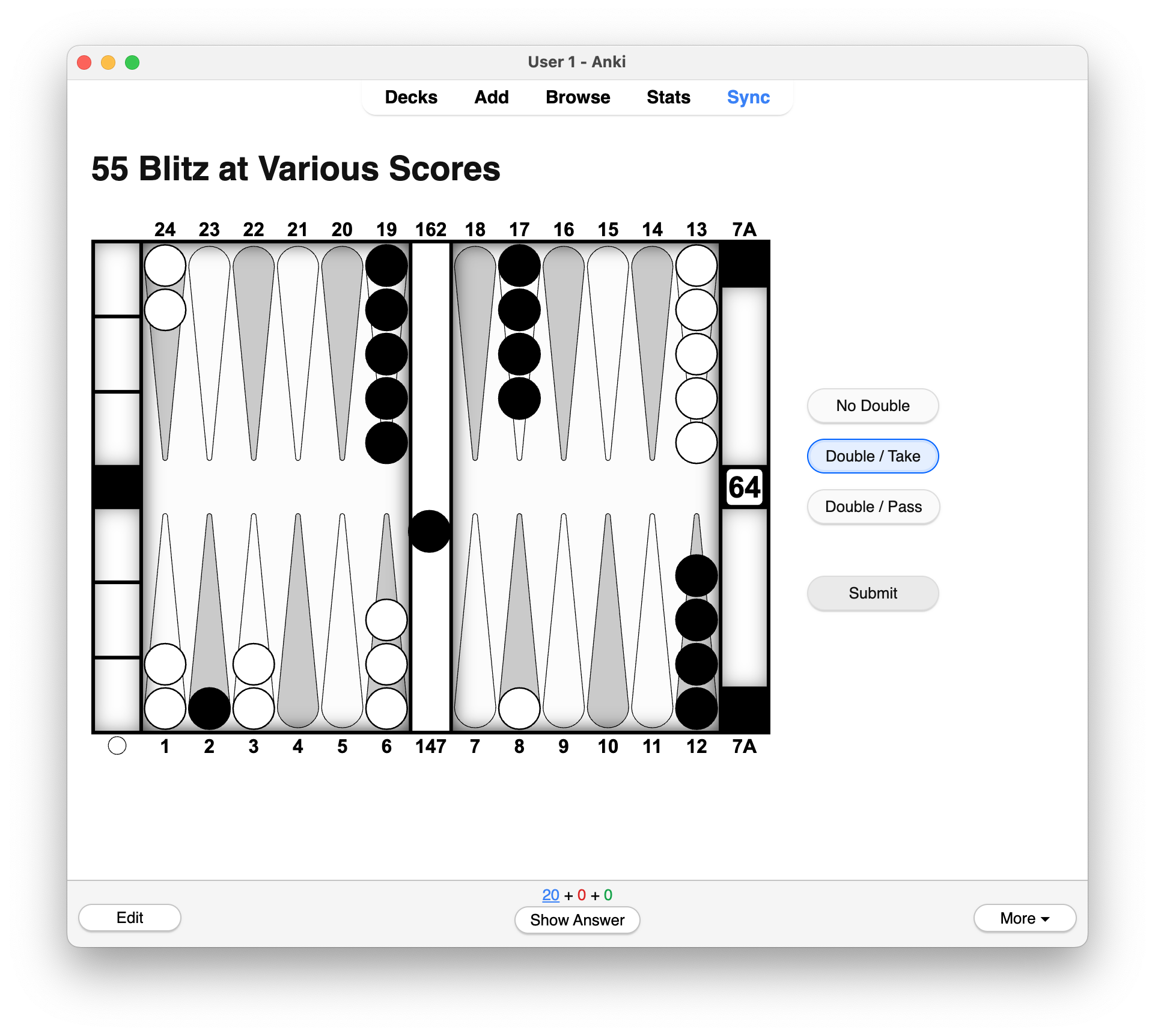
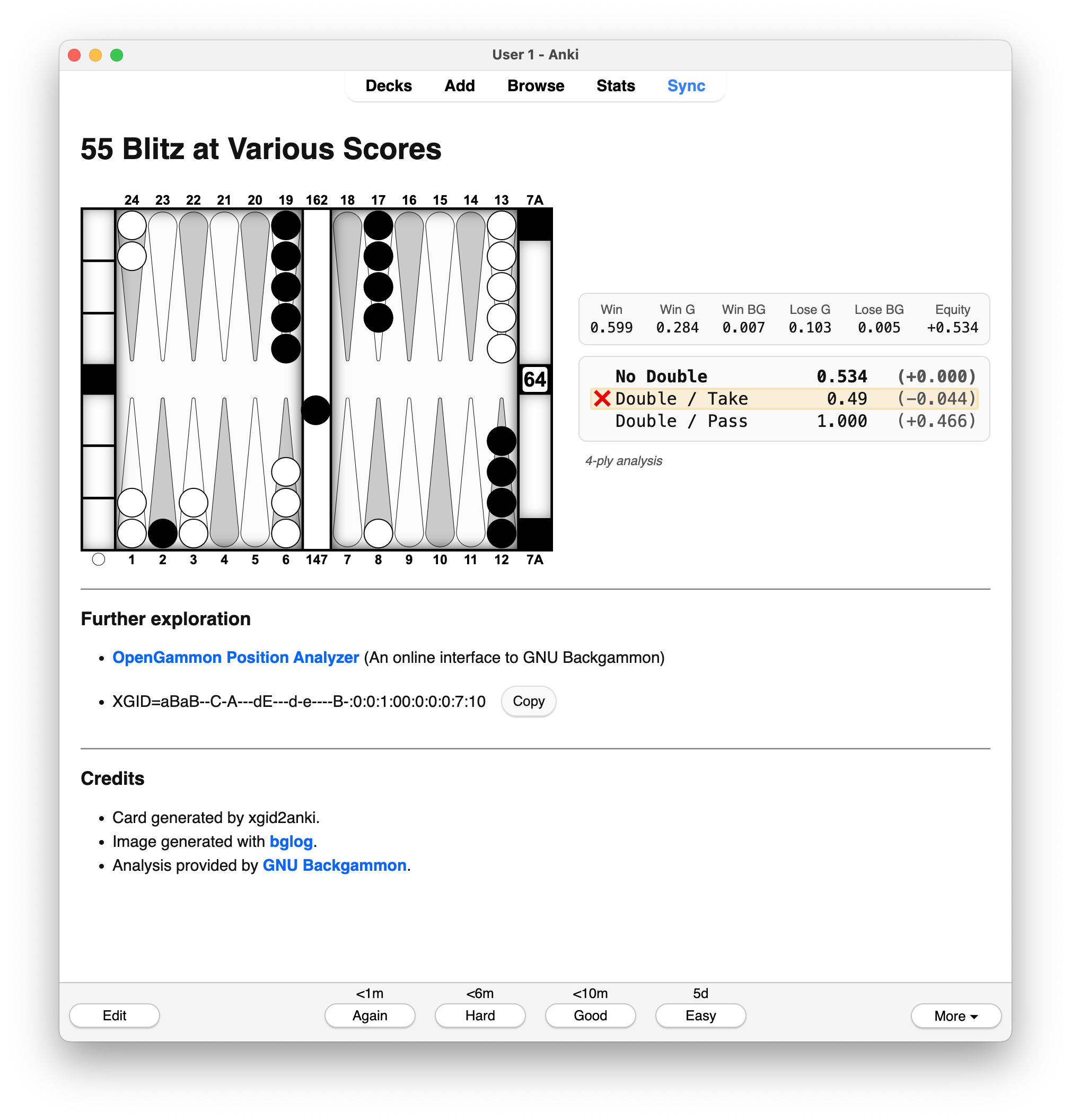
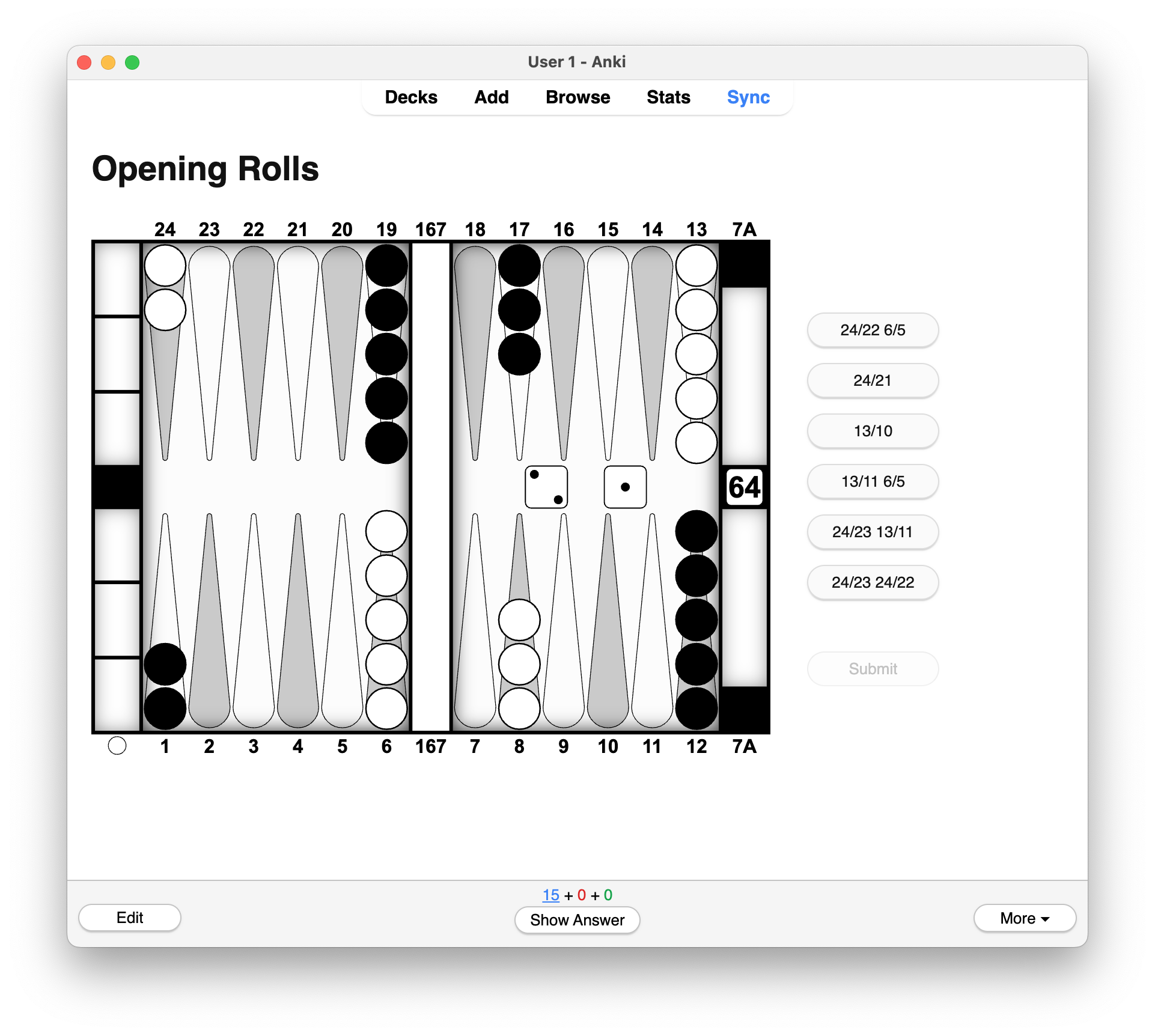
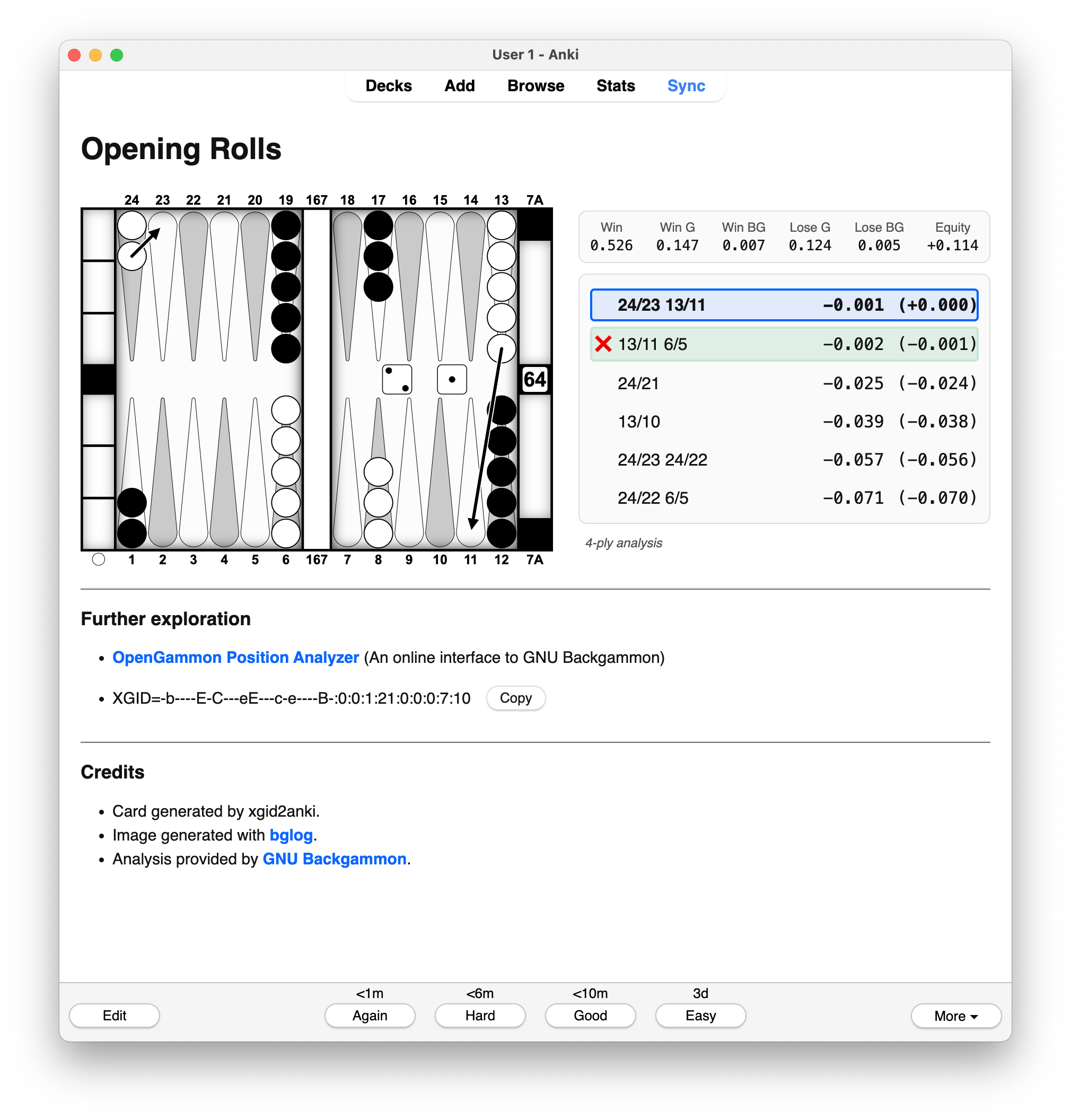
Click any image to view full size.
📝 Note
More screenshots (e.g., dark mode, mobile) can be found in docs/media.
🙏 Acknowledgments
- GNU Backgammon for analysis of positions
- bglog for backgammon board rendering
- Playwright for headless browser automation
- genanki for Anki deck generation
- OpenAI GPT-5 for coding and documentation assistance under the author’s direction
💬 Feedback
Bug reports and feature suggestions are welcome on the
GitHub Issues page.
Release history Release notifications | RSS feed


Download files
Download the file for your platform. If you're not sure which to choose, learn more about installing packages.
Source Distribution
Built Distribution
Filter files by name, interpreter, ABI, and platform.
If you're not sure about the file name format, learn more about wheel file names.
Copy a direct link to the current filters
File details
Details for the file xgid2anki-0.1.5.tar.gz.
File metadata
- Download URL: xgid2anki-0.1.5.tar.gz
- Upload date:
- Size: 57.3 kB
- Tags: Source
- Uploaded using Trusted Publishing? No
- Uploaded via: uv/0.9.3
File hashes
| Algorithm | Hash digest | |
|---|---|---|
| SHA256 |
6a855b5a4b73795736bf87a5858ab6d8a9b9d0da0c494ed96d5002c86a83797e
|
|
| MD5 |
663956559f3c5f4669c881ccd2d8eba4
|
|
| BLAKE2b-256 |
f1441147849d5d9803c9ba33b1ae3dd8dab18b3efdc787f2bc81e5bf274fc2b2
|
File details
Details for the file xgid2anki-0.1.5-py3-none-any.whl.
File metadata
- Download URL: xgid2anki-0.1.5-py3-none-any.whl
- Upload date:
- Size: 72.5 kB
- Tags: Python 3
- Uploaded using Trusted Publishing? No
- Uploaded via: uv/0.9.3
File hashes
| Algorithm | Hash digest | |
|---|---|---|
| SHA256 |
787e7bfdc4960b8c2a570be804f505cf39c38883270158ffdb23e2ef2ccbff0c
|
|
| MD5 |
1d1d1d6087e8b3985d5f2d7081a0f901
|
|
| BLAKE2b-256 |
1a555adcf0aab333e1780c33af7c43b4be20a23adfe09bd7808b99dfef31086f
|






