
XHIBIT
Exhibit your ASCII art and system specs
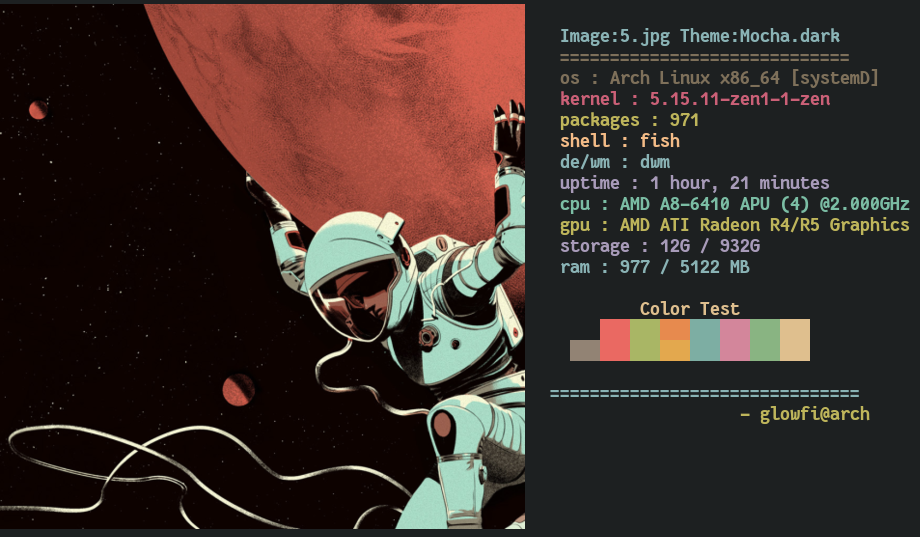
INSTALLATION
Add Path
Example to add ~/.local/bin/ in the PATH Variable
POSIX based shell (bash,zsh,dash,....)
Change bashrc to your repective shell's rc
echo 'export PATH=~/.local/bin:$PATH' >> $HOME/.bashrc
Fish shell
echo 'set PATH ~/.local/bin/ $PATH' >> $HOME/.config/fish/config.fish
Install Python Package
pip install xhibit
Dependencies
For Ascii art only
- python 3.5+
For Image display
- kitty terminal or ueberzug
- xorg-xdpyinfo
- xdotool
- xorg-xprop
- xorg-xwininfo
How To Use
usage: xhibit [-h] [-cs CS] [-rcs RCS] [-ccs CCS] [-cn CN] [-rcn RCN] [-cpu CPU] [-gpu GPU] [-img IMG] [-imb IMB] [-crop CROP]

options:
  -h, --help  show this help message and exit
  -cs CS      Colorscheme to display.
  -rcs RCS    Randomize Colorschemes [t or f].
  -ccs CCS    Give custom colorschemem of 8 colors like this "#BF616A,#A3BE8C,#EBCB8B,#81A1C1,#B48EAD,#88C0D0,#E5E9F0,#B48EAD".
  -cn CN      Specify Character name [monalisa,egyptian,fairy,casper,dragon].
  -rcn RCN    Randomize Characters [t or f].
  -cpu CPU    Mention Cpu [Custom Cpu name].
  -gpu GPU    Mention Gpu [Custom Gpu name].
  -img IMG    Image path.
  -imb IMB    Mention Image backend [kitty or ueberzug].
  -crop CROP  Mention crop type [fit or fill].
ASCII characters
ASCII Characters available
- monalisa
- egyptian
- casper
- fairy
- dragon
Default colorschemes
- gruvbox
- dracula
Extra Colorscheme List present inside this program
Example commands
To Choose gruvbox Colorscheme and casper
xhibit -cs gruvbox -cn casper

To Choose dracula Colorscheme and fairy
xhibit -cs dracula -cn fairy

To randomize colorscheme and character
xhibit -rcs t -rcn t

Pick colorscheme
Check Colorscheme list
xhibit -cs "Eighties.dark" -cn dragon

To give custom user colors
You can give custom user colors to xhibit to display text. Must give all the 8 colors in hex format just as shown below. Nord Colorscheme colors are used below as example.
xhibit -ccs "#BF616A,#A3BE8C,#EBCB8B,#81A1C1,#B48EAD,#88C0D0,#E5E9F0,#B48EAD"

DOWNLOAD ALL THE THEMES AND SEE WITH FZF
Note : FZF Required
git clone https://github.com/glowfi/xhibit-colorschemes
mv ~/xhibit-colorschemes/themes ~/.cache
rm -rf xhibit-colorschemes
ls ~/.cache/themes| fzf | xargs -I {} cat ~/.cache/themes/{} | xargs | tr " " "," | xargs -I {} xhibit -rcn t  -ccs "{}"
Try all colorscheme in 1 second interval
wget https://raw.githubusercontent.com/glowfi/xhibit-colorschemes/main/run.sh -O ~/.cache/xhibitCol.sh
sh ~/.cache/xhibitCol.sh
Image support with ueberzug or kitty terminal.
xhibit -img "path/to/image/file" -imb "kitty"

                or

xhibit -img "path/to/image/file" -imb "ueberzug"
Install ueberzug guide
The original ueberzug project has been abandoned by its original author.
But there are some people who are continuing its legacy.
You can install ueberzug by using the below commands.
I know projects like ueberzugpp exists but for now
my project supports only kitty and ueberzug backend
to display images.
git clone https://github.com/ueber-devel/ueberzug;
cd ueberzug/
pip install .
cd ..
rm -rf ueberzug
Image crop fit or fill
xhibit -img "path/to/image/file" -imb "kitty" -crop "fit"
xhibit -img "path/to/image/file" -imb "kitty" -crop "fill"

                or

xhibit -img "path/to/image/file" -imb "ueberzug" -crop "fit"
xhibit -img "path/to/image/file" -imb "ueberzug" -crop "fill"

1 maintainer

Metadata
1 maintainer
Release files for xhibit 9.8.6
For a detailed explanation of source distributions (sdists) and built distributions (wheels), please see the package formats documentation.
Source distribution (sdist)
| File | Size | Uploaded | |
|---|---|---|---|
| xhibit-9.8.6.tar.gz | 36.8 kB | Details |
Built distribution (wheel)
| File | Interpreter | ABI | Platform | Reset |
|---|---|---|---|---|
| xhibit-9.8.6-py3-none-any.whl | Python 3 | none | any | Details |
Total release size: 74.4 kB
Release files / xhibit-9.8.6.tar.gz
| Download URL | xhibit-9.8.6.tar.gz |
|---|---|
| Size | 36.8 kB |
| Tags | Source |
|
SHA-256 checksum How to use checksums |
034c34dee1cf8ec53f3efc2aeb1e08d50d40d7cd1a1cb62ef1fe404c56a814f3
|
|
BLAKE2b-256 checksum How to use checksums |
fa36bf57ed1ec31e26f0819a9728e4e89223442776207a8689f088a3fd24b25c
|
| Upload date | |
|
Uploaded using Trusted Publishing? What is trusted publishing? |
No |
| Uploaded via |
twine/4.0.2 CPython/3.11.6
|
Release files / xhibit-9.8.6-py3-none-any.whl
| Download URL | xhibit-9.8.6-py3-none-any.whl |
|---|---|
| Size | 37.6 kB |
| Tags | Python 3 |
|
SHA-256 checksum How to use checksums |
0a4bb42bd4238f2bb353d25828b7e50ac45cd1ae12a5608f50e63c0e00ebddcb
|
|
BLAKE2b-256 checksum How to use checksums |
7332e350d8cf73d8c85e044bf43b1e9b54f873537c4a6cfead43c848002c0cf7
|
| Upload date | |
|
Uploaded using Trusted Publishing? What is trusted publishing? |
No |
| Uploaded via |
twine/4.0.2 CPython/3.11.6
|














