
xiaobaiauto2是对自动化框架的第三次更新,功能覆盖UI自动化与API自动化意在帮助对自动化有更多需求且过多时间写代码的人群,让大家的时间花在业务的实现上

Project description




简介
xiaobaiauto2是一套自动化框架,功能覆盖UI自动化与API自动化
意在帮助对自动化有更多需求且过多时间写代码的人群,让大家的时间
花在业务的实现上
架构
-----------------------------xiaobaiauto2---------------------------
                                  |
--------------------------------------------------------------------
|                            |                 |         |         |
定时任务                      邮件发送          用例管理   日志内容   测试报告
开始使用
了解测试用例目录
test
|
|--__init__.py
|
|--WebTest
|   |
|   |--conftest.py
|   |--test_WebUI.py
|
|--APPTest
|   |
|   |--conftest.py
|   |--test_Manzhai_APP_Case1.py
|   |--test_Manzhai_APP_Case2.py
|
|--APITest
|   |
|   |--test_cases.py
|   |--yewua.py
了解关键词
| 序号 | CMD | key |
|---|---|---|
| 1 | 打开网页 | URL |
| 2 | 点击 | CLICK |
| 3 | 输入 | SENDKEY |
| 4 | 刷新 | REFRESH |
| 5 | 后退 | BACK |
| 6 | 关闭 | CLOSE |
| 7 | 退出 | QUIT |
| 8 | 标签 | TAG |
| 9 | 属性 | ATTR |
| 10 | URL | CURL |
| 11 | 标题 | ITLE |
| 12 | 内嵌页 | FRAME |
| 13 | 标签页[序号(1开始)] | WINDOW |
| 14 | JS_确定 | ALERT0 |
| 15 | JS_取消 | ALERT1 |
| 16 | JS_输入框 | ALERT2 |
| 17 | JS_文本 | ALERT3 |
| 18 | 停止 | WAIT |
| 19 | 脚本 | SCRIPT |
| 20 | 添加cookie | ADDCOOKIE |
| 21 | 滑屏 | SWIPE |
| 22 | 截屏 | DSCREENSHOT |
| 23 | 元素截图 | ESCREENSHOT |
| 24 | 识别验证码 | FINDTEXT |
| 25 | 坐标 | LOCATION |
修改脚本
参考test目录下面的脚本
@pytest.mark.xiaobai_web
def test_Case1(browser):
    web_action(browser, cmd=cmd.打开网页, loc='', data='http://www.baidu.com')
    web_action(browser, cmd=cmd.输入, loc='//*[@id="kw"]', data='小白科技')
    web_action(browser, cmd=cmd.点击, loc='//*[@id="su"]')
    web_action(browser, cmd=cmd.wait, data=3)
    web_action(browser, cmd=cmd.标题, contains_assert='小白')
关键词的使用,看上面示例亦可(xiaobaiauto2>0.1.5.0)
-
1 导入cmd类
from xiaobaiauto2.xiaobaiauto2 import cmd -
2 cmd类调用属性
cmd.关键词
若感觉关键词不足以使用,可以直接使用原生方法,示例如下
browser.find_element_by_id('id属性值').click()
代码执行之前,若您需要发送邮件,请将test_first方法中的email的参数值进行自行修改即可
备注
- 若APP测试需要获取toast信息可以写一个方法添加到自己的项目中,代码样例如下:
def find_toast(self, message, timeout, poll_frequency):
     new_message = f"//*[@text=\'{message}\']"
     element = WebDriverWait(self.driver, timeout, poll_frequency).until(
         EC.presence_of_element_located((By.XPATH, new_message)))
     return element.text
使用
1、命令行运行脚本
pytest --html=report.html --self-contained-html
or
pytest --html=report.html --self-contained-html -m xiaobai_web
or
pytest --html=report.html --self-contained-html -o log_cli=true -o log_cli_level=INFO
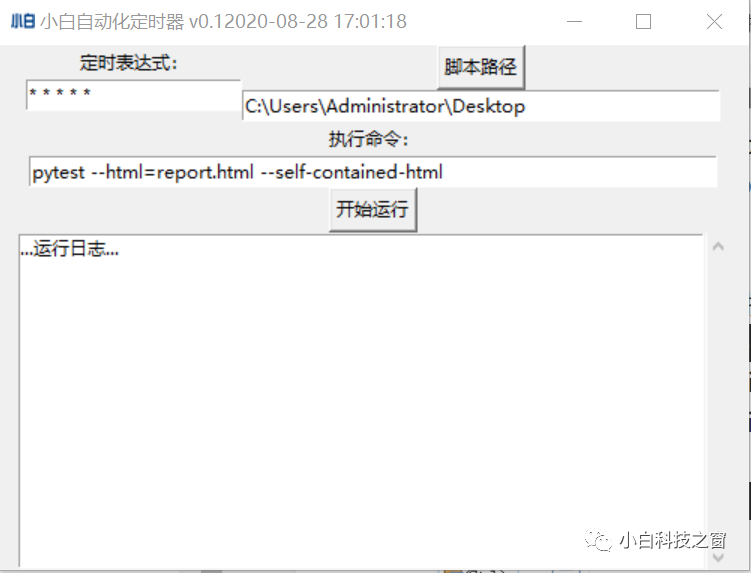
2、定时任务界面运行脚本(CMD命令)
xiaobaiauto2Timer
3.1、xiaobaiauto2Api将raw数据转换成python代码(版本>0.1.3.1可用)
xiaobaiauto2Api -h    # 帮助文档提示
xiaobaiauto2Api -f *.txt -s *.py
xiaobaiauto2Api -f *.txt -x 2
xiaobaiauto2Api -f *.saz -x 2
xiaobaiauto2Api -f *.har -x 2
xiaobaiauto2Api -d D:\example
3.2、xiaobaiauto2 >= 0.1.4.5 支持c参数
xiaobaiauto2Api -c 1 -f 1.har,2.har
xiaobaiauto2Api -c 1 -f 1.har,2.har -d E:\example
xiaobaiauto2Api -c 1 -f 1.har,2.har -d E:\example -s 1_2_compare
3.3、xiaobaiauto2 >= 0.1.5.5 支持t参数
xiaobaiauto2Api -t 0        // 生成api测试模板
xiaobaiauto2Api -t 1        // 生成web测试模板
xiaobaiauto2Api -t 2        // 生成app测试模板
3.4、xiaobaiauto2 >= 0.1.6.3 支持i与v参数
xiaobaiauto2Api -i 0 -v 8           // 安装jdk8
xiaobaiauto2Api -i 1 -v 5.3         // 安装jmeter5.3
xiaobaiauto2Api -i 2 -v 88          // 安装chromedriver的88版本
其他帮助
更新日志
| 版本 | 功能 |
|---|---|
| 0.0.1 | 添加邮件发送,用例排序,chrome提示框禁止等等 |
| 0.1.0.1 | 添加自动执行任务功能及UI界面 |
| 0.1.1 | fix缺陷,cmd执行xiaobaiauto2Timer |
| 0.1.2 | fix缺陷 |
| 0.1.3 | 新增验证码识别,支持 *.png *.jpg *.jpeg ,新增部分关键词(暂已关闭) |
| 0.1.3.1 | fix缺陷 |
| 0.1.4.0 | 新增xiaobaiauto2Api命令行工具,可以将raw请求数据转换成python代码 |
| 0.1.4.1 | fix缺陷 |
| 0.1.4.2 | 优化与新增Fiddler的saz文件支持 |
| 0.1.4.3 | 优化代码 |
| 0.1.4.4 | 优化与新增charles的har文件支持,支持批量脚本转换 |
| 0.1.4.5 | 优化与新增比较两个har文件并转为Python代码 |
| 0.1.4.6 | fix并支持fiddler导出的har文件转为Python代码 |
| 0.1.5.0 | fix并优化api_action |
| 0.1.5.1 | 优化xiaobaiauto2Api与web_action支持cmd调用关键词 |
| 0.1.5.2 | 新增apiTestCase装饰器 |
| 0.1.5.3 | 修复xiaobaiauto2Api部分bug |
| 0.1.5.4 | fix |
| 0.1.5.5 | add 选项-t template 参考xiaobaiauto2Api -h |
| 0.1.5.6 | fix |
| 0.1.5.7 | fix |
| 0.1.6.0 | add 参数化符{变量}系统自动识别并替换为预设值 |
| 0.1.6.1 | fix |
| 0.1.6.2 | fix |
| 0.1.6.3 | add -i, -v 新增命令行安装软件支持mac系统 |
Release history Release notifications | RSS feed


Download files
Download the file for your platform. If you're not sure which to choose, learn more about installing packages.
Source Distribution
xiaobaiauto2-0.1.6.3.tar.gz
(59.1 kB
view details)
Built Distribution
Filter files by name, interpreter, ABI, and platform.
If you're not sure about the file name format, learn more about wheel file names.
Copy a direct link to the current filters
File details
Details for the file xiaobaiauto2-0.1.6.3.tar.gz.
File metadata
- Download URL: xiaobaiauto2-0.1.6.3.tar.gz
- Upload date:
- Size: 59.1 kB
- Tags: Source
- Uploaded using Trusted Publishing? No
- Uploaded via: twine/3.2.0 pkginfo/1.5.0.1 requests/2.24.0 setuptools/45.2.0 requests-toolbelt/0.9.1 tqdm/4.48.0 CPython/3.8.1
File hashes
| Algorithm | Hash digest | |
|---|---|---|
| SHA256 |
eea1e9f3785ef6a4ec96c5a714d0ac247eca3a0fac2c1e54a2f9c7967b802334
|
|
| MD5 |
174009f03c3fde93a2fe28f867ff96ff
|
|
| BLAKE2b-256 |
5577948d18045c071d8d44176b36b58e092707cfe8dded2779ae41035d4cdb92
|
File details
Details for the file xiaobaiauto2-0.1.6.3-py3-none-any.whl.
File metadata
- Download URL: xiaobaiauto2-0.1.6.3-py3-none-any.whl
- Upload date:
- Size: 73.3 kB
- Tags: Python 3
- Uploaded using Trusted Publishing? No
- Uploaded via: twine/3.2.0 pkginfo/1.5.0.1 requests/2.24.0 setuptools/45.2.0 requests-toolbelt/0.9.1 tqdm/4.48.0 CPython/3.8.1
File hashes
| Algorithm | Hash digest | |
|---|---|---|
| SHA256 |
651159a16e654c06bc86692b5d72f27cb7510ca2dfc725f995c2b1d5a9a2be94
|
|
| MD5 |
27ac21f2cecfa13da908b2c23fff1412
|
|
| BLAKE2b-256 |
382963cbf479b9f1fbb422b52edae1748f1d46bcbc1c7cc2e41bb739fe3cfa9d
|






