

Usage • Key features • Installation • AI agents • Development
xlgrep is grep for spreadsheets: search cell values and formulas
across folders of .xlsx, .xlsm, .xlsb, .xls and .ods files. Read-only.
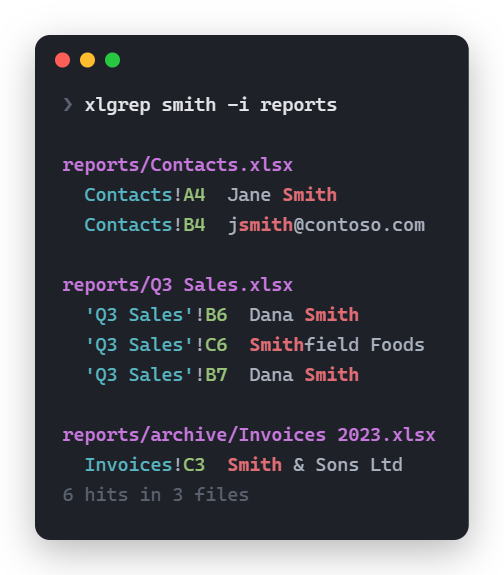
Usage
xlgrep smith -i                  # current folder, recursive, case-insensitive
xlgrep "O'Brien" C:\dir -F       # literal text
xlgrep smith -w                  # whole word (-wF "C++" works too)
xlgrep smith -x                  # whole cell
xlgrep smith --row               # print each matching row in full
xlgrep smith --row --header      # ...with each value labeled by its column's header in row 1
xlgrep smith --sheet Contacts    # only that sheet
xlgrep VLOOKUP --formulas -l     # workbooks whose formulas use VLOOKUP
xlgrep smith -c                  # hit count per file (rows with --row)
xlgrep smith -m 5                # stop each file after 5 hits
xlgrep smith --json --row        # JSON Lines for scripts and agents
xlgrep smith --json | head -50   # first 50 hits overall; the search stops early
Run xlgrep --help for the full option list.
Key features
Click to learn more.
Every common spreadsheet format
.xlsx, .xlsm, .xlsb, .xls and .ods, plus .xltx/.xltm templates, read with
calamine. No Excel or LibreOffice needed. Values print as Excel shows them where calamine allows: TRUE,
2024-03-05, 14:30:00, 36:05:07 durations. .csv and .tsv are plain text and aren't
searched; a folder search says on stderr how many it passed over, so you can grep them.
grep-style matching
Patterns are regexes; -F for literal text, -i to ignore case, -w for whole words (-wF "C++"
works too), -x to match the whole cell. --sheet limits the search to sheets with that name
(case-insensitive). --formulas searches formula text instead of values, as Excel shows it:
=XLOOKUP(A1,B:B,C:C), not the _xlfn.XLOOKUP stored in the file.
Results you can jump to
In a terminal, hits are grouped under each file with Excel-style refs like 'Q3 Sales'!B7, which
paste straight into Excel's Name Box. Output is colored (NO_COLOR disables it) and cut to the
window width. --row prints each matching row in full instead of single cells.
Built for scripts and agents
AI agents can't read spreadsheets with their usual tools: .xlsx files are compressed, so
grep, rg and file readers find nothing inside them, and agents fall back to writing
openpyxl or pandas scripts. xlgrep is one command instead, with no Python environment.
--json prints JSON Lines: {"file","sheet","cell","value"} per hit, plus
"row_values": {"A": …, "C": …} keyed by column with --row (formula cells only with
--formulas). --header adds each value's column header from row 1 (--header=3 for row 3):
"header" for the hit, and "row_headers" keyed like "row_values" with --row, so an agent
knows a value is an "Email" without reading the sheet. When row 1 looks like a title rather than
headers, stderr suggests the row to use (try --header=3). Only matching cells reach the agent's
context, not whole sheets, and -m, -l, -c and | head cap how much comes back; closing the
pipe early stops the search. Every hit names its sheet and cell, so a person can check it in Excel.
Exit code 0 if anything matched, 1 if not, 2 on an error: bad arguments, a --sheet name no file
has, or anything that couldn't be searched. Matches elsewhere still print and stderr names each
skipped file and why, so an agent can tell "not there" from "couldn't look". xlgrep is read-only
and won't download OneDrive files unless asked, so it's safe to let an agent run it without
approval. See Using with AI agents.
Fast
Files are read in parallel and output stays in file order: 400 files x 2000 rows take 0.25 s
instead of 1.56 s read one at a time. .xlsx and .xlsb sheets are streamed, not loaded whole,
and --sheet skips reading the others.
Safe on OneDrive
OneDrive online-only files are skipped by default, so a search never mass-downloads your OneDrive.
--download includes them. Skipped OneDrive files aren't errors.
Robust against bad files and bad cells
Unreadable files and folders (password-protected, corrupt, access denied, OneDrive offline) are
skipped with a reason, and the exit code says so; so is a file that crashes the reader. Control
characters in cells print escaped (\n, \u{1b}), so a cell can't break lines or inject terminal
codes.
Non-features
xlgrep only reads. It doesn't replace or edit cells.
Numbers print raw (51200, not $51,200.00); number formats aren't applied.
The human-readable output is for reading. Anything that parses output should use --json.
Installation
Windows, with Scoop:
scoop bucket add xlgrep https://github.com/DavisMcCracken/xlgrep
scoop install xlgrep
Windows, macOS or Linux, from PyPI with uv or pipx. The wheel holds the same binary; there's no Python code.
uv tool install xlgrep # or: pipx install xlgrep
uvx xlgrep … runs it without installing.
Or download the zip (Windows) or tar.gz (Linux x86_64/ARM, static, any distro) from
Releases, unpack, and put xlgrep on your
PATH. Each release has a SHA256SUMS file to check the download.
Or with Cargo:
cargo install xlgrep --locked
Using with AI agents
Paste this into your agent instructions (AGENTS.md, CLAUDE.md, …):
To search or read .xlsx/.xlsm/.xlsb/.xls/.ods files, use `xlgrep` instead of writing
openpyxl/pandas scripts (if `xlgrep --version` fails, `uvx xlgrep …` runs it). Use `--json` when
parsing output: `{"file","sheet","cell","value"}` per hit; add `--row` for the whole matching row
and `--header` to label values with their column's header from row 1 (`--header=3` if the headers
are in row 3; stderr suggests the row when row 1 looks like a title). Keep output small: `-m 20`
per file, `| head -N` overall; `-l` (matching files) and `-c` (hits per file) print plain lines,
not JSON.
Examples: `xlgrep "smith" -i --json -m 20`, `xlgrep VLOOKUP --formulas -l`,
`xlgrep . book.xlsx --sheet Sheet1 --json | head -100` (dump a sheet's non-empty cells).
Values are raw: search `51200`, not `$51,200.00`, and `0.15`, not `15%`; dates are `2024-03-05`.
Add `-x` for an exact value (`51200` alone also matches `151200`). .csv/.tsv files aren't
searched (stderr counts them): grep those separately.
Exit 1 = no match; exit 2 = something couldn't be searched: read stderr before concluding a value
isn't there (it also lists skipped OneDrive online-only files, which don't change the exit code).
PowerShell's `-Command` reports exit 2 as 1, so read stderr there too.
Don't pass `--download` (it downloads OneDrive online-only files) without asking.
Development

Build and run
cargo run --release -- <xlgrep args>
Run all tests
cargo test
On Windows without admin/Visual Studio, use the GNU toolchain: scoop install rustup-gnu.
Releasing
Bump version in Cargo.toml, commit, then git tag v0.2.0 && git push --tags. The release
workflow checks the tag matches Cargo.toml, builds and tests, publishes the binaries with
SHA256SUMS, updates the Scoop manifest (bucket/xlgrep.json) and publishes to crates.io and
PyPI (wheels built with maturin, holding the same binary).
Running it by hand from the Actions tab builds and tests without publishing.
License
MIT or Apache-2.0, at your option.
1 maintainer

Metadata
1 maintainer
Release files for xlgrep 0.5.0
For a detailed explanation of source distributions (sdists) and built distributions (wheels), please see the package formats documentation.
Built distributions (wheels)
| File | Reset | |||
|---|---|---|---|---|
| xlgrep-0.5.0-py3-none-win_arm64.whl | Python 3 | none | Windows ARM64 | Details |
| xlgrep-0.5.0-py3-none-win_amd64.whl | Python 3 | none | Windows x86-64 | Details |
| xlgrep-0.5.0-py3-none-manylinux_2_17_x86_64.manylinux2014_x86_64.whl | Python 3 | none | Linux glibc 2.17+ x86-64 | Details |
| xlgrep-0.5.0-py3-none-manylinux_2_17_aarch64.manylinux2014_aarch64.whl | Python 3 | none | Linux glibc 2.17+ ARM64 | Details |
| xlgrep-0.5.0-py3-none-macosx_10_12_x86_64.macosx_11_0_arm64.macosx_10_12_universal2.whl | Python 3 | none | macOS 10.12+ universal2 (ARM64, x86-64), macOS 11.0+ ARM64, macOS 10.12+ x86-64 | Details |
Total release size: 8.3 MB
Release files / xlgrep-0.5.0-py3-none-win_arm64.whl
| Download URL | xlgrep-0.5.0-py3-none-win_arm64.whl |
|---|---|
| Size | 1.3 MB |
| Tags | Python 3 Windows ARM64 |
|
SHA-256 checksum How to use checksums |
f0a26c1d8a7a66db42f31d2521de7a505f470baef34148e5f1555a06349626dd
|
|
BLAKE2b-256 checksum How to use checksums |
70e8d47d36df312d0068796c900c084ded484e6cd49cfa4bb2eb6f816b1d0d2f
|
| Upload date | |
|
Uploaded using Trusted Publishing? What is trusted publishing? |
Yes |
| Uploaded via |
twine/7.0.0 CPython/3.13.14
|
Provenance
Provenance describes where a file came from. On PyPI, provenance is shared via attestations, which provide a verifiable record of the build or publishing details. View details, limitations and caveats.


PyPI Publish Attestation
PyPI verified that this artifact, at this checksum, originated from the publisher listed below.
Signed by GitHub Actions, verified by PyPI on Oct 4, 2026.
Transparency logRelease files / xlgrep-0.5.0-py3-none-win_amd64.whl
| Download URL | xlgrep-0.5.0-py3-none-win_amd64.whl |
|---|---|
| Size | 1.4 MB |
| Tags | Python 3 Windows x86-64 |
|
SHA-256 checksum How to use checksums |
93c48729ee6b010685bef49b8f6a87e3c0b4183b51703b3dd5ac739272a68098
|
|
BLAKE2b-256 checksum How to use checksums |
72ae60050ee26eaeb04677e8a1e648331c687c9da421b0ea6447a638d4526d53
|
| Upload date | |
|
Uploaded using Trusted Publishing? What is trusted publishing? |
Yes |
| Uploaded via |
twine/7.0.0 CPython/3.13.14
|
Provenance
Provenance describes where a file came from. On PyPI, provenance is shared via attestations, which provide a verifiable record of the build or publishing details. View details, limitations and caveats.
PyPI Publish Attestation
PyPI verified that this artifact, at this checksum, originated from the publisher listed below.
Signed by GitHub Actions, verified by PyPI on Oct 4, 2026.
Transparency logRelease files / xlgrep-0.5.0-py3-none-manylinux_2_17_x86_64.manylinux2014_x86_64.whl
| Download URL | xlgrep-0.5.0-py3-none-manylinux_2_17_x86_64.manylinux2014_x86_64.whl |
|---|---|
| Size | 1.5 MB |
| Tags | Linux glibc 2.17+ x86-64 Python 3 |
|
SHA-256 checksum How to use checksums |
43a15acdf40af21bc4c1c6ac30761d06efdc3116b905c2ecd826ad8a2c36e644
|
|
BLAKE2b-256 checksum How to use checksums |
a05061b4b6b3c6b9e89c8ba69e20a5f140f066123f29c75f6a7f120303446748
|
| Upload date | |
|
Uploaded using Trusted Publishing? What is trusted publishing? |
Yes |
| Uploaded via |
twine/7.0.0 CPython/3.13.14
|
Provenance
Provenance describes where a file came from. On PyPI, provenance is shared via attestations, which provide a verifiable record of the build or publishing details. View details, limitations and caveats.
PyPI Publish Attestation
PyPI verified that this artifact, at this checksum, originated from the publisher listed below.
Signed by GitHub Actions, verified by PyPI on Oct 4, 2026.
Transparency logRelease files / xlgrep-0.5.0-py3-none-manylinux_2_17_aarch64.manylinux2014_aarch64.whl
| Download URL | xlgrep-0.5.0-py3-none-manylinux_2_17_aarch64.manylinux2014_aarch64.whl |
|---|---|
| Size | 1.4 MB |
| Tags | Linux glibc 2.17+ ARM64 Python 3 |
|
SHA-256 checksum How to use checksums |
21531495167d4f5eb55e9952f11032e74f82547f8ffca283f0c0f81386839494
|
|
BLAKE2b-256 checksum How to use checksums |
52c01b091c7cdb0a34c2296754a875da340382039bff60b6a1136d9ec082ede8
|
| Upload date | |
|
Uploaded using Trusted Publishing? What is trusted publishing? |
Yes |
| Uploaded via |
twine/7.0.0 CPython/3.13.14
|
Provenance
Provenance describes where a file came from. On PyPI, provenance is shared via attestations, which provide a verifiable record of the build or publishing details. View details, limitations and caveats.
PyPI Publish Attestation
PyPI verified that this artifact, at this checksum, originated from the publisher listed below.
Signed by GitHub Actions, verified by PyPI on Oct 4, 2026.
Transparency logRelease files / xlgrep-0.5.0-py3-none-macosx_10_12_x86_64.macosx_11_0_arm64.macosx_10_12_universal2.whl
| Download URL | xlgrep-0.5.0-py3-none-macosx_10_12_x86_64.macosx_11_0_arm64.macosx_10_12_universal2.whl |
|---|---|
| Size | 2.7 MB |
| Tags | Python 3 macOS 10.12+ universal2 (ARM64, x86-64) macOS 10.12+ x86-64 macOS 11.0+ ARM64 |
|
SHA-256 checksum How to use checksums |
a4409408ff189281f0a301ab6e280c98712ce1ead117a55c8e8b1d69db66958d
|
|
BLAKE2b-256 checksum How to use checksums |
b304491ac39bed490d202f4803481a3d50e4b209f7645a3c5e6777f9cf7e7a9d
|
| Upload date | |
|
Uploaded using Trusted Publishing? What is trusted publishing? |
Yes |
| Uploaded via |
twine/7.0.0 CPython/3.13.14
|
Provenance
Provenance describes where a file came from. On PyPI, provenance is shared via attestations, which provide a verifiable record of the build or publishing details. View details, limitations and caveats.
PyPI Publish Attestation
PyPI verified that this artifact, at this checksum, originated from the publisher listed below.
Signed by GitHub Actions, verified by PyPI on Oct 4, 2026.
Transparency log













