
xlreport – Easy Excel Export for Python objects

Project description
Xlreport – Easy Excel Export for Python Objects
Xlreport is a Python wrapper around xlsxwriter that makes it super easy to dump your data into Excel files. It takes care of all the formatting, so you don't have to mess with xlsxwriter's details. Most of the time, you'll just use the to_file function to throw whatever data you've got into a nicely formatted spreadsheet.
While Xlreport is mainly designed for 2D data (think tables with rows and columns), it can handle 1D data too. If you pass in a single-dimension list or array, it'll just fill up one column in your Excel file - simple as that.
Installation
pip install xlreport
Quick Start
# Generate some random data
from numpy.random import default_rng
arr = default_rng(42).random((100, 4))

# Save data to an Excel file and immediately open it
import xlreport as xl
header = ['col1', 'col2', 'col3', 'col4']
xl.to_file("test.xlsx", arr, header, title="Test numpy")
Supported Data Types
Xlreport works with various Python data structures:
- Lists and tuples - Regular Python sequences
- NumPy arrays - Numerical arrays with automatic conversion
- Pandas DataFrames - With automatic index and column handling
- Sets - Converted to list format
- 1D data - Single columns for simple lists
Features
🎯 Simple Data Export
Export any supported data structure with a single function call:
import xlreport as xl

# Simple list
data = [1, 2, 3, 4, 5]
xl.to_file("simple.xlsx", data, title="Simple List")

# 2D data with headers
data = [["Alice", 25], ["Bob", 30], ["Charlie", 35]]
headers = ["Name", "Age"]
xl.to_file("people.xlsx", data, headers, title="People Data")
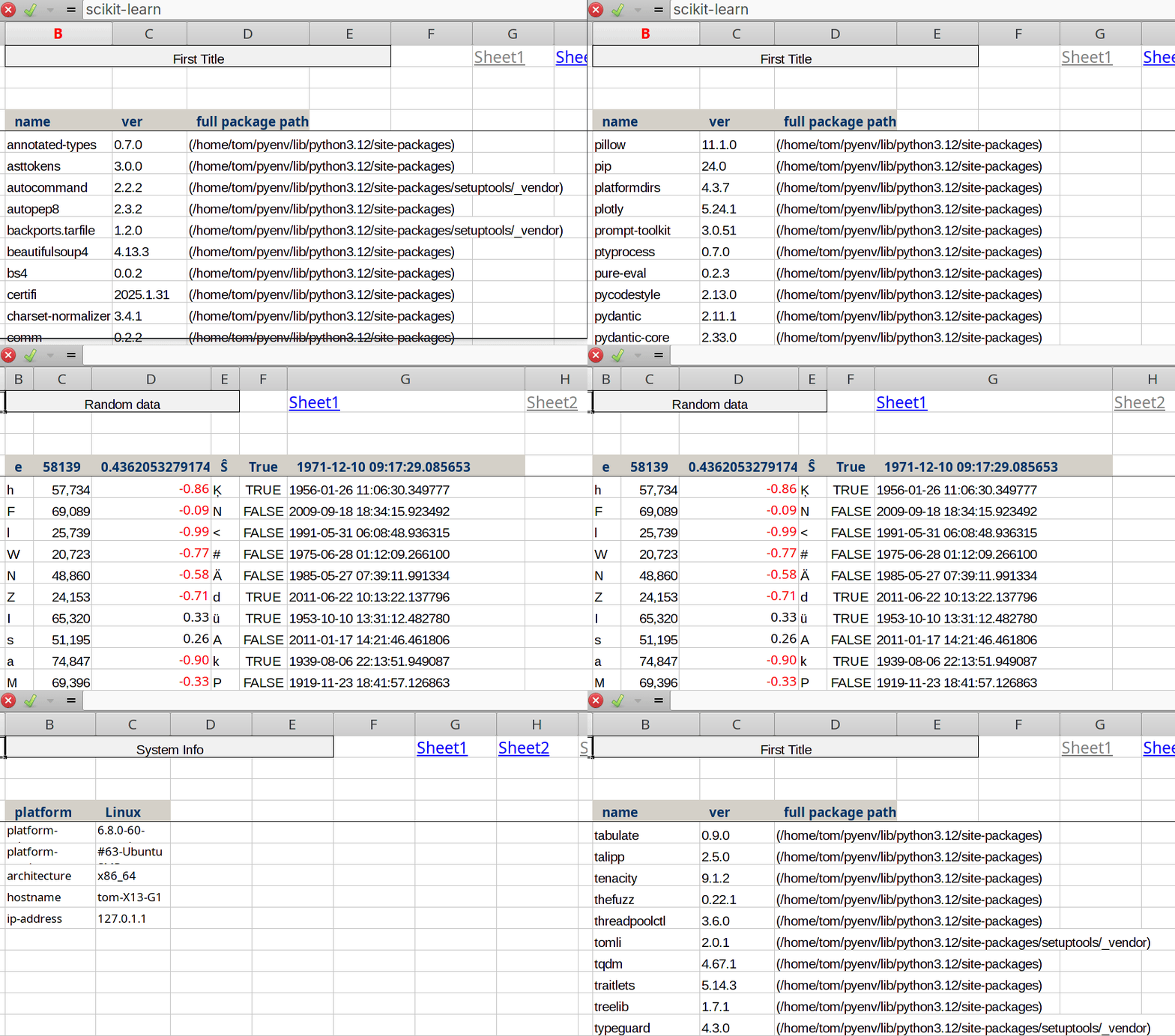
📊 Multi-Sheet Excel Files
Create complex reports with multiple sheets and navigation links:
import xlreport as xl

# Create a multi-sheet file
exfile = xl.Exfile("report.xlsx")

# Add different datasets to different sheets
exfile.write(sales_data, title="Sales Report", worksheet_name="Sales")
exfile.write(customer_data, title="Customer Data", worksheet_name="Customers")
exfile.write(system_info, title="System Info", worksheet_name="Info", wrap=True)

# Add navigation links between sheets
exfile.add_links()

# Save and open the file
exfile.save(start=True)
📏 Intelligent Column Sizing
Xlreport addresses common challenges with Excel's automatic column sizing. Unlike xlsxwriter's worksheet.autofit() method which can produce undesirable results (like excessively wide columns for long strings), Xlreport offers a smart solution.
The column width is automatically calculated based on header text length using a logarithmic formula that provides optimal readability. You can fine-tune column widths by simply adding spaces to your headers:
# Control column width with spaces
headers = [
    "ID",                                    # Narrow column
    "Name          ",                        # Medium column
    "Description - longer column          "  # Wide column
]
xl.to_file("sized.xlsx", data, headers, title="Custom Sizing")
🎨 Professional Formatting
- Frozen headers - Top row stays visible when scrolling
- Automatic number formatting - Decimals, integers, and currency
- Text wrapping - Long text content with
wrap=Trueoption - Color-coded headers - Professional appearance with consistent styling
- Unicode support - Handles international characters correctly
🔗 Sheet Navigation
When creating multi-sheet files, add_links() automatically creates clickable navigation links at the top of each sheet, making it easy to jump between different data views.
Advanced Usage
Working with Pandas DataFrames
import pandas as pd
import xlreport as xl

df = pd.DataFrame({
    "Product": ["Widget A", "Widget B", "Widget C"],
    "Sales": [1000, 1500, 800],
    "Profit": [200.50, 350.75, 120.25]
})

xl.to_file("dataframe.xlsx", df, title="Product Sales")
Text Wrapping for Long Content
# For data with long text content
long_text_data = [
    ["Topic", "Description"],
    ["AI", "Artificial Intelligence is a branch of computer science..."],
    ["ML", "Machine Learning is a subset of AI that focuses on..."]
]

xl.to_file("docs.xlsx", long_text_data, wrap=True, title="Documentation")
Custom Formatting Example
import xlreport as xl

# Create file with custom sheet name and formatting
exfile = xl.Exfile("custom_report.xlsx")

# Add data with specific formatting
exfile.write(
    data=financial_data,
    title="Q4 Financial Report",
    worksheet_name="Q4_Financials",
    wrap=False
)

# Add links and save
exfile.add_links()
exfile.save(start=True)  # Automatically opens the file
Dependencies
- xlsxwriter - The core Excel writing library
Use Cases
Xlreport is perfect for:
- Data inspection - Quick visual analysis of datasets
- Report generation - Professional-looking Excel reports
- Data sharing - Easy export for stakeholders
- Prototyping - Rapid data visualization during development
- Multi-sheet reports - Complex documents with navigation
Alternative: HTML Tables
If you don't like spreadsheets there is better solution, check out df2tables - a companion library that generates interactive HTML tables from your data.
License
This code is licensed under Apache 2.0
Contributing
Contributions are welcome! Please feel free to submit issues and pull requests.
Need more control over Excel formatting? Check out the full xlsxwriter documentation for advanced features.


Download files
Download the file for your platform. If you're not sure which to choose, learn more about installing packages.
Source Distribution
Built Distribution
Filter files by name, interpreter, ABI, and platform.
If you're not sure about the file name format, learn more about wheel file names.
Copy a direct link to the current filters
File details
Details for the file xlreport-0.0.5.tar.gz.
File metadata
- Download URL: xlreport-0.0.5.tar.gz
- Upload date:
- Size: 7.1 kB
- Tags: Source
- Uploaded using Trusted Publishing? No
- Uploaded via: twine/6.1.0 CPython/3.12.3
File hashes
| Algorithm | Hash digest | |
|---|---|---|
| SHA256 |
ef42072924f23193d38e062c3ac8e8aae2c2f25ba434c39b533d239689c96f29
|
|
| MD5 |
635c9e03332b38ee21af3c36d64657e2
|
|
| BLAKE2b-256 |
92a0fc8c5a6233ee2a3aec49353229353255053c71b305cc671b887e61367b46
|
File details
Details for the file xlreport-0.0.5-py3-none-any.whl.
File metadata
- Download URL: xlreport-0.0.5-py3-none-any.whl
- Upload date:
- Size: 6.8 kB
- Tags: Python 3
- Uploaded using Trusted Publishing? No
- Uploaded via: twine/6.1.0 CPython/3.12.3
File hashes
| Algorithm | Hash digest | |
|---|---|---|
| SHA256 |
e54cf99a11044ad9e7a4c9fad8dc6728da081985f99f6586ce29ecaed9a5855e
|
|
| MD5 |
ad3b48b4da7b6eb7f41a1c831a003461
|
|
| BLAKE2b-256 |
8a9ba99ab0ff5ac863a16b5cbe6da29d97d2e51f30bd23fec6636b342d9824aa
|






