
LLM-powered Excel parser — define a Pydantic schema, get structured data from any Excel file
Verified details
These details have been verified by PyPIProject links
GitHub Statistics
Maintainers

Project description
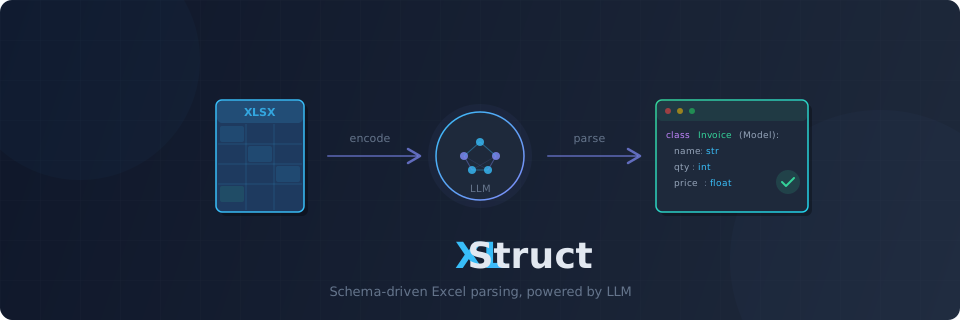
XLStruct




LLM-powered Excel/CSV parser — Define a Pydantic schema, get structured data from any spreadsheet.
Excel File + Pydantic Schema → LLM → Validated Structured Data
Features
- Schema-driven extraction — Define a Pydantic model, get validated instances from any spreadsheet. No parsing code needed.
- Excel + CSV —
.xlsx,.xlsm,.xltx,.xltm,.xls, and.csvsupported out of the box - Any Excel layout — Flat tables, merged cells, multi-level headers, form+table hybrids — handled by a single API
- Two extraction modes — Direct LLM extraction for small sheets; code generation for large ones. Auto-routed by sheet size, or choose manually.
- Reusable scripts — Codegen mode produces a standalone Python script. Run it without LLM calls — pay for generation once, use forever.
- Schema suggestion —
suggest_schema()analyzes a spreadsheet and generates a Pydantic model for you - Fast hybrid reader — calamine (Rust) for speed + openpyxl for formula extraction. Both passes in one call.
- Token usage tracking — Every extraction returns token counts, per-call breakdown, and prompt cache hit metrics
- Prompt caching — Anthropic cache_control markers applied automatically; OpenAI cached_tokens tracked
- Token-aware encoding — Auto-selects encoding strategy (markdown vs compressed) and chunks large sheets to fit within token budget
- Sandboxed execution — Generated scripts run in a subprocess with blocked imports (network, subprocess) and stripped credentials
- Multi-provider LLM — OpenAI, Anthropic, Gemini via Instructor
- Cloud storage — Read from S3, Azure Blob, GCS via fsspec
- Async-first — Async API with sync convenience wrappers. Jupyter-compatible via nest_asyncio.
Installation
pip install xlstruct
Extras
# LLM providers
pip install "xlstruct[openai]"
pip install "xlstruct[anthropic]"
pip install "xlstruct[gemini]"

# Cloud storage
pip install "xlstruct[s3]"        # AWS S3
pip install "xlstruct[azure]"     # Azure Blob Storage
pip install "xlstruct[gcs]"       # Google Cloud Storage

# Everything
pip install "xlstruct[all]"
Quick Start
1. Define a Pydantic schema
from pydantic import BaseModel, Field

class InvoiceItem(BaseModel):
    description: str = Field(description="Item description")
    quantity: int
    unit_price: float
    total: float
2. Extract data
from xlstruct import Extractor

extractor = Extractor(provider="openai/gpt-4o")
results = extractor.extract_sync("invoice.xlsx", schema=InvoiceItem)

for item in results:
    print(item.model_dump())
Async usage
import asyncio
from xlstruct import Extractor

async def main():
    extractor = Extractor(provider="anthropic/claude-sonnet-4-6")
    results = await extractor.extract("invoice.xlsx", schema=InvoiceItem)
    for item in results:
        print(item.model_dump())

asyncio.run(main())
Fine-grained control with ExtractionConfig
from xlstruct import ExtractionConfig

config = ExtractionConfig(
    output_schema=InvoiceItem,
    sheet="Sheet1",
    header_rows=[1],
    instructions="Parse dates as YYYY-MM-DD. Skip empty rows.",
)

results = extractor.extract_sync("invoice.xlsx", extraction_config=config)
Schema Suggestion
Don't know the spreadsheet structure? Let the LLM suggest a schema:
Schema = extractor.suggest_schema_sync("unknown_data.xlsx")

# Inspect the generated model
print(Schema.model_json_schema())

# Use it directly with extract
results = extractor.extract_sync("unknown_data.xlsx", schema=Schema)
# With hints
Schema = extractor.suggest_schema_sync(
    "report.xlsx",
    sheet="Q1 Sales",
    instructions="Focus on financial columns only",
)
Token Usage Tracking
Every extraction returns token usage details:
results = extractor.extract_sync("invoice.xlsx", schema=InvoiceItem)

print(results.usage.llm_calls)             # Number of LLM API calls
print(results.usage.input_tokens)          # Total input tokens
print(results.usage.output_tokens)         # Total output tokens
print(results.usage.total_tokens)          # Sum
print(results.usage.cache_creation_tokens) # Tokens written to prompt cache (Anthropic)
print(results.usage.cache_read_tokens)     # Prompt cache hits (Anthropic + OpenAI)
print(results.usage.breakdown)             # Per-call breakdown: [(label, in, out), ...]
CSV Support
CSV files work with the same API — no extra configuration needed:
results = extractor.extract_sync("data.csv", schema=MyModel)
Extraction Modes
XLStruct auto-routes based on data row count:
| Mode | Trigger | How it works |
|---|---|---|
| Direct | ≤ 20 data rows | Sheet encoded as markdown → LLM → Pydantic models |
| Codegen | > 20 data rows | LLM generates a standalone Python parsing script → runs in sandbox |
You can force a specific mode:
from xlstruct import ExtractionConfig, ExtractionMode

config = ExtractionConfig(
    mode=ExtractionMode.CODEGEN,    # Force code generation
    output_schema=MySchema,
    header_rows=[1],
)
Code Generation Pipeline
- Header Detection — Auto-detect header rows via lightweight LLM call
- Phase 0 (Analyzer) — LLM analyzes spreadsheet structure →
MappingPlan - Phase 1 (Parser Agent) — LLM generates openpyxl-based parsing script → validated via subprocess
- Phase 2 (Transformer) — Optional: adds data transformation rules
Each phase includes self-correction — errors are fed back to the LLM (up to max_codegen_retries).
Generate Standalone Scripts
script = extractor.generate_script_sync("report.xlsx", config)
print(script.code)          # Reusable Python script
print(script.explanation)   # How it works
Cloud Storage
# AWS S3
results = await extractor.extract(
    "s3://my-bucket/data/report.xlsx",
    schema=MySchema,
    key="AWS_KEY", secret="AWS_SECRET",
)

# Azure Blob Storage
results = await extractor.extract(
    "az://my-container/report.xlsx",
    schema=MySchema,
    account_name="...", account_key="...",
)

# Google Cloud Storage
results = await extractor.extract(
    "gs://my-bucket/report.xlsx",
    schema=MySchema,
    token="/path/to/credentials.json",
)
CLI
# Basic usage
xlstruct extract invoice.xlsx --schema myapp.models:InvoiceItem

# With options
xlstruct extract report.xlsx \
  --schema myapp.models:SalesRecord \
  --provider anthropic/claude-sonnet-4-6 \
  --mode codegen \
  --sheet "Q1 Sales" \
  --instructions "Ignore summary rows" \
  --temperature 0.0 \
  --max-retries 3 \
  --output results.json
Configuration
ExtractorConfig
| Parameter | Default | Description |
|---|---|---|
provider |
"anthropic/claude-sonnet-4-6" |
LLM provider (openai/gpt-4o, anthropic/claude-sonnet-4-6, etc.) |
api_key |
None |
API key (falls back to environment variables) |
max_retries |
3 |
LLM API retry count |
token_budget |
100_000 |
Max tokens per sheet |
temperature |
0.0 |
LLM temperature |
max_tokens |
8192 |
Max tokens for LLM generation |
thinking |
False |
Enable Anthropic extended thinking mode (forces temperature=1) |
max_codegen_retries |
3 |
Self-correction attempts for code generation |
codegen_timeout |
60 |
Script execution timeout in seconds |
export_dir |
None |
Directory to auto-save generated codegen scripts |
provider_options |
{} |
Provider-specific kwargs passed to instructor.from_provider() |
storage_options |
{} |
Storage backend options (S3 credentials, Azure keys, etc.) |
from xlstruct import ExtractorConfig

config = ExtractorConfig(
    provider="openai/gpt-4o",
    temperature=0.0,
    token_budget=200_000,
)
extractor = Extractor(config=config)
Docker Backend
For OS-level sandboxing, pass a DockerBackend via execution_backend:
pip install "xlstruct[docker]"
from xlstruct import Extractor
from xlstruct.codegen.backends.docker import DockerBackend, DockerConfig

extractor = Extractor(
    execution_backend=DockerBackend(
        config=DockerConfig(image="python:3.12-slim", mem_limit="1g"),
    ),
)
Architecture
Direct:  Storage (fsspec) → Reader → CompressedEncoder → ExtractionEngine (Instructor) → ExtractionResult[T]
Codegen: Storage (fsspec) → Reader → CodegenOrchestrator → [Header Detection → Analyzer → Parser → Transformer] → GeneratedScript
Module layout
src/xlstruct/
├── extractor.py          # Public API — Extractor class orchestrates everything
├── config.py             # ExtractorConfig, ExtractionConfig, ExtractionMode
├── storage.py            # fsspec-based file reading (local, s3://, az://, gs://)
├── exceptions.py         # Exception hierarchy
├── cli.py                # Typer CLI (xlstruct extract ...)
├── _tokens.py            # tiktoken token counting
├── reader/
│   ├── base.py           # SheetReader protocol
│   ├── hybrid_reader.py  # HybridReader (calamine + openpyxl)
│   └── csv_reader.py     # CsvReader (stdlib csv)
├── encoder/
│   ├── base.py           # SheetEncoder protocol
│   ├── compressed.py     # CompressedEncoder (sample-based)
│   └── _formatting.py    # Shared formatting helpers
├── extraction/
│   ├── engine.py         # ExtractionEngine (instructor.from_provider wrapper)
│   └── chunking.py       # ChunkSplitter for large sheets
├── codegen/
│   ├── orchestrator.py   # CodegenOrchestrator (multi-phase pipeline)
│   ├── engine.py         # CodegenEngine (LLM calls for codegen)
│   ├── executor.py       # Security scanning (AST-based import/builtin checks)
│   ├── validation.py     # ScriptValidator
│   ├── schema_utils.py   # Pydantic schema → source code utilities
│   └── backends/
│       ├── base.py       # ExecutionBackend protocol
│       ├── subprocess.py # SubprocessBackend (default sandbox)
│       └── docker.py     # DockerBackend (OS-level isolation)
├── schemas/
│   ├── core.py           # SheetData, WorkbookData, CellData
│   ├── codegen.py        # GeneratedScript, MappingPlan, CodegenAttempt
│   └── usage.py          # TokenUsage, UsageTracker
└── prompts/
    ├── system.py         # Shared system prompts
    ├── extraction.py     # Direct extraction prompts
    └── codegen.py        # Codegen phase prompts (analyzer, parser, transformer)
Reader
Excel — HybridReader uses a 2-pass approach:
- Pass 1 (calamine, Rust) — values, merged cells, data types, dimensions
- Pass 2 (openpyxl, read-only) — formula strings (
.xlsx/.xlsmonly)
CSV — CsvReader uses Python stdlib csv module. No extra dependencies.
Encoder
CompressedEncoder converts sheet data to markdown tables with structural metadata:
- Column types, formula patterns, merged regions
- Optional head+tail sampling for large sheets (20 rows by default)
Sandboxed Execution
Generated scripts run in SubprocessBackend (or optionally DockerBackend) with security layers:
- Allowlist imports — only safe modules (openpyxl, pydantic, stdlib math/data) permitted via AST scanning
- Blocked builtins —
exec,eval,__import__,open, etc. rejected before execution - Stripped credentials — API keys and cloud credentials removed from subprocess environment
- Timeout — enforced via
codegen_timeoutconfig
Exceptions
XLStructError (base)
├── StorageError
├── ReaderError
├── ExtractionError
└── CodegenValidationError
Development
uv sync                            # Install dependencies
uv run pytest tests/ -v            # Run all tests
uv run ruff check src/ tests/      # Lint
uv run mypy src/xlstruct/          # Type check
License
MIT
Project details
Verified details
These details have been verified by PyPIProject links
GitHub Statistics
Maintainers


Download files
Download the file for your platform. If you're not sure which to choose, learn more about installing packages.
Source Distribution
Built Distribution
Filter files by name, interpreter, ABI, and platform.
If you're not sure about the file name format, learn more about wheel file names.
Copy a direct link to the current filters
File details
Details for the file xlstruct-0.3.0.tar.gz.
File metadata
- Download URL: xlstruct-0.3.0.tar.gz
- Upload date:
- Size: 280.2 kB
- Tags: Source
- Uploaded using Trusted Publishing? Yes
- Uploaded via: twine/6.1.0 CPython/3.13.7
File hashes
| Algorithm | Hash digest | |
|---|---|---|
| SHA256 |
20ba8e76ea90351ac3e8c5bb6b6a004f7e7cee2bde766f5a83aa383bee85ee1c
|
|
| MD5 |
6a339320d2b84677c145de8bac103115
|
|
| BLAKE2b-256 |
8cae90689b66c12293ecb4f49e5296b427f5ab0d42c5861452b1c59dfb64b0d5
|
Provenance
The following attestation bundles were made for xlstruct-0.3.0.tar.gz:
Publisher:
publish.yml on DanMeon/xlstruct
-
Statement:
-
Statement type:
https://in-toto.io/Statement/v1 -
Predicate type:
https://docs.pypi.org/attestations/publish/v1 -
Subject name:
xlstruct-0.3.0.tar.gz -
Subject digest:
20ba8e76ea90351ac3e8c5bb6b6a004f7e7cee2bde766f5a83aa383bee85ee1c - Sigstore transparency entry: 1108943470
- Sigstore integration time:
-
Permalink:
DanMeon/xlstruct@eb1f0251cfd31f5fa16a9edf6eeb699202ff6111 -
Branch / Tag:
refs/tags/v0.3.0 - Owner: https://github.com/DanMeon
-
Access:
public
-
Token Issuer:
https://token.actions.githubusercontent.com -
Runner Environment:
github-hosted -
Publication workflow:
publish.yml@eb1f0251cfd31f5fa16a9edf6eeb699202ff6111 -
Trigger Event:
release
-
Statement type:
File details
Details for the file xlstruct-0.3.0-py3-none-any.whl.
File metadata
- Download URL: xlstruct-0.3.0-py3-none-any.whl
- Upload date:
- Size: 69.0 kB
- Tags: Python 3
- Uploaded using Trusted Publishing? Yes
- Uploaded via: twine/6.1.0 CPython/3.13.7
File hashes
| Algorithm | Hash digest | |
|---|---|---|
| SHA256 |
e21cb7d91a6c96bd63738ad31561a0333e17e9f5d172d5ecfb9d8650ea66af48
|
|
| MD5 |
60fad726785fae715369997124584bd4
|
|
| BLAKE2b-256 |
962670f1e8d87292d52e91466962f2010f970abadf117e36802620d046cb9449
|
Provenance
The following attestation bundles were made for xlstruct-0.3.0-py3-none-any.whl:
Publisher:
publish.yml on DanMeon/xlstruct
-
Statement:
-
Statement type:
https://in-toto.io/Statement/v1 -
Predicate type:
https://docs.pypi.org/attestations/publish/v1 -
Subject name:
xlstruct-0.3.0-py3-none-any.whl -
Subject digest:
e21cb7d91a6c96bd63738ad31561a0333e17e9f5d172d5ecfb9d8650ea66af48 - Sigstore transparency entry: 1108943574
- Sigstore integration time:
-
Permalink:
DanMeon/xlstruct@eb1f0251cfd31f5fa16a9edf6eeb699202ff6111 -
Branch / Tag:
refs/tags/v0.3.0 - Owner: https://github.com/DanMeon
-
Access:
public
-
Token Issuer:
https://token.actions.githubusercontent.com -
Runner Environment:
github-hosted -
Publication workflow:
publish.yml@eb1f0251cfd31f5fa16a9edf6eeb699202ff6111 -
Trigger Event:
release
-
Statement type:






