
XlsxWriter
XlsxWriter is a Python module for writing files in the Excel 2007+ XLSX file format.
XlsxWriter can be used to write text, numbers, formulas and hyperlinks to multiple worksheets and it supports features such as formatting and many more, including:
100% compatible Excel XLSX files.
Full formatting.
Merged cells.
Defined names.
Charts.
Autofilters.
Data validation and drop down lists.
Conditional formatting.
Worksheet PNG/JPEG/GIF/BMP/WMF/EMF images.
Rich multi-format strings.
Cell comments.
Integration with Pandas and Polars.
Textboxes.
Support for adding Macros.
Memory optimization mode for writing large files.
It supports Python 3.8+ and PyPy3 and uses standard libraries only.
Here is a simple example:
import xlsxwriter

# Create an new Excel file and add a worksheet.
workbook = xlsxwriter.Workbook("demo.xlsx")
worksheet = workbook.add_worksheet()

# Widen the first column to make the text clearer.
worksheet.set_column("A:A", 20)

# Add a bold format to use to highlight cells.
bold = workbook.add_format({"bold": True})

# Write some simple text.
worksheet.write("A1", "Hello")

# Text with formatting.
worksheet.write("A2", "World", bold)

# Write some numbers, with row/column notation.
worksheet.write(2, 0, 123)
worksheet.write(3, 0, 123.456)

# Insert an image.
worksheet.insert_image("B5", "logo.png")

workbook.close()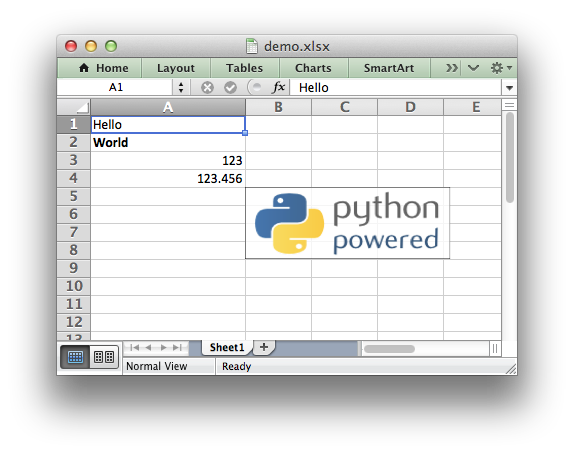
See the full documentation at: https://xlsxwriter.readthedocs.io
Release notes: https://xlsxwriter.readthedocs.io/changes.html
1 maintainer

Metadata
1 maintainer
Release files for xlsxwriter 3.3.0
For a detailed explanation of source distributions (sdists) and built distributions (wheels), please see the package formats documentation.
Source distribution (sdist)
| File | Size | Uploaded | Provenance | |
|---|---|---|---|---|
| xlsxwriter-3.3.0.tar.gz | 221.4 kB | Without provenance | Details |
Built distribution (wheel)
| File | Interpreter | ABI | Platform | Reset |
|---|---|---|---|---|
| xlsxwriter-3.3.0-py3-none-any.whl | Python 3 | none | any | Details |
Total release size: 400.9 kB
Release files / xlsxwriter-3.3.0.tar.gz
| Download URL | xlsxwriter-3.3.0.tar.gz |
|---|---|
| Size | 221.4 kB |
| Tags | Source |
|
SHA-256 checksum How to use checksums |
0a6bf2e4dcec8b29dd9b86d1e622132134c48bb6fd10f925fdfb229f0447199a
|
|
BLAKE2b-256 checksum How to use checksums |
93f298b45e52bc0330256bd4bb039cc44b28f838ad85602ce4f358f355d501bb
|
| Upload date | |
|
Uploaded using Trusted Publishing? What is trusted publishing? |
No |
| Uploaded via |
twine/6.1.0 CPython/3.13.0
|
Release files / xlsxwriter-3.3.0-py3-none-any.whl
| Download URL | xlsxwriter-3.3.0-py3-none-any.whl |
|---|---|
| Size | 179.5 kB |
| Tags | Python 3 |
|
SHA-256 checksum How to use checksums |
5f04772d43281da5109af66f39b65153359a203e896847c416476e709b024469
|
|
BLAKE2b-256 checksum How to use checksums |
ce9d3d30eaaa7e06bdb6172f938b2661d64f8d899bdca54120384ecf3759488a
|
| Upload date | |
|
Uploaded using Trusted Publishing? What is trusted publishing? |
No |
| Uploaded via |
twine/6.1.0 CPython/3.13.0
|
Security for xlsxwriter 3.3.0
Provenance
Provenance describes where a file came from. On PyPI, provenance is shared via attestations, which provide a verifiable record of the build or publishing details. View details, limitations and caveats.
No provenance found
None of the files in this release were uploaded with provenance metadata.
A note on package security
PyPI is a repository for distributing packages, not a service for auditing them. While third-party security researchers and our staff do their best to detect and remove malicious packages, PyPI cannot guarantee the quality, security or suitability of any given package.














