
XRLab SDK
XRLab SDK is a Python toolkit for putting vision-language models on XR headsets. It answers the two questions that decide whether a model is worth trying at all: which configurations survive on a given device, and what running them actually costs.
The package installs as xrlab and ships two commands. xrprobe reports what
a headset is and which model configurations fit on it. xreval runs a
benchmark against a llama-server, on the device or off it. Everything the
commands do is available as a library.
It came out of a study that ran about 10,000 inferences across a Mac mini M4 and a Meta Quest 3. Every constant in the sizing model replaced an assumption that measurement contradicted, and each is documented at the point it is used, with the figure behind it, so it can be checked rather than believed.
pip install xrlab
xrprobe devices
xrprobe probe
xrprobe fit --gguf model.gguf --mmproj p.gguf
xrprobe fit --device quest3
Requirements
Python 3.9 or newer is the only hard requirement, and the package itself has no dependencies. What else you need depends on how far you are going.
| To do this | You need |
|---|---|
| Size a model against a stored profile or a figure you have | nothing else |
| Read a GGUF's shape from disk | the model file, or just its first megabytes |
| Probe a headset, or size against the one you have | adb on PATH, and developer mode enabled on the device |
| Run a benchmark on a workstation | a llama.cpp build with llama-server |
| Run one on the headset | the same, cross-compiled for arm64-v8a, on the device |
adb comes with Android platform-tools, and also ships inside Meta Quest
Developer Hub if you already have that. Pass --adb if it is not on PATH.
Nothing here installs or manages llama.cpp for you.
Measured Against
Every figure in this package came from one setup. Yours will differ, which is
the reason xrprobe probe exists rather than a table of assumptions.
| Headset | Meta Quest 3, Horizon OS v207, Android 14, Snapdragon XR2 Gen 2, Adreno 740 |
| Runtime | llama.cpp b10738 for the study, b9585 for the OpenCL build |
| Models | Cosmos-Reason2 at 2B, 8B and 32B; Qwen3-VL-2B; Qwen2.5-3B |
| Host | Mac mini M4, 16 GB, Metal backend |
Getting Started
- Install the package.
pip install xrlab - Ask what fits, without a headset.
xrprobe fit --device quest3 - Put the headset in developer mode and plug it in.
xrprobe devicesshould list it; if it says no authorized device, accept the prompt inside the headset. - Read the device rather than a stored profile.
xrprobe probe - Size a model you actually have.
xrprobe fit --gguf model.gguf --mmproj mmproj.gguf
Steps 1 and 2 need nothing but Python. Step 3 is where adb starts mattering.
Background
Putting a model on a Quest is mostly an argument about memory, and the numbers that decide the argument are not the ones the device advertises. A Quest 3 is sold as an 8 GB machine, reports 7.58 GB, and hands an application somewhere between 3.4 and 4.5 GB depending on what the compositor is doing that minute. Size a model against the wrong one of those figures and the run dies partway through, usually after several hours.
Everything here came out of a study that ran about 10,000 inferences across a Mac mini M4 and a Quest 3. Each constant in the sizing model replaced an assumption that turned out to be wrong, and each one is documented at the point it is used, with the measurement behind it, so it can be checked rather than believed.
Finding a Headset
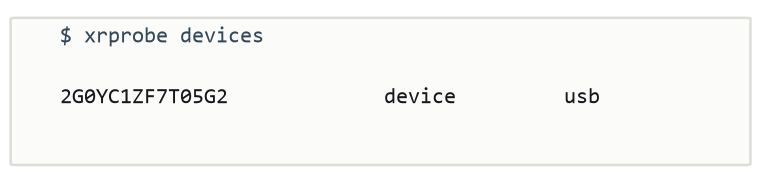
Wireless is preferred when both transports are available, because a tethered headset is a different thermal and power situation from an untethered one, and that matters for anything measuring what inference does to a device.
Reading the Device
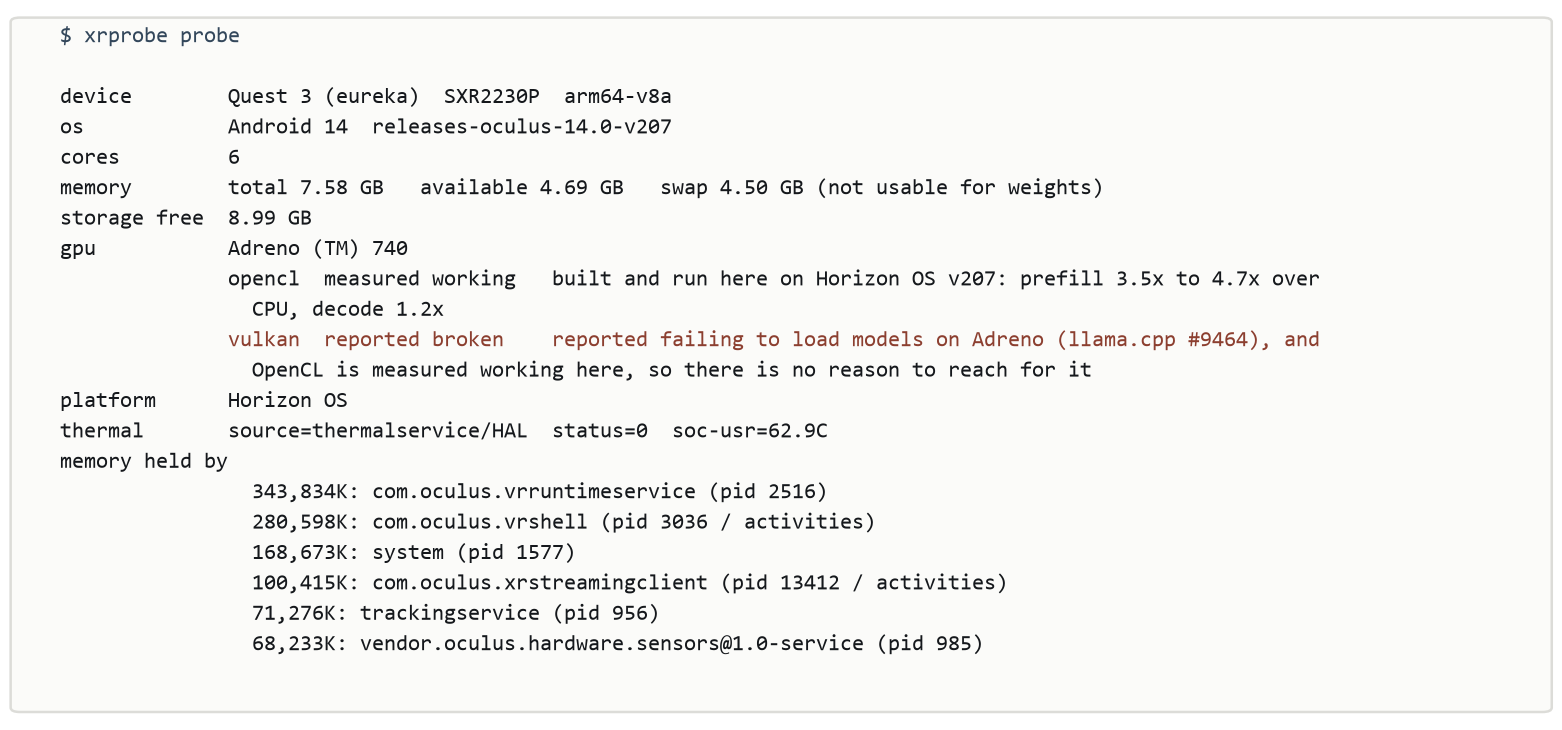
Every field is read from the device. Steps fail independently: if a build
refuses dumpsys thermalservice, that costs the thermal reading and not the
memory figures, and the failure is recorded rather than swallowed. A profile
with holes in it says INCOMPLETE before anything else, because one that reads
as complete when it is not is worse than one that failed outright.
Sizing a Model
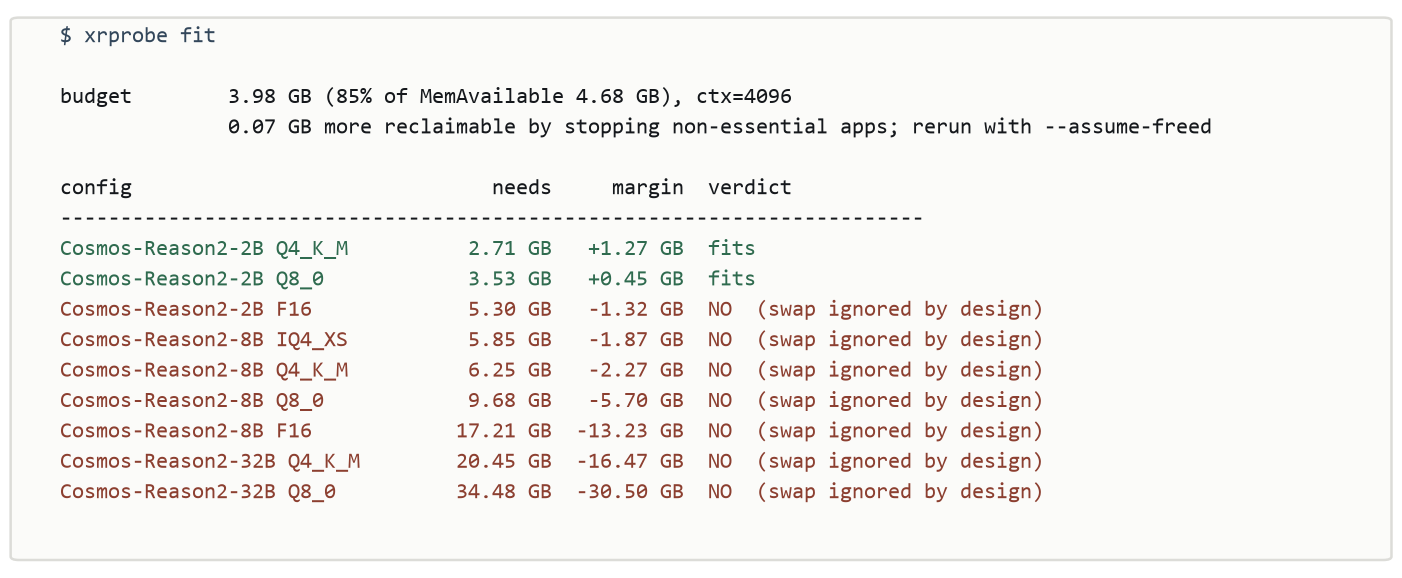
Four decisions in the arithmetic are worth knowing about.
MemAvailable, not MemTotal. The difference on a Quest 3 is around 3.5 GB, held by the runtime, the compositor and the tracking stack, and none of it is coming back while a session is live.
The vision projector counts. Every multimodal GGUF ships mmproj as a
separate file. Leaving it out understates the requirement by most of a
gigabyte, which is the whole margin on this class of device.
Swap is never spent. The Quest offers 4.5 GB of it. Paging weights destroys exactly the latency figures an on-device measurement exists to produce, so a configuration that only fits with swap does not fit.
The KV cache is sized from the model's real head counts. This was the expensive lesson. An early version assumed a grouped-query ratio of 4 for every architecture. Measured against real files, Cosmos-Reason2-2B is 2, Qwen3-VL-8B is 4, and Qwen2.5-3B is 8. A single constant is wrong in both directions across any two models you pick, and wrong in the direction that halves the cache is the direction that gets a run killed. Head width comes from the header too, because deriving it as embedding over heads is wrong for any model that declares otherwise, and Qwen3-VL-32B declares 128 where the derivation gives 80.
Shapes are read from the GGUF header, so any model works and nothing has to be
kept in a table. --kv-bits sizes a quantized cache, the same one llama.cpp
takes as --cache-type-k:
xrprobe fit --gguf model.gguf --mmproj mmproj.gguf
xrprobe fit --ctx 8192 --kv-bits 8
xrprobe fit --assume-freed --json
Sizing Without a Device
xrprobe known
xrprobe fit --device quest3
xrprobe fit --mem-available 6.0
xrprobe probe --json > mine.json
xrprobe fit --profile mine.json
known holds one device, because one device is what has been measured. A
plausible-looking entry for a headset nobody probed would answer the question
this tool exists to answer, confidently and wrongly. --mem-available covers
everything else: read MemAvailable out of /proc/meminfo once and pass the
figure.
Offline output always says which source it used. It matters more than it
sounds. On one headset, on one day, MemAvailable was observed between 3.44 and
4.49 GB, and Cosmos-Reason2-2B at Q8_0 needs 3.53 GB. Against the low reading
fit says no, against the high one it says yes. Probe the device in front of
you.
Running Benchmarks
On a workstation, spawning its own server:
xreval items.jsonl --llama-bin ./bin --model m.gguf --mmproj p.gguf
On the headset: start llama-server there, expose it, and drive it from here:
adb forward tcp:18080 tcp:18080
xreval items.jsonl --server-url http://127.0.0.1:18080 --config quest-2B-Q4
One llama-server stays resident for the whole run, and questions that share
an image are dispatched consecutively so the encoder runs once for the group
rather than once per question. On the run this came from, that was 48 encodes
instead of 586, and on a headset where a single encode takes 45 seconds it was
the difference between an overnight run and one that could not be finished.
It deliberately does not fold several questions into one prompt. That would be faster still and would change the task, because the model would see the other objects while answering.
Runs resume. A row that failed is retried rather than treated as done, and two kinds of failure are contained rather than fatal: an item that raises while being scored costs that row and is recorded with the exception that caused it, and a frame that cannot be read costs its group. Both used to end the run, and on a headset ending the run means throwing away hours of answers that were already paid for.
Writing a Task
Four decisions: what to ask, which image, how to read the answer, and what counts as right. Everything else the runner handles.
from xrlab import Task

class YesNo(Task):
    name = "yes-no"

    def prompt(self, item, condition):
        return item["question"] + " Answer yes or no."

    def parse(self, text):
        # match the whole first word: "nothing is visible" is not a no
        word = text.strip().lower().split(" ")[0].strip(".,!")
        return {"yes": True, "no": False}.get(word)

    def score(self, parsed, item, condition):
        return {"correct": parsed == item["answer"]}
PointLocalization is the worked example, and it carries a trap that cost a
full pass to find. Qwen3-VL and the models post-trained from it answer on a
0 to 1000 normalised grid whatever the prompt asks for. Read as absolute
pixels, every answer is a few hundred pixels out with a stable, plausible error
that never varies by condition. Pass norm_scale=0 if your model really
answers in pixels.
Using the Library
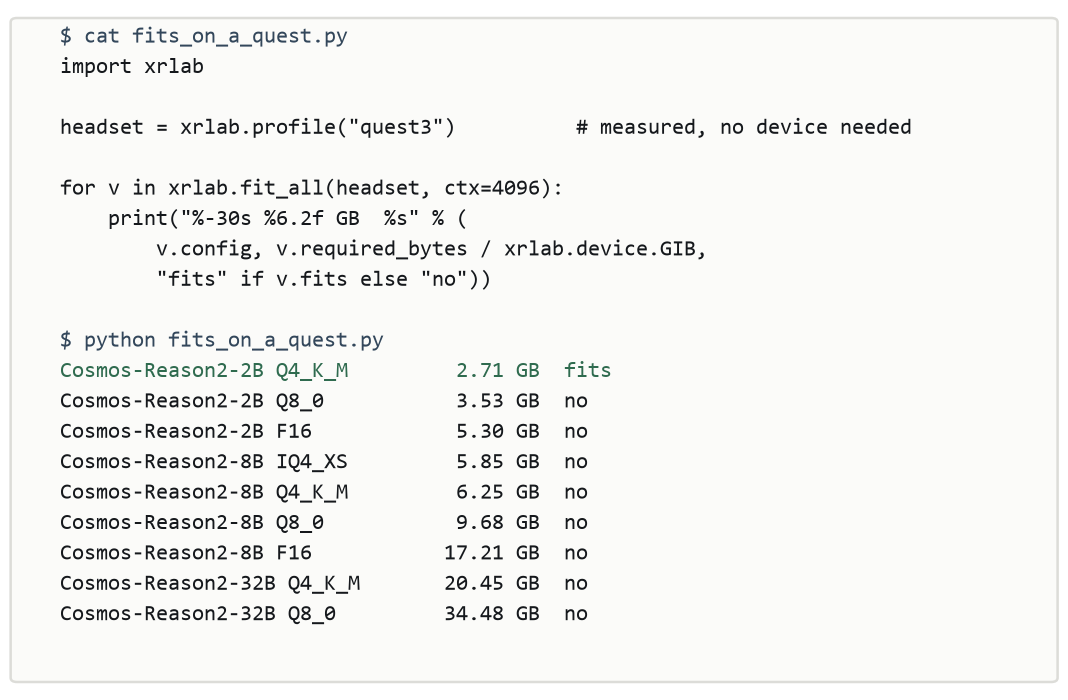
Everything the commands do is available directly. probe, fit, fit_all,
read_shape, run, Server, ExternalServer and the errors they raise are
all exported from the top level.
GPU Backends
xrprobe probe names the GPU and says what is known about running a backend on
that particular part. Which loaders sit on disk is true of every Android device
and tells you nothing.
The verdicts distinguish where they come from. On a Quest 3, llama.cpp's OpenCL
backend was built and run here, and reads measured working with the figures:
prefill 3.5x to 4.7x over CPU, decode 1.2x, on Cosmos-Reason2-2B Q4_K_M with
llama-bench. That part is an Adreno 740, which is not on llama.cpp's own
verified list, so the list is not the boundary it looks like.
reported working means someone else's result, dated and cited in
xrlab/backends.py. An unverified GPU reads unreported and never working.
None of it is a test on your device.
Two things are worth passing on for anyone taking this further. Vulkan is reported failing to load models on Adreno, so OpenCL is the path on Qualcomm parts. And llama.cpp warns at load that the CLIP graph uses an operator OpenCL does not implement, which means the vision encoder will not simply inherit the language model's speedup.
Diagnostics
tools/device_check.py runs the package against a headset that is actually
plugged in and reports where its beliefs and the hardware disagree, across
eighteen checks. The test suite runs against fixtures, and fixtures are a
snapshot of an OS version that has since had updates. --free-apps adds a
measurement of what stopping background apps actually recovers.
python tools/device_check.py
python tools/device_check.py --free-apps
Tests
python -m unittest discover -s tests
203 tests at 100% line and branch coverage, none of which need a device or a
model. The end-to-end tests drive a stand-in llama-server, probe runs against
captured Horizon OS output, and the GGUF reader is exercised over every model
file on the machine rather than only over headers the suite writes itself.
Limitations
Not an inference engine. It does not run llama.cpp; it tells you whether llama.cpp will run, and manages the run.
The 0.85 headroom fraction is a judgement rather than a measurement and says so
in the source. Sizing is arithmetic on a stated context length, and llama.cpp
prints the real allocation at load, so treat fit as the answer to whether a
configuration is worth trying.
The reclaimable-app list is per platform and only Horizon OS is filled in.
Anything else reclaims nothing and says so; name your own with --reclaimable
once you have checked. One list is not negotiable: every platform carries an
essential set covering the runtime, the compositor and the tracking stack, and
a list supplied on the command line is filtered through it, so a typo cannot
cost a run the session it is measuring.
Force-stopping background apps returns about three quarters of their reported PSS rather than all of it, measured once on one app, and the prediction is discounted accordingly. Stopping an app that is already stopped returns nothing and costs a little.
Contributing
The useful contributions here are measurements rather than features: a device profile taken from hardware, a platform's app lists with evidence for them, a backend verdict from a build you ran. CONTRIBUTING.md says what each one needs.
License
Apache 2.0. See LICENSE. If you use this in published work, there is a CITATION.cff.
1 maintainer

Download files
Download the file for your platform. If you're not sure which to choose, learn more about installing packages.
Source Distribution
Built Distribution
Filter files by name, interpreter, ABI, and platform.
If you're not sure about the file name format, learn more about wheel file names.
Copy a direct link to the current filters
File details
Details for the file xrlab-0.1.1.tar.gz.
File metadata
- Download URL: xrlab-0.1.1.tar.gz
- Upload date:
- Size: 67.7 kB
- Tags: Source
- Uploaded using Trusted Publishing? Yes
- Uploaded via:
twine/7.0.0 CPython/3.13.14
File hashes
| Algorithm | Hash digest | |
|---|---|---|
| SHA256 |
330837761503b4874ac0a90cfc5baad4f8fb9f314775406219b5d782de7fbf83
|
|
| MD5 |
b650a1189248fed60a41a40e1481c2c5
|
|
| BLAKE2b-256 |
a946cab81dfa4c9019f032d77ddb4b692a5a9bff6014e8b40ccdfae7aff61dbe
|
Provenance
The following attestation bundles were made for xrlab-0.1.1.tar.gz:
Publisher:
release.yml on mcbu-xrlab/xrlab
-
Statement:
-
Statement type:
https://in-toto.io/Statement/v1 -
Predicate type:
https://docs.pypi.org/attestations/publish/v1 -
Subject name:
xrlab-0.1.1.tar.gz -
Subject digest:
330837761503b4874ac0a90cfc5baad4f8fb9f314775406219b5d782de7fbf83 - Sigstore transparency entry: 2700736534
- Sigstore integration time:
-
Permalink:
mcbu-xrlab/xrlab@b449a2da04881f5ebb8eee80135e3cbaea8b058d -
Branch / Tag:
refs/tags/v0.1.1 - Owner: https://github.com/mcbu-xrlab
-
Access:
public
-
Token Issuer:
https://token.actions.githubusercontent.com -
Runner Environment:
github-hosted -
Publication workflow:
release.yml@b449a2da04881f5ebb8eee80135e3cbaea8b058d -
Trigger Event:
release
-
Statement type:
File details
Details for the file xrlab-0.1.1-py3-none-any.whl.
File metadata
- Download URL: xrlab-0.1.1-py3-none-any.whl
- Upload date:
- Size: 43.3 kB
- Tags: Python 3
- Uploaded using Trusted Publishing? Yes
- Uploaded via:
twine/7.0.0 CPython/3.13.14
File hashes
| Algorithm | Hash digest | |
|---|---|---|
| SHA256 |
521177a4303c55ca6d8265fac05c771afe7cf70e0e8e456cb14291d1fb96bcea
|
|
| MD5 |
d9a671786a9405cbdbce5baaa2aaace4
|
|
| BLAKE2b-256 |
b9588f3c8e0cf67f8011f2214e87818ea0dd322c5c95703ba9c5592aa9293a2a
|
Provenance
The following attestation bundles were made for xrlab-0.1.1-py3-none-any.whl:
Publisher:
release.yml on mcbu-xrlab/xrlab
-
Statement:
-
Statement type:
https://in-toto.io/Statement/v1 -
Predicate type:
https://docs.pypi.org/attestations/publish/v1 -
Subject name:
xrlab-0.1.1-py3-none-any.whl -
Subject digest:
521177a4303c55ca6d8265fac05c771afe7cf70e0e8e456cb14291d1fb96bcea - Sigstore transparency entry: 2700736554
- Sigstore integration time:
-
Permalink:
mcbu-xrlab/xrlab@b449a2da04881f5ebb8eee80135e3cbaea8b058d -
Branch / Tag:
refs/tags/v0.1.1 - Owner: https://github.com/mcbu-xrlab
-
Access:
public
-
Token Issuer:
https://token.actions.githubusercontent.com -
Runner Environment:
github-hosted -
Publication workflow:
release.yml@b449a2da04881f5ebb8eee80135e3cbaea8b058d -
Trigger Event:
release
-
Statement type:














