
Executable State Model Parser
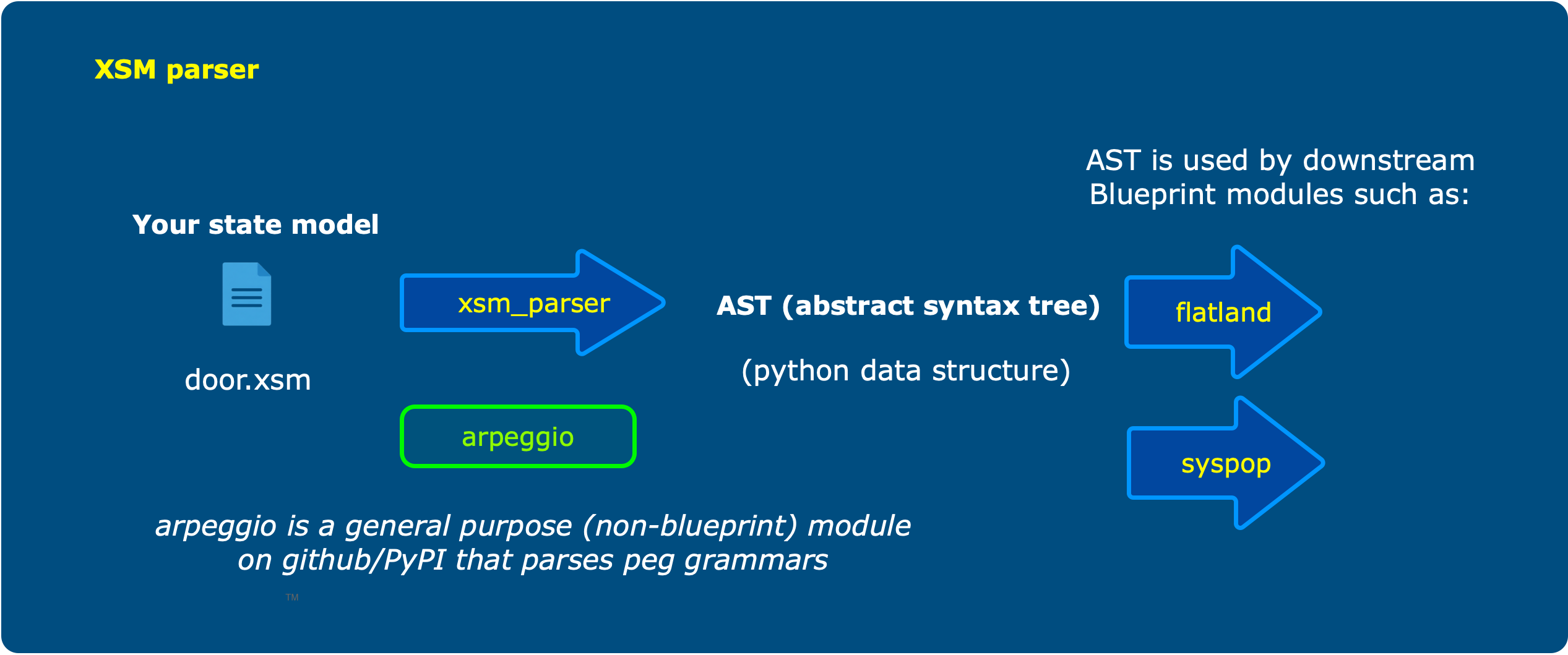
Parses an *.xsm file (Executable State Model) to yield an abstract syntax tree using python named tuples
📖 The xsm modeling language is fully documented in the project wiki.
Why you need this
You need to process an *.xsm file in preparation for populating a database or some other purpose
Installation
Create or use a python 3.11+ environment. Then
% pip install xsm-parser
At this point you can invoke the parser via the command line or from your python script.
From your python script
You need this import statement at a minimum:
from xsm_parser.state_model_parser import StateModelParser
You then specify a path as shown:
result = StateModelParser.parse_file(file_input=path_to_file, debug=False)
Check the code in state_model_parser.py to verify I haven't changed these parameters on you without updating the readme.
In either case, result will be a StateModel_a named tuple holding the parsed state model elements
(metadata, domain, lifecycle, assigner_rnum, assigner_pclass, initial_transitions, events
and states). A state model is either a class lifecycle or a relationship assigner, so either lifecycle
or the assigner_* fields will be filled in, never both. You may find the header of the
state_model_visitor.py file helpful in interpreting these results.
From the command line
The xsm command checks a model file, and can render it as a table for reading and review.
% xsm cabin.xsm
That says nothing and exits zero if the model parses. If it doesn't, you get the error and a non-zero
exit. Run xsm -h for the full set of options.
The .xsm extension is not necessary, but the file must contain xsm text. See this repository's wiki for more about the xsm language. The grammar is defined in the state_model.peg file. (if the link breaks after I do some update to the code, just browse through the code looking for the state_model.peg file, and let me know so I can fix it)
Two options leave diagnostic output behind in the current working directory, so you may want a scratch directory to run them from. A log of the run:
% xsm cabin.xsm -L
writes xsm_parser.log. And the debug option:
% xsm cabin.xsm -D
creates a diagnostics folder holding a couple of PDFs defining the parse of both the state model
grammar, state_model.pdf, and your supplied text, state_parse_tree.pdf.
Generating a state transition table
Add -t to write a markdown page presenting the model as a table:
% xsm cabin.xsm -t
You get cabin.md next to cabin.xsm, or somewhere else if you say so:
% xsm cabin.xsm -t -o docs
The page leads with a matrix of the wait states against the events, so you can see at a glance what each state does with each event. Below it, one section per state gives the reasoning behind every declared ignore and can't happen response, with reason tags resolved to the text they stand for.
Two things get flagged as you go. An event that no state answers at all is reported as a likely
oversight. And a wait state that says nothing about an event that could actually arrive there is
marked ? in the table and counted on the command line:
% xsm door.xsm -t
Wrote door.md
  6 interaction event response(s) not yet decided
Such a response defaults to can't happen, but nobody has said why — which is worth knowing, since it is the difference between a case that was considered and one that was overlooked.
You should also see a file named xsm_parser.log in your current working directory
1 maintainer

Download files
Download the file for your platform. If you're not sure which to choose, learn more about installing packages.
Source Distribution
Built Distribution
Filter files by name, interpreter, ABI, and platform.
If you're not sure about the file name format, learn more about wheel file names.
Copy a direct link to the current filters
File details
Details for the file xsm_parser-1.1.0.tar.gz.
File metadata
- Download URL: xsm_parser-1.1.0.tar.gz
- Upload date:
- Size: 20.1 kB
- Tags: Source
- Uploaded using Trusted Publishing? No
- Uploaded via:
twine/6.1.0 CPython/3.11.4
File hashes
| Algorithm | Hash digest | |
|---|---|---|
| SHA256 |
029d26ad9c4125440bba1f6e388a496b0ed3b2adaec01507b088112d0e55b0c3
|
|
| MD5 |
9cc61f4fbd45b71c22052020e0eca47e
|
|
| BLAKE2b-256 |
162922836dd82931de6ae8187a2b755febda71d8188b36ee779dca765268d1a0
|
File details
Details for the file xsm_parser-1.1.0-py3-none-any.whl.
File metadata
- Download URL: xsm_parser-1.1.0-py3-none-any.whl
- Upload date:
- Size: 17.6 kB
- Tags: Python 3
- Uploaded using Trusted Publishing? No
- Uploaded via:
twine/6.1.0 CPython/3.11.4
File hashes
| Algorithm | Hash digest | |
|---|---|---|
| SHA256 |
2f07b4f253455e6c2cb2483af8ede98cc37a5e878cf664c81ef8d7b604f2a70b
|
|
| MD5 |
c46f562319544e1ced15fd28ea88aaf5
|
|
| BLAKE2b-256 |
259a596679b662e9aba66b9c47a9bb892b1db76834e43a8d46b996499305ebb1
|







