










🚀 Speed Benchmark
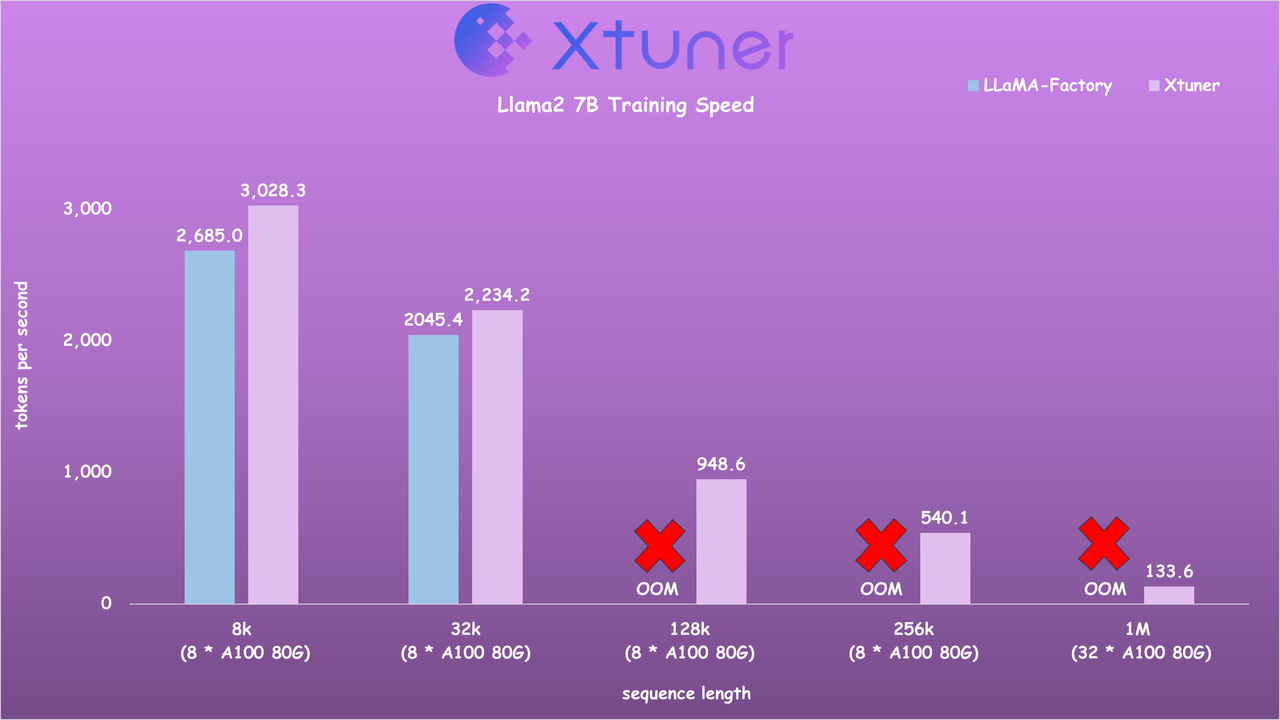
- Llama2 7B Training Speed
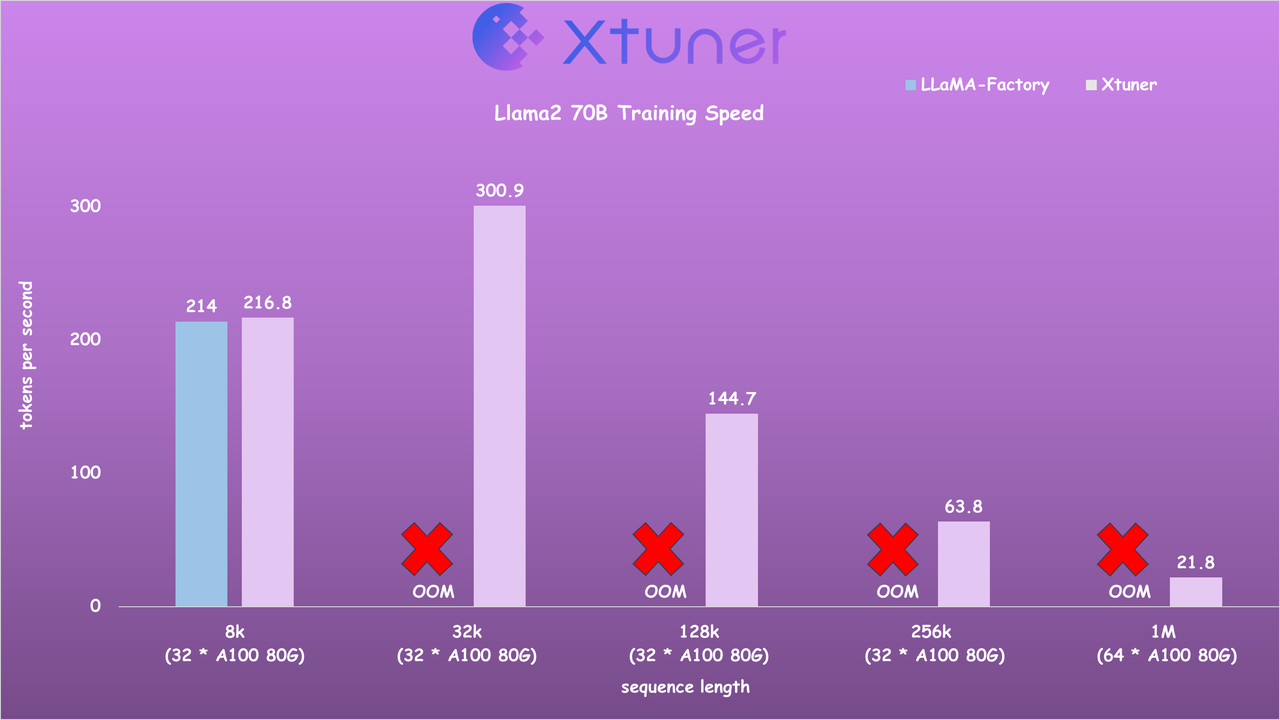
- Llama2 70B Training Speed
🎉 News
- [2025/02] Support OREAL, a new RL method for math reasoning!
- [2025/01] Support InternLM3 8B Instruct!
- [2024/07] Support MiniCPM models!
- [2024/07] Support DPO, ORPO and Reward Model training with packed data and sequence parallel! See documents for more details.
- [2024/07] Support InternLM 2.5 models!
- [2024/06] Support DeepSeek V2 models! 2x faster!
- [2024/04] LLaVA-Phi-3-mini is released! Click here for details!
- [2024/04] LLaVA-Llama-3-8B and LLaVA-Llama-3-8B-v1.1 are released! Click here for details!
- [2024/04] Support Llama 3 models!
- [2024/04] Support Sequence Parallel for enabling highly efficient and scalable LLM training with extremely long sequence lengths! [Usage] [Speed Benchmark]
- [2024/02] Support Gemma models!
- [2024/02] Support Qwen1.5 models!
- [2024/01] Support InternLM2 models! The latest VLM LLaVA-Internlm2-7B / 20B models are released, with impressive performance!
- [2024/01] Support DeepSeek-MoE models! 20GB GPU memory is enough for QLoRA fine-tuning, and 4x80GB for full-parameter fine-tuning. Click here for details!
- [2023/12] 🔥 Support multi-modal VLM pretraining and fine-tuning with LLaVA-v1.5 architecture! Click here for details!
- [2023/12] 🔥 Support Mixtral 8x7B models! Click here for details!
- [2023/11] Support ChatGLM3-6B model!
- [2023/10] Support MSAgent-Bench dataset, and the fine-tuned LLMs can be applied by Lagent!
- [2023/10] Optimize the data processing to accommodate
systemcontext. More information can be found on Docs! - [2023/09] Support InternLM-20B models!
- [2023/09] Support Baichuan2 models!
- [2023/08] XTuner is released, with multiple fine-tuned adapters on Hugging Face.
📖 Introduction
XTuner is an efficient, flexible and full-featured toolkit for fine-tuning large models.
Efficient
- Support LLM, VLM pre-training / fine-tuning on almost all GPUs. XTuner is capable of fine-tuning 7B LLM on a single 8GB GPU, as well as multi-node fine-tuning of models exceeding 70B.
- Automatically dispatch high-performance operators such as FlashAttention and Triton kernels to increase training throughput.
- Compatible with DeepSpeed 🚀, easily utilizing a variety of ZeRO optimization techniques.
Flexible
- Support various LLMs (InternLM, Mixtral-8x7B, Llama 2, ChatGLM, Qwen, Baichuan, ...).
- Support VLM (LLaVA). The performance of LLaVA-InternLM2-20B is outstanding.
- Well-designed data pipeline, accommodating datasets in any format, including but not limited to open-source and custom formats.
- Support various training algorithms (QLoRA, LoRA, full-parameter fune-tune), allowing users to choose the most suitable solution for their requirements.
Full-featured
- Support continuous pre-training, instruction fine-tuning, and agent fine-tuning.
- Support chatting with large models with pre-defined templates.
- The output models can seamlessly integrate with deployment and server toolkit (LMDeploy), and large-scale evaluation toolkit (OpenCompass, VLMEvalKit).
🔥 Supports
| Models | SFT Datasets | Data Pipelines | Algorithms |
🛠️ Quick Start
Installation
-
It is recommended to build a Python-3.10 virtual environment using conda
conda create --name xtuner-env python=3.10 -y
conda activate xtuner-env
-
Install XTuner via pip
pip install -U xtuner
or with DeepSpeed integration
pip install -U 'xtuner[deepspeed]'
-
Install XTuner from source
git clone https://github.com/InternLM/xtuner.git
cd xtuner
pip install -e '.[all]'
Fine-tune
XTuner supports the efficient fine-tune (e.g., QLoRA) for LLMs. Dataset prepare guides can be found on dataset_prepare.md.
-
Step 0, prepare the config. XTuner provides many ready-to-use configs and we can view all configs by
xtuner list-cfgOr, if the provided configs cannot meet the requirements, please copy the provided config to the specified directory and make specific modifications by
xtuner copy-cfg ${CONFIG_NAME} ${SAVE_PATH}
vi ${SAVE_PATH}/${CONFIG_NAME}_copy.py
-
Step 1, start fine-tuning.
xtuner train ${CONFIG_NAME_OR_PATH}
For example, we can start the QLoRA fine-tuning of InternLM2.5-Chat-7B with oasst1 dataset by
# On a single GPU
xtuner train internlm2_5_chat_7b_qlora_oasst1_e3 --deepspeed deepspeed_zero2
# On multiple GPUs
(DIST) NPROC_PER_NODE=${GPU_NUM} xtuner train internlm2_5_chat_7b_qlora_oasst1_e3 --deepspeed deepspeed_zero2
(SLURM) srun ${SRUN_ARGS} xtuner train internlm2_5_chat_7b_qlora_oasst1_e3 --launcher slurm --deepspeed deepspeed_zero2
-
--deepspeedmeans using DeepSpeed 🚀 to optimize the training. XTuner comes with several integrated strategies including ZeRO-1, ZeRO-2, and ZeRO-3. If you wish to disable this feature, simply remove this argument. -
For more examples, please see finetune.md.
-
-
Step 2, convert the saved PTH model (if using DeepSpeed, it will be a directory) to Hugging Face model, by
xtuner convert pth_to_hf ${CONFIG_NAME_OR_PATH} ${PTH} ${SAVE_PATH}
Chat
XTuner provides tools to chat with pretrained / fine-tuned LLMs.
xtuner chat ${NAME_OR_PATH_TO_LLM} --adapter {NAME_OR_PATH_TO_ADAPTER} [optional arguments]
For example, we can start the chat with InternLM2.5-Chat-7B :
xtuner chat internlm/internlm2_5-chat-7b --prompt-template internlm2_chat
For more examples, please see chat.md.
Deployment
-
Step 0, merge the Hugging Face adapter to pretrained LLM, by
xtuner convert merge \
    ${NAME_OR_PATH_TO_LLM} \
    ${NAME_OR_PATH_TO_ADAPTER} \
    ${SAVE_PATH} \
    --max-shard-size 2GB
-
Step 1, deploy fine-tuned LLM with any other framework, such as LMDeploy 🚀.
pip install lmdeploy
python -m lmdeploy.pytorch.chat ${NAME_OR_PATH_TO_LLM} \
    --max_new_tokens 256 \
    --temperture 0.8 \
    --top_p 0.95 \
    --seed 0
🔥 Seeking efficient inference with less GPU memory? Try 4-bit quantization from LMDeploy! For more details, see here.
Evaluation
- We recommend using OpenCompass, a comprehensive and systematic LLM evaluation library, which currently supports 50+ datasets with about 300,000 questions.
🤝 Contributing
We appreciate all contributions to XTuner. Please refer to CONTRIBUTING.md for the contributing guideline.
🎖️ Acknowledgement
🖊️ Citation
@misc{2023xtuner,
    title={XTuner: A Toolkit for Efficiently Fine-tuning LLM},
    author={XTuner Contributors},
    howpublished = {\url{https://github.com/InternLM/xtuner}},
    year={2023}
}
License
This project is released under the Apache License 2.0. Please also adhere to the Licenses of models and datasets being used.
1 maintainer

Release files for xtuner 0.2.0
For a detailed explanation of source distributions (sdists) and built distributions (wheels), please see the package formats documentation.
Source distribution (sdist)
| File | Size | Uploaded | |
|---|---|---|---|
| xtuner-0.2.0.tar.gz | 500.7 kB | Details |
Built distribution (wheel)
| File | Interpreter | ABI | Platform | Reset |
|---|---|---|---|---|
| xtuner-0.2.0-py3-none-any.whl | Python 3 | none | any | Details |
Total release size: 2.5 MB
Release files / xtuner-0.2.0.tar.gz
| Download URL | xtuner-0.2.0.tar.gz |
|---|---|
| Size | 500.7 kB |
| Tags | Source |
|
SHA-256 checksum How to use checksums |
bcb5e28116e7ac9474bcd71ba8e1c9cc95256ee8a2f6831818985c0d20b68440
|
|
BLAKE2b-256 checksum How to use checksums |
0ba53db25c63afe8de02ab63c7f757f8f06947d15c82bdc51088aa77185b7678
|
| Upload date | |
|
Uploaded using Trusted Publishing? What is trusted publishing? |
No |
| Uploaded via |
twine/6.1.0 CPython/3.8.18
|
Release files / xtuner-0.2.0-py3-none-any.whl
| Download URL | xtuner-0.2.0-py3-none-any.whl |
|---|---|
| Size | 2.0 MB |
| Tags | Python 3 |
|
SHA-256 checksum How to use checksums |
5b59e7e194d78579c3d00a9a68ea7195472869d7a4601d692ce200224ac86443
|
|
BLAKE2b-256 checksum How to use checksums |
d6ba49d49eb4f3b01ecc0b0b4b54c43d3fa5d9d14a239414b0ab315fa82c69d7
|
| Upload date | |
|
Uploaded using Trusted Publishing? What is trusted publishing? |
No |
| Uploaded via |
twine/6.1.0 CPython/3.8.18
|














