





XY is an extremely fast, interactive, customizable Python charting library for the web, notebooks, and static exports.
Charts are composed declaratively or through matplotlib conventions. You can fully customize them with Python, CSS, or Tailwind.
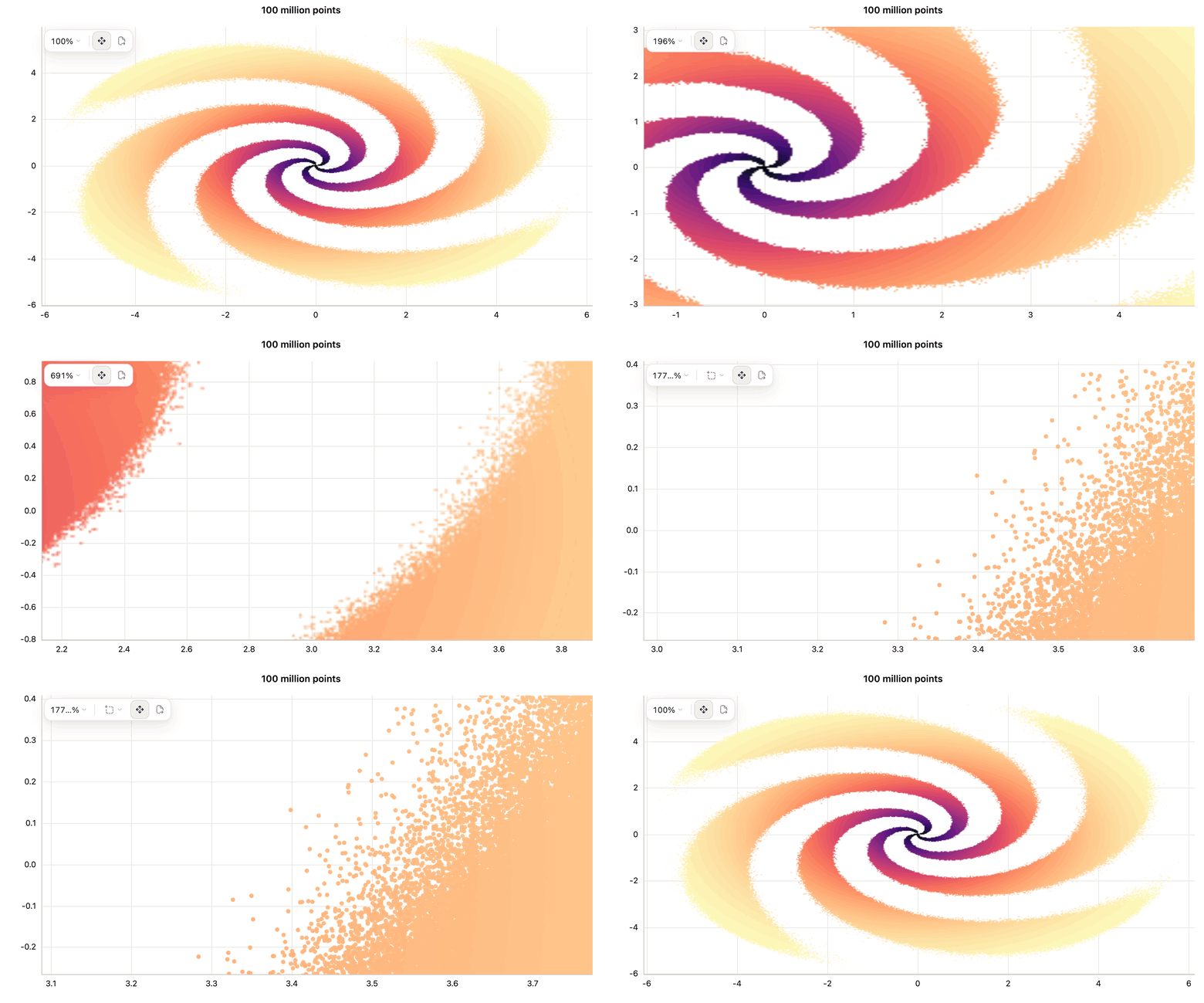
With small charts, every point is sent to the browser. For large charts, the Rust core computes only what the screen needs to display, based on its resolution. Pan, zoom, hover, and selection can show full details by running the same process for the new range, and a selection returns the original rows.
With XY we rendered the entirety of OpenStreetMap — a 10,000,000,000 point dataset. See the example →
[!IMPORTANT] XY is in alpha and is receiving frequent enhancements. ⭐️ Star the repo to follow the progress.
Is XY right for me?
XY is for Python users who want one flexible charting library for everything from everyday plots to custom application visuals and large datasets. Build a chart once, then use it in notebooks and web apps or export it as HTML, PNG, SVG, or PDF.
Installation
pip install xy

# or, with uv
uv add xy
Getting started
A chart is a container plus the marks inside it. Any sequence works; NumPy is optional.
import xy

chart = xy.line_chart(xy.line([1, 2, 3, 4, 5], [120, 180, 165, 240, 310]))
# chart.to_html("chart.html")
# chart.to_png("chart.png")
# chart.to_svg("chart.svg")
chart  # notebooks render it
The same API scales to a hundred million points as a density surface:
import numpy as np

import xy

rng = np.random.default_rng(7)
n = 100_000_000

r = 6.0 * rng.beta(1.2, 3.0, n)
theta = 2.9 * np.log1p(r) + rng.integers(0, 4, n) * (np.pi / 2) + rng.normal(0, 0.045 + 0.016 * r, n)

chart = xy.scatter_chart(
    xy.scatter(
        r * np.cos(theta),
        r * np.sin(theta),
        color=np.exp(-r / 2.2),
        colormap="magma_r",
        density=True,
        opacity=0.85,
        # Grow and solidify markers once a view drills through to real rows.
        size=2.5,
        zoom_size_factor=2.6,
        zoom_opacity=0.95,
    ),
    xy.theme(
        background="#ffffff", plot_background="#ffffff", grid_color="#e6e6e1",
        axis_color="#c3c2b7", text_color="#0b0b0b",
    ),
    title="100 million points",
)
chart
Coming from matplotlib
For common pyplot workflows, change the import and keep the plotting code:
import numpy as np
import xy.pyplot as plt

x = np.linspace(0, 10, 200)
fig, ax = plt.subplots()
ax.plot(x, np.sin(x), "r--", label="signal")
ax.legend()
plt.show()
See the compatibility guide; not all charts and functionality are supported yet.
Customize every layer
Use Python to control the chart, from marks and axes to interactions and layout.
- Marks: Control color, size, opacity, symbols, gradients, strokes, curves, and colormaps.
- Guides: Customize axes, ticks, grids, annotations, legends, colorbars, and tooltips.
- Interaction: Add pan, zoom, hover, selections, crosshairs, callbacks, and linked charts.
- Layout: Create layers and facets, set responsive dimensions, and apply themes.
chart = xy.line_chart(
    xy.line(x, y, color="#7c3aed", width=3),
    class_name="rounded-xl bg-white",
    class_names={"tooltip": "rounded-lg bg-zinc-900 text-white"},
)
See the styling guide for examples. For a detailed breakdown of what can be customized, see the capability matrix.
Benchmarks
Live interactive charts, 10k to 100M points. Every library gets every row and is driven through its own input path in a real browser. The clock stops only when the canvas is both correct (planted sentinel points verified lit) and stable (10 byte-identical frames), so progressive renderers are charged until their last chunk lands.
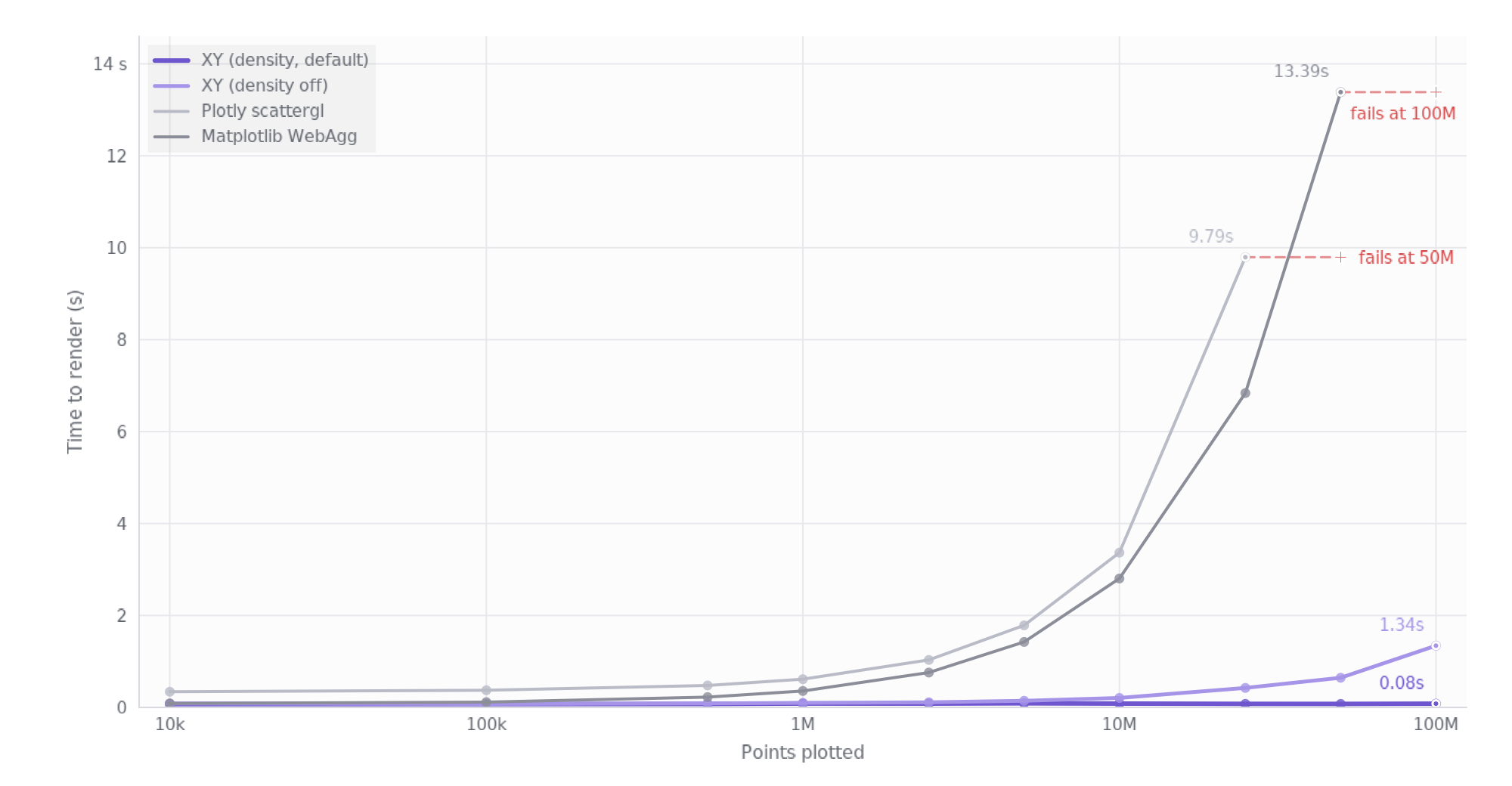
XY holds 0.071 s at 10k and 0.081 s at 100M, flat across four orders of magnitude, because above 200k rows it draws a screen-bounded density surface instead of one marker per row, and zoom drills back to exact rows. Every exact-marker path scales with N instead: Matplotlib crosses a second at ~3M and reaches 13.4 s at 50M; Plotly crosses at ~2.5M and reaches 9.8 s at 25M.
The pale line is XY with density=False: the same engine drawing one marker
per row, no aggregation credit. It renders 100M exact markers in 1.34 s on
5.26 GiB.
Time until every point is on screen, in seconds. ✕ is a size the library
did not render: Plotly never finishes constructing the figure at 50M, and
Matplotlib draws at 100M but never resolves the zoom that follows.
| Points | 10k | 100k | 500k | 1M | 2.5M | 5M | 10M | 25M | 50M | 100M |
|---|---|---|---|---|---|---|---|---|---|---|
| XY speedup | 1× | 2× | 3× | 4× | 9× | 16× | 34× | 89× | 177× | — |
| XY | 0.071 | 0.072 | 0.075 | 0.084 | 0.083 | 0.089 | 0.083 | 0.077 | 0.076 | 0.081 |
XY (density=False) |
0.085 | 0.074 | 0.087 | 0.098 | 0.111 | 0.144 | 0.206 | 0.424 | 0.645 | 1.343 |
| Matplotlib (WebAgg) | 0.086 | 0.115 | 0.224 | 0.357 | 0.758 | 1.424 | 2.804 | 6.838 | 13.385 | ✕ |
| Plotly (scattergl) | 0.341 | 0.373 | 0.477 | 0.614 | 1.033 | 1.785 | 3.367 | 9.794 | ✕ | ✕ |
Peak Python-side resident memory, in GiB. Browser memory is tracked separately and excluded here, since a headless Chrome resides ~1 GiB before drawing anything.
| Points | 10k | 100k | 500k | 1M | 2.5M | 5M | 10M | 25M | 50M | 100M |
|---|---|---|---|---|---|---|---|---|---|---|
| XY advantage | 1.8× | 1.7× | 1.9× | 2.1× | 2.1× | 2.4× | 2.6× | 2.9× | 2.8× | — |
| XY | 0.05 | 0.05 | 0.06 | 0.07 | 0.13 | 0.19 | 0.32 | 0.70 | 1.36 | 2.58 |
XY (density=False) |
0.05 | 0.05 | 0.07 | 0.10 | 0.18 | 0.31 | 0.57 | 1.35 | 2.66 | 5.26 |
| Matplotlib (WebAgg) | 0.09 | 0.09 | 0.12 | 0.15 | 0.28 | 0.46 | 0.84 | 2.06 | 3.85 | ✕ |
| Plotly (scattergl) | 0.21 | 0.18 | 0.28 | 0.36 | 0.60 | 1.05 | 1.86 | 4.70 | ✕ | ✕ |
One machine (Apple M5 Pro), one run per cell; at the small end the timings carry roughly ±10 ms of run-to-run spread.
For the environment, methodology, per-size videos, and raw results, see the benchmark runbook and competitive benchmark specification.
Embed XY in a Reflex app
The Reflex integration bundled with xy turns any XY chart into a regular
Reflex component, with no JavaScript, iframe, or separate chart service.
Install the reflex extra to select a compatible framework version:
pip install "xy[reflex]"

# or, with uv
uv add "xy[reflex]"
The import namespace remains reflex_xy. Register the integration once:
# rxconfig.py
import reflex as rx
import reflex_xy

config = rx.Config(
    app_name="dashboard",
    plugins=[reflex_xy.XYPlugin()],
)
Then add a chart anywhere in the component tree:
import reflex as rx
import reflex_xy
import xy

signups = xy.line_chart(
    xy.line([1, 2, 3, 4, 5], [120, 180, 165, 240, 310]),
    title="Weekly signups",
)


def index() -> rx.Component:
    return rx.card(
        rx.heading("Growth"),
        reflex_xy.chart(signups, height="320px"),
        width="100%",
    )


app = rx.App()
app.add_page(index)
For state-driven charts, declare the chart in the page and supply columns from
a @reflex_xy.data state method — the structure (channels, colormaps, axes)
is validated when reflex run compiles the app, while the columns ride the
app's own websocket as binary buffers, never through Reflex state:
from typing import TypedDict

import numpy as np
import reflex as rx
import reflex_xy


class CloudData(TypedDict):
    x: np.ndarray
    y: np.ndarray
    mag: np.ndarray


class Dash(rx.State):
    points: int = 200_000

    @reflex_xy.data
    def cloud(self) -> CloudData:
        rng = np.random.default_rng(7)
        x = rng.normal(size=self.points)
        y = x * 0.6 + rng.normal(scale=0.6, size=self.points)
        return {"x": x, "y": y, "mag": np.hypot(x, y)}


def dashboard() -> rx.Component:
    return reflex_xy.scatter_chart(
        data=Dash.cloud,
        x="x", y="y", color="mag", colormap="viridis",
        height="460px",
    )
Hover, pan, and zoom keep working. For charts driven by Reflex state, events, or live streams, see the Reflex integration guide and the runnable example app.
Examples
Each notebook fetches its rows from the linked public source; no raw datasets are stored in this repository. Counts describe the featured chart, and the notebooks scale further. See the example guide for sources, workload controls, and setup.
| Gaia DR3 · HR diagram 250,000 plotted stars 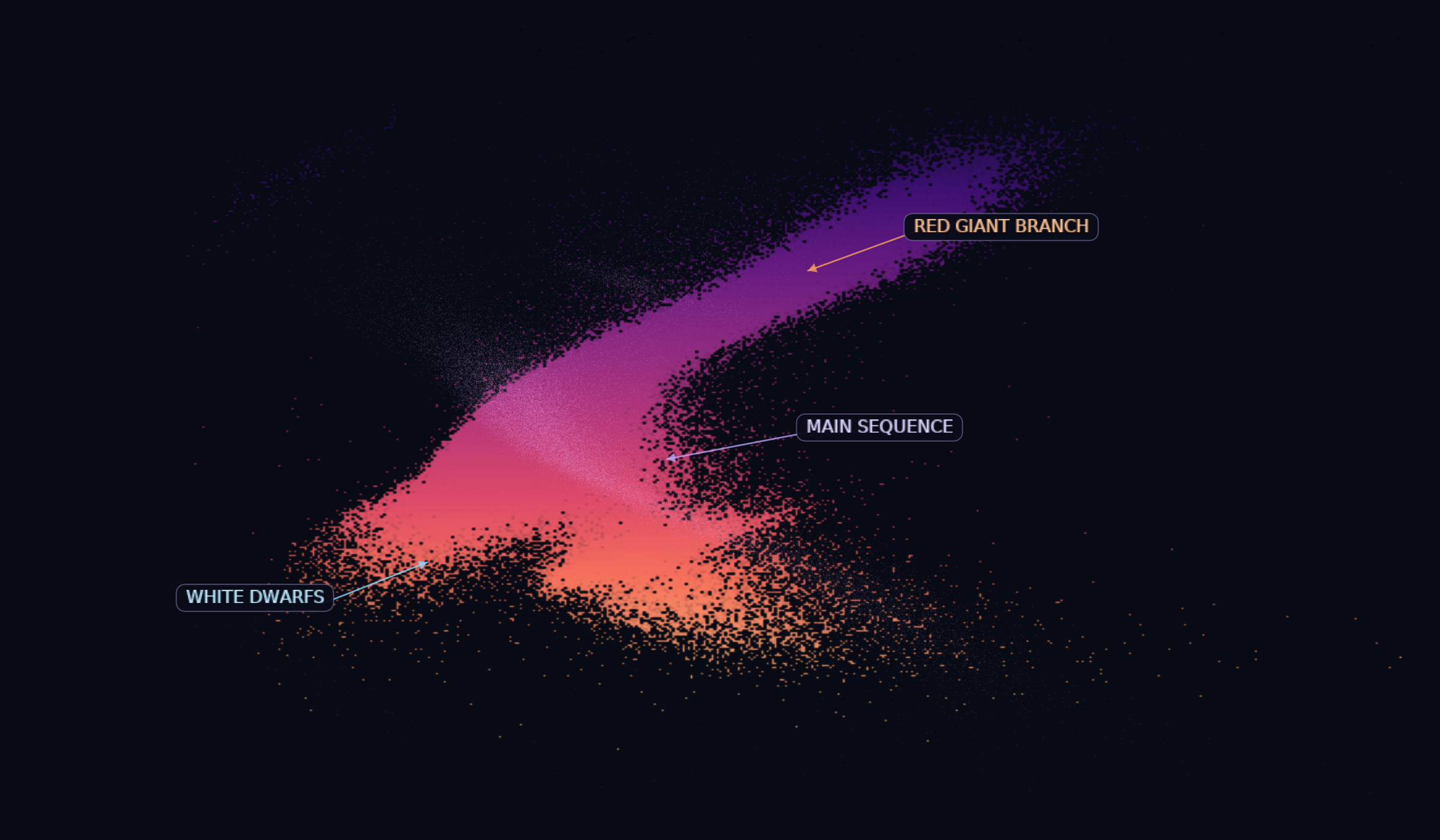 Open notebook |
gnomAD v4.1 · allele frequency 164,000 plotted variants 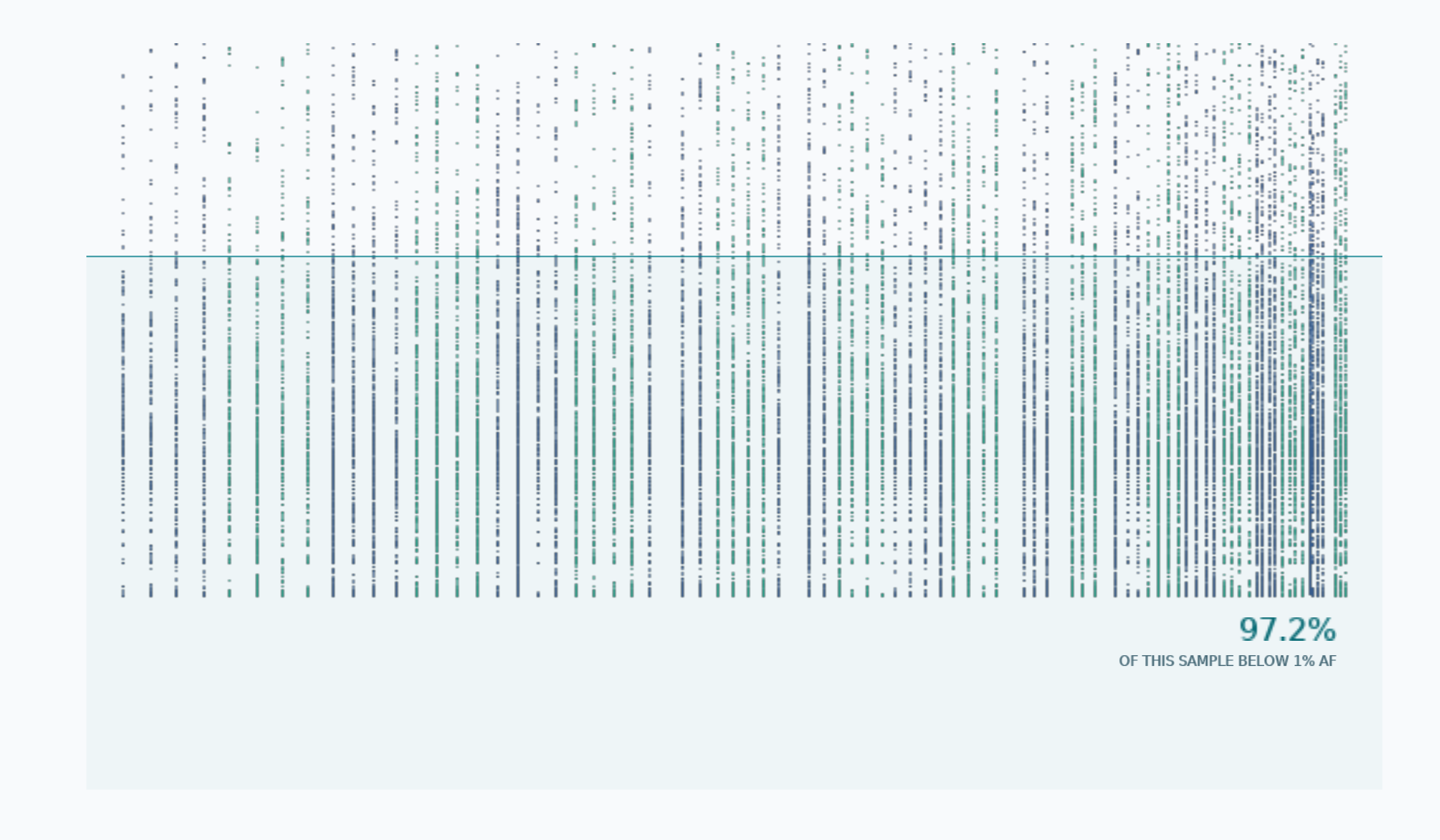 Open notebook |
Pan-UKBB · Manhattan plot 814,294 plotted variants 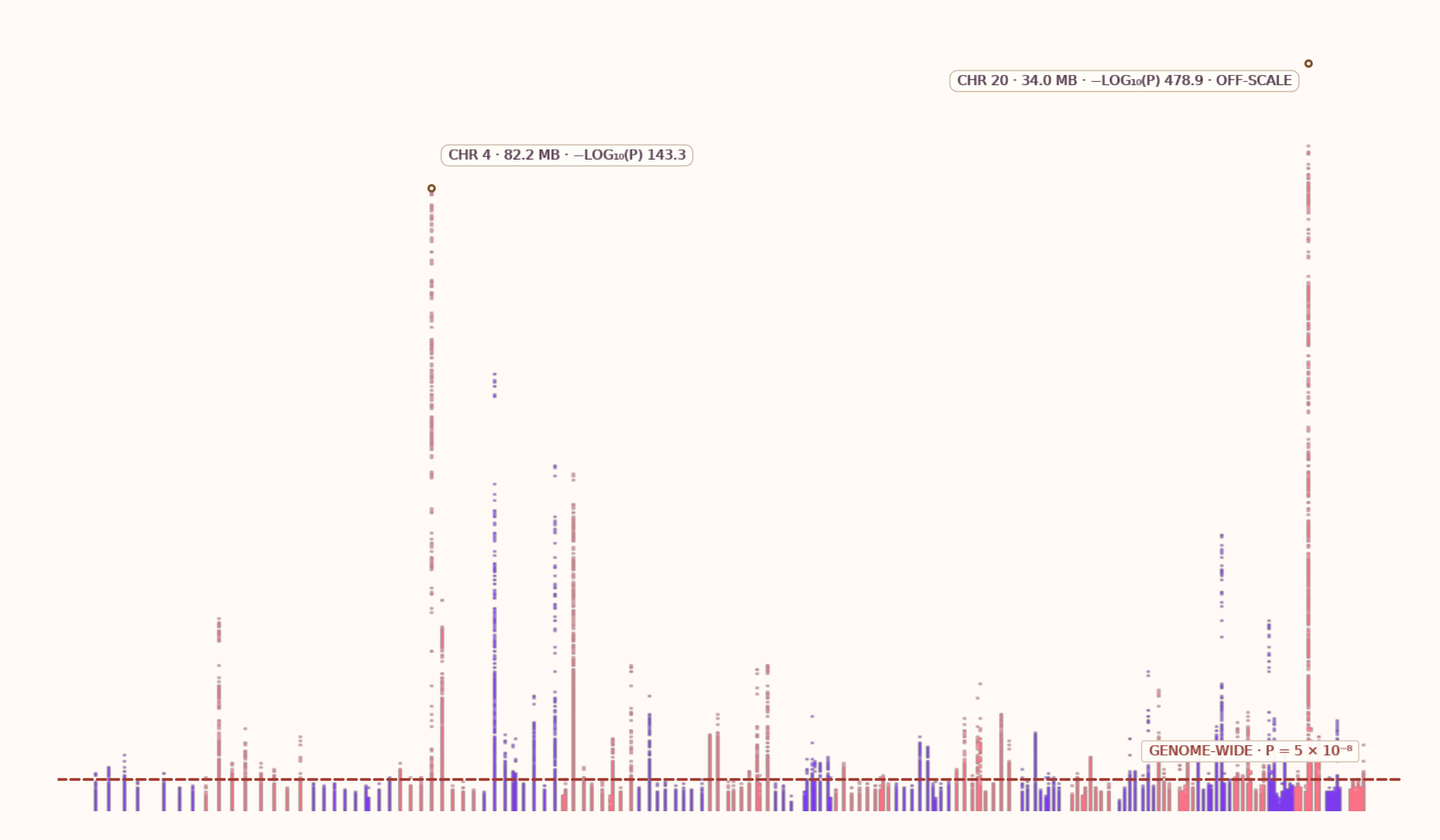 Open notebook |
| Dukascopy · EUR/USD ticks 101,427 plotted ticks 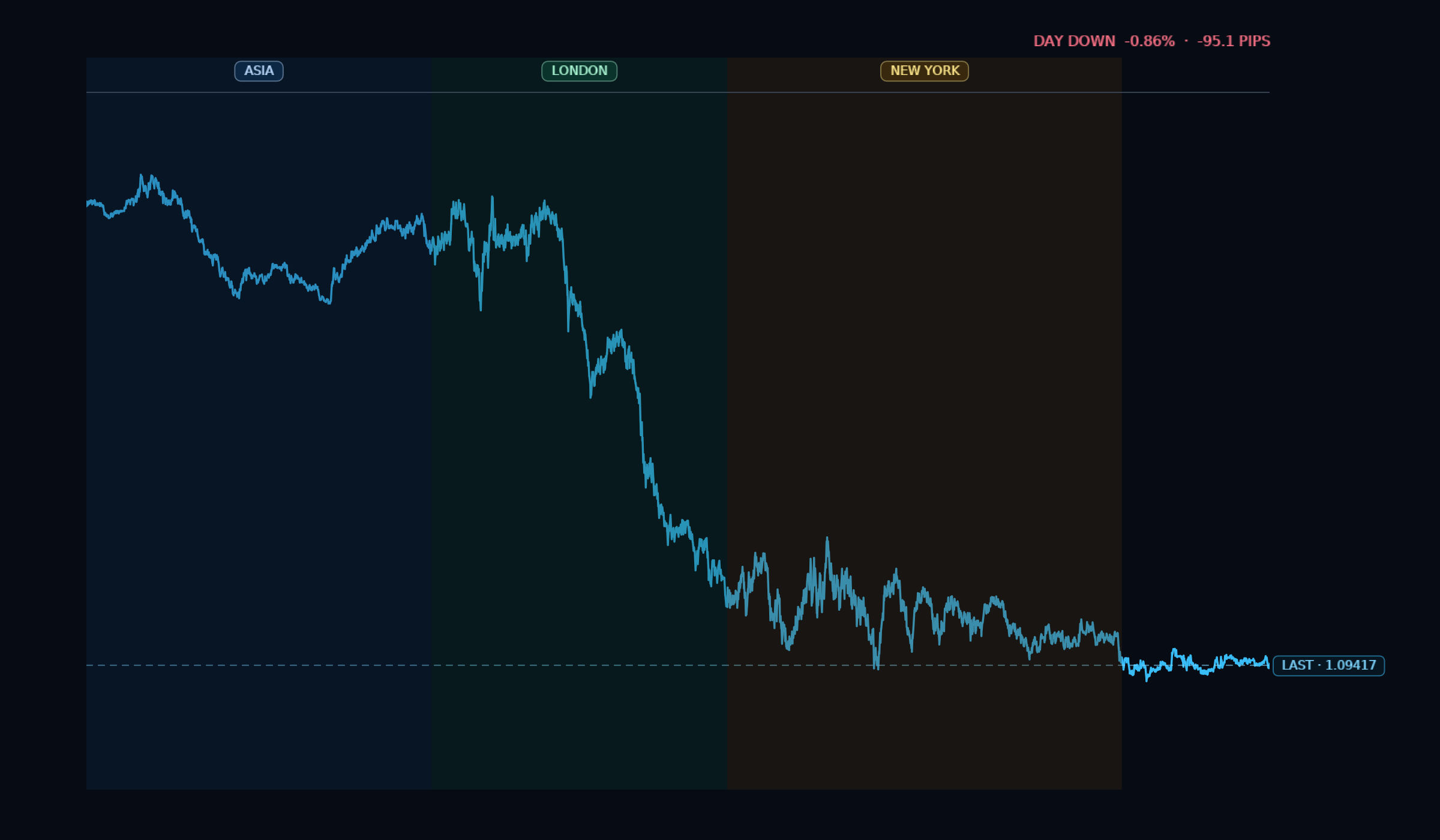 Open notebook |
LIGO · GW150914 strain 16,777,216 raw · 3,441 shown 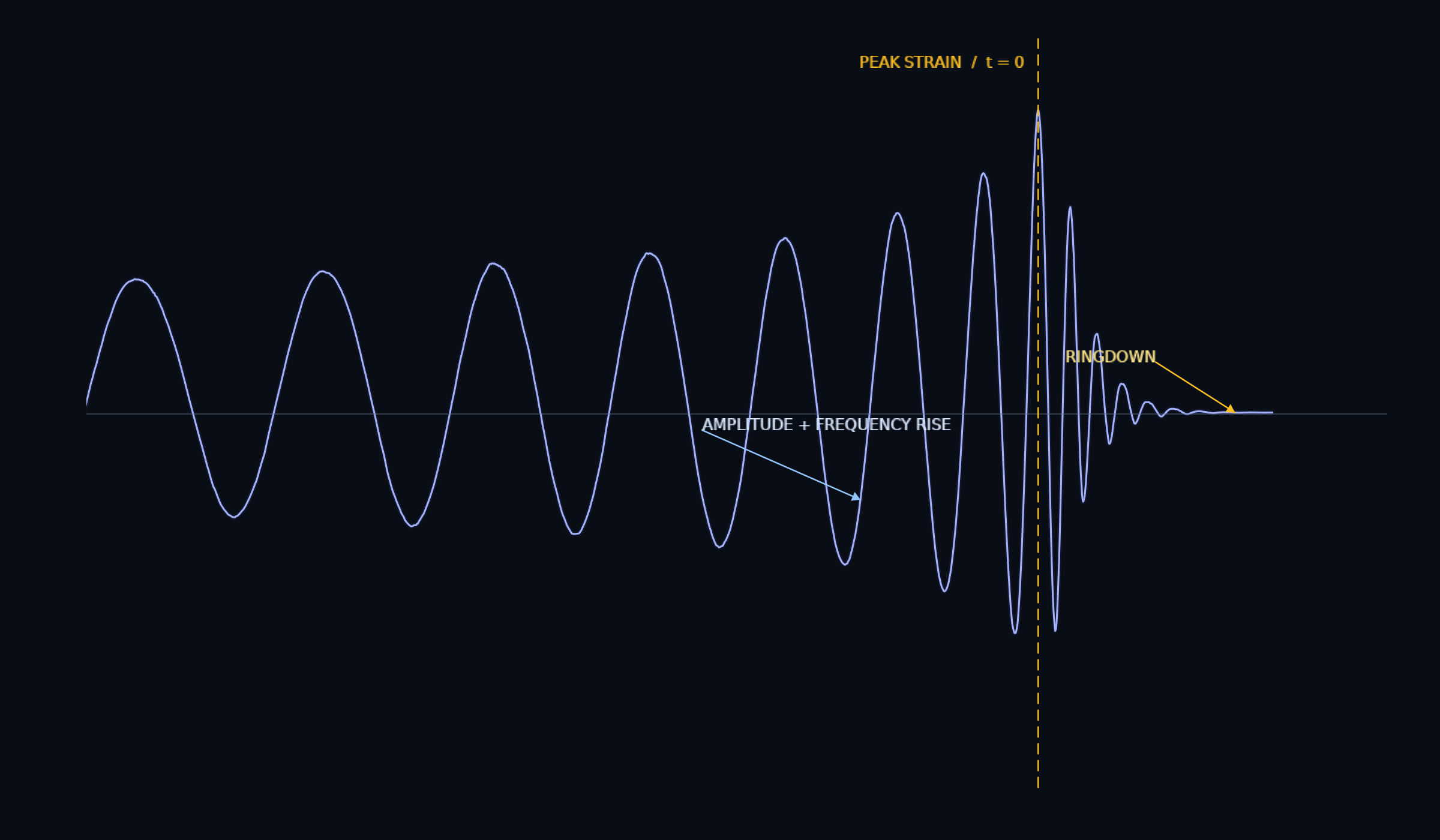 Open notebook |
NYC TLC · taxi pickup density 300,000 pickup records 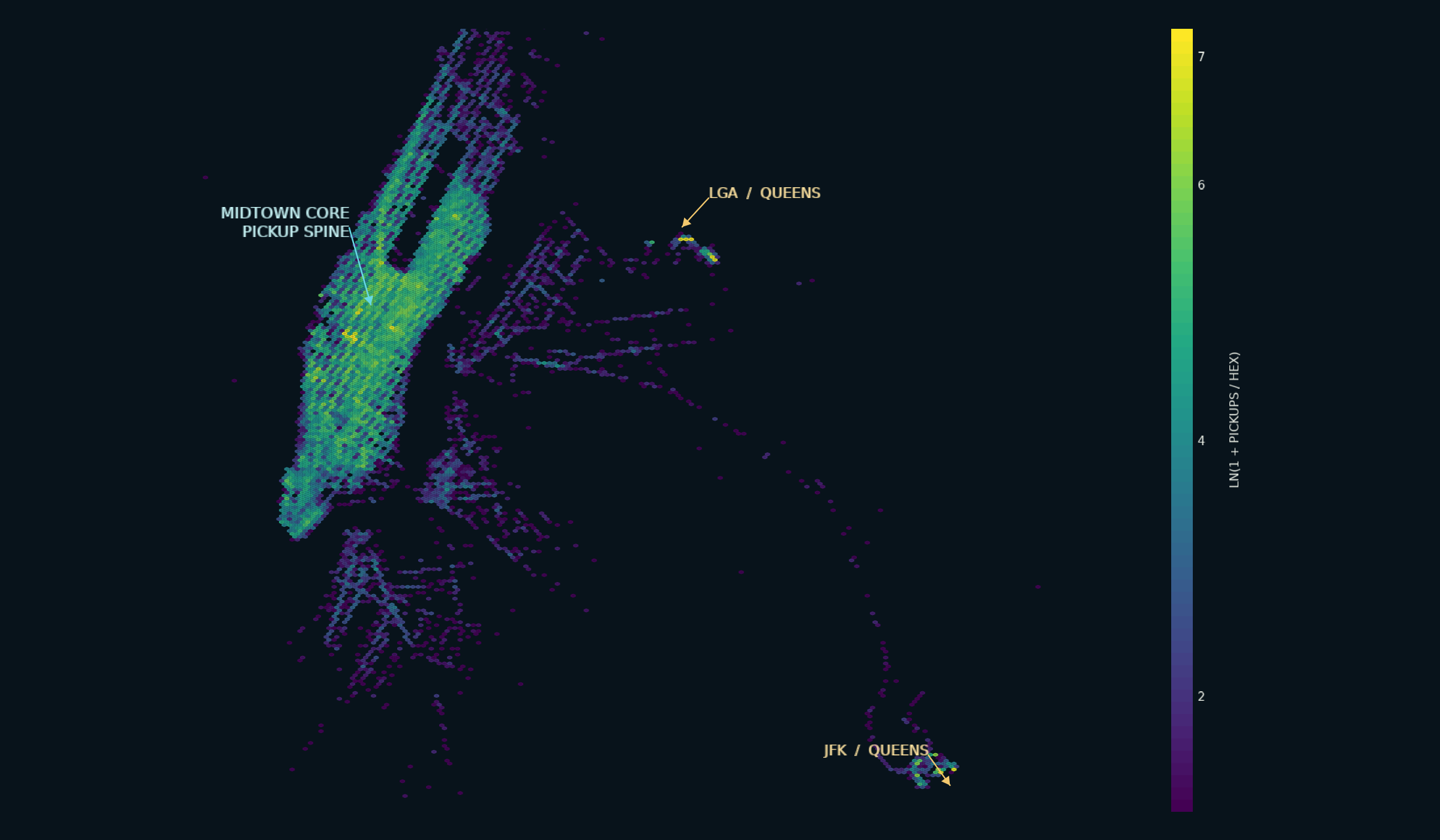 Open notebook |
How it works
Most chart stacks serialize every value as JSON and ask the browser to draw
every mark. XY keeps exact values in a ColumnStore, computes a level of detail
in Rust, and transfers typed binary buffers. Decimated and density views are
bounded by the visible result.
flowchart TB
    API["Python API<br/>Build the chart"]
    STORE["ColumnStore<br/>Keep canonical f64 columns"]
    CORE["Native Rust compute<br/>Direct · decimated · density"]
    PAYLOAD["Compact payload<br/>Data-less JSON spec + typed binary buffers"]
    RENDER["Browser or notebook<br/>WebGL2 marks · Canvas axes · DOM interface"]

    API --> STORE --> CORE --> PAYLOAD --> RENDER
So a dense overview can aggregate while a narrow view returns exact points. With a live host, pan and zoom request a refined payload. Canonical f64 data stays in Python, so hover and selection still return original rows.
For the full design, see the design dossier.
Roadmap
Broad 2D coverage first, then geographic, 3D, and volume visualization. Queued next, no dates implied:
- Categorical distributions: strip, swarm, beeswarm, boxen, rug
- Regression diagnostics: trendline, residual, QQ, PP
- Scatter matrix and joint plots: SPLOM, pair grid, marginal histograms
- Pie / donut:
xy.pie_chart(labels, values, hole=...)ships over unequal-width core polar bars, with Matplotlib-shaped helpers inxy.pyplot; nested donuts and variable-radius composition remain - Candlestick / OHLC and finance overlays: SMA, VWAP, Bollinger, RSI, MACD; prototyped, awaiting a fresh landing
- Waterfall and funnel
- Treemap, sunburst, and icicle
- Gauge / indicator: build on the shipped polar axes and composable radial marks
- Slope, bump, and dumbbell
- 3D and volume: scatter, surfaces, meshes, isosurfaces, and volumetric views
The full ranked backlog is in the chart roadmap. Want a chart or feature that isn't listed? Open an issue.
Metadata
Release files for xy 0.0.7
For a detailed explanation of source distributions (sdists) and built distributions (wheels), please see the package formats documentation.
Source distribution (sdist)
| File | Size | Uploaded | |
|---|---|---|---|
| xy-0.0.7.tar.gz | 1.6 MB | Details |
Built distributions (wheels)
Total release size: 22.0 MB
Release files / xy-0.0.7.tar.gz
| Download URL | xy-0.0.7.tar.gz |
|---|---|
| Size | 1.6 MB |
| Tags | Source |
|
SHA-256 checksum How to use checksums |
a517f8400a247520f610110c4c78bb38ef7e0d9f05b1b9c93d0f40ebef5d278c
|
|
BLAKE2b-256 checksum How to use checksums |
882f9cace979d208285bd3b5ddb895f0818ceb380dd211b1dea846b5a1ae2a85
|
| Upload date | |
|
Uploaded using Trusted Publishing? What is trusted publishing? |
Yes |
| Uploaded via |
uv/0.12.6 {"installer":{"name":"uv","version":"0.12.6","subcommand":["publish"]},"python":null,"implementation":{"name":null,"version":null},"distro":{"name":"Ubuntu","version":"24.04","id":"noble","libc":null},"system":{"name":null,"release":null},"cpu":null,"openssl_version":null,"setuptools_version":null,"rustc_version":null,"ci":true}
|
Release files / xy-0.0.7-py3-none-win_arm64.whl
| Download URL | xy-0.0.7-py3-none-win_arm64.whl |
|---|---|
| Size | 1.6 MB |
| Tags | Python 3 Windows ARM64 |
|
SHA-256 checksum How to use checksums |
c4d81724f6ecb70ab929e19cf1a9210687a6803f8e2d5822acabf4d535a3be3c
|
|
BLAKE2b-256 checksum How to use checksums |
3f8ef5dcacfe53bce9eb8a3113ee3cf683c88cb49c0df8bd7ee8dc77b76a0ede
|
| Upload date | |
|
Uploaded using Trusted Publishing? What is trusted publishing? |
Yes |
| Uploaded via |
uv/0.12.6 {"installer":{"name":"uv","version":"0.12.6","subcommand":["publish"]},"python":null,"implementation":{"name":null,"version":null},"distro":{"name":"Ubuntu","version":"24.04","id":"noble","libc":null},"system":{"name":null,"release":null},"cpu":null,"openssl_version":null,"setuptools_version":null,"rustc_version":null,"ci":true}
|
Release files / xy-0.0.7-py3-none-win_amd64.whl
| Download URL | xy-0.0.7-py3-none-win_amd64.whl |
|---|---|
| Size | 1.7 MB |
| Tags | Python 3 Windows x86-64 |
|
SHA-256 checksum How to use checksums |
793e57217d732a51826f890e4f95b73fa1eb600991383144a697715f69013e40
|
|
BLAKE2b-256 checksum How to use checksums |
51208209167edbd51db5e797a9502d1a79cfe1a0e0b0881148c930971829f6b6
|
| Upload date | |
|
Uploaded using Trusted Publishing? What is trusted publishing? |
Yes |
| Uploaded via |
uv/0.12.6 {"installer":{"name":"uv","version":"0.12.6","subcommand":["publish"]},"python":null,"implementation":{"name":null,"version":null},"distro":{"name":"Ubuntu","version":"24.04","id":"noble","libc":null},"system":{"name":null,"release":null},"cpu":null,"openssl_version":null,"setuptools_version":null,"rustc_version":null,"ci":true}
|
Release files / xy-0.0.7-py3-none-win32.whl
| Download URL | xy-0.0.7-py3-none-win32.whl |
|---|---|
| Size | 1.7 MB |
| Tags | Python 3 Windows x86-32 |
|
SHA-256 checksum How to use checksums |
7d9f90f09dc6662eb18eefa97b7bd66ad6c2d07bdd33871a1eda1250179b287b
|
|
BLAKE2b-256 checksum How to use checksums |
d22805a7d4c9986bd07b2e0980b2d2f87e9ba2be8bdcd5a53045b2488e4ee055
|
| Upload date | |
|
Uploaded using Trusted Publishing? What is trusted publishing? |
Yes |
| Uploaded via |
uv/0.12.6 {"installer":{"name":"uv","version":"0.12.6","subcommand":["publish"]},"python":null,"implementation":{"name":null,"version":null},"distro":{"name":"Ubuntu","version":"24.04","id":"noble","libc":null},"system":{"name":null,"release":null},"cpu":null,"openssl_version":null,"setuptools_version":null,"rustc_version":null,"ci":true}
|
Release files / xy-0.0.7-py3-none-pyemscripten_2026_0_wasm32.whl
| Download URL | xy-0.0.7-py3-none-pyemscripten_2026_0_wasm32.whl |
|---|---|
| Size | 1.4 MB |
| Tags | PyEmscripten 2026.0+ WebAssembly Python 3 |
|
SHA-256 checksum How to use checksums |
c713abd7fc864305243bb47ea0b0d1297d883292c0b94d91db3f61a3fedff332
|
|
BLAKE2b-256 checksum How to use checksums |
e5c5c236b2e8a6dd40e7a5b3b7a7a86281e1b23ddaead870280c459c4c06c717
|
| Upload date | |
|
Uploaded using Trusted Publishing? What is trusted publishing? |
Yes |
| Uploaded via |
uv/0.12.6 {"installer":{"name":"uv","version":"0.12.6","subcommand":["publish"]},"python":null,"implementation":{"name":null,"version":null},"distro":{"name":"Ubuntu","version":"24.04","id":"noble","libc":null},"system":{"name":null,"release":null},"cpu":null,"openssl_version":null,"setuptools_version":null,"rustc_version":null,"ci":true}
|
Release files / xy-0.0.7-py3-none-musllinux_1_2_x86_64.whl
| Download URL | xy-0.0.7-py3-none-musllinux_1_2_x86_64.whl |
|---|---|
| Size | 1.8 MB |
| Tags | Linux musl 1.2+ x86-64 Python 3 |
|
SHA-256 checksum How to use checksums |
c83a0e643afe57df9a3ed3829bf756b1e11506a0a826802b715ebcb4074cc4f1
|
|
BLAKE2b-256 checksum How to use checksums |
de589621f4e2a7b98713c3597e241b9cf487336dd8a3dc12b865ac8be940efdd
|
| Upload date | |
|
Uploaded using Trusted Publishing? What is trusted publishing? |
Yes |
| Uploaded via |
uv/0.12.6 {"installer":{"name":"uv","version":"0.12.6","subcommand":["publish"]},"python":null,"implementation":{"name":null,"version":null},"distro":{"name":"Ubuntu","version":"24.04","id":"noble","libc":null},"system":{"name":null,"release":null},"cpu":null,"openssl_version":null,"setuptools_version":null,"rustc_version":null,"ci":true}
|
Release files / xy-0.0.7-py3-none-musllinux_1_2_armv7l.whl
| Download URL | xy-0.0.7-py3-none-musllinux_1_2_armv7l.whl |
|---|---|
| Size | 1.7 MB |
| Tags | Linux musl 1.2+ ARMv7l Python 3 |
|
SHA-256 checksum How to use checksums |
0e13752c29019a58ec4dc9f50c6ff878770ac0f241178b9d9717c1100a2d41b3
|
|
BLAKE2b-256 checksum How to use checksums |
034cad8c3b8cd96cbc1fcc0b50183e62654c893571008519458eb19a6bd8ea99
|
| Upload date | |
|
Uploaded using Trusted Publishing? What is trusted publishing? |
Yes |
| Uploaded via |
uv/0.12.6 {"installer":{"name":"uv","version":"0.12.6","subcommand":["publish"]},"python":null,"implementation":{"name":null,"version":null},"distro":{"name":"Ubuntu","version":"24.04","id":"noble","libc":null},"system":{"name":null,"release":null},"cpu":null,"openssl_version":null,"setuptools_version":null,"rustc_version":null,"ci":true}
|
Release files / xy-0.0.7-py3-none-musllinux_1_2_aarch64.whl
| Download URL | xy-0.0.7-py3-none-musllinux_1_2_aarch64.whl |
|---|---|
| Size | 1.7 MB |
| Tags | Linux musl 1.2+ ARM64 Python 3 |
|
SHA-256 checksum How to use checksums |
7b91575624b0d543e828c68629e0dd76685b7515a13139b3785b18cdad7c94d2
|
|
BLAKE2b-256 checksum How to use checksums |
348649874a87defffcdcc138f186dcf6b553cb984ac2202d86826d2b0452fb6d
|
| Upload date | |
|
Uploaded using Trusted Publishing? What is trusted publishing? |
Yes |
| Uploaded via |
uv/0.12.6 {"installer":{"name":"uv","version":"0.12.6","subcommand":["publish"]},"python":null,"implementation":{"name":null,"version":null},"distro":{"name":"Ubuntu","version":"24.04","id":"noble","libc":null},"system":{"name":null,"release":null},"cpu":null,"openssl_version":null,"setuptools_version":null,"rustc_version":null,"ci":true}
|
Release files / xy-0.0.7-py3-none-manylinux_2_17_x86_64.whl
| Download URL | xy-0.0.7-py3-none-manylinux_2_17_x86_64.whl |
|---|---|
| Size | 1.8 MB |
| Tags | Linux glibc 2.17+ x86-64 Python 3 |
|
SHA-256 checksum How to use checksums |
0e2d769728ee4b8bd54c33e02781459340817c52e67cb3ed2e0504f6deed6149
|
|
BLAKE2b-256 checksum How to use checksums |
375ce74838d6b88fe9d03857e6afd4d4641d78a9f2423f4bc93f9006e757766e
|
| Upload date | |
|
Uploaded using Trusted Publishing? What is trusted publishing? |
Yes |
| Uploaded via |
uv/0.12.6 {"installer":{"name":"uv","version":"0.12.6","subcommand":["publish"]},"python":null,"implementation":{"name":null,"version":null},"distro":{"name":"Ubuntu","version":"24.04","id":"noble","libc":null},"system":{"name":null,"release":null},"cpu":null,"openssl_version":null,"setuptools_version":null,"rustc_version":null,"ci":true}
|
Release files / xy-0.0.7-py3-none-manylinux_2_17_armv7l.whl
| Download URL | xy-0.0.7-py3-none-manylinux_2_17_armv7l.whl |
|---|---|
| Size | 1.7 MB |
| Tags | Linux glibc 2.17+ ARMv7l Python 3 |
|
SHA-256 checksum How to use checksums |
8bec6815a1dd9b3dd6481a064289540929d78362fbafe821334ad7139acd5825
|
|
BLAKE2b-256 checksum How to use checksums |
7a9c892b98afff5a693ac93c8d756982c5d655d59a700c318c6a07e386946e69
|
| Upload date | |
|
Uploaded using Trusted Publishing? What is trusted publishing? |
Yes |
| Uploaded via |
uv/0.12.6 {"installer":{"name":"uv","version":"0.12.6","subcommand":["publish"]},"python":null,"implementation":{"name":null,"version":null},"distro":{"name":"Ubuntu","version":"24.04","id":"noble","libc":null},"system":{"name":null,"release":null},"cpu":null,"openssl_version":null,"setuptools_version":null,"rustc_version":null,"ci":true}
|
Release files / xy-0.0.7-py3-none-manylinux_2_17_aarch64.whl
| Download URL | xy-0.0.7-py3-none-manylinux_2_17_aarch64.whl |
|---|---|
| Size | 1.7 MB |
| Tags | Linux glibc 2.17+ ARM64 Python 3 |
|
SHA-256 checksum How to use checksums |
ecb393aae5a0d0ff19d90d4ab7249c1d765988d29d956e293a4a914212504611
|
|
BLAKE2b-256 checksum How to use checksums |
e7b1345194923fbb71bd1d2fc23281ce06fbee3da32f1b7b23aa6ef2a9abf17f
|
| Upload date | |
|
Uploaded using Trusted Publishing? What is trusted publishing? |
Yes |
| Uploaded via |
uv/0.12.6 {"installer":{"name":"uv","version":"0.12.6","subcommand":["publish"]},"python":null,"implementation":{"name":null,"version":null},"distro":{"name":"Ubuntu","version":"24.04","id":"noble","libc":null},"system":{"name":null,"release":null},"cpu":null,"openssl_version":null,"setuptools_version":null,"rustc_version":null,"ci":true}
|
Release files / xy-0.0.7-py3-none-macosx_11_0_arm64.whl
| Download URL | xy-0.0.7-py3-none-macosx_11_0_arm64.whl |
|---|---|
| Size | 1.7 MB |
| Tags | Python 3 macOS 11.0+ ARM64 |
|
SHA-256 checksum How to use checksums |
866a7b442266253d9e788cf6e8d239f9ccff6d6047723ce65caaafc0809bb792
|
|
BLAKE2b-256 checksum How to use checksums |
f1d3f43bee94f7629141472fe07889149f080b93eb7a3e884f85dc765a50c1b7
|
| Upload date | |
|
Uploaded using Trusted Publishing? What is trusted publishing? |
Yes |
| Uploaded via |
uv/0.12.6 {"installer":{"name":"uv","version":"0.12.6","subcommand":["publish"]},"python":null,"implementation":{"name":null,"version":null},"distro":{"name":"Ubuntu","version":"24.04","id":"noble","libc":null},"system":{"name":null,"release":null},"cpu":null,"openssl_version":null,"setuptools_version":null,"rustc_version":null,"ci":true}
|
Release files / xy-0.0.7-py3-none-macosx_10_12_x86_64.whl
| Download URL | xy-0.0.7-py3-none-macosx_10_12_x86_64.whl |
|---|---|
| Size | 1.7 MB |
| Tags | Python 3 macOS 10.12+ x86-64 |
|
SHA-256 checksum How to use checksums |
7dced5ffcc6b52d5c1089aa10d307cce6034a2626fe49b1bf825c6ed016f3bfe
|
|
BLAKE2b-256 checksum How to use checksums |
610c6b611332050f775e82615eabe0cef93beedc80c40e336dee2c5bb527fd34
|
| Upload date | |
|
Uploaded using Trusted Publishing? What is trusted publishing? |
Yes |
| Uploaded via |
uv/0.12.6 {"installer":{"name":"uv","version":"0.12.6","subcommand":["publish"]},"python":null,"implementation":{"name":null,"version":null},"distro":{"name":"Ubuntu","version":"24.04","id":"noble","libc":null},"system":{"name":null,"release":null},"cpu":null,"openssl_version":null,"setuptools_version":null,"rustc_version":null,"ci":true}
|














