
Library to control XY Screens and See Max projector screens and lifts.
Verified details
These details have been verified by PyPIProject links
GitHub Statistics
Maintainers

Project description
Python library to control XY Screens and See Max projector screens and lifts








Introduction
This Python library lets you control XY Screens and See Max projector screens and lifts over the serial and RS-485 interface.
This Python library was first implemented for XY Screens. After I was informed that the See Max devices use a very similar protocol support, for these devices has been added.
XY Screens and See Max are OEM manufacturers of projector screens and lifts. Their devices are sold around the world under various brand names.
Features
- Position control: move the screen/lift to any position along the way
- Program device address on devices that support this
- Use multiple devices on the same RS-485 interface
- Synchronous and asynchronous methods
- Uses callbacks for asynchronous methods
About position control
The XY Screens and See Max projector screens and lifts do not provide any positional feedback. The state of the screen is thus always an assumed one. The screen position is calculated based on the time the cover has moved and the configured up and down durations. This results in a potential error margin. Every time the screen reaches its maximum up or down position the position any potential error is reset. If the screen is controlled outside the library, for instance with the remote control, the screen position and state will no longer represent the actual state.
Hardware
Use a USB to RS-485 converter where position 5 of the RJ25 connector is connected to D+ and position 6 to D-.

I use this cheap USB RS-485 controller which you can find on Aliexpress (affiliate link)
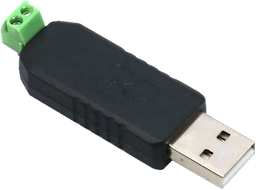
See the documentation of your specific projector screen or lift on how to wire yours correctly.
Protocol
If your device follows the following protocol it is supported by this Python library:
2400 baud 8N1
Up command : 0xFF 0xXX 0xXX 0xXX 0xDD
Down command: 0xFF 0xXX 0xXX 0xXX 0xEE
Stop command: 0xFF 0xXX 0xXX 0xXX 0xCC
Where 0xXX 0xXX 0xXX is the three byte address of the device.
For XY Screens devices the default address is 0xAA 0xEE 0xEE, while for See Max devices the
default address is 0xEE 0xEE 0xEE.
Supported projector screens and lifts
The following projector screen is known to work:
- iVisions Electro M Series
The following projector screens and lifts are not tested but use the same protocol according to the documentation:
XY Screens:
- iVisions Electro L/XL/Pro/HD Series
- iVisions PL Series projector lift
- Elite Screens
- KIMEX
- DELUXX
- Telon
See Max:
- ScreenPro
- Monoprice
- Grandview
- Dragonfly
- WS Screens
- Cirrus Screens
- Lumien
- Celexon
Installation
You can install the Python XY Screens library using the Python package manager pip:
pip3 install xyscreens
xyscreens CLI
You can use the Python XY Screens library directly from the command line to move your screen up or down, or to stop the screen using the following syntax:
Move the screen down: python3 -m xyscreens <serial port> <address> down <duration>
Stop the screen: python3 -m xyscreens <serial port> <address> stop
Move the screen up: python3 -m xyscreens <serial port> <address> up <duration>
Where <address> is the six character hexadecimal (three bytes) address of the device.
<duration> is the optional time in seconds to move the screen up or down, when given the process
will wait until the screen is up or down and show the progress.
For XY Screens devices the default address is AAEEEE, while for See Max devices the default
address is EEEEEE. If you have reprogrammed the device address use the appropriate address.
Programming the device address
Some See Max projector screens and lifts which use the RS-485 interface seem to allow programming the device address. This way multiple devices can be connected to the same RS-485 interface. Each device should have a unique address.
python3 -m xyscreens <serial port> <address> program
Where <address> is the three byte address to be programmed.
Troubleshooting
You can add the --debug flag to any CLI command to get more details on what’s going on. Like so:
python3 -m xyscreens <serial port> <address> down <duration> --debug
Contribution and appreciation
Do you enjoy using this Python library? You can contribute or show your appreciation, in the following ways.
Contribute your projector screen brand and model
Is your projector screen supported by this Python library but not listed under Supported projector screens and lifts? Let me know your projector screen brand and model so I can improve the overview of supported projector screens and lifts.
Star this GitHub page
Help other projector screen users find this Python library by starring this GitHub page. Click ⭐ Star on the top right of the GitHub page.
Support my work
Please consider supporting my work through one of the following platforms. Your contribution is greatly appreciated and keeps me motivated:
Hire me
If you're in need for a freelance Python developer for your project please contact me, you can find my email address on my GitHub profile.
Project details
Verified details
These details have been verified by PyPIProject links
GitHub Statistics
Maintainers
Release history Release notifications | RSS feed


Download files
Download the file for your platform. If you're not sure which to choose, learn more about installing packages.
Source Distribution
Built Distribution
Filter files by name, interpreter, ABI, and platform.
If you're not sure about the file name format, learn more about wheel file names.
Copy a direct link to the current filters
File details
Details for the file xyscreens-1.1.0rc2.tar.gz.
File metadata
- Download URL: xyscreens-1.1.0rc2.tar.gz
- Upload date:
- Size: 92.5 kB
- Tags: Source
- Uploaded using Trusted Publishing? Yes
- Uploaded via: twine/6.1.0 CPython/3.13.12
File hashes
| Algorithm | Hash digest | |
|---|---|---|
| SHA256 |
975967c0f093674687d2d705025b62ca4823029d1e7853891a71cfd1078215ea
|
|
| MD5 |
6163f864eb4f702230869fac6fd0c855
|
|
| BLAKE2b-256 |
3500b65741a583bfb2cb330efeadec69c2fca4a2118f20694b563ab87dde6ffe
|
Provenance
The following attestation bundles were made for xyscreens-1.1.0rc2.tar.gz:
Publisher:
pypi-publish.yml on rrooggiieerr/xyscreens.py
-
Statement:
-
Statement type:
https://in-toto.io/Statement/v1 -
Predicate type:
https://docs.pypi.org/attestations/publish/v1 -
Subject name:
xyscreens-1.1.0rc2.tar.gz -
Subject digest:
975967c0f093674687d2d705025b62ca4823029d1e7853891a71cfd1078215ea - Sigstore transparency entry: 1779766656
- Sigstore integration time:
-
Permalink:
rrooggiieerr/xyscreens.py@4d79bc04c0d1542a4718a8638bce071b23ef2216 -
Branch / Tag:
refs/tags/1.1.0-rc2 - Owner: https://github.com/rrooggiieerr
-
Access:
public
-
Token Issuer:
https://token.actions.githubusercontent.com -
Runner Environment:
github-hosted -
Publication workflow:
pypi-publish.yml@4d79bc04c0d1542a4718a8638bce071b23ef2216 -
Trigger Event:
release
-
Statement type:
File details
Details for the file xyscreens-1.1.0rc2-py3-none-any.whl.
File metadata
- Download URL: xyscreens-1.1.0rc2-py3-none-any.whl
- Upload date:
- Size: 14.3 kB
- Tags: Python 3
- Uploaded using Trusted Publishing? Yes
- Uploaded via: twine/6.1.0 CPython/3.13.12
File hashes
| Algorithm | Hash digest | |
|---|---|---|
| SHA256 |
3a18d4b78f6b61f11c649daac2ea02bd1c4b2c7573c1a931917c690f8c092885
|
|
| MD5 |
21ce7cf4d92270841637eba1acee6a35
|
|
| BLAKE2b-256 |
259ab25d60ff35a0eb8c44ca5460b79a1457dbcdf728c8434632206ace8e4057
|
Provenance
The following attestation bundles were made for xyscreens-1.1.0rc2-py3-none-any.whl:
Publisher:
pypi-publish.yml on rrooggiieerr/xyscreens.py
-
Statement:
-
Statement type:
https://in-toto.io/Statement/v1 -
Predicate type:
https://docs.pypi.org/attestations/publish/v1 -
Subject name:
xyscreens-1.1.0rc2-py3-none-any.whl -
Subject digest:
3a18d4b78f6b61f11c649daac2ea02bd1c4b2c7573c1a931917c690f8c092885 - Sigstore transparency entry: 1779766855
- Sigstore integration time:
-
Permalink:
rrooggiieerr/xyscreens.py@4d79bc04c0d1542a4718a8638bce071b23ef2216 -
Branch / Tag:
refs/tags/1.1.0-rc2 - Owner: https://github.com/rrooggiieerr
-
Access:
public
-
Token Issuer:
https://token.actions.githubusercontent.com -
Runner Environment:
github-hosted -
Publication workflow:
pypi-publish.yml@4d79bc04c0d1542a4718a8638bce071b23ef2216 -
Trigger Event:
release
-
Statement type:






