
This is a BASIC interpreter for an old dialect of the language used in early IBM PCs – and, in fact even earlier incarnations of BASIC that existed on a UNIVAC (according to [1] the code there – which can be run with Yabasi – ran on a UNIVAC).
It is written in Python. I wrote this over a weekend to be able to run old MININEC code (the linked version of MININEC contains some small fixes). I’ve later considerably enhanced it to also support graphics, see below. It has almost no error checking (it relies on the code being correct not trying to aid you in writing a new program in BASIC, I think the world does not need new code in BASIC). If you’re looking for a working BASIC interpreter, look at the pcbasic implementation, it is also in Python but faithfully reproduces the memory limitations of the machines at the time. And it seems to use single-precision floating point numbers. This is why I wrote my own interpreter: I needed to compare computations in double precision and I could not fit some examples into the limited memory of pcbasic.
I’m probably not going to put much work into improving this code, it has achieved the purpose: Running (and debugging in Python) old MININEC code to allow me to compare the computations in BASIC to my re-implementation of MININEC in Python, pymininec.
But in fact the code can now run more than the publicly available version of MININEC and implements some of the basic binary file I/O mechanisms of the time.
Graphics
The latest version can emulate text-based interfaces with cursor movement and graphics using an emulated CGA high-resolution mode. To turn on this feature, Yabasi needs to be called with the
--screen=tkinter
option (which can be abbreviated with -S tkinter). This emulates the text mode of a CGA graphics card and the (what counted at the time as) high-resolution (640x200) mode for graphics. The latter had double-height lines and is emulated in tkinter with a 640x400 canvas.
The reason for this change is to be able to run the “GRAPS” graphics package [2] which was used by many technical reports of the time. One of those reports is the MiniNec version 3 report [3] which I’m especially interested in.
Interesting today is that GRAPS (besides showing the plot on the emulated CGA screen) can export graphics in the HPGL plotter language which can be turned into graphics formats that can be used today. On my Debian Linux I’m using the hp2xx package for this.
To make text in the graphics mode work, you need a special double-height CGA font. I’ve successfully used the font Mx437_IBM_CGA-2y.ttf from The Ultimate Oldschool PC Font Pack. You may still run into trouble if your system does scale fonts differently. On my Linux X-Windows system I had to scale the font with 12pt, this may be different on other systems. See the line in Yabasi with the string
Mx437 IBM CGA-2y
this line has the scaling of the font in the second parameter. An example of a GRAPS screen plot using this font is here:
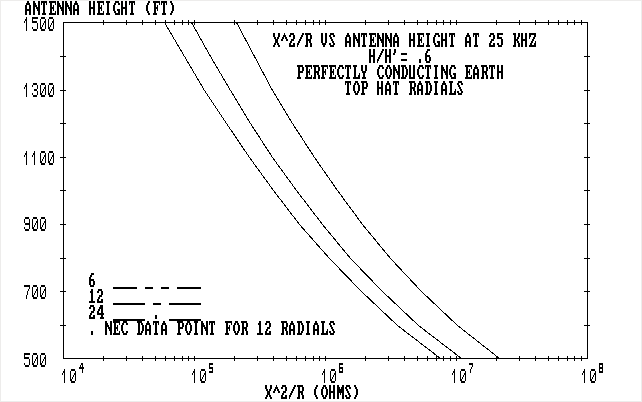
Compare this figure to the original in the GRAPS report [2] on page D-10. Note that unfortunately the pages in the GRAPS report are mixed up (my PDF view shows it as page 141), I’ve made a version with the pages in the correct order if anybody is interested.
Changes
Version 2.0: Support Text mode and CGA type-2 graphics using tkinter
This version now supports a grapic mode based on the tkinter toolkit (coming with python). It supports a text interface (using a text screen) and a graphical interface (emulating a CGA card in high resolution monochrome mode). The version needs a CGA font with double height.
tkinter-based text and graphics
lots of bug-fixes
Considerable enhancement of the supported Basic primitives
implement different graphics/text backends (currently two, the old default text-based interface and the tkinter backend)
Version 1.0: More fixes
This version has a lot of fixes that go beyond just running MININEC, it can now be used to read binary files (MININEC used a pre-processor script to create a binary representation of an antenna geometry) and it can run programs without a line number on every line.
We no longer require line numbers on every line
Handle multi-line IF/END IF
Dynamic DIM statements
Binary File I/O with GET/PUT, note that a file is opened for binary if a record length is specified, this probably should change at some time to just convert everything written to a file from python’s string representation where necessary and open all files in binary mode. We use the default in Basic of opening a file read/write, so don’t be surprised if a file opened for reading which doesn’t exist is created with zero length.
Conversion of int and float from/to strings – in python the strings are represented as bytes objects – these are the functions MKI$, MKS$ and fixes to CVI and CVS
Bug-fix when a GOSUB is not the last statement in a list of statements (e.g. in IF expr THEN list-of-statements), this did not execute the GOSUB previously
Version 0.3: Fix rules for printlist
The syntax of parameters to the PRINT statement can either use a semicolon (or a comma) to separate expressions or just put the expressions together without a separator. The latter had some quite ad-hoc rules and I’ve removed many of them, the result removes a reduce/reduce conflict…
Version 0.2: First working (released) version
1 maintainer

Release files for yabasi 2.1
For a detailed explanation of source distributions (sdists) and built distributions (wheels), please see the package formats documentation.
Source distribution (sdist)
| File | Size | Uploaded | |
|---|---|---|---|
| yabasi-2.1.tar.gz | 50.9 kB | Details |
Built distribution (wheel)
| File | Interpreter | ABI | Platform | Reset |
|---|---|---|---|---|
| yabasi-2.1-py3-none-any.whl | Python 3 | none | any | Details |
Total release size: 96.3 kB
Release files / yabasi-2.1.tar.gz
| Download URL | yabasi-2.1.tar.gz |
|---|---|
| Size | 50.9 kB |
| Tags | Source |
|
SHA-256 checksum How to use checksums |
40fbda8c39dae1c97ad3209b1bde8eaa49e172ba558d0d3962cdd4dfd4026648
|
|
BLAKE2b-256 checksum How to use checksums |
3e0a4e80e9457a75f823b5366e4ef013c4d63f645d85503281218d141fce018c
|
| Upload date | |
|
Uploaded using Trusted Publishing? What is trusted publishing? |
No |
| Uploaded via |
twine/4.0.2 CPython/3.11.2
|
Release files / yabasi-2.1-py3-none-any.whl
| Download URL | yabasi-2.1-py3-none-any.whl |
|---|---|
| Size | 45.4 kB |
| Tags | Python 3 |
|
SHA-256 checksum How to use checksums |
645e73ffc7b1a8ae22e18bd56091f78fce5342cefb153a8b913981dcc782a951
|
|
BLAKE2b-256 checksum How to use checksums |
33cfabbd4131fe29a49fe47e9419d48c5d3e3421d91781419f288bc729fd3bc2
|
| Upload date | |
|
Uploaded using Trusted Publishing? What is trusted publishing? |
No |
| Uploaded via |
twine/4.0.2 CPython/3.11.2
|














