
A modern, distributed, fault-tolerant, highly available, leader-electing, container-friendly, highly configurable, precompiled, multi-architecture, portable, security-hardened, production-ready cron replacement.
Verified details
These details have been verified by PyPIProject links
GitHub Statistics
Maintainers

Project description
yacron2 (Yet Another Cron ...2)













A modern, optionally-distributed, fault-tolerant, highly available, leader-electing, container-friendly, highly configurable, precompiled, multi-architecture, portable, security-hardened, production-ready cron replacement.
yacron2 is a fork of yacron (by Gustavo Carneiro), continuing development from version 0.19.
Features
- "Crontab" is in YAML format; classic crontab files are accepted as-is too (see Classic crontab files)
- Builtin sending of Sentry and Mail outputs when cron jobs fail
- Flexible configuration: you decide how to determine if a cron job fails or not
- Designed for running in Docker, Kubernetes, or 12 factor environments:
- Runs in the foreground
- Logs everything to stdout/stderr
- Production-ready for locked-down corporate container platforms: runs as a
non-root user, under a restricted seccomp profile, with a read-only root
filesystem, an
fsGroup-mounted config, and all Linux capabilities dropped, so no writable paths or elevated privileges are required (see Production container deployment)
- Option to automatically retry failing cron jobs, with exponential backoff
- Optional HTTP REST API, to fetch status, start jobs, cancel running jobs, and read per-job run history on demand
- Native Prometheus metrics at
/metrics(plus per-job statsd push metrics), covering run outcomes, durations, retries, schedules, and cluster health (see Metrics) - A job-set id: an order-independent fingerprint of every job's effective configuration, so replicas deployed from the same config can confirm they hold an identical set of jobs (see Job-set id)
- Opt-in clustering and leader election: optionally have instances confirm over mutual TLS that a configured set of peers is running the same job set, and elect a leader so several replicas can run from one config without double-running jobs (see Clustering and leader election)
- Arbitrary timezone support
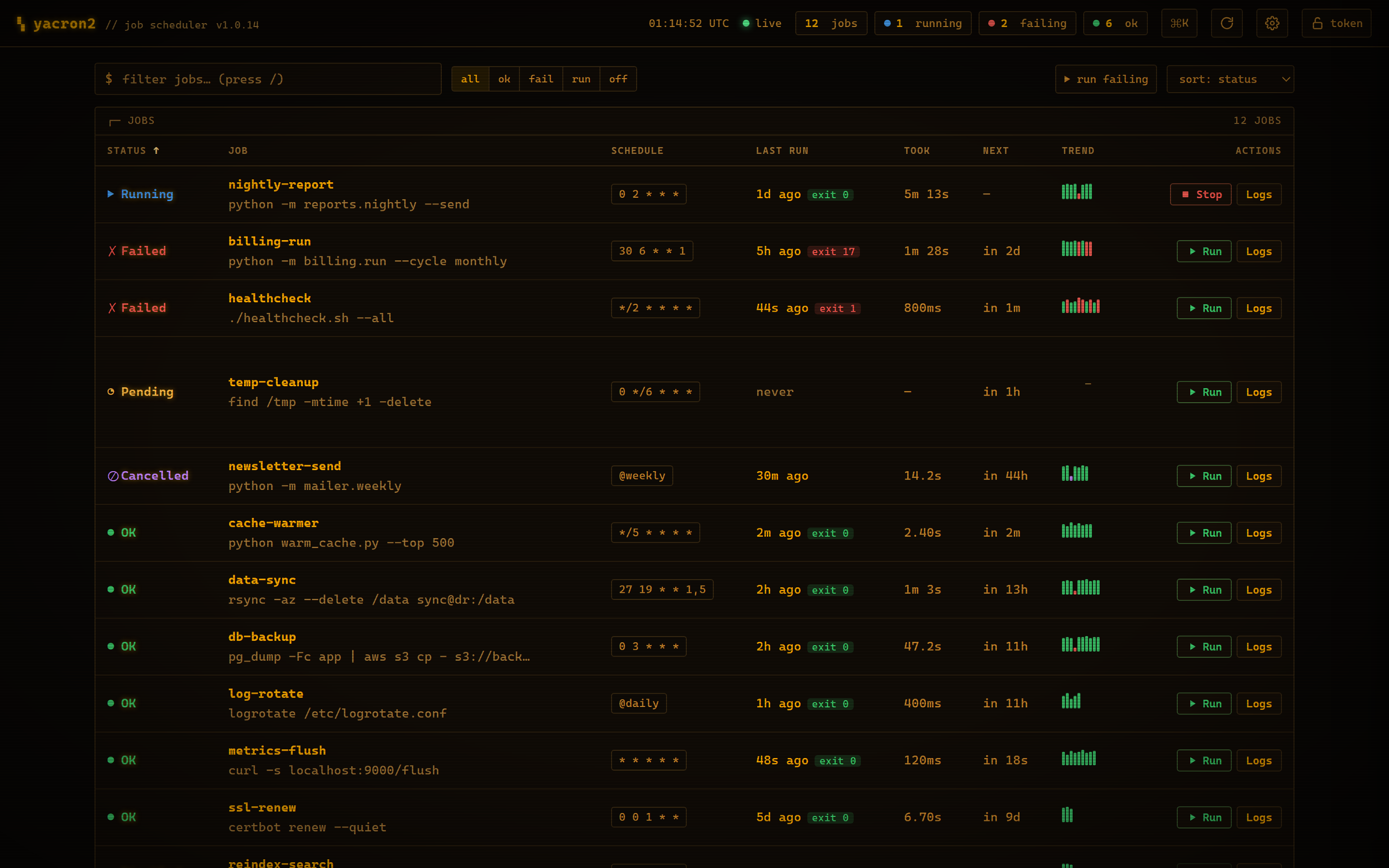
- Optional live control panel to watch every job's status, tail its logs in real time, run or cancel jobs on demand, and review run history, success rates, and schedules
Installation
Run with Docker
Prebuilt, multi-architecture (linux/amd64, linux/arm64, linux/386,
linux/arm/v7, linux/ppc64le, linux/s390x and linux/riscv64) images are
published on every release to two registries: the GitHub Container Registry
and Docker Hub. The images are identical; pull from whichever you prefer. The
default image is built on Debian (slim); if you would rather match a particular
base, Alpine, Ubuntu, RHEL/UBI and other variants are
published from the same release too. Mount your crontab and go:
# GitHub Container Registry
docker run --rm \
  -v "$PWD/yacron2tab.yaml:/etc/yacron2.d/yacron2tab.yaml:ro" \
  ghcr.io/ptweezy/yacron2:latest

# Docker Hub
docker run --rm \
  -v "$PWD/yacron2tab.yaml:/etc/yacron2.d/yacron2tab.yaml:ro" \
  ptweezy/yacron2:latest
The image runs as a non-root user and reads its configuration from
/etc/yacron2.d by default. For production, pin a specific version instead of
latest (e.g. ghcr.io/ptweezy/yacron2:1.0.14 or ptweezy/yacron2:1.0.14) and
see Production container deployment for the
hardened Kubernetes/Docker setup.
Distro variants
The default latest (and <version>) image is built on Debian (slim). The
same release is also published on several other bases, so you can match a
specific one to your environment: a familiar userland, an image-provenance
policy that mandates a particular vendor, or the smallest possible image. Each
variant adds a -<distro> suffix to the tag (and the default Debian image is
also available explicitly as -debian):
| Tag suffix | Base image | Python | Notes |
|---|---|---|---|
(none) / -debian |
python:3.14-slim |
3.14 | Default. Widest architecture coverage. |
-alpine |
python:3.14-alpine |
3.14 | musl libc; smallest image. |
-ubuntu |
ubuntu:24.04 |
3.12 | Ubuntu LTS userland. |
-rhel |
UBI 9 (ubi-minimal) |
3.12 | Red Hat base for RHEL / OpenShift. |
-fedora |
fedora:41 |
3.13 | Leading-edge RPM userland. |
-opensuse |
opensuse/leap:15.6 |
3.11 | SUSE / SLES family. |
-amazonlinux |
amazonlinux:2023 |
3.11 | AWS-centric deployments. |
-distroless |
gcr.io/distroless/python3 |
3.11 | No shell or package manager; minimal attack surface. |
# e.g. the Alpine variant, pinned to a version:
docker run --rm \
  -v "$PWD/yacron2tab.yaml:/etc/yacron2.d/yacron2tab.yaml:ro" \
  ghcr.io/ptweezy/yacron2:1.0.14-alpine
yacron2 is a pure-Python app that supports any Python >= 3.10, so behavior is
identical across variants. Pick the base, not the interpreter version. The
Debian default covers the most architectures; each variant covers the arches
its base image publishes (Alpine matches Debian's full set; RHEL, Fedora,
openSUSE and distroless cover amd64, arm64, ppc64le and s390x; Amazon
Linux covers amd64 and arm64). All variants share the same non-root,
read-only-friendly hardening as the default image.
Install using pip
yacron2 requires Python >= 3.10 (for systems with older Python, use the binary instead). It is advisable to install it in a Python virtual environment, for example:
python3 -m venv yacron2env
. yacron2env/bin/activate
pip install yacron2
Install using pipx
pipx automates creating a virtualenv and installing a python program in the newly created virtualenv. It is as simple as:
pipx install yacron2
Install using binary
Alternatively, a self-contained binary can be downloaded from github: https://github.com/ptweezy/yacron2/releases. Every release automatically attaches binaries for Linux (amd64, arm64, i686, armv7, armv6, ppc64le, s390x and riscv64), macOS (amd64 and arm64) and Windows (amd64 and arm64):
- Linux: glibc builds (
yacron2-linux-<arch>) for the mainstream distros, working on any system post glibc 2.39 (e.g. Ubuntu 24.04) on the matching CPU, plus musl builds (yacron2-linux-<arch>-musl) for Alpine and other musl-based systems.<arch>is one ofamd64,arm64,i686(32-bit x86),armv7(32-bit ARM, e.g. older Raspberry Pi),armv6(musl only),ppc64le(POWER),s390x(IBM Z) orriscv64(64-bit RISC-V). - macOS:
yacron2-macos-arm64(Apple Silicon) /yacron2-macos-amd64(Intel). - Windows:
yacron2-windows-amd64.exe(x64) /yacron2-windows-arm64.exe(ARM64).
Python is not required on the target system (it is embedded in the executable):
# pick the asset for your OS and architecture (glibc amd64 Linux shown; append
# -musl on Alpine, or use yacron2-macos-<arch> on a Mac)
curl -fsSL -o yacron2 \
  https://github.com/ptweezy/yacron2/releases/latest/download/yacron2-linux-amd64
chmod +x yacron2
./yacron2 --version
The macOS binaries are signed and notarized by Apple.
The standalone binary is a self-extracting executable: on each start it unpacks
its embedded Python runtime into a temporary directory and loads shared
libraries from there. It therefore needs a temporary directory that is both
writable and executable. On an ordinary system the default /tmp already
satisfies this, so no extra setup is required.
This only matters when you run the binary under a read-only root filesystem
(for example, a hardened container). With the root filesystem read-only, /tmp
is read-only too, and the binary aborts at startup: Could not create temporary directory, or Error loading shared library …: Operation not permitted. Give
it a small writable and executable temp mount and it runs fine:
# Note `exec`: Docker's --tmpfs defaults to `noexec`, but the binary must be
# able to execute the libraries it unpacks.
docker run --rm --read-only \
  --tmpfs /tmp:rw,exec,nosuid,nodev,size=64m \
  -v "$PWD/yacron2tab.yaml:/etc/yacron2.d/yacron2tab.yaml:ro" \
  your-image-with-the-binary -c /etc/yacron2.d
On Kubernetes, mount an emptyDir at /tmp (an emptyDir is writable and
executable by default; use medium: Memory for a tmpfs). Alternatively, point
the binary at another writable, executable directory with TMPDIR=/path.
This requirement is unique to the standalone binary. The published container
image (and pip/pipx installs) run yacron2 as a normal Python package with
the interpreter on disk, so they never self-extract and need no writable temp
directory. See Production container deployment.
Running on Windows
yacron2 runs natively on Windows (x64 and ARM64), in addition to Linux and
macOS. Install it with pip install yacron2, or download the self-contained
yacron2-windows-amd64.exe / yacron2-windows-arm64.exe from the
releases page (no Python
required). Everything else, like the YAML crontab, scheduling, reporting, retries,
the HTTP API and the web dashboard, works the same as on
POSIX. A few platform details differ:
-
Default config location. When
-cis omitted, yacron2 looks in%APPDATA%\yacron2(e.g.C:\Users\you\AppData\Roaming\yacron2), the Windows analog of/etc/yacron2.d. Point it anywhere with-c:yacron2 -c C:\path\to\yacron2tab.yaml
-
Default shell. A string
commandwith no explicitshellruns through the native command processor (%ComSpec%, i.e.cmd.exe), mirroring the/bin/shdefault on POSIX. For PowerShell, or any other interpreter, setshell:or passcommandas a list (which bypasses the shell entirely):jobs: - name: powershell-job command: - powershell - -Command - Get-Date schedule: "*/5 * * * *" captureStdout: true
-
Graceful shutdown. Press
Ctrl-C(orCtrl-Break) to stop yacron2; it shuts down after the currently running jobs finish, just asSIGTERMdoes on POSIX. -
Not supported on Windows. Per-job
user/groupswitching (there is nosetuid/setgidequivalent) is rejected with a clear configuration error, andunix://web listeners are skipped with a warning. Use anhttp://listener instead.
Production container deployment
yacron2 is built to run unmodified under the hardened security contexts that corporate and enterprise Kubernetes / container platforms enforce. At runtime the daemon only reads its configuration and secrets and writes its output to stdout/stderr. It never needs a writable working directory, temp files, or log files, so it slots cleanly into a locked-down pod:
- Non-root user: yacron2 needs no special privileges to run, so the whole
daemon can run as an unprivileged UID. Only the optional per-job
user/groupswitching (see Change to another user/group) requires running as root; if you don't use that feature, drop root entirely. - Seccomp profile: yacron2 makes no exotic syscalls, so the
RuntimeDefaultseccomp profile (or an equivalently strict custom profile) works out of the box. - Read-only root filesystem: no runtime writes are required by the
published image (or a
pip/pipxinstall). Mount your crontab config read-only. (If you enable the optional HTTP interface on a Unix socket, point the socket at a small writableemptyDirvolume rather than the root filesystem. And if you deploy the standalone binary instead of the image, it additionally needs a small writable, executable temp mount; see Install using binary.) fsGroupand dropped capabilities: config and secret volumes can be mounted with anfsGroupso the non-root process can read them, and you can drop all Linux capabilities and forbid privilege escalation.
The published image (ghcr.io/ptweezy/yacron2 and docker.io/ptweezy/yacron2)
is already built this way (non-root, with yacron2 -c /etc/yacron2.d as its
entrypoint and no writable paths required), so for most deployments you can use
it directly and mount your crontab read-only. If you would rather bake the
configuration into your own image, base it on the published image:
FROM ghcr.io/ptweezy/yacron2:latest

# The base image already runs as the non-root user 65534.
COPY yacron2tab.yaml /etc/yacron2.d/yacron2tab.yaml
And a corresponding Kubernetes Deployment with a fully restricted security
context:
apiVersion: apps/v1
kind: Deployment
metadata:
  name: yacron2
spec:
  replicas: 1
  selector:
    matchLabels:
      app: yacron2
  template:
    metadata:
      labels:
        app: yacron2
    spec:
      securityContext:           # pod-level
        runAsNonRoot: true
        runAsUser: 65534
        runAsGroup: 65534
        fsGroup: 65534           # lets the non-root process read mounted volumes
        seccompProfile:
          type: RuntimeDefault
      containers:
        - name: yacron2
          image: ghcr.io/ptweezy/yacron2:latest
          args: ["-c", "/etc/yacron2.d"]
          securityContext:       # container-level
            allowPrivilegeEscalation: false
            readOnlyRootFilesystem: true
            capabilities:
              drop:
                - ALL
          resources:
            limits:
              cpu: 200m
              memory: 128Mi
            requests:
              cpu: 10m
              memory: 64Mi
          volumeMounts:
            - name: crontab
              mountPath: /etc/yacron2.d
              readOnly: true
      volumes:
        - name: crontab
          configMap:
            name: yacron2tab
Web dashboard
yacron2 ships with a built-in web dashboard. Point your browser at the HTTP listener and you have a keyboard-driven control room for every job.
The overview shows every job with its live status, a countdown to its next run, how long the last run took, an exit-code badge, and a sparkline of recent runs, all sortable, filterable, and searchable. Click any job (or press Enter) to open its detail drawer:
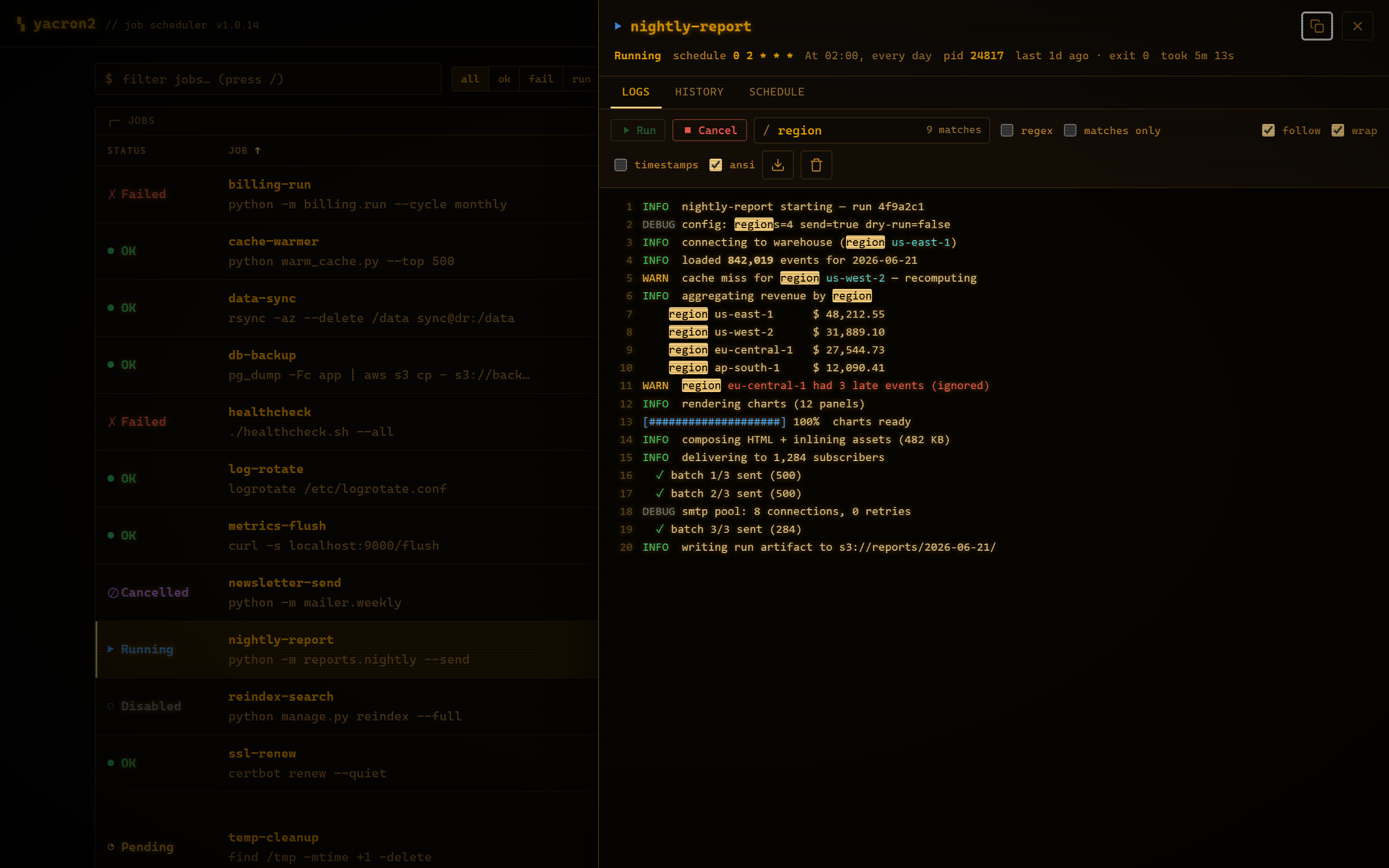
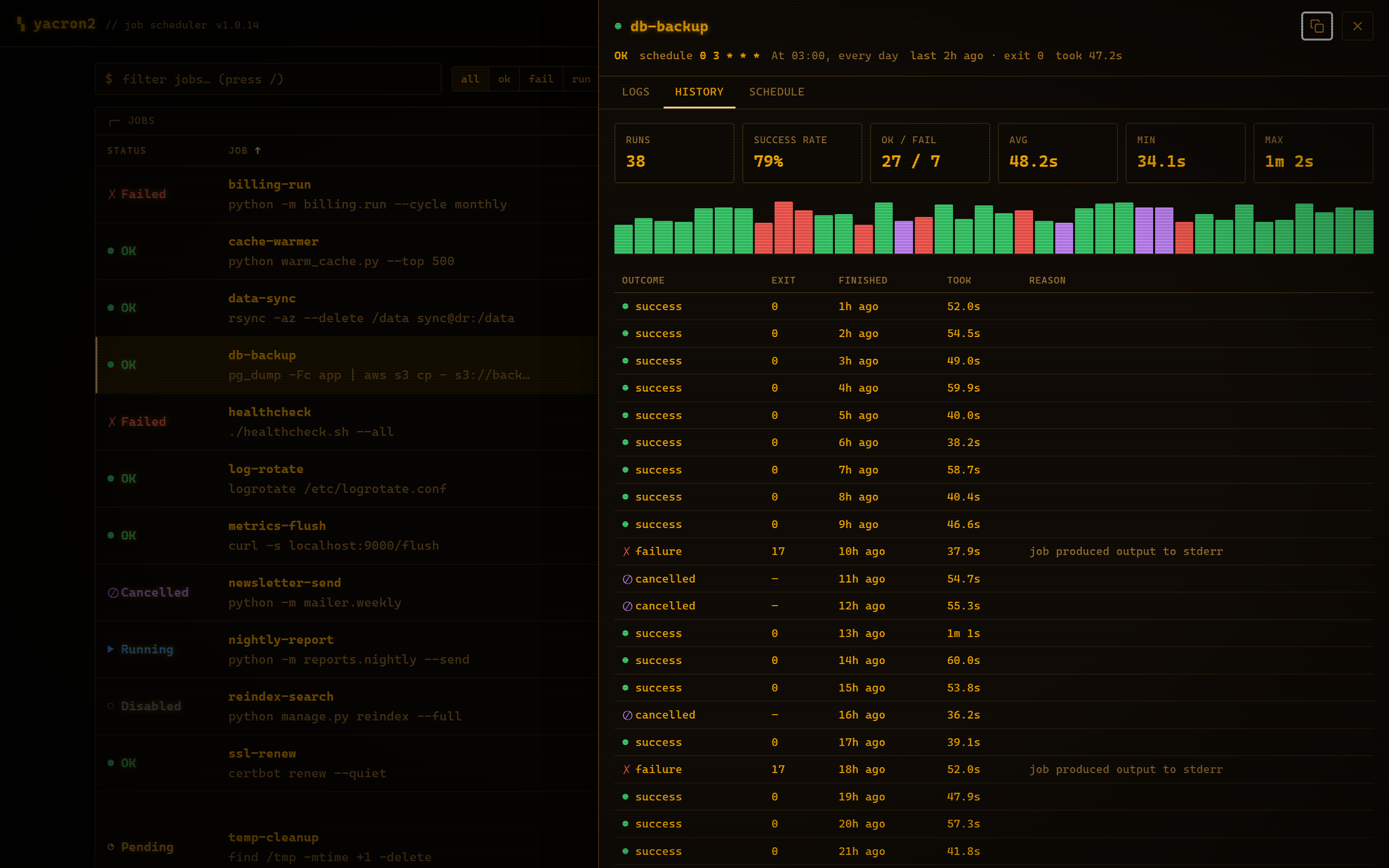
| Live log tail | Run history | Schedule, explained |
|---|---|---|
 |
 |
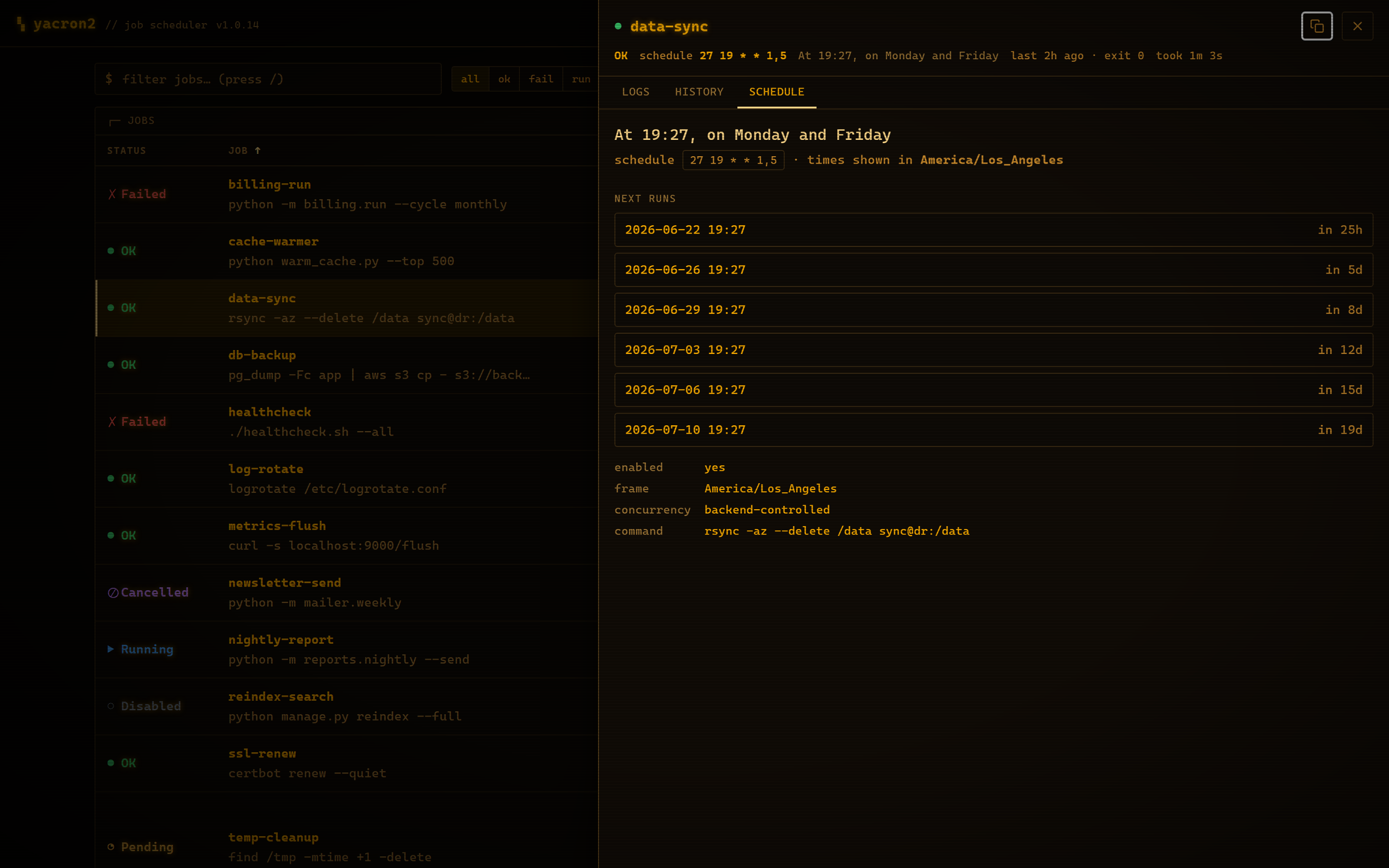 |
| Follow a running job's output live over Server-Sent Events, with ANSI color, in-log grep (plain text or regex), per-line timestamps, line-wrap, and one-click download. | Success rate plus average / min / max duration over the retained history, with a color-coded per-run duration chart and the full run log. | A plain-English reading of the cron expression and a timezone-aware preview of the next run times, computed live in the browser. |
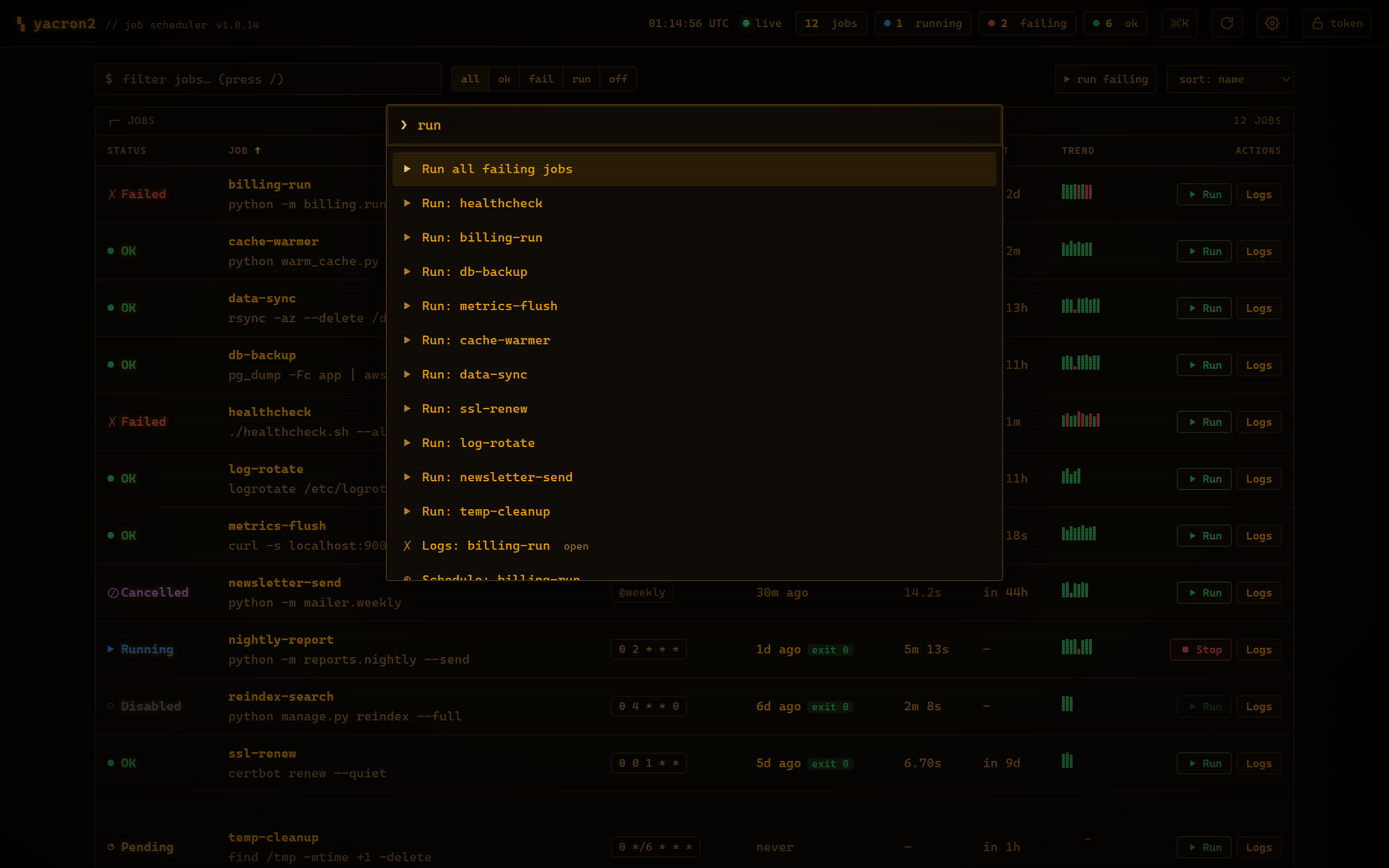
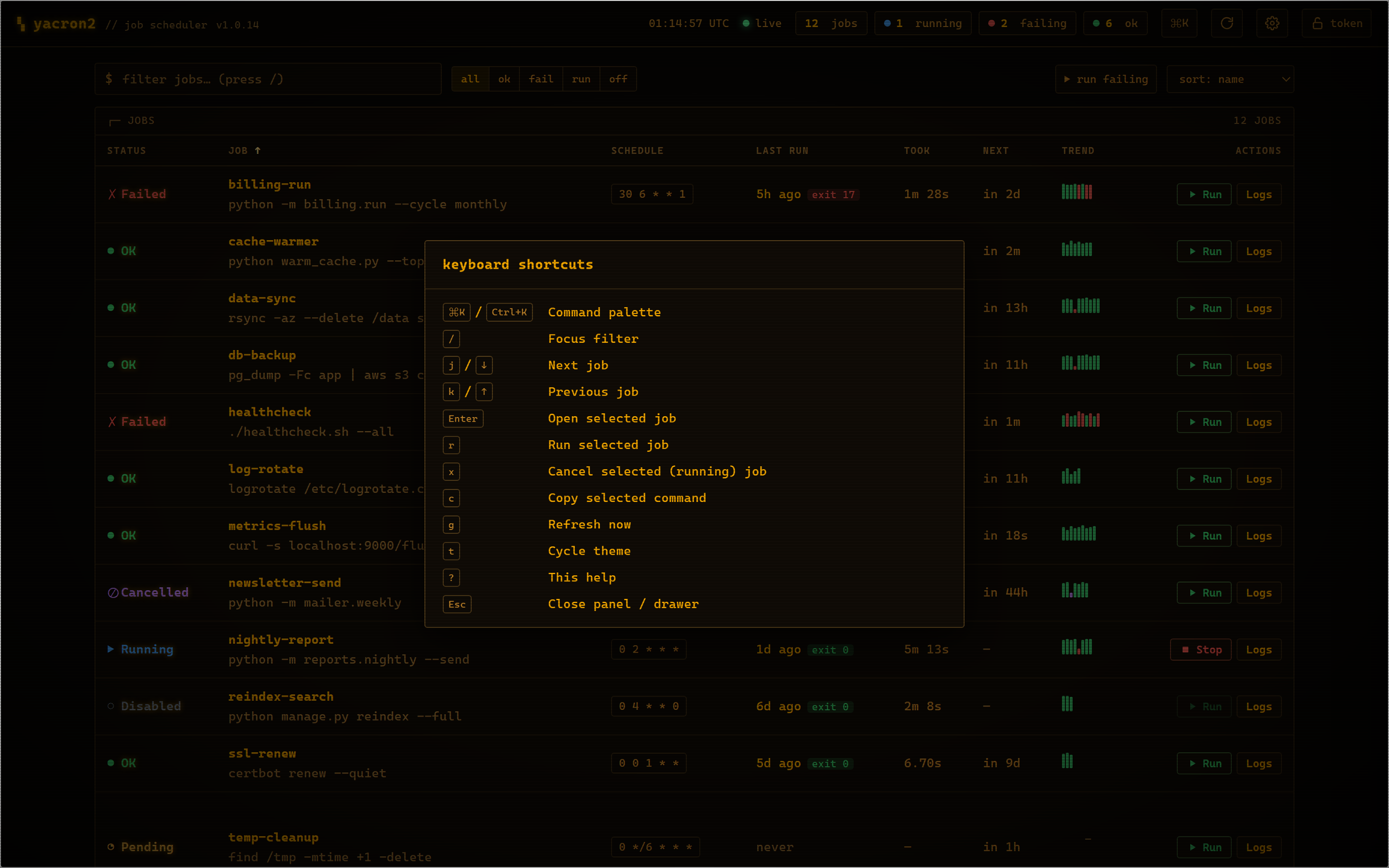
Everything is one keypress away: a fuzzy command palette (Ctrl-K / ⌘K) runs any action or jumps to any job, ? lists every shortcut, / filters, j/k move the cursor, r runs the selected job and x cancels it. You can run a single job, or every failing job at once, on demand, with a click.
| Fuzzy command palette | Keyboard-first, with a shortcut for everything |
|---|---|
 |
 |
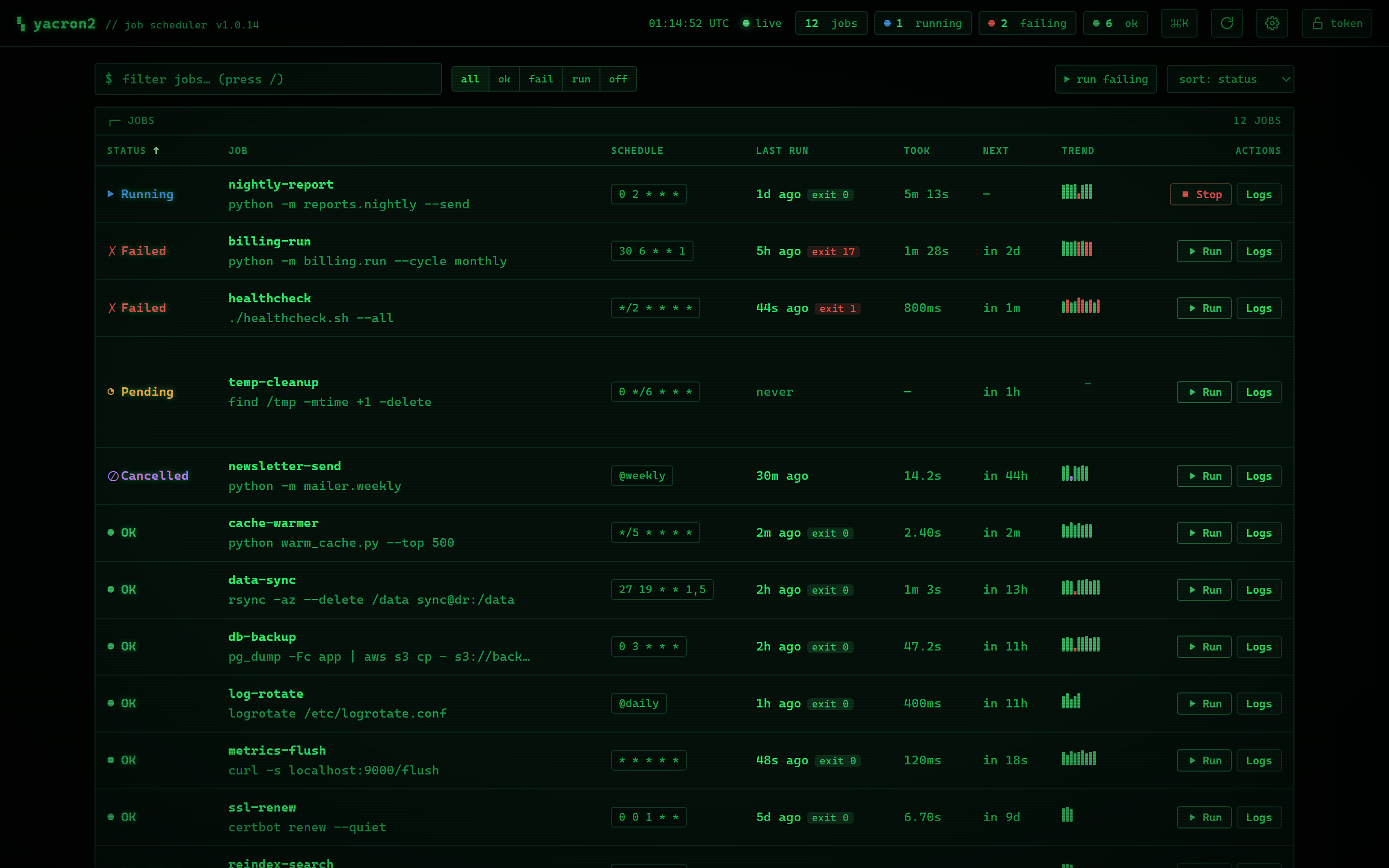
Three built-in themes (amber and green phosphor CRT, or a flat modern look), plus configurable CRT glow, scanlines, compact density, desktop failure notifications, and polling interval, all remembered in your browser (and the CRT effects honor prefers-reduced-motion):
| Green phosphor CRT | Flat modern theme |
|---|---|
 |
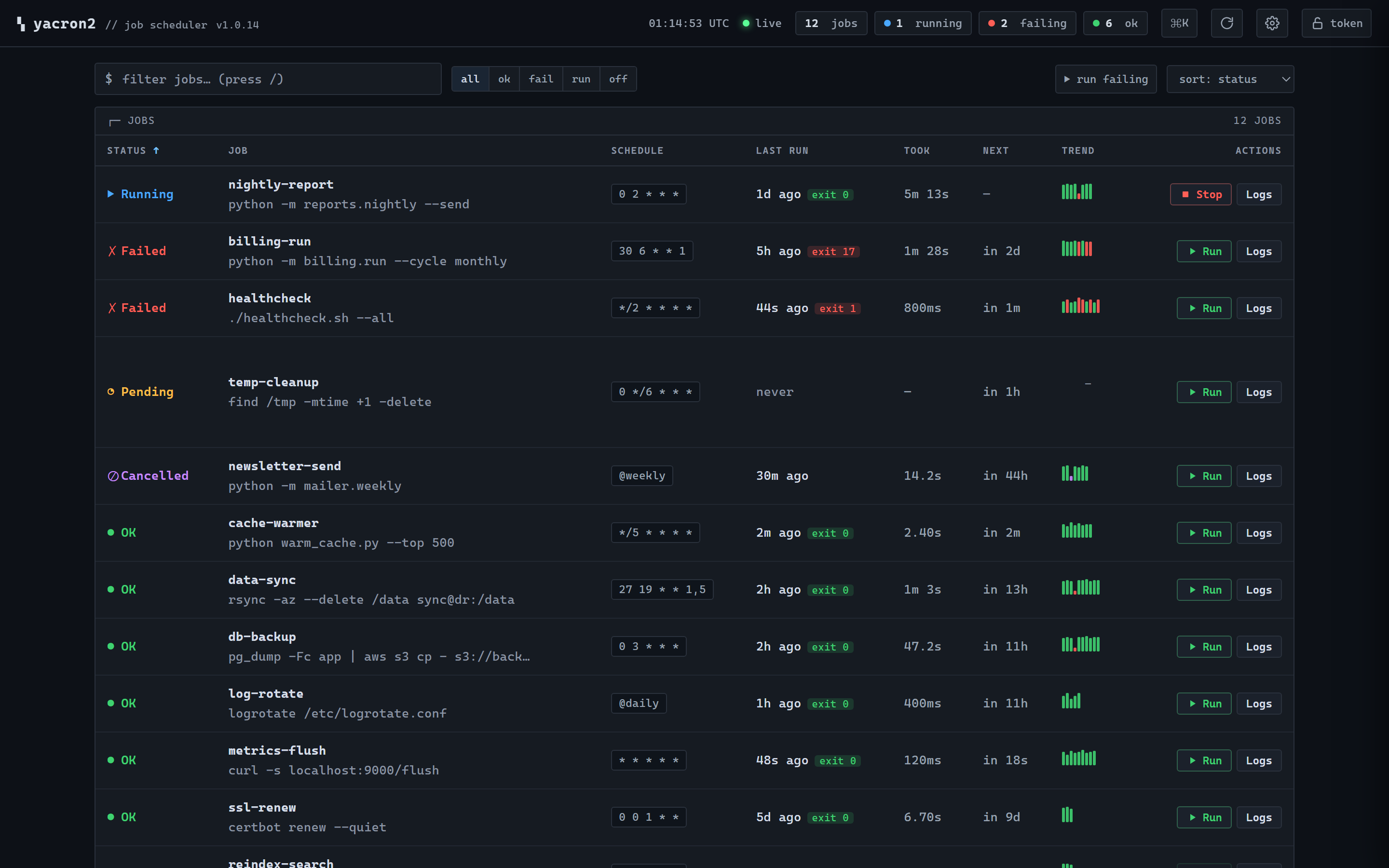 |
Run history and live logs are kept in memory only, and the page is served with a strict Content-Security-Policy. Turn it on with a one-line web: block: the web dashboard tour in the wiki is the full walkthrough, and Remote web/HTTP interface below shows how to enable it.
Try it: docker compose -f docker-compose-zen.yml up boots a single node with a demo job set, and docker compose -f docker-compose-cluster.yml up boots a 3-node cluster (yacron-a/yacron-b/yacron-c) so you can open each node's dashboard and watch the cluster panel and leader election live.
Usage
Configuration is in YAML format. To start yacron2, give it a configuration file
or directory path as the -c argument. For example:
yacron2 -c /tmp/my-crontab.yaml
This starts yacron2 (always in the foreground!), reading
/tmp/my-crontab.yaml as configuration file. If the path is a directory,
any *.yaml or *.yml files inside this directory are taken as
configuration files, along with any classic crontabs (*.crontab, *.cron,
or a file named crontab; see
Classic crontab files).
Configuration basics
This configuration runs a command every 5 minutes:
jobs:
  - name: test-01
    command: echo "foobar"
    shell: /bin/bash
    schedule: "*/5 * * * *"
The command can be a string or a list of strings. If command is a string,
yacron2 runs it through a shell, which is /bin/bash in the above example, but
is /bin/sh by default.
If the command is a list of strings, the command is executed directly, without a shell. The ARGV of the command to execute is extracted directly from the configuration:
jobs:
  - name: test-01
    command:
      - echo
      - foobar
    schedule: "*/5 * * * *"
The schedule option can be a string in a crontab format specified by https://github.com/josiahcarlson/parse-crontab (this module is used by yacron2).
Additionally @reboot can be included , which will only run the job when yacron2 is initially
executed. Further schedule can be an object with properties. The following configuration
runs a command every 5 minutes, but only on the specific date 2017-07-19, and
doesn't run it in any other date:
jobs:
  - name: test-01
    command: echo "foobar"
    schedule:
      minute: "*/5"
      dayOfMonth: 19
      month: 7
      year: 2017
      dayOfWeek: "*"
Important: by default all time is interpreted to be in UTC, but you can
request to use local time instead. For instance, the cron job below runs
every day at 19h27 local time because of the utc: false option:
jobs:
  - name: test-01
    command: echo "hello"
    schedule: "27 19 * * *"
    utc: false
    captureStdout: true
You can also request that the schedule be
interpreted in an arbitrary timezone, using the timezone attribute:
jobs:
  - name: test-01
    command: echo "hello"
    schedule: "27 19 * * *"
    timezone: America/Los_Angeles
    captureStdout: true
You can ask for environment variables to be defined for command execution:
jobs:
  - name: test-01
    command: echo "foobar"
    shell: /bin/bash
    schedule: "*/5 * * * *"
    environment:
      - key: PATH
        value: /bin:/usr/bin
You can also provide an environment file to define environments for command execution:
jobs:
  - name: test-01
    command: echo "foobar"
    shell: /bin/bash
    schedule: "*/5 * * * *"
    env_file: .env
The env file must be a list of KEY=VALUE pairs. Empty lines and lines starting with # will be ignored.
Variables declared in the environment option will override those found in the env_file.
Classic crontab files
Already have a crontab? yacron2 runs it as-is. A file named *.crontab,
*.cron, or just crontab (so -c /etc/crontab works) is read in the
classic Vixie format, whether passed directly to -c, dropped into a config
directory next to YAML files, or pulled in with include::
SHELL=/bin/bash
PATH=/usr/local/bin:/usr/bin:/bin

# m h dom mon dow command
*/15 * * * *  /usr/local/bin/backup --incremental
30 4 * * mon-fri  /usr/local/bin/report --daily
@daily  /usr/local/bin/rotate-logs
0 0 * * *  pg_dump mydb > /backup/mydb-$(date +\%F).sql
Comments, NAME=value environment lines (position-sensitive, SHELL and
CRON_TZ honored), the @reboot/@daily/... nicknames, and \% escapes
all work as in man 5 crontab. Each entry becomes an ordinary yacron2 job
named <file>:<line>, configured to yacron2's standard defaults rather than
an emulation of cron's environment: schedules run in UTC unless the
crontab sets CRON_TZ, failure means a non-zero exit or stderr output (no
MAILTO mail), and the %-as-stdin feature is a load-time error instead of
a silent surprise (\% still gives a literal %). When an entry needs
retries, reporting, timeouts, or any other per-job option, move it to YAML.
The full mapping and every deviation are documented in the
Classic Crontabs
wiki page, and a runnable example (a config directory mixing a crontab with
YAML and the dashboard) lives in example/crontab.
Specifying defaults
There can be a special defaults section in the config. Any attributes
defined in this section provide default values for cron jobs to inherit.
Although cron jobs can still override the defaults, as needed:
defaults:
    environment:
      - key: PATH
        value: /bin:/usr/bin
    shell: /bin/bash
    utc: false
jobs:
  - name: test-01
    command: echo "foobar"  # runs with /bin/bash as shell
    schedule: "*/5 * * * *"
  - name: test-02  # runs with /bin/sh as shell
    command: echo "zbr"
    shell: /bin/sh
    schedule: "*/5 * * * *"
Note: if the configuration option is a directory and there are multiple configuration files in that directory, then the defaults section in each configuration file provides default options only for cron jobs inside that same file; the defaults have no effect beyond any individual YAML file.
Reporting
Yacron2 has builtin support for reporting jobs failure (more on that below) by email, Sentry and shell command (additional reporting methods might be added in the future):
- name: test-01
  command: |
    echo "hello" 1>&2
    sleep 1
    exit 10
  schedule:
    minute: "*/2"
  captureStderr: true
  onFailure:
    report:
      sentry:
        dsn:
          value: example
          # Alternatively:
          # fromFile: /etc/secrets/my-secret-dsn
          # fromEnvVar: SENTRY_DSN
        fingerprint:  # optional
          - yacron2
          - "{{ environment.HOSTNAME }}"
          - "{{ name }}"
        extra:
          foo: bar
          zbr: 123
        level: warning
        environment: production
      mail:
        from: example@foo.com
        to: example@bar.com
        smtpHost: 127.0.0.1
        # optional fields:
        username: "username1"  # set username and password to enable login
        password:
          value: example
          # Alternatively:
          # fromFile: /etc/secrets/my-secret-password
          # fromEnvVar: MAIL_PASSWORD
        tls: false  # set to true to enable TLS
        starttls: false  # set to true to enable StartTLS
      shell:
        shell: /bin/bash
        command: ...
Here, the onFailure object indicates that what to do when a job failure
is detected. In this case we ask for it to be reported both to sentry and by
sending an email.
The captureStderr: true part instructs yacron2 to capture output from the the
program's standard error, so that it can be included in the report. We could
also turn on standard output capturing via the captureStdout: true option.
By default, yacron2 captures only standard error. If a cron job's standard error
or standard output capturing is not enabled, these streams will simply write to
the same standard output and standard error as yacron2 itself.
Both stdout and stderr stream lines are by default prefixed with
[{job_name} {stream_name}], i.e. [test-01 stdout], if for any reason you
need to change this, provide the option streamPrefix
with your own custom string.
- name: test-01
  command: echo "hello world"
  schedule:
    minute: "*/2"
  captureStdout: true
  streamPrefix: "[{job_name} job]"
In some cases, for instance when you're logging JSON objects you might want to completely get rid of the prefix altogether:
- name: test-01
  command: echo "hello world"
  schedule:
    minute: "*/2"
  captureStdout: true
  streamPrefix: ""
It is possible also to report job success, as well as failure, via the
onSuccess option.
- name: test-01
  command: echo "hello world"
  schedule:
    minute: "*/2"
  captureStdout: true
  onSuccess:
    report:
      mail:
        from: example@foo.com
        to: example@bar.com
        smtpHost: 127.0.0.1
It is possible to customize the format of the report. For
mail reporting, the option subject indicates what is the subject of the
email, while body formats the email body. For Sentry reporting, there is
only body. In all cases, the values of those options are strings that are
processed by the jinja2 templating engine. The following variables are
available in templating:
- name(str): name of the cron job
- success(bool): whether or not the cron job succeeded
- stdout(str): standard output of the process
- stderr(str): standard error of the process
- exit_code(int): process exit code
- command(str): cron job command
- shell(str): cron job shell
- environment(dict): subprocess environment variables
Example:
- name: test-01
  command: |
    echo "hello" 1>&2
    sleep 1
    exit 10
  schedule:
    minute: "*/2"
  captureStderr: true
  onFailure:
    report:
      mail:
        from: example@foo.com
        to: example@bar.com
        smtpHost: 127.0.0.1
        subject: Cron job '{{name}}' {% if success %}completed{% else %}failed{% endif %}
        body: |
          {{stderr}}
          (exit code: {{exit_code}})
The shell reporter executes a user given shell command in the specified shell. It passes all environment variables from the python executable and specifies some additional ones to inform about the state of the job:
- YACRON2_FAIL_REASON (str)
- YACRON2_FAILED ("1" or "0")
- YACRON2_JOB_NAME (str)
- YACRON2_JOB_COMMAND (str)
- YACRON2_JOB_SCHEDULE (str)
- YACRON2_RETCODE (str)
- YACRON2_STDERR (str)
- YACRON2_STDOUT (str)
A simple example configuration:
- name: test-01
  command: echo "foobar" && exit 123
  shell: /bin/bash
  schedule: "* * * * *"
  onFailure:
    report:
      shell:
        shell: /bin/bash
        command: echo "Error code $YACRON2_RETCODE"
It is possible to send emails formatted as html, by adding
the html: true property. For example, here the standard output of a shell
command is captured and interpreted as html and placed in the email message:
- name: test-01
  command: echo "hello <b>world</b>"
  schedule: "@reboot"
  captureStdout: true
  onSuccess:
    report:
      mail:
        from: example@foo.com
        to: example@bar.com, zzz@sleep.com
        html: true
        smtpHost: 127.0.0.1
        smtpPort: 1025
        subject: This is a cron job with html body
Metrics
Yacron2 natively exposes Prometheus metrics whenever the HTTP REST API is enabled -- no exporter sidecar needed:
web:
  listen:
    - http://127.0.0.1:8080
GET /metrics then serves job run outcomes, duration histograms, retries,
next-run times, config-reload health, and cluster/leader-election state, in
both the Prometheus text format and OpenMetrics. See
Metrics with Prometheus
for the full metric reference, scrape configuration, and example alert rules.
Yacron2 also has builtin support for pushing per-job metrics to Statsd:
jobs:
  - name: test01
    command: echo "hello"
    schedule: "* * * * *"
    statsd:
      host: my-statsd.example.com
      port: 8125
      prefix: my.cron.jobs.prefix.test01
With this config Yacron2 will write the following metrics over UDP
to the Statsd listening on my-statsd.example.com:8125:
my.cron.jobs.prefix.test01.start:1|g  # this one is sent when the job starts
my.cron.jobs.prefix.test01.stop:1|g   # the rest are sent when the job stops
my.cron.jobs.prefix.test01.success:1|g
my.cron.jobs.prefix.test01.duration:3|ms|@0.1
Handling failure
By default, yacron2 considers that a job has failed if either the process returns a non-zero code or if it generates output to standard error (and standard error capturing is enabled, of course).
You can instruct yacron2 how to determine if a job has failed or not via the
failsWhen option:
failsWhen:
  producesStdout: false
  producesStderr: true
  nonzeroReturn: true
  always: false
producesStdout : If true, any captured standard output causes yacron2 to consider the job as failed. This is false by default.
producesStderr : If true, any captured standard error causes yacron2 to consider the job as failed. This is true by default.
nonzeroReturn : If true, if the job process returns a code other than zero causes yacron2 to consider the job as failed. This is true by default.
always : If true, if the job process exits that causes yacron2 to consider the job as failed. This is false by default.
It is possible to instruct yacron2 to retry failing cron jobs by adding a
retry option inside onFailure:
- name: test-01
  command: |
    echo "hello" 1>&2
    sleep 1
    exit 10
  schedule:
    minute: "*/10"
  captureStderr: true
  onFailure:
    report:
      mail:
        from: example@foo.com
        to: example@bar.com
        smtpHost: 127.0.0.1
    retry:
      maximumRetries: 10
      initialDelay: 1
      maximumDelay: 30
      backoffMultiplier: 2
The above settings tell yacron2 to retry the job up to 10 times, with the delay between retries defined by an exponential backoff process: initially 1 second, doubling for every retry up to a maximum of 30 seconds. A value of -1 for maximumRetries will mean yacron2 will keep retrying forever, this is mostly useful with a schedule of "@reboot" to restart a long running process when it has failed.
If the cron job is expected to fail sometimes, you may wish to report only in
the case the cron job ultimately fails after all retries and we give up on it.
For that situation, you can use the onPermanentFailure option:
- name: test-01
  command: |
    echo "hello" 1>&2
    sleep 1
    exit 10
  schedule:
    minute: "*/10"
  captureStderr: true
  onFailure:
    retry:
      maximumRetries: 10
      initialDelay: 1
      maximumDelay: 30
      backoffMultiplier: 2
  onPermanentFailure:
    report:
      mail:
        from: example@foo.com
        to: example@bar.com
        smtpHost: 127.0.0.1
Concurrency
Sometimes it may happen that a cron job takes so long to execute that when the moment its next scheduled execution is reached a previous instance may still be running. How yacron2 handles this situation is controlled by the option concurrencyPolicy, which takes one of the following values:
Allow : allows concurrently running jobs (default)
Forbid : forbids concurrent runs, skipping next run if previous hasn't finished yet
Replace : cancels currently running job and replaces it with a new one
Execution timeout
If you have a cron job that may possibly hang sometimes, you can instruct yacron2
to terminate the process after N seconds if it's still running by then, via the
executionTimeout option. For example, the following cron job takes 2
seconds to complete, yacron2 will terminate it after 1 second:
- name: test-03
  command: |
    echo "starting..."
    sleep 2
    echo "all done."
  schedule:
    minute: "*"
  captureStderr: true
  executionTimeout: 1  # in seconds
When terminating a job, it is always a good idea to give that job process some time to terminate properly. For example, it may have opened a file, and even if you tell it to shutdown, the process may need a few seconds to flush buffers and avoid losing data.
On the other hand, there are times when programs are buggy and simply get stuck,
refusing to terminate nicely no matter what. For this reason, yacron2 always
checks if a process exited some time after being asked to do so. If it hasn't,
it tries to forcefully kill the process. The option killTimeout option
indicates how many seconds to wait for the process to gracefully terminate
before killing it more forcefully. In Unix systems, we first send a SIGTERM,
but if the process doesn't exit after killTimeout seconds (30 by default)
then we send SIGKILL. For example, this cron job ignores SIGTERM, and so yacron2
will send it a SIGKILL after half a second:
- name: test-03
  command: |
    trap "echo '(ignoring SIGTERM)'" TERM
    echo "starting..."
    sleep 10
    echo "all done."
  schedule:
    minute: "*"
  captureStderr: true
  executionTimeout: 1
  killTimeout: 0.5
Change to another user/group
You can request that Yacron2 change to another user and/or group for a specific
cron job. The field user indicates the user (uid or userame) under which
the subprocess must be executed. The field group (gid or group name)
indicates the group id. If only user is given, the group defaults to the
main group of that user. Example:
- name: test-03
  command: id
  schedule:
    minute: "*"
  captureStderr: true
  user: www-data
Naturally, yacron2 must be running as root in order to have permissions to change to another user.
This feature is POSIX-only (it relies on setuid/setgid). On Windows, a job
with user or group set is rejected with a configuration error; see
Running on Windows.
Remote web/HTTP interface
If you wish to remotely control yacron2, you can optionally enable an HTTP REST interface, with the following configuration (example):
web:
  listen:
     - http://127.0.0.1:8080
     - unix:///tmp/yacron2.sock
Enabling the web dashboard
With the web interface enabled, yacron2 also serves the web dashboard
(showcased near the top of this README) at the root path (/) of any http://
listener. Open http://127.0.0.1:8080/ in the example above, and see the
full dashboard tour in
the wiki. It is a single self-contained page (no build step or external assets)
that watches every job's status, tails its logs live, runs or cancels jobs on
demand, and shows run history and a plain-English schedule preview. Logs are
shown for the streams a job captures, so enable captureStdout /
captureStderr on jobs whose output you want to watch here.
The run history and logs are kept in memory only. Nothing is written to disk, so the dashboard does not change yacron2's read-only-filesystem deployment story. History resets when yacron2 restarts.
If you have enabled bearer-token authentication for the web API (the
web.authToken option), the dashboard page itself loads without a token, then
prompts you for one and stores it only in that browser tab; every data request
it makes is authenticated with that token.
To disable the dashboard and expose only the REST API, set ui: false:
web:
  listen:
     - http://127.0.0.1:8080
  ui: false
Now you have the following options to control it (using HTTPie as example):
Get the version of yacron2
$ http get http://127.0.0.1:8080/version
HTTP/1.1 200 OK
Content-Length: 22
Content-Type: text/plain; charset=utf-8
Date: Sun, 03 Nov 2019 19:48:15 GMT
Server: Python/3.7 aiohttp/3.6.2

0.10.0b3.dev7+g45bc4ce
Get the status of cron jobs
$ http get http://127.0.0.1:8080/status
HTTP/1.1 200 OK
Content-Length: 104
Content-Type: text/plain; charset=utf-8
Date: Sun, 03 Nov 2019 19:44:45 GMT
Server: Python/3.7 aiohttp/3.6.2

test-01: scheduled (in 14 seconds)
test-02: scheduled (in 74 seconds)
test-03: scheduled (in 14 seconds)
You may also get status info in json format:
$ http get http://127.0.0.1:8080/status Accept:application/json
HTTP/1.1 200 OK
Content-Length: 206
Content-Type: application/json; charset=utf-8
Date: Sun, 03 Nov 2019 19:45:53 GMT
Server: Python/3.7 aiohttp/3.6.2

[
    {
        "job": "test-01",
        "scheduled_in": 6.16588,
        "status": "scheduled"
    },
    {
        "job": "test-02",
        "scheduled_in": 6.165787,
        "status": "scheduled"
    },
    {
        "job": "test-03",
        "scheduled_in": 6.165757,
        "status": "scheduled"
    }
]
Start a job right now
Sometimes it's useful to start a cron job right now, even if it's not scheduled to run yet, for example for testing:
$ http post http://127.0.0.1:8080/jobs/test-02/start
HTTP/1.1 200 OK
Content-Length: 0
Content-Type: application/octet-stream
Date: Sun, 03 Nov 2019 19:50:20 GMT
Server: Python/3.7 aiohttp/3.6.2
Cancel a running job
POST /jobs/{name}/cancel terminates any currently-running instances of a job
(the same graceful SIGTERM-then-SIGKILL sequence, honoring the job's
killTimeout, that yacron2 uses elsewhere). A job cancelled this way is recorded
in its history with the outcome cancelled; unlike a failure it is not
reported and does not trigger retries. It returns 409 Conflict if the job
is not currently running, and 404 Not Found for an unknown job.
$ http post http://127.0.0.1:8080/jobs/test-03/cancel
HTTP/1.1 200 OK
Get detailed job info (used by the dashboard)
GET /jobs returns a JSON array describing every job: its schedule and
timezone, whether it is enabled/running, the time until its next scheduled run, a
summary of its most recent finished run (outcome, exit code, start/finish times
and duration), and a compact history of recent outcomes for the trend
sparkline. This is what the web dashboard polls.
$ http get http://127.0.0.1:8080/jobs
[
    {
        "name": "test-01",
        "enabled": true,
        "schedule": "*/5 * * * *",
        "command": "echo foobar",
        "captureStdout": true,
        "captureStderr": true,
        "utc": true,
        "timezone": "UTC",
        "running": false,
        "pids": [],
        "scheduled_in": 42.1,
        "last_run": {
            "outcome": "success",
            "exit_code": 0,
            "started_at": "2026-06-21T12:00:00+00:00",
            "finished_at": "2026-06-21T12:00:01+00:00",
            "duration": 1.02,
            "fail_reason": null
        },
        "history": [
            {"outcome": "success", "duration": 0.98},
            {"outcome": "failure", "duration": 1.21},
            {"outcome": "success", "duration": 1.02}
        ]
    }
]
Get a job's run history
GET /jobs/{name}/runs returns the job's retained run history (oldest first,
bounded and in memory only) together with aggregate statistics. Each run carries
the same fields as last_run above; stats summarizes them. The success_rate
is computed over runs that ran to completion (cancellations are excluded).
Returns 404 Not Found for an unknown job.
$ http get http://127.0.0.1:8080/jobs/test-01/runs
{
    "name": "test-01",
    "runs": [
        {
            "outcome": "success",
            "exit_code": 0,
            "started_at": "2026-06-21T12:00:00+00:00",
            "finished_at": "2026-06-21T12:00:01+00:00",
            "duration": 1.02,
            "fail_reason": null
        }
    ],
    "stats": {
        "total": 1,
        "success": 1,
        "failure": 0,
        "cancelled": 0,
        "success_rate": 1.0,
        "avg_duration": 1.02,
        "min_duration": 1.02,
        "max_duration": 1.02,
        "last_duration": 1.02
    }
}
Tail a job's logs
GET /jobs/{name}/logs is a
Server-Sent Events
stream of a job's captured output: the most recent buffered lines first, then
new lines live as a running job produces them, and finally an end event when
the run finishes. Each line arrives as an event: line whose data is a JSON
object {"stream": "stdout"|"stderr", "line": "..."}. Only output from the
streams a job captures (captureStdout / captureStderr) is available here.
$ curl -N http://127.0.0.1:8080/jobs/test-01/logs
event: line
data: {"stream": "stdout", "line": "foobar"}

event: end
data: {}
Job-set id
The job-set id is an order-independent fingerprint of the set of jobs a yacron2 instance is running. Two instances produce the same id if and only if they hold the same set of jobs, which lets several replicas deployed from the same configuration confirm they are running the same thing, or detect that one has drifted from the others.
The id is taken over the effective (post-merge) configuration of every job, which gives it some useful properties:
- it is independent of job order, and of whether a setting was written
inline on each job or hoisted into a
defaultsblock; - equivalent schedule spellings match: the
minute:/hour:object form fingerprints the same as the equivalent five-field crontab string; - it covers every behavior-affecting field (command, schedule, shell, the
names of
environmentvariables, capture flags,failsWhen, retry/reporting policy, timezone,enabled, and so on), so any meaningful change to a job changes the id; user/groupare fingerprinted as configured (e.g.www-data), not as the resolved numeric uid/gid, which can differ host to host;- secret/value material is never embedded: inline reporting secrets
(Sentry DSN, mail password) are redacted, and only the names of
environmentvariables are hashed, not their values (env commonly holds secrets, and a per-host value, e.g. fromenv_file, would otherwise make identical configs differ across hosts). The id is safe to log and serve, and rotating a secret or changing an env value does not change it.
Because it reflects effective config, it also reflects platform-dependent
defaults (the default shell is /bin/sh on POSIX, cmd.exe on Windows), so
compare instances running on the same platform, which replicas are. The scheme
is versioned with a v1: prefix; ids are only comparable within a scheme
version.
It is available three ways:
-
CLI: print it and exit (handy in scripts / health checks):
$ yacron2 -c /etc/yacron2.d --job-set-id
v1:b834d7565aee0da50cd017f666651a5ba3b2e6b161daf0cb6e430f23f51ce90b
-
HTTP:
GET /job-set-idon the web interface (alsoapplication/json), and shown in the dashboard header:$ http get http://127.0.0.1:8080/job-set-id v1:b834d7565aee0da50cd017f666651a5ba3b2e6b161daf0cb6e430f23f51ce90b $ http get http://127.0.0.1:8080/job-set-id Accept:application/json {"job_set_id": "v1:b834d7…51ce90b", "jobs": 3}
-
Logs: it is logged once at startup, and again whenever a config reload changes it.
Clustering and leader election
By default yacron2 runs as a single instance and every replica runs every job.
An optional cluster section lets several replicas coordinate: each node serves
a small GET /peer endpoint over mutual TLS and periodically polls its
configured peers, comparing job-set ids so they can confirm they
are running the same set of jobs (cluster peer attestation). Turning on
electLeader promotes that same attestation into a quorum-gated leader
election, so you can run more than one replica from one config without
double-running scheduled jobs:
cluster:
  listen: "0.0.0.0:8443"          # the mTLS listener for this node
  tls:
    ca:   /etc/yacron2/cluster-ca.pem   # trust anchor for peer certificates
    cert: /etc/yacron2/this-node.pem    # this node's certificate
    key:  /etc/yacron2/this-node.key
  peers:
    - host: yacron-b.internal:8443
    - host: yacron-c.internal:8443
  nodeName: yacron-a              # optional; defaults to the system hostname
  interval: 30                    # optional; seconds per round (default 30)
  connectTimeout: 10              # optional; per-peer connect timeout (default 10)
  driftAfter: 3                   # optional; rounds before "drifted" (default 3)
  electLeader: true               # observe-only if false (the default)
Each node independently elects, as leader, the lowest nodeName among the
members it currently sees agreeing on the job-set id, but only if that set is a
quorum (a strict majority) of the cluster, so under a clean partition at
most one side leads. This is best-effort (the default gossip backend keeps no
shared state); for a fenced, exactly-once guarantee set
cluster.backend: kubernetes or cluster.backend: etcd
to elect through a coordination.k8s.io/v1 Lease or a lease-bound etcd key
instead.
Each job can override the cluster-wide default with a per-job clusterPolicy,
picking its own point on the liveness-vs-duplication trade-off:
clusterPolicy |
healthy (quorate) | partitioned / sub-quorum | use for |
|---|---|---|---|
Leader (default) |
leader runs once | nobody runs (skips) | non-idempotent jobs where a duplicate is harmful and an occasional skip is OK (billing, outbound email) |
PreferLeader |
lowest node runs once | each side's lowest node runs (may double-run) | important and idempotent jobs that should never skip |
EveryNode |
every node runs | every reachable node runs | genuinely per-node work (local log rotation), or fully idempotent jobs |
The current view (members, elected leader, quorum, and any conflicts) is
available at GET /cluster and shown as a panel in the dashboard. This is a
teaser: the full trust model, per-peer status table, quorum math, sizing
guidance, distribution: spread load-balancing, and the fenced lease backends
are all covered in depth in the
Clustering and Leader Election
guide in the wiki. To watch it live, see Try it below.
Includes
You may have a use case where it's convenient to have multiple config files, and choose at runtime which one to use. In that case, it might be useful if you can put common definitions (such as defaults for reporting, shell, etc.) in a separate file, that is included by the other files.
To support this use case, it is possible to ask one config file to include
another one, via the include directive. It takes a list of file names:
those files will be parsed as configuration and merged in with this file.
Example, your main config file could be:
include:
  - _inc.yaml

jobs:

  - name: my job
    ...
And your included _inc.yaml file could contain some useful defaults:
defaults:
  shell: /bin/bash
  onPermanentFailure:
    report:
      sentry:
        ...
Custom logging
It's possible to provide a custom logging configuration, via the logging
configuration section. For example, the following configuration displays log lines with
an embedded timestamp for each message.
logging:
  # In the format of:
  # https://docs.python.org/3/library/logging.config.html#dictionary-schema-details
  version: 1
  disable_existing_loggers: false
  formatters:
    simple:
      format: '%(asctime)s [%(processName)s/%(threadName)s] %(levelname)s (%(name)s): %(message)s'
      datefmt: '%Y-%m-%d %H:%M:%S'
  handlers:
    console:
      class: logging.StreamHandler
      level: DEBUG
      formatter: simple
      stream: ext://sys.stdout
  root:
    level: INFO
    handlers:
      - console
Obscure configuration options
enabled: true|false (default true)
It is possible to disable a specific cron job by adding a enabled: false option. Jobs
with enabled: false will simply be skipped, as if they aren't there, apart from
validating the configuration.
jobs:
  - name: test-01
    enabled: false  # this cron job will not run until you change this to `true`
    command: echo "foobar"
    shell: /bin/bash
    schedule: "* * * * *"
Contributing
Development setup, the test/lint/type-check workflow, and the automated release process (including the commit-message marker that triggers a PyPI release) are documented in CONTRIBUTING.md.
Project details
Verified details
These details have been verified by PyPIProject links
GitHub Statistics
Maintainers
Release history Release notifications | RSS feed


Download files
Download the file for your platform. If you're not sure which to choose, learn more about installing packages.
Source Distribution
Built Distribution
Filter files by name, interpreter, ABI, and platform.
If you're not sure about the file name format, learn more about wheel file names.
Copy a direct link to the current filters
File details
Details for the file yacron2-1.2.1.tar.gz.
File metadata
- Download URL: yacron2-1.2.1.tar.gz
- Upload date:
- Size: 4.7 MB
- Tags: Source
- Uploaded using Trusted Publishing? Yes
- Uploaded via: twine/6.1.0 CPython/3.13.12
File hashes
| Algorithm | Hash digest | |
|---|---|---|
| SHA256 |
b8b162c598118bca6bf22316f05f53d169911a7e6e16b3bf22b6ca089b273157
|
|
| MD5 |
24385ca9012d4fcec0ba87732b96566c
|
|
| BLAKE2b-256 |
3ddf400fce52bc46bcab21d3d1655897fffaa29b41c6a03ca5e4cdb122a68478
|
Provenance
The following attestation bundles were made for yacron2-1.2.1.tar.gz:
Publisher:
release.yml on ptweezy/yacron2
-
Statement:
-
Statement type:
https://in-toto.io/Statement/v1 -
Predicate type:
https://docs.pypi.org/attestations/publish/v1 -
Subject name:
yacron2-1.2.1.tar.gz -
Subject digest:
b8b162c598118bca6bf22316f05f53d169911a7e6e16b3bf22b6ca089b273157 - Sigstore transparency entry: 2048388466
- Sigstore integration time:
-
Permalink:
ptweezy/yacron2@60407df55750d85fca9b16814ccadf706a529d02 -
Branch / Tag:
refs/heads/main - Owner: https://github.com/ptweezy
-
Access:
public
-
Token Issuer:
https://token.actions.githubusercontent.com -
Runner Environment:
github-hosted -
Publication workflow:
release.yml@60407df55750d85fca9b16814ccadf706a529d02 -
Trigger Event:
workflow_dispatch
-
Statement type:
File details
Details for the file yacron2-1.2.1-py3-none-any.whl.
File metadata
- Download URL: yacron2-1.2.1-py3-none-any.whl
- Upload date:
- Size: 270.2 kB
- Tags: Python 3
- Uploaded using Trusted Publishing? Yes
- Uploaded via: twine/6.1.0 CPython/3.13.12
File hashes
| Algorithm | Hash digest | |
|---|---|---|
| SHA256 |
f6da50f2892feeaa2d51630670b3d92c61a965fba6b8bc3d5b1748dbb5add15c
|
|
| MD5 |
df0487a9746de3af0f9efaee5064e993
|
|
| BLAKE2b-256 |
ed1102065f8b42d99632f4a7dc0ace942d0bb6048e0d3b9d08aab98c8f4e06d5
|
Provenance
The following attestation bundles were made for yacron2-1.2.1-py3-none-any.whl:
Publisher:
release.yml on ptweezy/yacron2
-
Statement:
-
Statement type:
https://in-toto.io/Statement/v1 -
Predicate type:
https://docs.pypi.org/attestations/publish/v1 -
Subject name:
yacron2-1.2.1-py3-none-any.whl -
Subject digest:
f6da50f2892feeaa2d51630670b3d92c61a965fba6b8bc3d5b1748dbb5add15c - Sigstore transparency entry: 2048388484
- Sigstore integration time:
-
Permalink:
ptweezy/yacron2@60407df55750d85fca9b16814ccadf706a529d02 -
Branch / Tag:
refs/heads/main - Owner: https://github.com/ptweezy
-
Access:
public
-
Token Issuer:
https://token.actions.githubusercontent.com -
Runner Environment:
github-hosted -
Publication workflow:
release.yml@60407df55750d85fca9b16814ccadf706a529d02 -
Trigger Event:
workflow_dispatch
-
Statement type:






