
MCP server for YADE open-source discrete element method simulation
Verified details
These details have been verified by PyPIProject links
GitHub Statistics
Maintainers

Project description
yade-mcp






O.engines += [LLM()] # yet another engine.
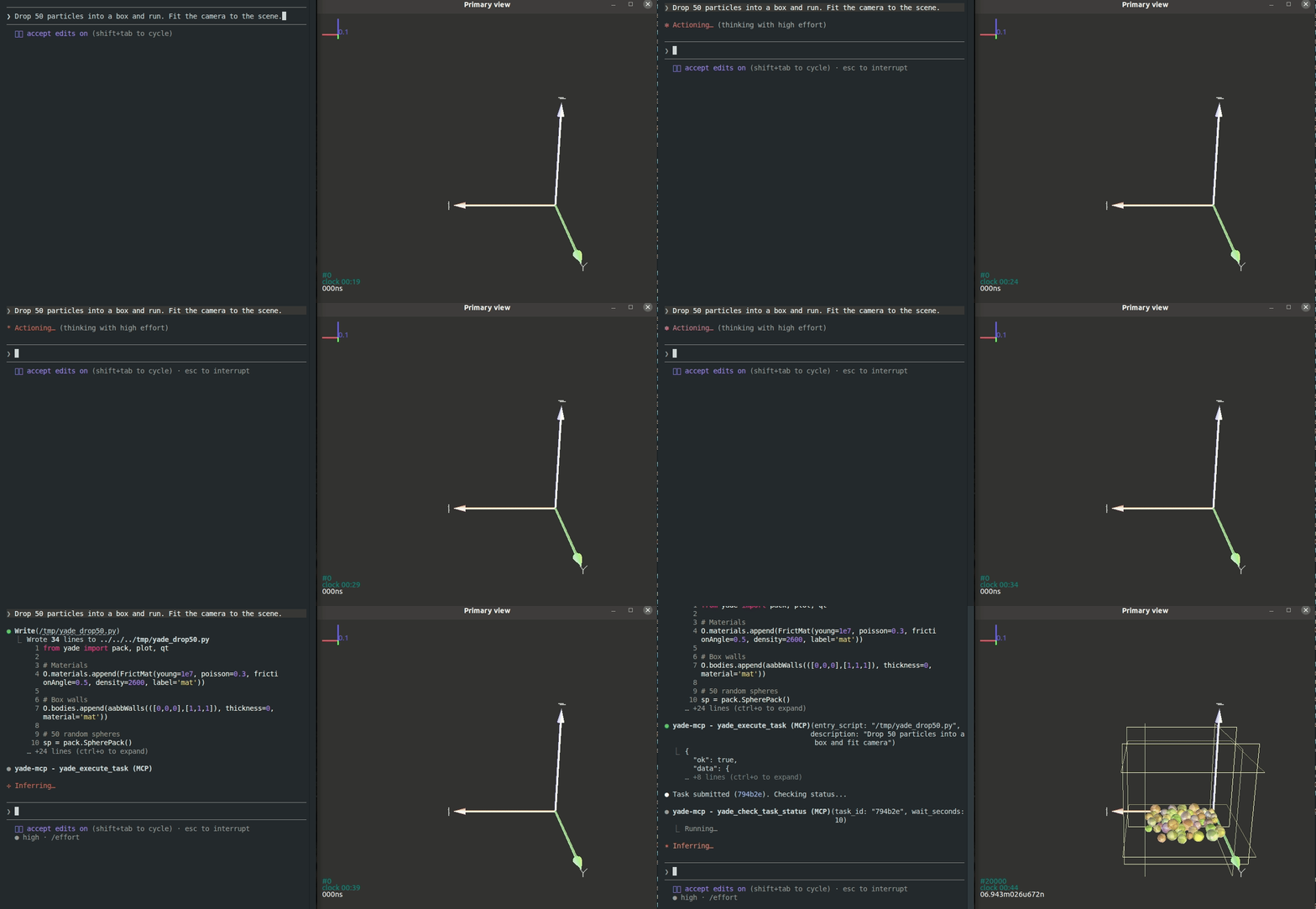
yade-mcp connects AI agents to YADE — the open-source discrete element method engine — through the Model Context Protocol. Browse API docs, run simulations, and execute code, all through natural conversation.
Tools (7)
2 documentation tools — browse and search the YADE Python API with BM25 keyword search. No bridge required.
5 execution tools — synchronous REPL, async task submission, progress monitoring, interruption, and task history. Requires bridge.
Quick Start
Prerequisites
Agentic Setup (Recommended)
Copy this to your AI agent and let it self-configure:
Fetch and follow this bootstrap guide end-to-end:
https://raw.githubusercontent.com/yusong652/yade-mcp/master/docs/agentic/yade-mcp-bootstrap.md
Manual Setup
1. Register the MCP server in your client config:
{
  "mcpServers": {
    "yade-mcp": {
      "command": "uvx",
      "args": ["yade-mcp"]
    }
  }
}
2. Start the bridge inside YADE:
pip install yade-mcp-bridge
Then in a YADE Python console:
import yade_mcp_bridge
yade_mcp_bridge.start()
Verify
Restart your AI agent (Claude Code, Codex CLI, Gemini CLI, etc.) and ask it to call yade_execute_code to verify the connection.
Features
- API documentation & search — browse and search the full YADE Python API with ranked results, real types, and defaults
- Live code execution — run code in the YADE process and get results back instantly, or submit long-running simulations with progress monitoring and interruption
- User intent awareness — agents automatically see what the user is doing in the YADE console, enabling contextual assistance without explicit instructions
- Multi-client compatible — works with Claude Code, Codex CLI, Gemini CLI, OpenCode, and other MCP clients
Contributing
See CONTRIBUTING.md for development setup and guidelines.
License
MIT — see LICENSE.
Project details
Verified details
These details have been verified by PyPIProject links
GitHub Statistics
Maintainers
Release history Release notifications | RSS feed


Download files
Download the file for your platform. If you're not sure which to choose, learn more about installing packages.
Source Distribution
Built Distribution
Filter files by name, interpreter, ABI, and platform.
If you're not sure about the file name format, learn more about wheel file names.
Copy a direct link to the current filters
File details
Details for the file yade_mcp-0.2.1.tar.gz.
File metadata
- Download URL: yade_mcp-0.2.1.tar.gz
- Upload date:
- Size: 359.4 kB
- Tags: Source
- Uploaded using Trusted Publishing? Yes
- Uploaded via: twine/6.1.0 CPython/3.13.12
File hashes
| Algorithm | Hash digest | |
|---|---|---|
| SHA256 |
bfca6bccb8a2d0fb90bc825e798dcb199d16c83380e619d4de60063270aaa6a8
|
|
| MD5 |
3172d7a02478f29b8426eb3b04f6c05d
|
|
| BLAKE2b-256 |
c3a9e24626b655b4a47143a1515374098fa685e2bc544f0311c6c14dbb824e3d
|
Provenance
The following attestation bundles were made for yade_mcp-0.2.1.tar.gz:
Publisher:
release.yml on yusong652/yade-mcp
-
Statement:
-
Statement type:
https://in-toto.io/Statement/v1 -
Predicate type:
https://docs.pypi.org/attestations/publish/v1 -
Subject name:
yade_mcp-0.2.1.tar.gz -
Subject digest:
bfca6bccb8a2d0fb90bc825e798dcb199d16c83380e619d4de60063270aaa6a8 - Sigstore transparency entry: 1271649993
- Sigstore integration time:
-
Permalink:
yusong652/yade-mcp@a574ea7c33013ecb9929e0bf5f258dca7cb5f4ce -
Branch / Tag:
refs/tags/v0.2.1 - Owner: https://github.com/yusong652
-
Access:
public
-
Token Issuer:
https://token.actions.githubusercontent.com -
Runner Environment:
github-hosted -
Publication workflow:
release.yml@a574ea7c33013ecb9929e0bf5f258dca7cb5f4ce -
Trigger Event:
push
-
Statement type:
File details
Details for the file yade_mcp-0.2.1-py3-none-any.whl.
File metadata
- Download URL: yade_mcp-0.2.1-py3-none-any.whl
- Upload date:
- Size: 460.4 kB
- Tags: Python 3
- Uploaded using Trusted Publishing? Yes
- Uploaded via: twine/6.1.0 CPython/3.13.12
File hashes
| Algorithm | Hash digest | |
|---|---|---|
| SHA256 |
23abc0c17df75c6c5e18f522864dc42720d586891ff33d7463d55ecf6964a57c
|
|
| MD5 |
1cbe21f2723921c92d09e6733b2e0b2b
|
|
| BLAKE2b-256 |
c708cdf0e3b4f0cd8c95b45f0f08ea54c5d694f786929335160d7ac8d8ef878b
|
Provenance
The following attestation bundles were made for yade_mcp-0.2.1-py3-none-any.whl:
Publisher:
release.yml on yusong652/yade-mcp
-
Statement:
-
Statement type:
https://in-toto.io/Statement/v1 -
Predicate type:
https://docs.pypi.org/attestations/publish/v1 -
Subject name:
yade_mcp-0.2.1-py3-none-any.whl -
Subject digest:
23abc0c17df75c6c5e18f522864dc42720d586891ff33d7463d55ecf6964a57c - Sigstore transparency entry: 1271650012
- Sigstore integration time:
-
Permalink:
yusong652/yade-mcp@a574ea7c33013ecb9929e0bf5f258dca7cb5f4ce -
Branch / Tag:
refs/tags/v0.2.1 - Owner: https://github.com/yusong652
-
Access:
public
-
Token Issuer:
https://token.actions.githubusercontent.com -
Runner Environment:
github-hosted -
Publication workflow:
release.yml@a574ea7c33013ecb9929e0bf5f258dca7cb5f4ce -
Trigger Event:
push
-
Statement type:






