
This project has been archived by its maintainers, and is no longer receiving any updates.

Yet Another Document Translator




PDF scientific paper translation and bilingual comparison library.
- Provides a simple command line interface.
- Provides a Python API.
- Mainly designed to be embedded into other programs, but can also be used directly for simple translation tasks.
Preview

Getting Started
Install from PyPI
We recommend using the Tool feature of uv to install yadt.
-
First, you need to refer to uv installation to install uv and set up the
PATHenvironment variable as prompted. -
Use the following command to install yadt:
uv tool install --python 3.12 yadt

yadt --help
- Use the
yadtcommand. For example:
yadt --bing  --files example.pdf

# multiple files
yadt --bing  --files example1.pdf --files example2.pdf
Install from Source
We still recommend using uv to manage virtual environments.
-
First, you need to refer to uv installation to install uv and set up the
PATHenvironment variable as prompted. -
Use the following command to install yadt:
# clone the project
git clone https://github.com/funstory-ai/yadt

# enter the project directory
cd yadt

# install dependencies and run yadt
uv run yadt --help
- Use the
uv run yadtcommand. For example:
uv run yadt --bing --files example.pdf

# multiple files
uv run yadt --bing --files example.pdf --files example2.pdf
[!TIP] The absolute path is recommended.
Advanced Options
Language Options
--lang-in,-li: Source language code (default: en)--lang-out,-lo: Target language code (default: zh)
[!TIP] Currently, this project mainly focuses on English-to-Chinese translation, and other scenarios have not been tested yet.
PDF Processing Options
--files: One or more file paths to input PDF documents.--pages,-p: Specify pages to translate (e.g., "1,2,1-,-3,3-5"). If not set, translate all pages--split-short-lines: Force split short lines into different paragraphs (may cause poor typesetting & bugs)--short-line-split-factor: Split threshold factor (default: 0.8). The actual threshold is the median length of all lines on the current page * this factor
Translation Service Options
--qps: QPS (Queries Per Second) limit for translation service (default: 4)--ignore-cache: Ignore translation cache and force retranslation--no-dual: Do not output bilingual PDF files--no-mono: Do not output monolingual PDF files--openai: Use OpenAI for translation (default: False)--bing: Use Bing for translation (default: False)--google: Use Google Translate for translation (default: False)
[!TIP]
- You must specify one translation service among
--openai,--bing,- It is recommended to use models with strong compatibility with OpenAI, such as:
glm-4-flash,deepseek-chat, etc.- Currently, it has not been optimized for traditional translation engines like Bing/Google, it is recommended to use LLMs.
OpenAI Specific Options
--openai-model: OpenAI model to use (default: gpt-4o-mini)--openai-base-url: Base URL for OpenAI API--openai-api-key: API key for OpenAI service
Output Control
--output,-o: Output directory for translated files. If not set, use current working directory.--debug,-d: Enable debug logging level and export detailed intermediate results in~/.cache/yadt/working.
Configuration File
--config,-c: Configuration file path. Use the TOML format.
Example Configuration:
[yadt]
debug = true
lang-in = "en-US"
lang-out = "zh-CN"
qps = 20
# this is a comment
# pages = 4
openai = true
openai-model = "SOME_ALSOME_MODEL"
openai-base-url = "https://example.example/v1"
openai-api-key = "[KEY]"
# All other options can also be set in the configuration file.
Python API
You can refer to the example in main.py to use YADT's Python API.
Please note:
-
Make sure all font files described in
main.download_font_assetsexist -
The current
TranslationConfigdoes not fully validate input parameters, so you need to ensure the validity of input parameters
Background
There are a lot projects and teams working on to make document editing and translating easier like:
There are also some solutions to solve specific parts of the problem like:
- layoutreader: the read order of the text block in a pdf
- Surya: the structure of the pdf
This project hopes to promote a standard pipeline and interface to solve the problem.
In fact, there are two main stages of a PDF parser or translator:
- Parsing: A stage of parsing means to get the structure of the pdf such as text blocks, images, tables, etc.
- Rendering: A stage of rendering means to render the structure into a new pdf or other format.
For a service like mathpix, it will parse the pdf into a structure may be in a XML format, and then render them using a single column reader order as layoutreader does. The bad news is that the original structure lost.
Some people will use Adobe PDF Parser because it will generate a Word document and it keeps the original structure. But it is somewhat expensive. And you know, a pdf or word document is not a good format for reading in mobile devices.
We offer an intermediate representation of the results from parser and can be rendered into a new pdf or other format. The pipeline is also a plugin-based system which everybody can add their new model, ocr, renderer, etc.
Roadmap
- Add line support
- Add table support
- Add cross-page/cross-column paragraph support
- More advanced typesetting features
- Outline support
- ...
Our first 1.0 version goal is to finish a translation from PDF Reference, Version 1.7 to the following language version:
- Simplified Chinese
- Traditional Chinese
- Japanese
- Spanish
And meet the following requirements:
- layout error less than 1%
- content loss less than 1%
Known Issues
- Parsing errors in the author and reference sections; they get merged into one paragraph after translation.
- Lines are not supported.
- Does not support drop caps.
How to Contribute
We encourage you to contribute to YADT! Please check out the CONTRIBUTING guide.
Everyone interacting in YADT and its sub-projects' codebases, issue trackers, chat rooms, and mailing lists is expected to follow the YADT Code of Conduct.
Acknowledgements
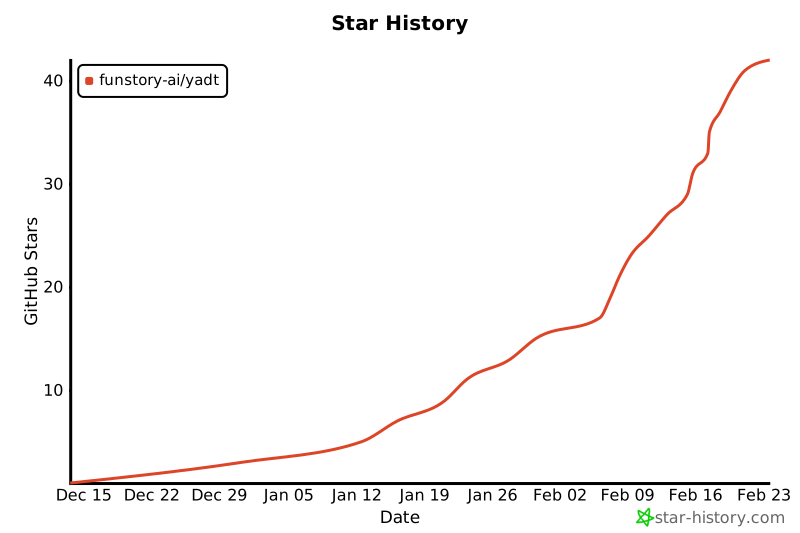
Star History
1 maintainer

Metadata
1 maintainer
Release files for yadt 0.1.5
For a detailed explanation of source distributions (sdists) and built distributions (wheels), please see the package formats documentation.
Source distribution (sdist)
| File | Size | Uploaded | |
|---|---|---|---|
| yadt-0.1.5.tar.gz | 4.3 MB | Details |
Built distribution (wheel)
| File | Interpreter | ABI | Platform | Reset |
|---|---|---|---|---|
| yadt-0.1.5-py3-none-any.whl | Python 3 | none | any | Details |
Total release size: 4.4 MB
Release files / yadt-0.1.5.tar.gz
| Download URL | yadt-0.1.5.tar.gz |
|---|---|
| Size | 4.3 MB |
| Tags | Source |
|
SHA-256 checksum How to use checksums |
e7087d6166cb6a4931662ed2037b75bbc883d33cde1af5b0d76a4d8ce0bf615e
|
|
BLAKE2b-256 checksum How to use checksums |
3264c309288fee25e03af721feed056d170be5fdb189a3b5a9c72cc5a9e8d7fe
|
| Upload date | |
|
Uploaded using Trusted Publishing? What is trusted publishing? |
Yes |
| Uploaded via |
twine/6.1.0 CPython/3.12.8
|
Provenance
Provenance describes where a file came from. On PyPI, provenance is shared via attestations, which provide a verifiable record of the build or publishing details. View details, limitations and caveats.


PyPI Publish Attestation
PyPI verified that this artifact, at this checksum, originated from the publisher listed below.
Signed by GitHub Actions, verified by PyPI on Feb 6, 2025.
Transparency logRelease files / yadt-0.1.5-py3-none-any.whl
| Download URL | yadt-0.1.5-py3-none-any.whl |
|---|---|
| Size | 91.8 kB |
| Tags | Python 3 |
|
SHA-256 checksum How to use checksums |
2787cda05bcff5ab9c5e0f6d152298e2b8b37f41f4667abca32f159af8088b21
|
|
BLAKE2b-256 checksum How to use checksums |
72d08b30940005409ff0adca543a4e96de12305a69458c3fc6640a24229f4090
|
| Upload date | |
|
Uploaded using Trusted Publishing? What is trusted publishing? |
Yes |
| Uploaded via |
twine/6.1.0 CPython/3.12.8
|
Provenance
Provenance describes where a file came from. On PyPI, provenance is shared via attestations, which provide a verifiable record of the build or publishing details. View details, limitations and caveats.
PyPI Publish Attestation
PyPI verified that this artifact, at this checksum, originated from the publisher listed below.
Signed by GitHub Actions, verified by PyPI on Feb 6, 2025.
Transparency log













