
Yagami
An AI router that chooses models and protects privacy.


Yagami automatically routes requests to local or cloud models based on the task and your privacy policy. When it detects sensitive information, including protected health information (PHI), the default policy keeps processing local. Sensitive conversation history inherits the same restriction.
Local models can also reduce cloud API costs when they are sufficient for the task. More demanding reasoning, research, and image generation can use cloud models when your policy allows and the appropriate provider is configured.
Use the included browser chat or connect your application through the
OpenAI-compatible API. Yagami is open source and self-hosted; existing OpenAI
SDK applications can connect by changing one base_url.
Watch Yagami in action
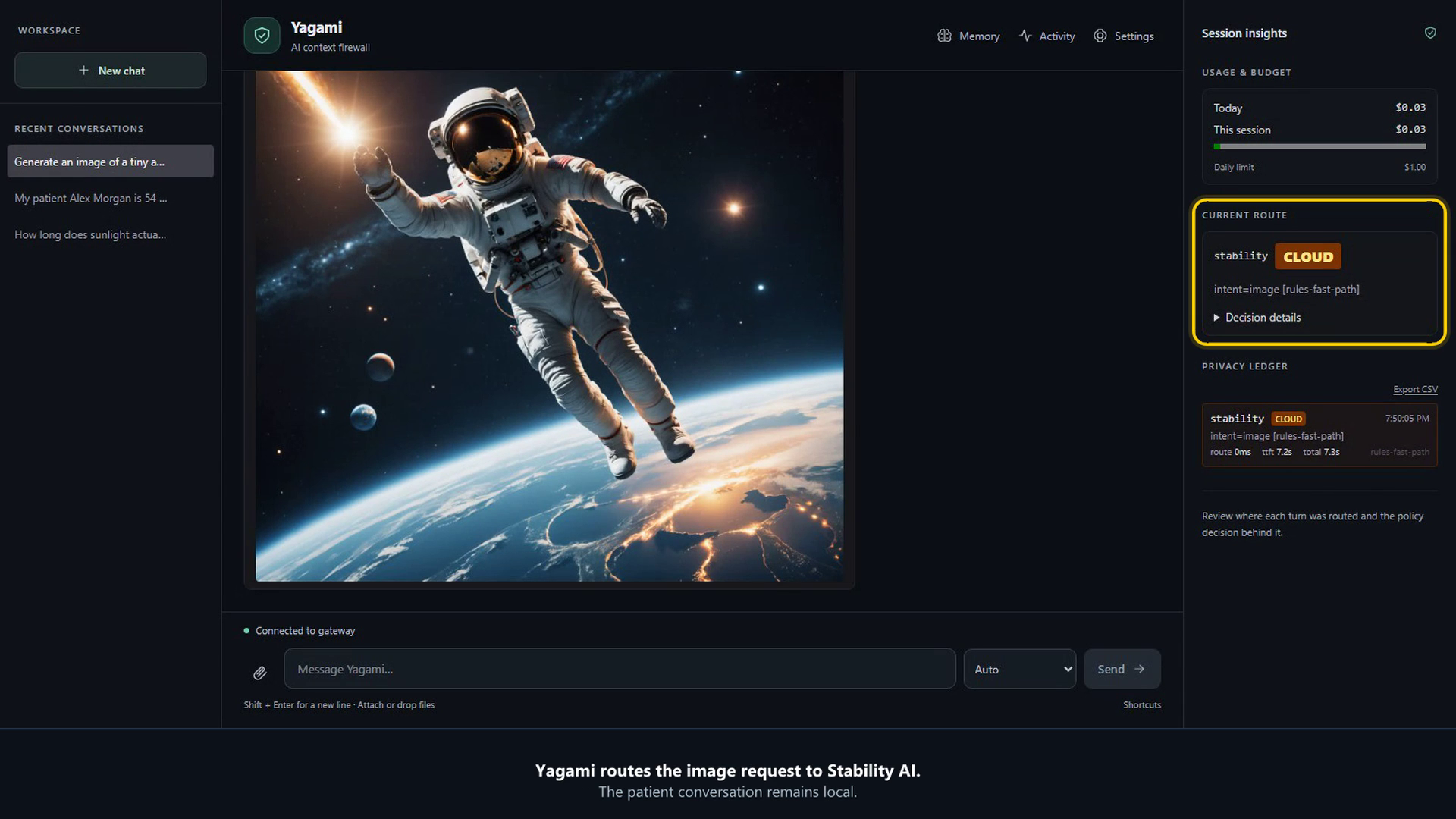
Watch the 59-second demo: an everyday physics question, a fictional patient request kept local, and an image generated through a cloud provider. The recording uses real models and synthetic patient information.
The recording uses configured local and cloud providers with yagami serve.
The no-credential yagami demo command below disables cloud routing.
Try it in 60 seconds
Choose one command:
uvx yagami demo
# or: python -m pip install yagami && yagami demo
# or: docker run --rm -p 127.0.0.1:8000:8000 ghcr.io/matthewtracy/yagami:latest yagami demo --host 0.0.0.0 --allow-remote
Open http://127.0.0.1:8000. The no-credential demo uses the configured Ollama model when it is installed and otherwise presents a clearly labeled policy-only fallback. It disables cloud routing while still exercising classification, policy, lineage, storage, and audit behavior.
For local model-backed answers, install Ollama, run
ollama pull llama3.2:3b-instruct-q4_K_M, and restart the demo.
Protect an application
yagami init
yagami doctor
yagami serve
from openai import OpenAI

client = OpenAI(
    base_url="http://127.0.0.1:8000/v1",
    api_key="your-yagami-project-key",
)

response = client.chat.completions.create(
    model="yagami-auto",
    messages=[{"role": "user", "content": "Summarize this document."}],
    metadata={"sensitivity": "none", "purpose": "internal-documentation"},
)
print(response.choices[0].message.content)
Install yagami[providers] when the Yagami process or example client needs
Anthropic/OpenAI-compatible SDKs. PDF extraction uses yagami[ingest], OS
keyring storage uses yagami[desktop], and yagami[all] retains the previous
batteries-included behavior.
What Yagami enforces
- Sensitive-context containment. Caller labels and local detectors can force PHI, clinical context, credentials, and inherited sensitive history to device/private-network backends.
- Governed tools. Function tools and MCP calls pass through policy, schema checks, risk controls, and optional identity-bound one-time approvals.
- Retrieval and memory boundaries. Namespaces, provenance, labels, TTLs, quarantine, and policy govern stored and retrieved context.
- Content-free evidence. Policy passports, audit chains, metrics, and traces carry labels, hashes, reason codes, counts, and timing rather than prompts, completions, retrieved text, or tool arguments/results.
- Self-hosted operations. Use SQLite locally or PostgreSQL plus distributed coordination for production. Containers, Compose, Helm, Prometheus, OpenTelemetry, backup/restore, and signed policy bundles are supported.
Yagami exposes OpenAI-compatible Chat Completions and core Responses APIs plus Streamable HTTP MCP. It works with local Ollama, explicitly configured llama.cpp, Foundry Local, direct cloud providers, and existing OpenAI-compatible gateways. Frameworks can use the standard endpoint without bypassing the same policy and evidence pipeline.
Limits and trust
Yagami is alpha software and an enforcement component, not a compliance certification. Detection can miss sensitive or malicious content. Strict deployments should declare known sensitivity at the caller, fail closed, use a local-only policy where appropriate, test organization-specific cases, and review the threat model before production use. Telemetry is disabled by default.
1 maintainer

Metadata
1 maintainer
Release files for yagami 0.8.6
For a detailed explanation of source distributions (sdists) and built distributions (wheels), please see the package formats documentation.
Source distribution (sdist)
| File | Size | Uploaded | Provenance | Actions |
|---|---|---|---|---|
| yagami-0.8.6.tar.gz | 402.0 kB | With provenance | Details for yagami-0.8.6.tar.gz |
Built distribution (wheel)
| File | Interpreter | ABI | Platform | Actions Reset |
|---|---|---|---|---|
| yagami-0.8.6-py3-none-any.whl | Python 3 | none | any | Details for yagami-0.8.6-py3-none-any.whl |
Total release size: 853.3 kB
Release files / yagami-0.8.6.tar.gz
| Download URL | yagami-0.8.6.tar.gz |
|---|---|
| Size | 402.0 kB |
| Tags | Source |
|
SHA-256 checksum How to use checksums |
dca6bf45bbcb893f74942f641c1bc5ce9854ed74300bc29e905369358bf79d8b
|
|
BLAKE2b-256 checksum How to use checksums |
586458dc97bc494cd4539afd83357275733bf0b1654721966ea43cba1c0b3c2d
|
| Upload date | |
|
Uploaded using Trusted Publishing? What is trusted publishing? |
Yes |
| Uploaded via |
twine/7.0.0 CPython/3.13.14
|
Provenance
Provenance describes where a file came from. On PyPI, provenance is shared via attestations, which provide a verifiable record of the build or publishing details. View details, limitations and caveats.


PyPI Publish Attestation
PyPI verified that this artifact, at this checksum, originated from the publisher listed below.
Signed by GitHub Actions, verified by PyPI on Nov 3, 2026.
Transparency logRelease files / yagami-0.8.6-py3-none-any.whl
| Download URL | yagami-0.8.6-py3-none-any.whl |
|---|---|
| Size | 451.2 kB |
| Tags | Python 3 |
|
SHA-256 checksum How to use checksums |
8e5e95f037d6d980619da9d899f2a47d5e7a698952a5f2a0ba86ca628bdf045e
|
|
BLAKE2b-256 checksum How to use checksums |
a2d8b0c9964db42beab0ff64b38b7b3ada9ac6f669812f4c3ab1510c7eadeb40
|
| Upload date | |
|
Uploaded using Trusted Publishing? What is trusted publishing? |
Yes |
| Uploaded via |
twine/7.0.0 CPython/3.13.14
|
Provenance
Provenance describes where a file came from. On PyPI, provenance is shared via attestations, which provide a verifiable record of the build or publishing details. View details, limitations and caveats.
PyPI Publish Attestation
PyPI verified that this artifact, at this checksum, originated from the publisher listed below.
Signed by GitHub Actions, verified by PyPI on Nov 3, 2026.
Transparency logSecurity for yagami 0.8.6
Provenance
Provenance describes where a file came from. On PyPI, provenance is shared via attestations, which provide a verifiable record of the build or publishing details. View details, limitations and caveats.
Full provenance
All 2 files in this release have been uploaded with provenance metadata.
Attestation for yagami-0.8.6.tar.gz
PyPI Publish Attestation
PyPI verified that this artifact, at this checksum, originated from the publisher listed below.
Signed by GitHub Actions, verified by PyPI on Nov 3, 2026.
Transparency logA note on package security
PyPI is a repository for distributing packages, not a service for auditing them. While third-party security researchers and our staff do their best to detect and remove malicious packages, PyPI cannot guarantee the quality, security or suitability of any given package.
To learn more about protecting yourself from malicious actors, visit our package security documentation.














