
A product-neutral SSOT governance harness for agentic software projects
Verified details
These details have been verified by PyPIProject links
GitHub Statistics
Maintainers

Project description

Yakherd
Yakherd - herds the yaks so your agent stops shaving them.
Yakherd installs a strict, repository-centered single source of truth (SSOT) harness for agentic software projects. It gives Architecture, Implementation, Red Team, Temporary Branch, and Governor tasks durable ownership rules before the first product prompt arrives.




Absolute Beginner? Start Here
You do not need to understand "SSOT," Git, Python, or software architecture to start. Yakherd is the project-management and reliability half of vibe coding. It gives a coding agent a disciplined way to plan, build, check, and remember a software project without letting important decisions disappear into old chats.
You provide the other half: your idea, usually written as a master prompt. The master prompt describes what you want the software to do. Yakherd does not invent that idea for you; it gives the agent a safer, more organized working environment in which to build it.
In short:
- Yakherd provides the operating system for the work: roles, plans, decisions, evidence, review, and a durable source of truth.
- Your master prompt provides the product: the problem, users, desired behavior, constraints, and definition of success.
- An agentic coding environment uses both to build the software.
The coding environment must be able to read and write project files, run shell commands, use Git, and run Python 3.11 or newer. Codex or Claude Code can do this when its execution environment also has Git and Python 3.11 or newer. An ordinary AI web chat without filesystem and shell tools cannot install Yakherd merely from a URL.
Which Coding Agents Work?
| Environment | Yakherd support |
|---|---|
| Codex | Native when the generated repository is opened as the project. Codex loads the installed AGENTS.md. |
| Claude Code | Native after the generated repository is opened as the project and the local import is approved. CLAUDE.md imports the same AGENTS.md; verify both are loaded with /context. |
| Other coding agents | Compatible when the agent can use files, Git, a shell, and Python, and is explicitly told to read AGENTS.md. Automatic instruction loading depends on the tool. |
| Ordinary AI chat | Not sufficient unless the chat has access to the required coding tools and project filesystem. |
The governance files and role prompts are product- and model-neutral.
AGENTS.md is the authority, while CLAUDE.md is only an import adapter; they
do not create two competing copies of the rules. Agent instruction files are
behavioral context, not a security sandbox, and the client must actually load
them before work begins.
Tell Your Agent To Install It
If all you know how to do is talk to your coding agent, that is enough. Use the prompt for your environment.
Codex:
Install Yakherd from https://github.com/gigajeff/Yakherd into a new project repository for me. First verify that this environment has Git and Python 3.11 or newer. Follow Yakherd's README and safety instructions. Do not overwrite an existing project. After installation, open the generated repository as the Codex project and confirm its AGENTS.md is loaded. After the required review, ask me for my idea or master prompt.
Claude Code:
Install Yakherd from https://github.com/gigajeff/Yakherd into a new project repository for me. First verify that this environment has Git and Python 3.11 or newer. Follow Yakherd's README and safety instructions. Do not overwrite an existing project. After installation, open the generated repository as the Claude Code project and start a fresh session there. Confirm that CLAUDE.md contains only the local @AGENTS.md import. If Claude Code asks, approve that import only after verifying it resolves to AGENTS.md inside the generated repository. Use /context to confirm that CLAUDE.md and AGENTS.md are loaded; do not begin product work if they are not. After the required review, ask me for my idea or master prompt.
Another coding agent:
Install Yakherd from https://github.com/gigajeff/Yakherd into a new project repository for me. First verify that this environment has Git and Python 3.11 or newer. Read and follow Yakherd's README, AGENTS.md, and safety instructions. Do not overwrite an existing project. In the generated project, always read AGENTS.md before working and confirm it is in the active context. After installation and the required review, ask me for my idea or master prompt.
The agent can clone this repository, run the installer, and guide you through the next step. Once Yakherd is installed and its initial review passes, give the agent your master prompt. Together, Yakherd plus a clear master prompt can turn an idea into usable software in Codex, Claude Code, or another capable agentic coding environment.
Yakherd improves how the work is organized and reviewed; it does not guarantee that every generated program is correct or safe. You should still review and test consequential software before relying on it.
Why Yakherd
Long-running agent projects often drift because decisions live in chat, multiple files claim authority, failed experiments remain active, and the human becomes a courier between tasks. Yakherd installs a small governance shell that makes authority, current state, decisions, evidence, and review boundaries explicit.
It is deliberately product-neutral. It does not choose your language, framework, cloud provider, database, architecture, or deployment system.
Quick Start
Install Yakherd and preview a fresh installation without writing anything:
python3 -m pip install yakherd
yakherd init \
  --target ~/dev/my-project \
  --project-name my-project \
  --dry-run
Install into a nonexistent or empty folder:
yakherd init \
  --target ~/dev/my-project \
  --project-name my-project
Then open the generated
docs/prompts/bootstrap_cold_resume_review.md in a fresh Red Team task. Only
after that review passes should the repository receive its product master
prompt.
On Windows PowerShell, the equivalent commands are:
py -m pip install yakherd
yakherd init `
  --target C:\dev\my-project `
  --project-name my-project `
  --dry-run

yakherd init `
  --target C:\dev\my-project `
  --project-name my-project
To run directly from source instead, clone this repository and replace
yakherd in the examples with python yakherd.py.
See a Cold Resume
The strongest Yakherd claim is recoverability: a new agent should be able to open the generated repository with no implementation chat, reconstruct the project's state from its files, run the required checks, and issue an independent review.
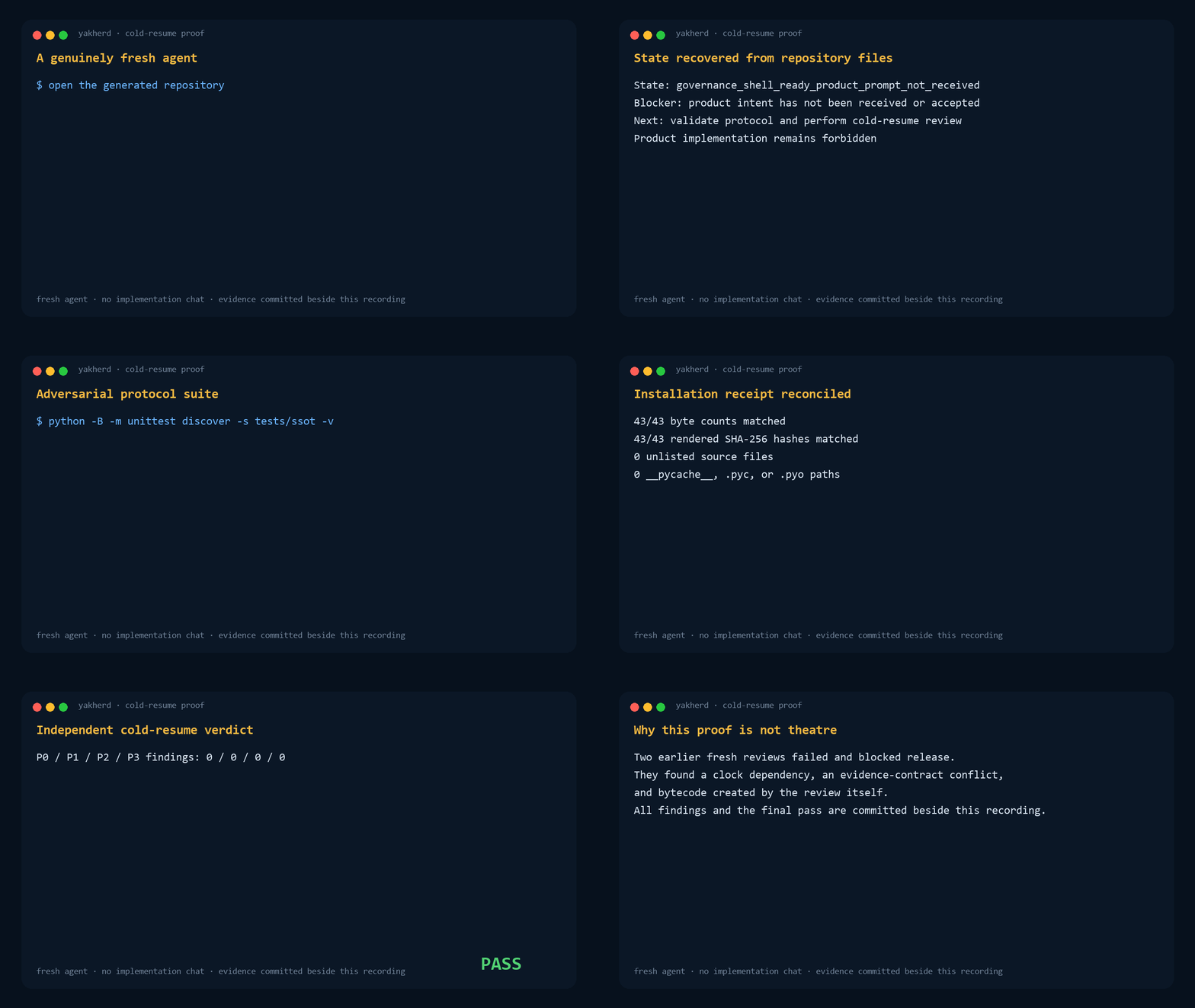
This recording is rendered from a real isolated fresh-agent run. The session source, exact prompt and result, review, and hashes are committed beside it so the result is inspectable rather than a staged terminal animation.
What Gets Installed
SSOT.md: authority map and conflict order.DECISIONS.md: durable decision owner.STATUS.md: bounded current-state index.AGENTS.md: the one authoritative set of repository operating rules.CLAUDE.md: a one-line Claude Code adapter that importsAGENTS.md.- Architecture, Implementation, Red Team, Temporary Branch, and Governor task prompts.
- Governance, review, plan, run-record, and status-history directories.
- Standard-library validators and focused tests.
- A hash-bound installation receipt.
See Usage and Architecture.
Existing Repositories
Retrofit mode is intentionally fail-closed. It requires a separately reviewed JSON plan with an exact allowlist and expected hashes. Do not point fresh mode at an established repository, and do not improvise a retrofit from the command line. See Retrofit Safety.
Trust Boundary
Yakherd 1.0.0 distributed the exact package that passed the Mosaic-origin V3 independent review. Those historical audits remain provenance for the first release, not a claim that later versions have identical bytes.
For every version, RELEASE.json binds bootstrap.py and MANIFEST.json; the
manifest binds every installed template. Package changes require regenerated
hashes, clean acceptance evidence, and a new independent review before release.
The Git tag and GitHub release then authenticate those reviewed bytes
externally.
The engine remains under packages/jeff_strict_ssot_v1/ because the V1 name
identifies the protocol generation. Package versions within V1 may add
backward-compatible adapters only through the full acceptance and independent
review cycle.
Non-Goals
Yakherd does not:
- run product code or experiments;
- install product dependencies;
- access project secrets;
- create automations;
- choose technical architecture;
- make Git mutations inside the target repository; or
- replace human approval for consequential decisions.
Development
python3 -B -m unittest discover \
  -s packages/jeff_strict_ssot_v1/tests -v

python3 packages/jeff_strict_ssot_v1/tests/run_acceptance.py \
  --package-root packages/jeff_strict_ssot_v1 \
  --output-root .tmp/acceptance \
  --date 2026-07-20
Windows PowerShell:
python -B -m unittest discover `
  -s packages\jeff_strict_ssot_v1\tests -v

python packages\jeff_strict_ssot_v1\tests\run_acceptance.py `
  --package-root packages\jeff_strict_ssot_v1 `
  --output-root .tmp\acceptance `
  --date 2026-07-20
Read CONTRIBUTING.md before changing the audited package.
License
Apache License 2.0. See LICENSE.
Project details
Verified details
These details have been verified by PyPIProject links
GitHub Statistics
Maintainers
Release history Release notifications | RSS feed


Download files
Download the file for your platform. If you're not sure which to choose, learn more about installing packages.
Source Distribution
Built Distribution
Filter files by name, interpreter, ABI, and platform.
If you're not sure about the file name format, learn more about wheel file names.
Copy a direct link to the current filters
File details
Details for the file yakherd-1.1.1.tar.gz.
File metadata
- Download URL: yakherd-1.1.1.tar.gz
- Upload date:
- Size: 62.8 kB
- Tags: Source
- Uploaded using Trusted Publishing? Yes
- Uploaded via: twine/6.1.0 CPython/3.13.13
File hashes
| Algorithm | Hash digest | |
|---|---|---|
| SHA256 |
feaa91e7949b9ab51e09ed43f1814b5cb9234c44789b7aa345b0160bc9e80eb0
|
|
| MD5 |
f16fb23e27591035d4059649e5ed8e93
|
|
| BLAKE2b-256 |
32d2b1adb70d1eb74d69a71d1774c609ef9308a891daf901093de6db913e738e
|
Provenance
The following attestation bundles were made for yakherd-1.1.1.tar.gz:
Publisher:
publish.yml on gigajeff/Yakherd
-
Statement:
-
Statement type:
https://in-toto.io/Statement/v1 -
Predicate type:
https://docs.pypi.org/attestations/publish/v1 -
Subject name:
yakherd-1.1.1.tar.gz -
Subject digest:
feaa91e7949b9ab51e09ed43f1814b5cb9234c44789b7aa345b0160bc9e80eb0 - Sigstore transparency entry: 2208584036
- Sigstore integration time:
-
Permalink:
gigajeff/Yakherd@f8d3890a58ff750e919ee088c1b904ad0e30c639 -
Branch / Tag:
refs/tags/v1.1.1 - Owner: https://github.com/gigajeff
-
Access:
public
-
Token Issuer:
https://token.actions.githubusercontent.com -
Runner Environment:
github-hosted -
Publication workflow:
publish.yml@f8d3890a58ff750e919ee088c1b904ad0e30c639 -
Trigger Event:
push
-
Statement type:
File details
Details for the file yakherd-1.1.1-py3-none-any.whl.
File metadata
- Download URL: yakherd-1.1.1-py3-none-any.whl
- Upload date:
- Size: 76.6 kB
- Tags: Python 3
- Uploaded using Trusted Publishing? Yes
- Uploaded via: twine/6.1.0 CPython/3.13.13
File hashes
| Algorithm | Hash digest | |
|---|---|---|
| SHA256 |
b19364534c9a74f15e48091959f9e8c40261150fc161f5812e852d8893ccd842
|
|
| MD5 |
029849d2cfc14f53f76a285e0240f5ed
|
|
| BLAKE2b-256 |
597b49451bc91ef1b2127289948cd465b58a0774e889642eb4d92dd5384174e4
|
Provenance
The following attestation bundles were made for yakherd-1.1.1-py3-none-any.whl:
Publisher:
publish.yml on gigajeff/Yakherd
-
Statement:
-
Statement type:
https://in-toto.io/Statement/v1 -
Predicate type:
https://docs.pypi.org/attestations/publish/v1 -
Subject name:
yakherd-1.1.1-py3-none-any.whl -
Subject digest:
b19364534c9a74f15e48091959f9e8c40261150fc161f5812e852d8893ccd842 - Sigstore transparency entry: 2208584146
- Sigstore integration time:
-
Permalink:
gigajeff/Yakherd@f8d3890a58ff750e919ee088c1b904ad0e30c639 -
Branch / Tag:
refs/tags/v1.1.1 - Owner: https://github.com/gigajeff
-
Access:
public
-
Token Issuer:
https://token.actions.githubusercontent.com -
Runner Environment:
github-hosted -
Publication workflow:
publish.yml@f8d3890a58ff750e919ee088c1b904ad0e30c639 -
Trigger Event:
push
-
Statement type:






