
yamlreel
Write a short YAML file. Get a finished video.
yamlreel turns a YAML file into a finished video: system-design explainers, code tips, project launches and feature demos for YouTube, Shorts and LinkedIn, with diagrams, typed code, original music and an optional voiceover in your own voice.


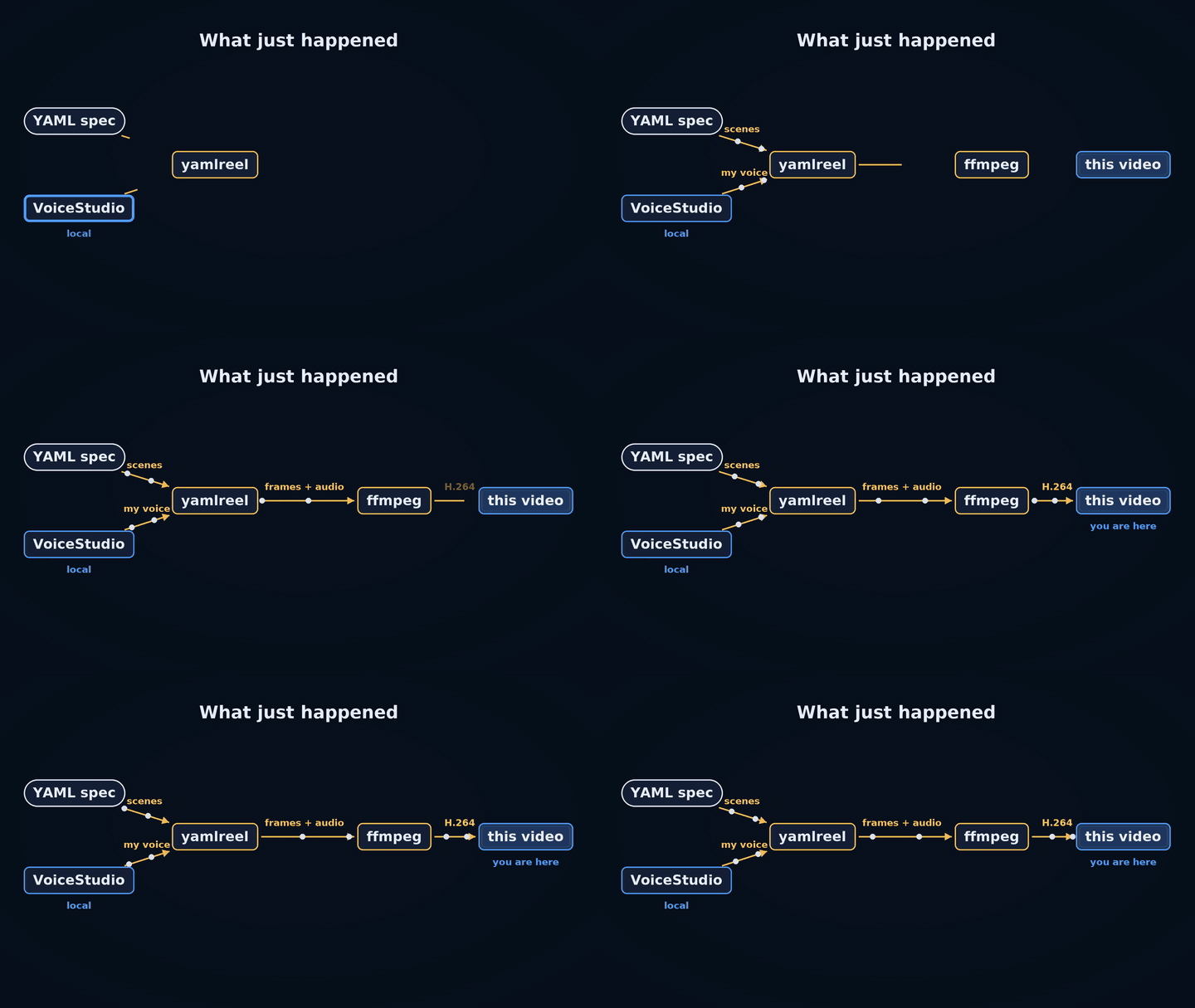
▶ Watch the 1-minute demo: a video about yamlreel, made by yamlreel from one YAML file, with no video editor.
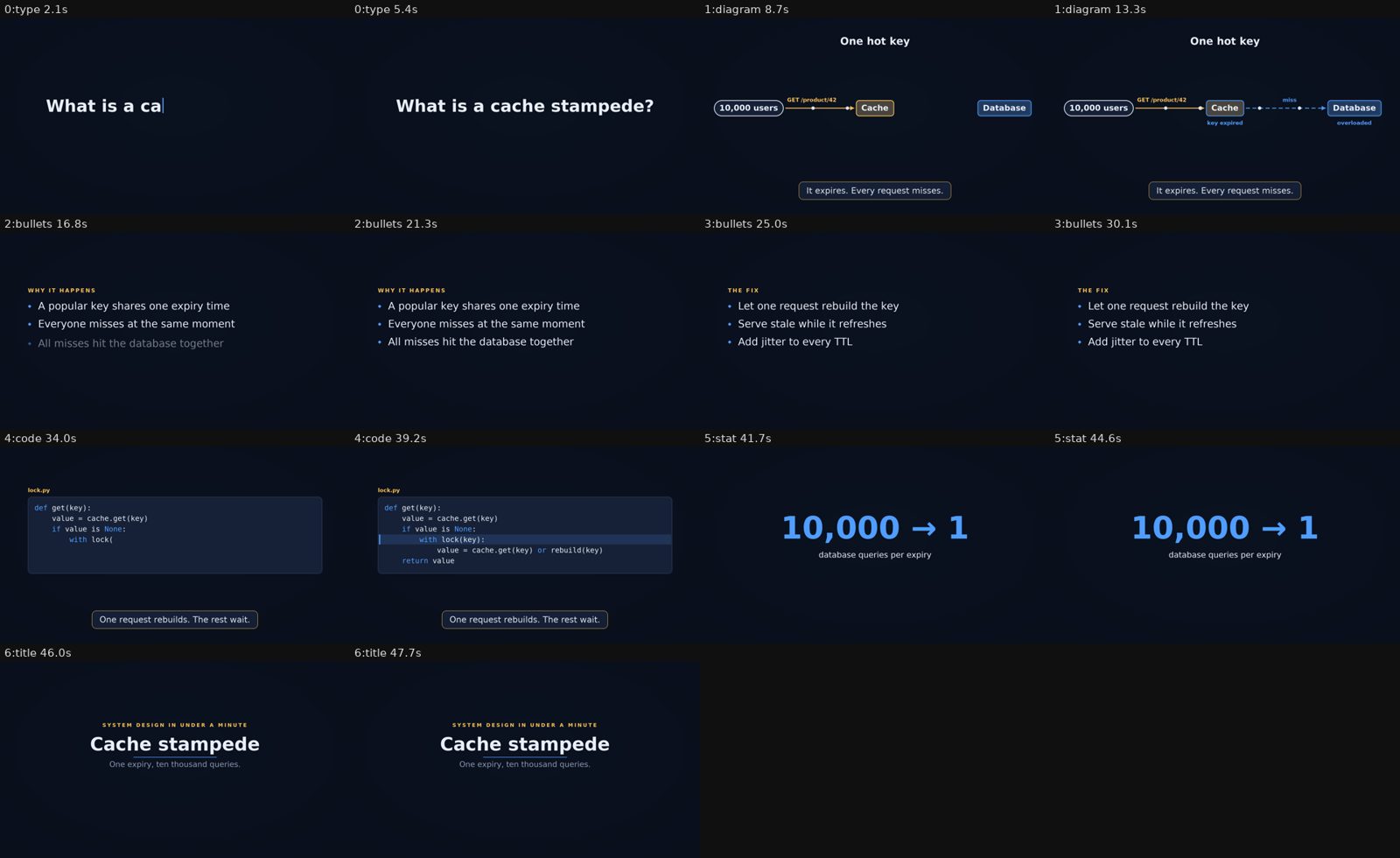
Every scene of examples/cache-stampede-45s.yaml, rendered from one YAML file.
What you get
Every render writes this layout (the output folder is yamlreel-output/ unless you pass --out DIR):
yamlreel-output/
├── vertical/            one folder per format: landscape 1920×1080, vertical 1080×1920, square 1080×1080
│   ├── video.mp4        H.264 (+ AAC when there is music or a voice). Frame 0 is the poster, so the thumbnail is never blank.
│   ├── poster.jpg       the settled hook frame, ready to upload as a thumbnail
│   └── contact.png      two labelled stills per scene: look at this before you publish
└── share-copy.txt       title, description and hashtags for the whole video, ready to paste
share-copy.txt adds #Shorts for vertical clips up to 60 seconds. Videos can be any length, and only a
vertical video over 3 minutes gets a warning. Music is generated on your machine (plucked strings in a
Japanese scale), so there is nothing to license or credit.
Quick start
You need Python 3.10 or newer. pip installs everything else except fonts on macOS and Windows (see the note below).
python3 -m venv .venv && source .venv/bin/activate
pip install "yamlreel[ffmpeg]"
Prefer an isolated command-line install? pipx install "yamlreel[ffmpeg]" works too. (The vidgen package on
PyPI is unrelated to this project, which was called vidgen before 0.2.)
Make your first video:
yamlreel init system-design my-video.yaml     # a starter spec (or: project, code-tip)
yamlreel render my-video.yaml --preview       # half size, 12 fps: check layout and timing in seconds
yamlreel render my-video.yaml                 # full quality, every format in the spec
Open yamlreel-output/<format>/contact.png first. To try the showcased example without setting up a voice:
curl -LO https://raw.githubusercontent.com/nsijwali/yamlreel/main/examples/cache-stampede-45s.yaml
yamlreel render cache-stampede-45s.yaml --no-voice
Fonts on macOS and Windows: yamlreel draws text with the free DejaVu fonts, which most Linux systems include. On macOS run
brew install --cask font-dejavuonce. On Windows, install them from dejavu-fonts.github.io ("Install for me" is fine).
Install details for each system
| macOS | Linux | Windows (PowerShell) | |
|---|---|---|---|
| Python 3.10+ | brew install python@3.12 or python.org |
usually installed; Debian/Ubuntu also need python3-venv |
python.org, then use py instead of python3 |
| Activate the venv | source .venv/bin/activate |
same | .venv\Scripts\Activate.ps1 (if scripts are blocked: Set-ExecutionPolicy -Scope CurrentUser RemoteSigned) |
| ffmpeg | the [ffmpeg] extra (or brew install ffmpeg) |
the extra, or sudo apt install ffmpeg. On Fedora use the extra: its own ffmpeg-free cannot encode H.264 |
the [ffmpeg] extra |
| Fonts | brew install --cask font-dejavu |
Debian/Ubuntu: sudo apt install fonts-dejavu-core; Fedora: sudo dnf install dejavu-sans-fonts dejavu-serif-fonts dejavu-sans-mono-fonts; Arch: sudo pacman -S ttf-dejavu |
DejaVu from dejavu-fonts.github.io |
| Web captures (optional) | pip install "yamlreel[capture]" then playwright install chromium |
same | same |
- ffmpeg: yamlreel uses the
ffmpegon your PATH if there is one, and otherwise the copy that the[ffmpeg]extra (theimageio-ffmpegpackage) brings along. You only need one of them. - Fonts: yamlreel looks in your
font_dirsetting (orYAMLREEL_FONT_DIR) first, then the system font folders, then your own (~/Library/Fontson macOS,%LOCALAPPDATA%\Microsoft\Windows\Fontson Windows). If your fonts live anywhere else, pointfont_dirat that folder. Japanese text uses Noto CJK when it is installed. - Web captures are only needed for
shotscenes that screenshot a URL.chromium_pathin your user config (orYAMLREEL_CHROMIUM) picks a different browser. - Windows is not covered by CI yet. Reports are welcome.
Examples
| Spec | What it is |
|---|---|
examples/cache-stampede-45s.yaml |
A 45-second system-design explainer with a diagram, code and a narrated script. |
It is narrated; add --no-voice to render it with music only. For more starting points, run
yamlreel init with the system-design, project or code-tip template.
Commands
| Command | What it does |
|---|---|
yamlreel init <template> <file> |
Writes a starter spec: system-design, project or code-tip. |
yamlreel validate <spec> |
Checks a spec and prints its scene count and length, without rendering. |
yamlreel render <spec> |
Renders. Useful flags: --preview, --out DIR, --format vertical|landscape|square|all, --music koto|none|file.mp3, --fps N, --no-voice, --voice-url URL, --read-screen, --allow-path DIR, --allow-private-hosts. |
yamlreel config init [--user] / config show |
Writes a starter config, or shows the merged settings and the files they came from. |
yamlreel music --seconds 30 --out track.wav |
Generates the music track on its own (--bpm, --root, --scale, --seed). |
Writing a spec
A spec is a list of scenes. Each scene has a type, how many seconds it lasts, and an optional caption
(a lower third that fades in).
meta: {title: "Cache stampede in 45 seconds", tags: [systemdesign, caching]}
theme: midnight                     # sumi | washi | midnight | your own
formats: [vertical, landscape]
scenes:
  - type: type
    text: What is a cache stampede?
    seconds: 3
  - type: bullets
    title: The fix
    items: [Let one request rebuild the key, Serve stale while it refreshes, Add jitter to every TTL]
  - type: stat
    value: "10,000 → 1"
    label: database queries per expiry
| Scene | Shows | Main fields |
|---|---|---|
title |
eyebrow, title, subtitle and URL, easing in line by line | title, eyebrow, subtitle, url |
type |
one line typed out with a cursor: your hook | text |
bullets |
points that appear one at a time | title, items |
code |
code typed on screen, with highlighted lines | code, highlight, title |
stat |
one big number or phrase | value, label, eyebrow |
diagram |
boxes and arrows that appear in order, packets flowing, nodes flashing | nodes, edges, flash, title |
shot |
a screenshot of a URL or an image, with a slow camera move | source, zoom, focus, fit, click, scroll_y |
All spec options
meta: {title, description, tags: [], links: [], credits: []}
theme: sumi | washi | midnight | <a theme from your config>
formats: [vertical, landscape, square]
music: {style: koto | none | path/to.mp3, bpm: 72, root: D, scale: hirajoshi, seed: 7, snap: false, volume: 0.9}
watermark: "Your Name"        # or {text|image: logo.png, position: top-left|top-right|bottom-left|bottom-right, opacity: 0.75, size: 30}
poster: {scene: 0, at: 2.6}   # optional; default is the first scene, just before it ends
voiceover: {voice, language, gap, music_level, read_screen}
scenes: [...]
- Diagrams:
nodestakeid, label, kind (client|service|cache|db), x, y, at, wherexandyare fractions of the frame.vx, vyoverride them in vertical frames, so one diagram fits both shapes.edgestakefrom, to, label, bad, dashed, at, colorandflashtakesnode, at, text, color. - Shots:
source(URL or image),fit: cover | card,zoom: [from, to],focus: [x, y],focus_to,click: [selectors],scroll_y,wait_ms,viewport,scale. Screenshots are cached in<output folder>/.cache; delete it to capture again. - Files: images, pages, music and logos must sit in the spec's folder, a config folder, or a folder you allow with
--allow-path DIR(orallow_pathsin your user config). - Music:
seedchanges the melody andsnap: truerounds scene lengths to beats. To use your own track, pointstyleat an audio file and credit it inmeta.credits. - Watermark: appears on every frame and the poster. The default corner is bottom-right for landscape and top-left for vertical, because the Shorts buttons cover the right edge and the bottom.
Tips
- Text never silently overflows. It wraps, then shrinks, and
renderwarns you when it had to. - In vertical frames, content sits above the lower third, clear of the Shorts UI.
- A 15-second video carries one idea. Before you publish, check anything you simplified.
Voiceover in your own voice
Give a scene a narration: line and yamlreel speaks it, lowers the music under the voice, and makes the scene as
long as the speech needs. Speech comes from a text-to-speech server running on your own machine, for example
VoiceStudio, which can also clone your voice from a short recording.
scenes:
  - type: type
    text: What is a cache stampede?
    narration: Ever seen one expired cache key take down a whole database? That's a cache stampede.
  - type: title
    title: Cache stampede
    narration: false          # silent end card
Write narration, don't read the screen. The voice sounds natural when it explains what the viewer sees, in a sentence or two.
read_screen: true(or--read-screen) speaks every title, bullet and caption word for word, for scenes without their ownnarration:. That is fine as a quick draft, but it sounds robotic in a finished video.--no-voicerenders any spec with music only.
Set up VoiceStudio, step by step
- Install and open VoiceStudio. Use the desktop app
(easiest), or run it from source (
uv sync, thenuv run uvicorn main:app --app-dir backend --port 3900). Its speech server listens onhttp://127.0.0.1:3900/mcp/while it is running. - Accept the model licences. Open Model Catalogue and accept the terms for OmniVoice and its audio
tokenizer. Until you do, every request fails with
403 Forbidden. The first request also downloads the model (about 2.3 GB). - (Optional) Clone your voice. In Voice cloning, add a 5 to 10 second recording of yourself in a quiet room, with its exact transcript. Copy the voice's profile id.
- Tell yamlreel where the server is, once. Run
yamlreel config init --userand open~/.config/yamlreel/config.yaml. At the bottom, uncommentvoice_server:and itsurl:line. Under the existingvoiceover:block, uncommentvoice:and paste your profile id there (leave it out to use the server's default voice). You can also pass--voice-url http://127.0.0.1:3900/mcp/on each render.
Prefer to record yourself? Use narration_audio: clip.wav (PCM WAV, inside the spec folder or an allowed
folder) instead of narration:.
How voiceover works: other servers, privacy, caching
- Any compatible server works. yamlreel speaks MCP "Streamable HTTP" and calls the server's
generate_speechtool, which must return the audio inline (VoiceStudio's default). VoiceStudio is just one server that does this. - Privacy: narration text is sent only to the server you configured. A spec cannot choose the server: the address comes only from your user config or the command line.
- Precedence: a scene's own
narration:wins overread_screen, andnarration: falsekeeps a scene silent. - Caching: audio is cached per text and voice in
<output folder>/.cache, so re-renders do not speak lines again. If you change the recording behind a voice, delete<output folder>/.cache/narration-*.wav. - Licences: VoiceStudio is AGPL-3.0, and its models have their own licences, which its Model Catalogue shows per model. OmniVoice's weights are non-commercial (CC-BY-NC), and that may carry over to the speech they generate. Check before you monetise a video.
Configuration
Defaults live in a config file, so a spec only needs to say what is different for that video. You can adapt yamlreel to your own name, colours and music without touching code.
yamlreel config init            # ./yamlreel.config.yaml: this project (add it to your .gitignore)
yamlreel config init --user     # ~/.config/yamlreel/config.yaml: every project
yamlreel config show            # the merged settings, and the files they came from
Settings apply in this order, lowest to highest: built-in defaults → user config → project config → the spec → command-line flags.
Nested settings merge, so setting only music.bpm keeps the rest. meta.tags, links and credits add up across layers.
What you can set: theme, your own themes (colours, extends, display: serif | sans, frame), formats,
fps, output_dir, watermark (text or a logo), music, voiceover, meta defaults and limits. Your name,
watermark and default tags belong in config, not in code. Every option is explained in
yamlreel/templates/config.example.yaml.
A few settings widen what a spec can touch, so yamlreel only reads them from your user config or the command
line, never from a spec or project config you downloaded: allow_paths, allow_private_hosts,
chromium_path, font_dir and voice_server. See SECURITY.md.
Troubleshooting
| You see | Fix |
|---|---|
ffmpeg not found |
pip install "yamlreel[ffmpeg]", or install ffmpeg with your package manager. |
font 'DejaVuSans-Bold.ttf' not found |
Install DejaVu (see Install details), or point font_dir in your user config at the folder that holds them. |
scene 0 has narration but no voice server is configured |
Start VoiceStudio and set voice_server in your user config, pass --voice-url, or render with --no-voice. |
cannot reach the voice server … Is VoiceStudio running? |
Start VoiceStudio and check that the URL ends in /mcp/. |
Client error '403 Forbidden' for url '…/generate' |
Accept the OmniVoice and tokenizer licences in VoiceStudio's Model Catalogue. |
Server error '500' from the voice server, or the server is killed |
The machine is out of memory. Close other apps, and use a 5 to 10 second voice sample: a longer reference needs over 2 GB on the CPU. |
voice server reply had no audio |
VoiceStudio is set to OMNIVOICE_MCP_OUTPUT_MODE=files. yamlreel needs the default inline mode. |
capturing a URL needs playwright |
pip install "yamlreel[capture]", then playwright install chromium. |
could not capture … Executable doesn't exist |
Run playwright install chromium, or set chromium_path in your user config. |
… outside the folders this run may read |
Move the file next to your spec, or pass --allow-path DIR. For localhost pages, add --allow-private-hosts. |
| A narration line still uses an old voice | Delete <output folder>/.cache/narration-*.wav. |
| Homebrew fails to build ffmpeg or Python | Older macOS versions get no prebuilt packages. Use the [ffmpeg] extra for ffmpeg, and python.org or uv for Python. |
Built with
| Used for | |
|---|---|
| Pillow, NumPy, PyYAML | drawing every frame, generating the music, reading specs |
| FFmpeg (or imageio-ffmpeg) | encoding the video |
| Playwright | capturing web pages for shot scenes (optional) |
| DejaVu fonts | all on-screen text |
| VoiceStudio with OmniVoice | the optional local voiceover, including voice cloning (not bundled) |
| Claude Code | building, testing and reviewing yamlreel |
If you publish a video voiced with OmniVoice, credit it and keep it non-commercial: its licence (CC-BY-NC)
requires both, and VoiceStudio's audio tokenizer has its own terms (see Licences above). yamlreel puts a
spec's meta.credits into share-copy.txt for you.
Why yamlreel
- Manim is excellent for math animation, but each animation is code you write. yamlreel is a spec: you describe scenes, not frames.
- Remotion renders video from React and is very flexible. yamlreel trades that flexibility for zero JavaScript and a fixed set of scene types.
- MoviePy edits and composes video clips you already have. yamlreel generates frames and music itself and adds an optional voiceover.
- Online AI video tools are quick but run in the cloud, usually cost money, and your script and voice leave your machine. yamlreel runs locally and is MIT licensed.
Contributing
Bug reports, new scene types, examples and docs are welcome. See CONTRIBUTING.md for setup and the pull request flow.
Development
git clone https://github.com/nsijwali/yamlreel.git
cd yamlreel
python3 -m venv .venv && source .venv/bin/activate
pip install -e '.[dev,ffmpeg]'
pytest -q
Tests never read your own user or project config. Checks that need ffprobe, Playwright or Chromium are skipped
when those tools are missing. CI runs on Ubuntu with Python 3.10 and 3.12.
Security and licence
Specs are treated as untrusted input. File access is confined, URL captures are checked, and settings that widen access come only from you. SECURITY.md covers the details and how to report a vulnerability.
yamlreel is MIT licensed. Tools you pair it with keep their own licences.
1 maintainer

Metadata
1 maintainer
Release files for yamlreel 0.2.1
For a detailed explanation of source distributions (sdists) and built distributions (wheels), please see the package formats documentation.
Source distribution (sdist)
| File | Size | Uploaded | Provenance | Actions |
|---|---|---|---|---|
| yamlreel-0.2.1.tar.gz | 69.1 kB | With provenance | Details for yamlreel-0.2.1.tar.gz |
Built distribution (wheel)
| File | Interpreter | ABI | Platform | Actions Reset |
|---|---|---|---|---|
| yamlreel-0.2.1-py3-none-any.whl | Python 3 | none | any | Details for yamlreel-0.2.1-py3-none-any.whl |
Total release size: 125.5 kB
Release files / yamlreel-0.2.1.tar.gz
| Download URL | yamlreel-0.2.1.tar.gz |
|---|---|
| Size | 69.1 kB |
| Tags | Source |
|
SHA-256 checksum How to use checksums |
eb464ae8cd3b02f989f5c350656c2258b45d8e1b9dfc5869c6fcafa7cad25021
|
|
BLAKE2b-256 checksum How to use checksums |
8e104f703dedf9c538e64674621b4380226125f22a5cdb179eab39b9ae2dd172
|
| Upload date | |
|
Uploaded using Trusted Publishing? What is trusted publishing? |
Yes |
| Uploaded via |
twine/7.0.0 CPython/3.13.16
|
Provenance
Provenance describes where a file came from. On PyPI, provenance is shared via attestations, which provide a verifiable record of the build or publishing details. View details, limitations and caveats.


PyPI Publish Attestation
PyPI verified that this artifact, at this checksum, originated from the publisher listed below.
Signed by GitHub Actions, verified by PyPI on Oct 29, 2026.
Transparency logRelease files / yamlreel-0.2.1-py3-none-any.whl
| Download URL | yamlreel-0.2.1-py3-none-any.whl |
|---|---|
| Size | 56.4 kB |
| Tags | Python 3 |
|
SHA-256 checksum How to use checksums |
c658f1b006be55bd216fc0d57884b6b1fa1c4558dc58666feb998c97b9150526
|
|
BLAKE2b-256 checksum How to use checksums |
308789239e3e44116fc6e5989b8e27ae2ad56af3202d22a7a8142524539efea0
|
| Upload date | |
|
Uploaded using Trusted Publishing? What is trusted publishing? |
Yes |
| Uploaded via |
twine/7.0.0 CPython/3.13.16
|
Provenance
Provenance describes where a file came from. On PyPI, provenance is shared via attestations, which provide a verifiable record of the build or publishing details. View details, limitations and caveats.
PyPI Publish Attestation
PyPI verified that this artifact, at this checksum, originated from the publisher listed below.
Signed by GitHub Actions, verified by PyPI on Oct 29, 2026.
Transparency logSecurity for yamlreel 0.2.1
Provenance
Provenance describes where a file came from. On PyPI, provenance is shared via attestations, which provide a verifiable record of the build or publishing details. View details, limitations and caveats.
Full provenance
All 2 files in this release have been uploaded with provenance metadata.
Attestation for yamlreel-0.2.1.tar.gz
PyPI Publish Attestation
PyPI verified that this artifact, at this checksum, originated from the publisher listed below.
Signed by GitHub Actions, verified by PyPI on Oct 29, 2026.
Transparency logA note on package security
PyPI is a repository for distributing packages, not a service for auditing them. While third-party security researchers and our staff do their best to detect and remove malicious packages, PyPI cannot guarantee the quality, security or suitability of any given package.
To learn more about protecting yourself from malicious actors, visit our package security documentation.













